How to Integrate LoRaWAN Smart Badges into Existing Security Systems — It’s Easier Than You Think
One simple question many safety solution providers ask is: Can the LoRaWAN Smart Safety Badge be added to the system we already use? The short answer is yes, and the setup is usually much simpler than most people think.
Most solution providers want hardware that fits into the systems they’ve already built. Most security platforms can already handle external device data, so adding a LoRaWAN Smart Safety Badge does not require rewriting workflows or redesigning your backend logic.
In this blog, we’ll explain how the badge sends its data, and the different ways you can integrate it into your current security platform.
How Smart Badge Data Enters Your Platform
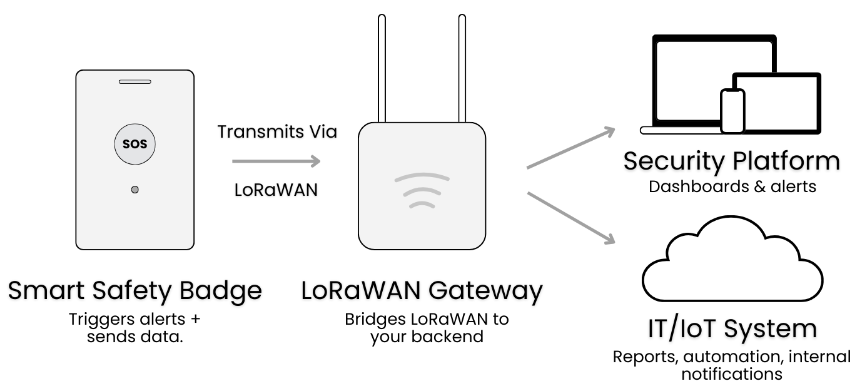
The Smart Safety Badge follows a straightforward flow. When someone presses the SOS or when the badge sends its regular updates, the data goes through the LoRaWAN gateway, reaches the LoRaWAN Network Server (LNS), and then gets passed into your system.
Each message includes:
- Event type (SOS or status update)
- Device ID
- Timestamp
- Location reference for your mapping or zone logic
Once the data reaches your platform, everything else is in your hands. You decide how it’s displayed, how alerts are triggered, and how it fits into workflows you’ve alreay built for your clients.
Integration Path 1: Use Your Existing LoRaWAN Network Instantly
If your solution already uses LoRaWAN gateways, the wearable panic button can join that same network without any extra setup. No new LoRaWAN gateways are required. The badge simply uses the LoRaWAN coverageyou already have, keeping deployment fast and cost-effective.
If indoor positioning is needed, BLE beacons will need to be installed around the facility. These beacons provide the room-level or zone-level location reference, but they don’t affect connectivity.
Integration Path 2: Plugging the Badge Into Their Existing Security Platform
Your system can receive badge events through the standard methods you already use. This includes API, MQTT, Webhooks, or direct integration with the LoRaWAN Network Server.
Once the data arrives, you can map the SOS or location events into your existing dashboard. The badge simply provides the event and location reference through the methods above, and your platform handles the display and alert logic. If your platform can receive standard data, integration is easy.
Integration Path 3: Routing Data Into Their IT/IoT Architecture
Badge events can also be routed into the IT or IoT platforms the team already uses. These can include systems like AWS IoT, The Things Network, ThingsBoard, or on-prem servers, depending on how their environment is set up.
Many enterprise clients prefer on-prem setups for security or compliance reasons. The badge works on both cloud and on-prem environments, so you can choose what fits your deployment.
Once the data reaches your IT layer, it can feed into dashboards, automation rules, reporting modules, or internal notification tools like Slack, Teams, or SMS. You can also generate weekly or monthly reports for auditing, staffing analysis, or safety reviews. This lets you extend the badge’s data beyond the main security dashboard and into your existing enterprise workflows.
Why Deployment is Fast and Simple
LoRaWAN is based on open standard, so adding new devices into existing setups is easy. The badge supports common data delivery methods like API, MQTT, and Webhooks, so you can receive events using the same formats you already use in your system.
Also, it works with both on cloud and on-prem environments, giving solution providers flexibility based on their client’s requirements. Since the badge only needs LoRaWAN coverage and standard data inputs, you don’t have to change your existing architecture. It’s designed to plug into the platforms solution providers have already built.
Introducing Seeed’s Smart Safety Badge Solution
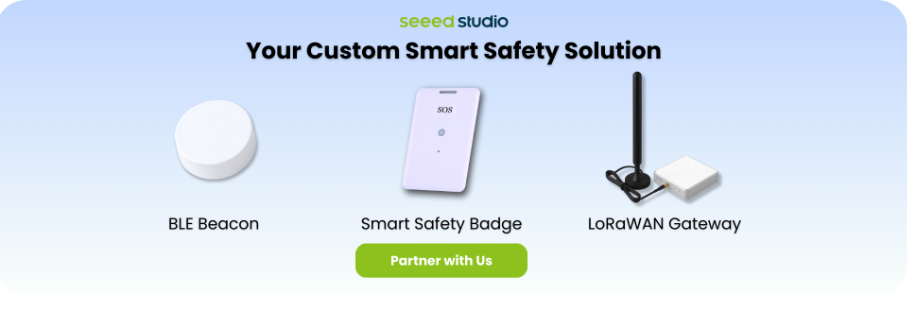
Seeed’s wearable panic button is a part of a complete personnel safety system that includes the badge, BLE beacons for indoor positioning, and LoRaWAN gateways where needed. The system is designed to integrate smoothly into the platform solution providers already run, sending SOS and location data through standard methods like REST API, MQTT, or webhooks.
We also provide sample payloads and technical guidance, so you can test how the full system fits into your own architecture. Talk to our expert today!
About Author
