A Complete LCD Display Screen Guide – Types, Working, & Selection Tips
The LCD display screen is the heart of what we call the visual revolution. This technology changed the way humans interact with digital information. Every day, we use items that feature LCD screens, such as digital clocks, laptops, microwave ovens, etc.
Most of us know LCD as “Liquid Crystal Display” that powers our screens, but we don’t always realize how it works behind the scenes. Plus, do you know there are different types of LCDs for different purposes? Let’s explore everything about the LCD display screen in this guide. You will learn:
- What is an LCD Display Screen?
- Types of LCD Display Screens & Their Comparison
- How Does an LCD Display Screen Work?
- Pros and Cons of LCD Display Screen
- Tips for Choosing the Right LCD Display Screen
- Wrapping Up
What is an LCD Display Screen?
LCD (Liquid Crystal Display) is a flat-panel display technology that uses liquid crystals and polarized light to produce visible images. LCDs don’t emit light directly and rely on the backlight or reflective surface to illuminate the liquid crystals. This then controls the passage of light to create images with colors on the screen.
The fundamental concept of LCD involves controlling the light waves through liquid crystal materials sandwiched between two polarized screens. Liquid crystals follow a specific arrangement pattern.
When an electric current is applied to them, they can twist and rotate. This twisting and rotating mechanism controls how much light from the backlight can pass through specific areas. This precise control allows LCD display screens to display the required image, such as a single digit or complex graphics.
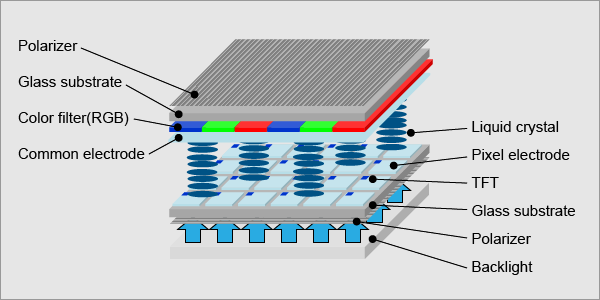
The popularity of LCDs is due to the perfect balance of clarity and energy efficiency. Plus, their cost-effectiveness also makes them ideal for use in various industries and consumer electronics.
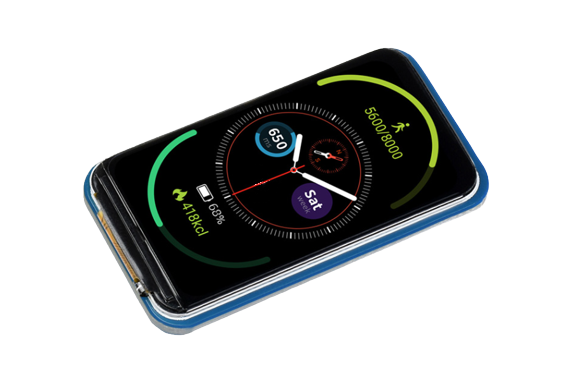
For example, the 1.47 inch LCD Display Module of Seeed Studio features a 172×320 resolution and a vibrant spectrum of 262K colors. It uses an SPI interface that saves IO pins and connects with popular controllers like Raspberry Pi, Arduino, and STM32.
Types of LCD Display Screens & Their Comparison
First things first, not all LCDs are the same. The arrangement of the liquid crystal molecules and the driving method affect viewing angle, color accuracy, contrast, cost, response time, and end-use suitability. Therefore, LCD display screens are further subdivided into the following types:
TN (Twisted Nematic) LCD
TN LCD is the most common type of LCD display screen. In this screen, a nematic liquid crystal is sandwiched between two glass plates. When electricity passes through the electrodes, the liquid crystals twist at a 90° angle.
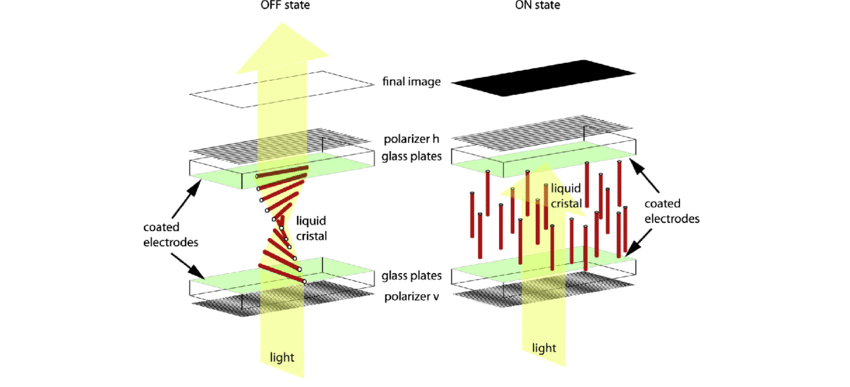
- Viewing Angle: The worst among the group, especially when looking from the side or vertically. Colors may shift, and brightness drops quickly. Typical viewing angle is between 45° and 65°.
- Features: Fastest response times and refresh rates, lowest cost, weak color fidelity.
- Suitable For: Cost-sensitive products, where the display is of simple content and no demand for high viewing angles.
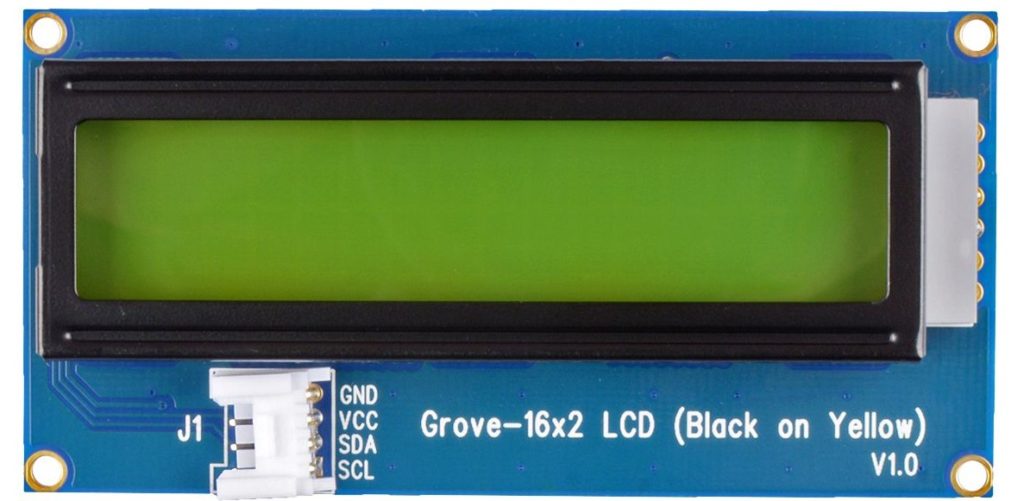
As an example, consider Grove – 16X2 LCD module of Seeed Studio. It is a classic I2C interface character LCD module (2 rows × 16 characters) that offers high contrast and easy deployment, best for Arduino and Raspberry Pi. It is available in various color combinations, such as White on Blue and Black on Yellow, among others.
VA (Vertical Alignment) LCD
VA LCD involves vertically arranged liquid crystal molecules on the glass surface when no voltage is applied. After exposure to electricity, the crystals tilt to allow light to pass through. This structure offers much better color reproduction and contrast than TN.
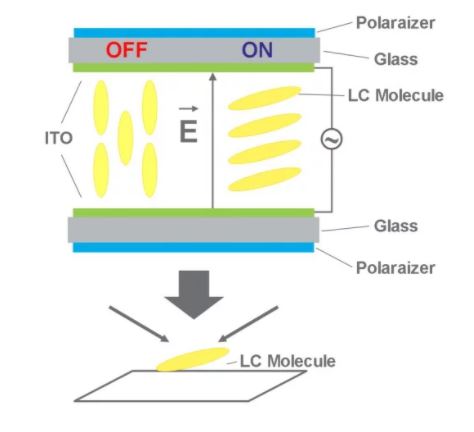
- Viewing Angle: Moderate to good, typically up to 160°. Colors remain stable within a wide range but may distort at extreme angles.
- Features: Better contrast than TN, capable of displaying deeper blacks, and improved viewing angles. Slightly slower response time than TN LCD.
- Suitable For: Products where image quality matters more than speed, such as dashboards, mid-to-low-end TVs, medical displays, and industrial panels.
IPS (In-Plane Switching) LCD
IPS LCD involves parallel-arranged liquid crystal molecules with the glass surface instead of twisting or tilting. When voltage is applied, the crystals rotate horizontally and offer more uniform light transmission. This leads to consistent color and brightness across the screen.
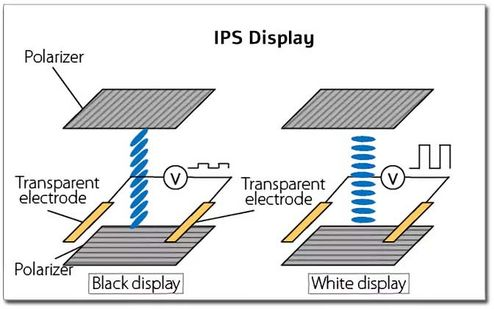
- Viewing Angle: Excellent, typically 178° both horizontally and vertically, with minimal color or brightness distortion.
- Features: Superior color accuracy, wide viewing angles, and stable image quality, but higher power consumption and cost than TN or VA LCDs.
- Suitable For: Devices requiring high-quality visuals, such as smartphones, tablets, graphic design monitors, and premium industrial displays.
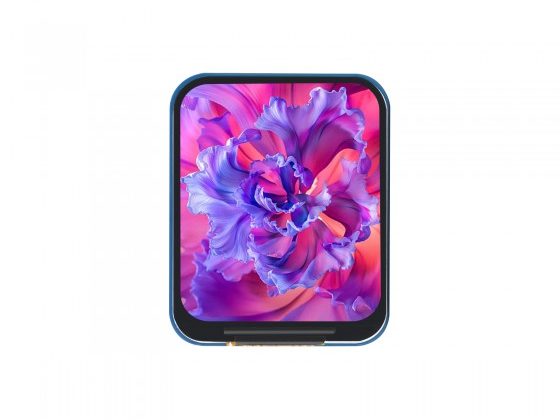
Consider the 1.69-inch LCD Display Module of Seeed Studio. It offers a 240×280 resolution with 262K colors. The IPS LCD technology makes it deliver sharp visuals and connect easily via SPI to Raspberry Pi, Arduino, and STM32.
Explore Seeed Studio’s collection of more LCD screens and get yourself a high-performance and cost-friendly display module.
TFT (Thin Film Transistor) LCD
TFT LCD is a subtype of active-matrix LCD, where each pixel is controlled by a thin-film transistor. This switch can independently control the on/off state of each pixel, thus achieving “active matrix” driving. The modern TN, VA, and IPS LCDs actually use TFT technology as their base structure.
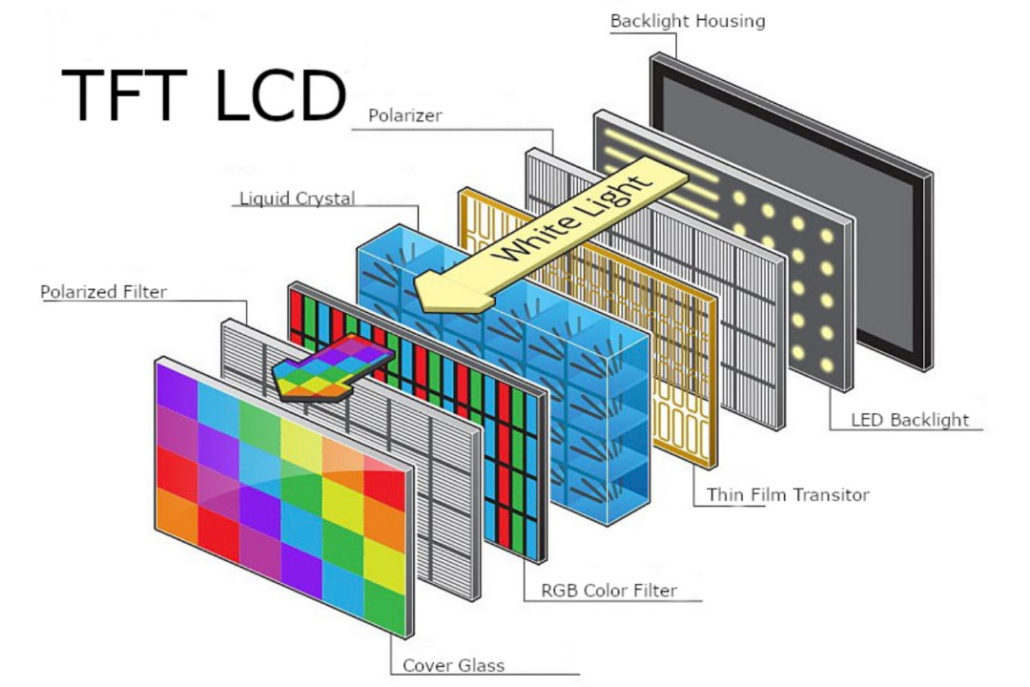
- Viewing Angle: Depends on the panel type (TN, VA, or IPS), since TFT is a control technology rather than a liquid crystal alignment type.
- Features: High-quality images, fast response, better colors, and low flicker. However, they consume more power and cost more to manufacture than passive-matrix displays.
- Suitable For: Consumer electronics, touchscreens, automotive displays, and industrial-grade equipment.
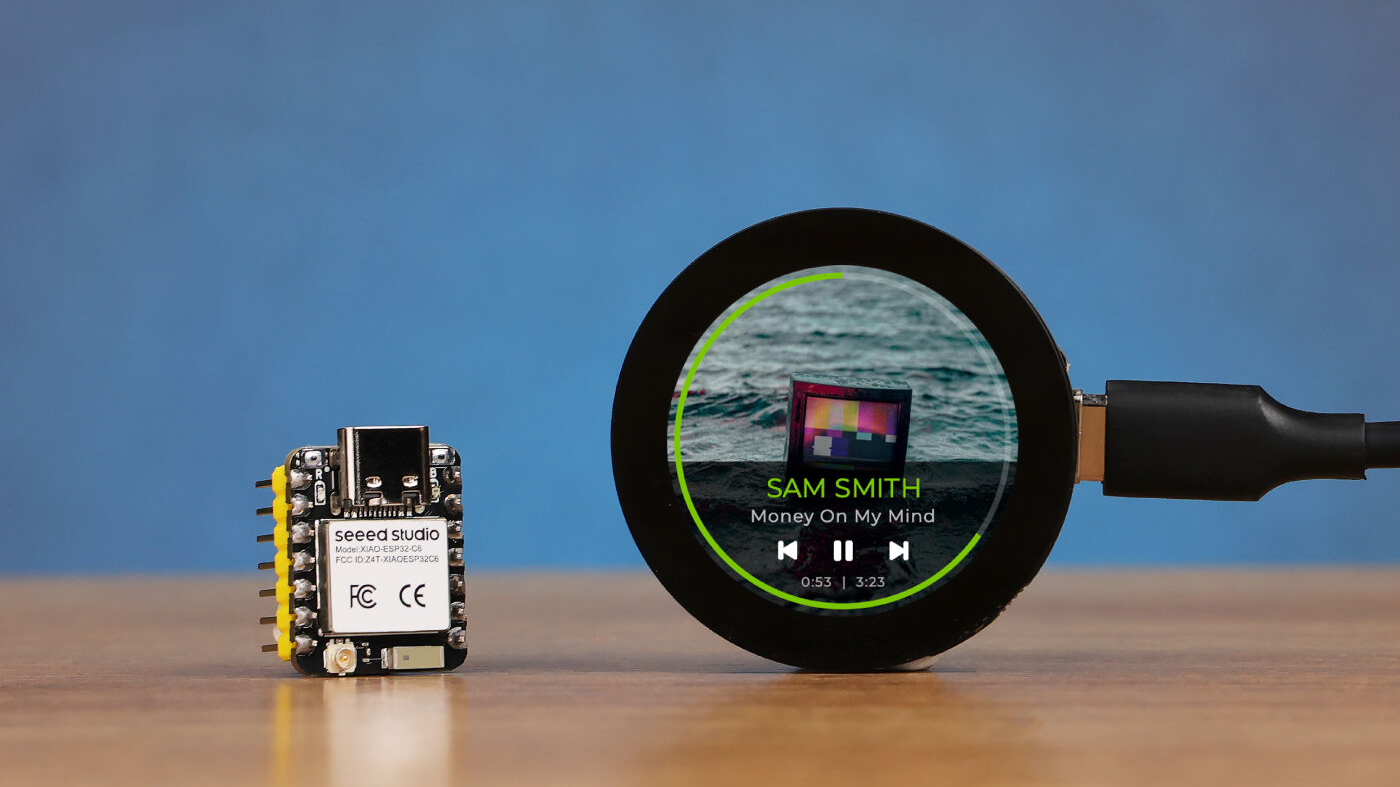
Consider the Seeed Studio Round Display for XIAO as an example. It features a 39mm circular design, a complete touch screen, an onboard RTC holder, a charge chip, and a TF card slot within its compact size. Plus, it is compatible with all XIAO development boards.
Comparison of TN LCD, VA LCD, IPS LCD and TFT LCD
| Type | Viewing Angle | Contrast | Color Quality | Cost | Typical Use |
| TN LCD | Narrow | Fair | Fair | Lowest | Simple displays |
| VA LCD | Moderate | Good | Good | Lower | Mid-range displays |
| IPS LCD | Wide | Very good | Excellent | Higher | High-end displays |
| TFT LCD | Depends on LCD type | Depends on LCD type | Depends on LCD type | Depends on LCD type | Broad range |
How Does an LCD Display Screen Work?
Until now, we have looked at what an LCD display screen is and its different types. Let’s now get deep into how this technology actually works to produce the visuals.
How is a Liquid Crystal Display Built?
An LCD (Liquid Crystal Display) construction is based on stacking two thin layers of glass that are coated with special polarizing filters. Between these glass layers lies a very thin layer of liquid crystal material, usually around 10–20 micrometers thick.
Each glass layer also has a transparent conducting film made of indium tin oxide (ITO). These films act as electrodes, one positive and one negative. They allow voltage to be applied across the liquid crystal layer.
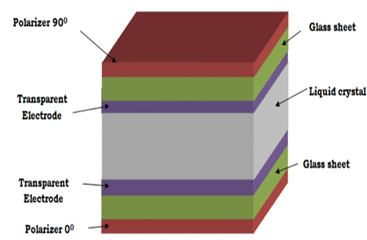
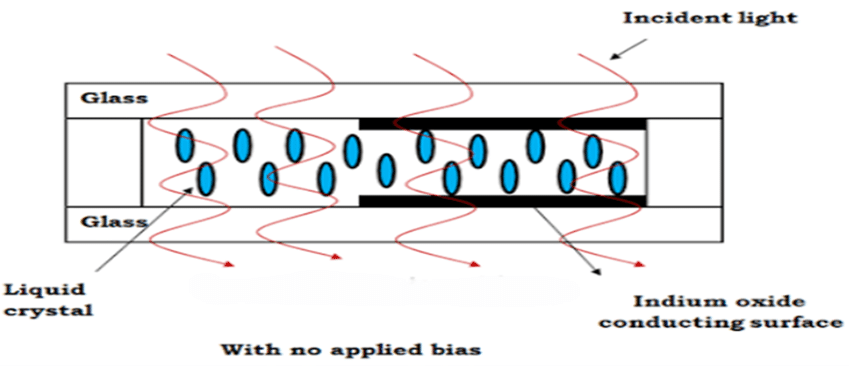
When electricity passes through, it changes the orientation of the liquid crystal molecules. Depending on how they align, they either let light pass through or block it. This is how different parts of the display become light or dark and form the visible image.
Working Principle of LCD Display Screen
LCDs don’t produce their own light. They instead control how much light from an external source can pass through.
The first polarizing filter gets polarized when light enters it, which means that light waves move in one direction. As it travels through the liquid crystal layer, the orientation of the molecules changes in response to the applied voltage. This adjustment twists or untwists the light so that some light passes through and some is blocked when it reaches the second polarizing layer. The combination of these light and dark regions creates images on the screen.
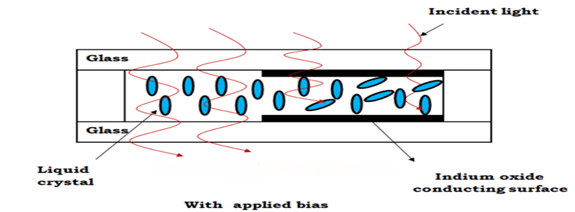
When no voltage is applied, the molecules remain naturally aligned and let light pass through evenly. They only react when they get exposed to voltage and display the bright and dark visions.
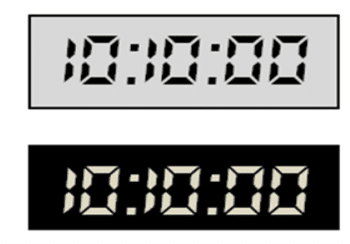
Positive vs. Negative LCD Displays
LCDs can be designed in two main display types, i.e., positive and negative.
- Positive LCDs have polarizers set at right angles to each other. This makes the background look light (often gray or white) and the characters/symbols appear dark.
- Negative LCDs align their polarizers in the same direction. This setup produces a dark background with bright or white characters. It gives a clearer contrast in low-light environments.
Pros and Cons of LCD Display Screen
Pros
- Consumes less power
- Compact and lightweight
- Excellent image quality
- No screen burn-in
- Availability in various sizes and at affordable prices
- Low heat generation
Cons
- Limited viewing angles
- Slower response time
- More prone to cracking or damage under pressure
- Color and brightness limitations compared to modern OLED displays
Tips for Choosing the Right LCD Display Screen
Considering the various types of LCD display screens, it is essential to select the right screen based on your application needs, viewing environment, size requirements, and other factors.
- Viewing Angle & Use Case
How will your product be viewed? IPS LCD is better when viewed from off-axis (i.e., from the side, top, or bottom). If the product only needs a front-facing screen, a TN LCD can work best.
- Contrast & Color
When the demand is for high contrast and accurate colors, go for VA or IPS LCD. Prefer TN LCD when you only want a utilitarian display.
- Resolution & Size
The screen size and resolution determine how sharp your visuals will be. Smaller sizes work for micro-controllers, while larger displays work for HMI, Raspberry Pi, etc.
- Interface & Integration
Modules may use HDMI, SPI, I2C, or parallel interfaces. Choose modules compatible with your platform, such as Arduino, Raspberry Pi, STM32, etc.
- Cost
TN LCDs cost the lowest among the rest of the screens. Choose TN for high-volume products with tight margins, but opt for other LCD display types if quality is paramount.
Wrapping Up
LCD is one of the most widely used display technologies currently available, with relatively low cost. TN, VA, and IPS are three main types of LCD display screens, each suited for different purposes. The choice between them relies on your specific requirements, as discussed above. Therefore, we will wrap up our guide by recommending that you get a solid understanding of LCDs and then check out Seeed Studio for the right LCD module you need.
FAQs
- Which screen is better, LCD or LED?
LED is better than LCD due to its superior picture quality and longer lifespan. It uses light-emitting diodes instead of backlighting, which provides better color accuracy and higher contrast.
- What happens if the LCD is broken?
You will notice visual defects when an LCD is broken, such as black spots, colored lines, a completely black screen, etc. The only effective fix for a broken LCD is a full screen replacement.
- Are LCD screens glass or plastic?
An LCD screen uses a combination of materials. It uses two sheets of glass to hold the liquid crystal material between them. The outer surface that the user touches is also made of glass. The plastic is often used for internal components like light diffusers or polarizers within the display assembly.
>> Read more

Add your description here…
Add your description here…
About Author
