Why Smart Safety Badges Stop Reporting Before the Battery Hits 0%
In real deployments, smart safety badges may stop reporting even when the battery indicator does no show “0%”, or may not resume uplinks immediately after charging. This can be confusing during active operations and often leads teams to suspect device faults. Battery behaviour and reporting reliability are closely tied to how BLE and LoRaWAN work together in wearable safety deployments, especially in real-world indoor environments.
In most cases, this behaviour is related to how battery levels are estimated, how low-power protection works, and how reporting frequency affects power consumption. This article answers common questions around battery behaviour and uplink reliability, helping teams understand what is happening before taking further action.
Below are some common questions we receive during smart safety badge deployments, particularly around battery behaviour and reporting reliability.
1. Why does the badge stop uplinking when the battery shows below 20%?
In some cases, uplink transmissions may stop as the device approaches the end of a discharge cycle, particularly under higher power demand.
Battery percentage is an estimate based on voltage. When the battery voltage drops below a predefined protection threshold, the badge automatically enters low-power mode to prevent battery damage.
Low-power mode limits certain functions to reduce power consumption. As part of this protective mechanism, uplink transmissions may stop temporarily. This behaviour is part of the device’s normal power protection design and does not indicate a hardware fault.
2. Can the battery be depleted even if the app still shows remaining power?
2. Can the battery be depleted even if the app still shows remaining power?
Yes. The battery level displayed by the badge is an estimated value based on measured battery voltage, not a direct measurement of remaining capacity. Because of this, the percentage shown in the app cannot guarantee precise accuracy.
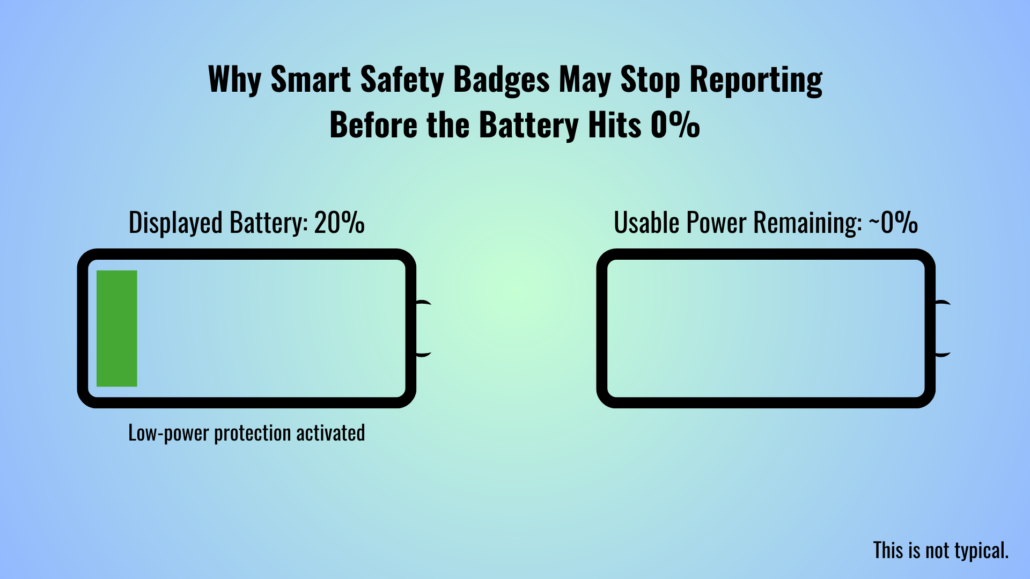
Under certain conditions, such as higher power demand or near the end of a discharge cycle, the battery voltage can drop more quickly than expected. When this happens, the app may still show remaining battery percentage even though the usuable battery power is already very low.
This difference between displayed battery level and actual available power is a normal characteristic of voltage-based battery estimation and does not indicate a fault with the device.
Note: This behaviour is not unique to smart safety badges and can also be observed in devices such as smartphones, which may shut down under high load even when the battery indicator has not reached 0%.
3. Why doesn’t the device resume uplinks after being fully charged?
In some cases, charging the device alone may not immediately restore uplink transmissions. If the device previously entered low-power protection mode due to low battery voltage, it may require a short recovery period or confirmation that is operating normally before uplink resumes.
Before assuming a device fault, it is recommended to check that the device can power on and off normally, enter Bluetooth configuration mode, and successfully rejoin the network. If these conditions are met, uplink transmissions should resume under normal operating conditions.
If uplinks still do not resume after these checks, sharing the device details and logs with support can help further analysis.
4. How does uplink interval affect battery life?
Uplink interval has a direct impact on battery consumption. More frequent uplink transmissions require the device to wake up and transmit data more often, increasing overall power usage.
As the uplink interval becomes shorter, battery life decreases accordingly. In Bluetooth-only positioning mode, reporting data every minute typically results in a battery life of approximately 10–26 days. Selecting an uplink interval that balances reporting needs with battery life is essential for stable operation.
5. Why do some deployments see faster battery drain than expected?
Battery drain can vary depending on deployment conditions, even when devices use the same configuration. Environmental conditions and network behaviour also play a role, as signal range, attenuation, and retry behaviour directly impact how often devices need to transmit or rescan. In addition, regional LoRaWAN regulations, network conditions, and transmission retries can further affect power usage, particularly in intermittent networks where data consistency and SOS delivery must still be maintained.
As a result, deployments operating in more demanding environments may experience faster battery drain than anticipated, and may require more frequent charging or adjusted reporting strategies.
Align Battery Life With Your Reporting Requirements
Battery performance and reporting reliability are closely tied to how a smart safety badge is configured and deployed. If your use case involves specific reporting intervals, positioning modes, or operating conditions, a customisable smart safety badge can help align power usage with real deployment needs.
If you’d like to discuss how configuration choices impact battery life and reporting behaviour in your environment, feel free to reach out to explore a tailored smart safety badge setup.
About Author
