Smart Home Dashboard: How to Build Your Own with E-Ink
In today’s connected homes, the idea of a smart home dashboard has become almost essential. A dashboard brings all your key data together in one place — from room temperatures and energy usage to security alerts and calendar reminders.
Some people use software dashboards on their phones or PCs, while others prefer dedicated displays such as tablets, DIY builds, or e-ink screens to visualize their smart space.
In this guide, we’ll explore how e-ink works as a smart home dashboard: its strengths, its trade-offs compared with tablets and DIY approaches, and how you can build a smart dashboard with Seeed Studio’s reTerminal E ePaper using its SenseCraft HMI UI design platform and AI customization tools.

Table of Contents
Why Use E-Paper as Your Smart Home Dashboard?
What is reTerminal E?
Building a Smart Home Dashboard with reTerminal
· Dashboard with Home Assistant
· Smarter Dashboards with SenseCraft HMI + AI
· Dashboard with TRMNL Plugins
· Custom Dashboard with Arduino, ESPHome & more
Build your Smart Home Dashboard Now!
Why Use E-Paper as Your Smart Home Dashboard?
E-paper might not be the first thing most people think of when building a smart home dashboard. Tablets and DIY boards are common alternatives — but when you weigh the trade-offs, e-paper offers some unique advantages that make it stand out.
Long Battery Life, No Wires
Unlike tablets that need to stay plugged in, e-paper displays consume very little power. A dashboard can last weeks or even months on a single charge. This makes them easy to place anywhere in your home — on a wall, a nightstand, or even the fridge — without worrying about messy cables.
Paper-Like Readability
E-paper looks like real paper: glare-free, comfortable for long viewing, and perfectly readable in sunlight. Compared with the bright backlit LCDs on tablets, this makes e-ink dashboards more pleasant for passive information display, especially when you want a quick glance rather than constant screen time.
Elegant Aesthetics
E-paper screens have a clean, minimalist appearance that doubles as home décor. Instead of a glowing tablet stuck on your wall, an e-ink panel blends into your smart space with a more natural, understated style. For those who value design, this is a major plus.
Flexible Yet Sustainable
DIY dashboards with ESP32 or Raspberry Pi can offer deep customization, but they often require significant technical skills and time. E-paper strikes a balance: with firmware like ESPHome, you can configure exactly what you want to display — weather, energy use, calendars — without starting from scratch. And because it runs on low power, it’s also more eco-friendly.
Where E-Paper Falls Short
Of course, e-paper isn’t perfect. Refresh rates are slower, so it’s not suited for animations or real-time control like a tablet. Most models aren’t touch-enabled either, meaning they work best as passive information hubs rather than interactive control panels. But for many smart home users, this trade-off is exactly what makes e-paper dashboards so efficient and distraction-free.
In short: if you need a device for active control, a tablet may still be better. But if your goal is a low-power, always-on, visually elegant dashboard that simply shows you the most important information, e-paper is hard to beat.
What is reTerminal E?
Let’s get hands-on and build an e-ink smart dashboard using Seeed Studio’s reTerminal E. Before diving into the setup, you might want to know more about the reTerminal E series:
The reTerminal E series is Seeed’s latest open-source e-paper device, available in 7.3″ full-color, 7.5″ monochrome, 10.3″ monochrome, and 13.3″ full-color screen sizes.
More than just an e-ink display, the reTerminal E features built-in humidity and temperature sensors and HMI components such as buttons, a microphone, and a buzzer, enabling various interactive smart home scenarios.
It also supports popular software platforms like Home Assistant and TRMNL, as well as Seeed’s own SenseCraft HMI UI design platform, giving you multiple ways to create a fully functional smart dashboard. In the next section, we’ll show how to build dashboards using those platforms.
Building a Smart Home Dashboard with reTerminal E
Dashboard with Home Assistant
Home Assistant remains the most popular smart home dashboard platform, and its interface is literally called a “dashboard.” If you want to connect reTerminal E as an external display, ESPHome provides the bridge — turning your e-paper into a live window for Home Assistant data.
Setting up your e-ink dashboard is straightforward: install ESPHome in Home Assistant (or run it via Docker), flash the ESP32-S3 firmware onto reTerminal E, and then pair it with Home Assistant so it can pull entities like temperature, humidity, or weather. With just these steps, your e-paper display comes alive.
👉 For a detailed walkthrough with YAML examples and drawing the graphics in ESPHome, see our setup guide here: reTerminal E Series ePaper Display Work with ESPHome for Home Assistant
👉 You can also use Puppet to take the Home Assistant dashboard as a screenshot, full guide here: Advanced ESPHome Usage of reTerminal E Series ePaper Display in Home
Skip the Coding: Smarter Dashboards with SenseCraft HMI + AI
While Home Assistant requires ESPHome to configure your e-paper dashboard, Seeed’s SenseCraft HMI platform offers a zero-code alternative — perfect for those who want a plug-and-play experience.
Canvas: In SenseCraft HMI, click “Canvas” to see all dashboard layout elements like text, images, and shapes. Start designing your own dashboard interface with simple drag-and-drop, just like creating a slide. Combine static elements with dynamic data for a fully personalized layout.
In the new added page library, easily design your UIs without any limitation. Once you finish your ideal design, select the desired pages to form a page list and deploy it directly to your device. (Note: Without an SD card, you can deploy up to three pages in the page list at a time.) All selected pages will appear seamlessly, bringing your ideas to life through a flexible, efficient, and visually polished layout.
More details about the HMI UI design feature: SenseCraft HMI v1.0 — A New Era for ePaper UI Design
AI Generator: Tell AI what you want. You can say, “I need a smart home dashboard with temperature and humidity displays and let it know where to place icons and how to arrange the layout. Describe what you want in natural language, and instantly generate polished layouts or visuals. Just a prompt and you’re done.
Templates, RSS, and Web Functions: Use ready-made modules for weather, environment monitoring, or energy tracking. Add live RSS feeds or embed web content directly into your display.
With these tools, you can create dashboards that are not only functional but also uniquely tailored to your home and style.
Dashboard with TRMNL Plugins
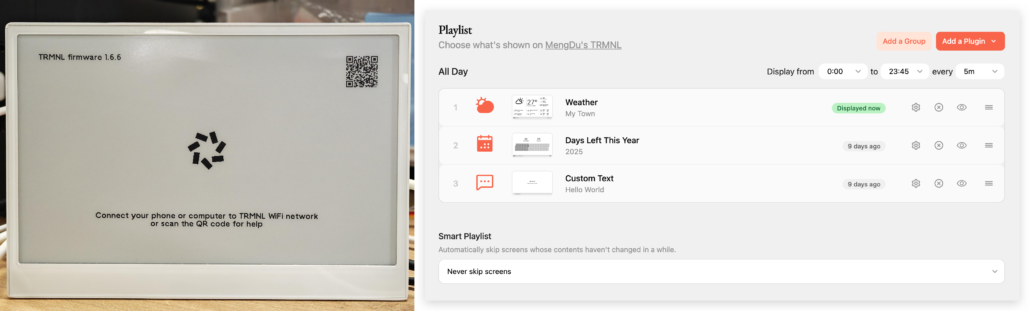
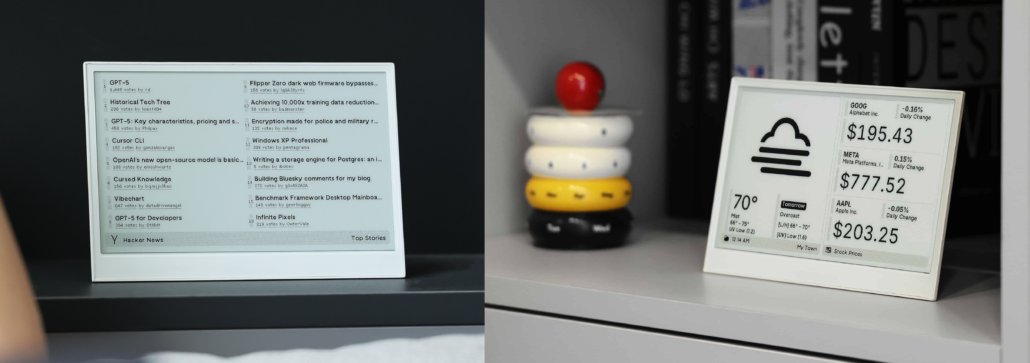
If you’re already familiar with and love TRMNL’s plugin system, you’ll be glad to know that the reTerminal is also compatible with its software—all you need is their BYOD license ($50). We’ve previously introduced its plugin system using our DIY Kit in this article: DIY E-Ink Display with the TRMNL DIY Kit. So if you’re a TRMNL fan, its 500+ plugins can also help you build and manage your ideal smart space dashboard.
Custom Dashboard with Arduino, ESPHome & more
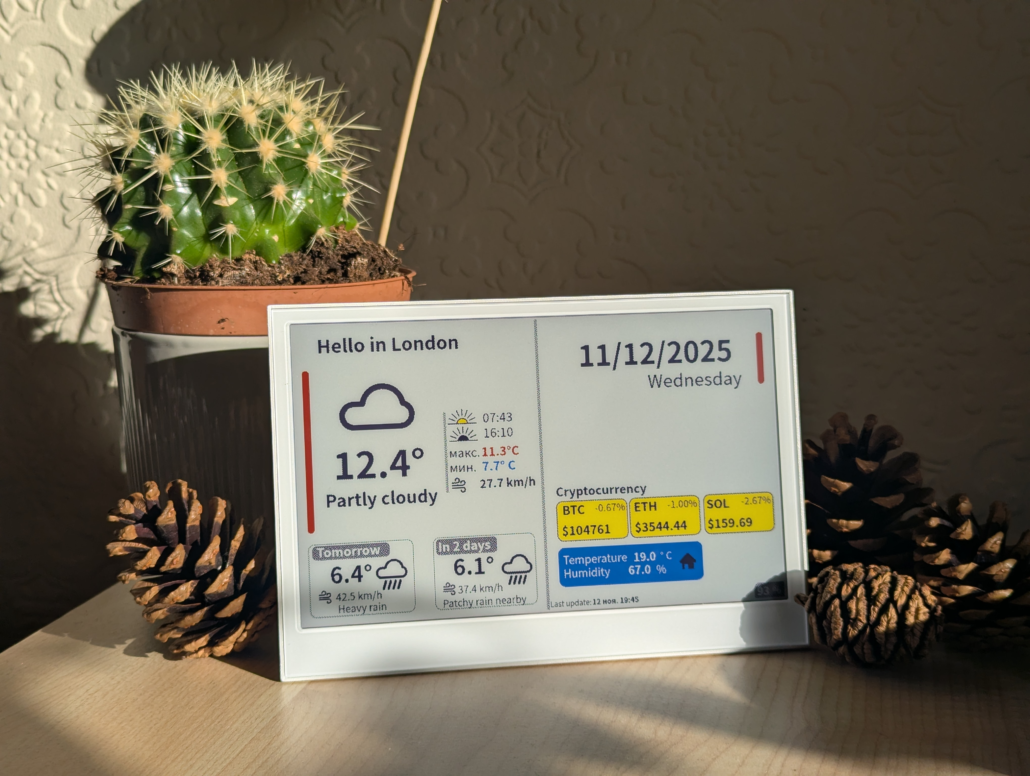
For makers who want full control over their e-paper dashboard, multiple development paths are available. Whether you choose ESPHome’s YAML-based configuration for Home Assistant integration, Arduino’s beginner-friendly ecosystem, professional-grade ESP32-IDF framework or PlatformIO —the reTerminal E offers full compatibility.
Community developer WarC0zes demonstrates this capability through an elegant weather dashboard project. Using ESPHome with the Météo-France integration, they created template sensors for temperature and wind data, displaying real-time forecasts on the e-paper screen. The result is a seamlessly integrated information panel that perfectly illustrates the potential of custom dashboard development.
Build your Smart Home Dashboard Now!
Smart home dashboards don’t have to be limited to glowing tablets or complex DIY setups. With e-paper displays, you get low power consumption, paper-like readability, and an elegant design — ideal for passive dashboards that blend seamlessly into your smart space.
If you’re ready to build a smarter, greener, and more beautiful dashboard, an e-ink display might be your ideal choice. reTerminal E combines hardware designed for smart homes, flexible software support, and multiple e-paper display options. Check out the reTerminal E series and start your project today!
>> Read more
About Author
