Open Source AI Voice Recorder: Why Firmware Freedom Matters

An AI voice recorder can do much more than capture audio. It can transcribe conversations, identify speakers, generate meeting summaries, and turn spoken information into searchable knowledge.
But there’s another question worth asking before choosing one:
You Bought an AI Recorder. But Do You Really Own It?
What happens if the manufacturer’s app changes, its cloud service is discontinued, or firmware development stops?
For many smart devices, the hardware is only one part of the experience. The companion app, cloud infrastructure, AI processing services, and firmware all work together to deliver the features users expect.
This integrated approach can make a product easier to use. But it can also create dependencies. If an essential service becomes unavailable or a workflow no longer meets your needs, your ability to adapt may be limited.
That’s why openness matters.
Open-source firmware and developer SDKs give users and developers more ways to understand, customize, and maintain their devices. They can make it easier to build new features, connect different software services, and adapt a product to changing requirements.
For an AI voice recorder, this is about more than modifying code. It’s about maintaining control over the device, keeping recordings accessible, and having room to build beyond the manufacturer’s original ecosystem.
1. How Do Closed AI Recorder Ecosystems Work?
Most consumer AI voice recorders are designed around an integrated hardware-and-software experience.
A typical workflow looks like this:
Recording Device → Companion App → Cloud Processing → AI-Generated Results
The recorder captures audio, then transfers it to a mobile app or cloud service. Depending on the product, cloud-based AI models process the recording and return transcriptions, summaries, action items, or other structured results.
This model has clear advantages:
- Convenience: Users can start recording and receive AI-generated results without configuring their own technical environment.
- Consistent experience: Hardware, software, and cloud services are designed to work together.
- Centralized updates: Manufacturers can improve features and address issues through software and firmware updates.
- Lower setup requirements: Users don’t need to select or integrate their own AI models and infrastructure.
For users who want a ready-to-use recording and transcription experience, an integrated ecosystem can be a practical choice.
However, convenience and flexibility are not always the same thing.
1.1 Where Can Platform Dependency Become a Limitation?
When a device relies heavily on a manufacturer’s software ecosystem, users may encounter several limitations:
Limited customization
The official app may provide the features most users need, but developers may want to change recording behavior, add custom interactions, or connect the device to their own applications.
If the firmware and communication interfaces are inaccessible, making these changes can be difficult.
Dependence on cloud services
Some AI features rely on remote processing. This may introduce additional requirements around internet connectivity, service availability, pricing, and data handling.
Restricted integration options
A developer building a custom voice assistant, meeting intelligence system, or enterprise workflow may need to connect recordings to a specific database, speech recognition engine, or private LLM.
An ecosystem with limited integration options can make this more complicated.
Uncertainty about long-term support
Smart devices depend on software as much as hardware. Changes to mobile operating systems, cloud APIs, and application services can affect the user experience over time.
This doesn’t mean every integrated AI recorder has the same limitations. Some manufacturers provide APIs, developer programs, or additional integration tools. The important question is not simply whether a product has an official app, but how much flexibility it offers beyond that app.
For developers and users who value customization, access to firmware and documented interfaces can make a meaningful difference.
2. What Does Open-Source Firmware Actually Mean?
Open-source firmware makes the device’s underlying software available for inspection, modification, and development under its applicable license.
Unlike a system where users can only interact with predefined features, an open firmware project gives developers a starting point for understanding how the hardware works.
For an AI voice recorder, firmware controls much more than the recording button. It can manage:
- Microphone input and audio capture
- Audio processing and encoding
- Recording states and device behavior
- Physical button interactions
- Display content and user feedback
- Bluetooth and Wi-Fi communication
- File storage and transfer
- Power management and battery behavior
- Firmware updates and device recovery
Access to these components creates opportunities to customize the device at a deeper level.
2.1 From Using a Device to Building on It
Consider a few practical examples.
Customize the recording experience
A developer could modify button behavior, add a specific recording workflow, or adjust how the device responds to different events.
Build a custom user interface
The display could show information relevant to a particular application, such as recording status, connection state, or custom interaction prompts.
Integrate with different software services
Instead of relying exclusively on one predefined workflow, developers can build their own applications and connect the device to different AI services or data systems.
Experiment with audio processing
Developers working on voice interfaces may want to test different audio pipelines, processing methods, or recording configurations.
The key distinction is that open firmware provides access to the device-side foundation. It gives developers more control over how the hardware behaves, rather than limiting customization to settings exposed by an official application.
3. Data Ownership: Your Voice Recordings Should Remain Accessible
Voice recordings can contain far more than meeting notes.
They may include customer conversations, research interviews, product feedback, personal ideas, business discussions, or other information that users need to keep and revisit.
When evaluating an AI recorder, it’s worth looking beyond the quality of its transcription and summary features.
Ask a few practical questions:
- Can you access the original audio files?
- Can you export recordings without depending entirely on the official cloud service?
- Can you choose which AI service processes your recordings?
- Can your application access the data for further analysis?
- What happens to your recordings if you stop using the manufacturer’s app?
These questions help distinguish between having access to AI-generated results and having meaningful access to your underlying data.
3.1 Local Storage and Data Export Matter
Local storage provides an important layer of independence.
When recordings can be stored on the device and transferred through documented interfaces, users have more options for managing their audio files.
They can archive recordings, move them to another system, or build additional processing workflows around them.
However, local storage alone does not guarantee complete data ownership. Users should also understand how files are transferred, whether original audio remains available, and whether cloud-based features introduce separate data-processing requirements.
3.2 Choose Your Own AI Workflow
Different applications need different AI models.
A meeting assistant may prioritize transcription accuracy and speaker diarization. A voice-controlled robot may need low-latency speech recognition and command execution. An enterprise system may require a private deployment or integration with internal services.
A flexible AI recorder should make it possible to adapt the processing workflow to these different requirements.
For developers, this may mean connecting recordings to:
- A preferred speech-to-text (STT) service
- A custom LLM endpoint
- A local AI inference environment
- An internal knowledge base
- An enterprise data pipeline
This is where hardware openness and software integration become especially valuable.
The device captures the voice data. Developers decide how to process, organize, and use it within the boundaries of the device’s supported interfaces and their own privacy and security requirements.
4. Device Longevity: What Happens When Official Support Ends?
A smart device can remain physically functional long after its original software ecosystem has changed.
But if essential functions depend on an application, cloud API, or proprietary service, the user may have fewer options when that software is no longer maintained.
Consider a few possible scenarios:
| Situation | Potential impact |
| The companion app is no longer updated | Compatibility issues may appear on newer operating systems |
| A cloud service changes or shuts down | Cloud-dependent features may become unavailable |
| A required API changes | Existing integrations may stop working |
| Firmware development stops | Bugs and compatibility issues may become harder to address |
| The original workflow no longer fits your needs | Customization may be difficult without accessible development interfaces |
Open-source firmware cannot prevent every one of these problems. It does, however, give developers more information and more options when adapting or maintaining a device.
4.1 Why Firmware Updates and Recovery Paths Matter
Firmware updates are essential for fixing bugs, improving functionality, and maintaining compatibility.
But an update mechanism is only one part of a maintainable device. Developers also need to understand what happens if an update fails or a custom firmware build causes unexpected behavior.
A documented recovery process can make troubleshooting more manageable.
For example, a device may support:
- Wireless firmware updates
- USB-based firmware recovery
- Documented flashing procedures
- Access to firmware source code
- Development tools and build instructions
These options don’t guarantee that a device can never become unusable. Hardware failures, incorrect firmware images, and other problems can still occur.
The difference is that developers have more visibility into the system and more documented ways to investigate and recover from software-related issues.
A device that can be inspected, updated, and recovered is easier to maintain than one that offers no meaningful access to its underlying software.
5. reSpeaker Clip: An Open Wearable AI Recorder Built for Developers
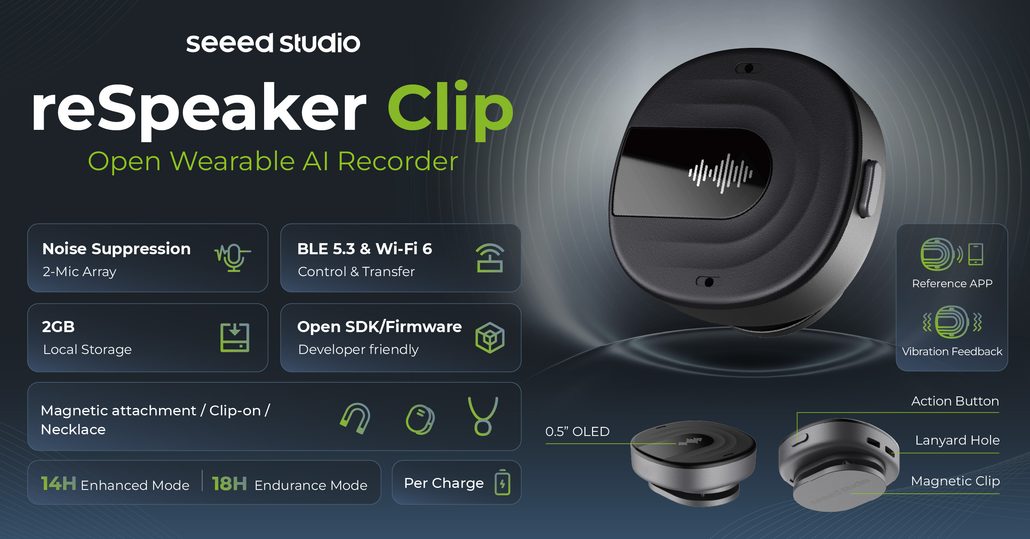
The Seeed Studio reSpeaker Clip is designed for more than everyday voice recording. It is an open wearable AI recorder built for developers, makers, and teams that want to create their own voice-based applications.
Instead of treating the official application as the only way to interact with the device, reSpeaker Clip provides an open firmware foundation and development interfaces for building custom workflows.
5.1 Open-Source Firmware Based on Zephyr RTOS
reSpeaker Clip runs on the nRF5340 + nRF7002 platform and uses nRF Connect SDK (NCS) v3.3.0, built on Zephyr RTOS, as its firmware foundation.
Its firmware manages the device’s core functions, including audio capture, recording states, connectivity, storage, display interactions, and power management.
The firmware architecture is organized into different layers, covering application logic, services and communication, audio processing, hardware abstraction, and the operating system.
For developers, this provides a clearer starting point for understanding how the device works and where custom functionality can be introduced.
You can explore the source code and development resources here:
5.2 SDKs and Interfaces for Custom Development
Different developers need different levels of access.
Some want to build a custom application. Others need to modify the firmware itself or integrate the recorder into an existing system.
reSpeaker Clip provides development resources for these scenarios:
Firmware SDK
For developers who want to work on device-side behavior, including recording logic, audio processing, button interactions, display behavior, and connectivity.
Basic SDK and communication interfaces
For developers who need to control the device, access recording information, or build custom communication workflows.
Service integration
For connecting the recording workflow with external services and AI processing pipelines.
The available documentation and SDK support continue to evolve. Developers should check the current SDK documentation for platform-specific availability and implementation details before starting a project.
Explore the reSpeaker Clip documentation.
5.3 More Than One Way to Update or Recover Firmware
Firmware development naturally involves experimentation. A custom build may introduce unexpected behavior, and developers need a way to update or recover the device.
reSpeaker Clip supports two firmware update methods:
- Bluetooth OTA: Firmware can be transferred to the device over Bluetooth Low Energy.
- USB serial recovery: Developers can enter USB serial recovery mode and transfer firmware through a USB connection.USB CDC-ACM serial + mcumgr SMP, not native USB DFU (dfu-util is not used)
Both methods use MCUboot and the mcumgr Simple Management Protocol (SMP).
These documented paths give developers practical options for updating firmware and troubleshooting software-related issues without relying exclusively on a debug probe.
For detailed procedures, see the Firmware Update Guide.
5.4 Local Recording and Flexible AI Integration
Open development is only useful when the device also provides practical ways to work with recorded data.
reSpeaker Clip supports standalone recording and local storage, allowing users to capture audio without requiring a continuous connection to an AI cloud service.
Recordings can then be transferred for further processing or integrated into custom workflows.
Depending on the application, developers can connect the device to different speech recognition and language model services, including cloud-based or local AI processing environments.
This creates room for a range of applications:
- Personal AI assistants
- Meeting transcription and conversation intelligence
- Interview and research recording
- Voice interfaces for robotics
- Custom enterprise voice workflows
The goal is not to force every user into one predefined AI experience. It’s to provide a hardware and firmware foundation that developers can adapt to their own applications.
6. Who Benefits Most from an Open Source AI Voice Recorder?
An open AI recorder may not be necessary for everyone. If you only need a simple recording device with automatic transcription, a fully integrated product may be sufficient.
But openness becomes more valuable when users need greater control over their workflows.
6.1 Developers and Makers
For developers building voice assistants, smart devices, or AI-powered applications, access to firmware and SDKs makes experimentation easier.
They can explore device behavior, create custom interfaces, and connect the recorder to their own software projects.
6.2 Privacy-Conscious Users
Users who care about how their recordings are stored and processed can benefit from local recording and more flexible data workflows.
They can evaluate where their audio goes, which services process it, and how recordings are transferred or archived.
Open firmware does not automatically guarantee privacy or security. Those still depend on implementation, configuration, and how the device is used. But greater visibility and control can make it easier to evaluate the system.
6.3 Enterprise and Research Teams
Organizations may have requirements that differ significantly from consumer use cases.
A research team may need to connect recordings to a custom analysis pipeline. An enterprise may want to integrate voice data with internal systems or private AI infrastructure.
An open development environment can make these integrations more achievable without requiring every workflow to follow the manufacturer’s default application design.
7. Don’t Just Buy a Smart Device. Own the Freedom to Build.
The value of an AI voice recorder should not be measured only by how well it performs on the day you buy it.
Its long-term value also depends on what you can do with it as your requirements change.
Can you access your recordings? Can you customize its behavior? Can you connect it to different AI services? Can developers inspect the firmware, build new functionality, and troubleshoot software issues?
These are the questions that distinguish a simple connected device from a flexible development platform.
Open-source firmware does not eliminate every dependency, and it does not guarantee that a device will never encounter a software or hardware problem.
But it can give users and developers more control over how a device works, how it evolves, and how it fits into their own workflows.
With open-source firmware, SDKs, local recording, and documented firmware update and recovery paths, reSpeaker Clip is built for people who want to do more than use an AI recorder.
They want to build on it.
Your device. Your data. Your workflow. More freedom to build.
Frequently Asked Questions
What is open-source firmware?
Open-source firmware is device software whose source code is made available under an open-source license. Developers can inspect, modify, and build on the code, subject to the license terms.
For smart devices, firmware controls functions such as hardware interaction, connectivity, audio processing, and power management.
Why is open-source firmware important for AI voice recorders?
It gives developers more control over how the recorder works. They can inspect device behavior, customize recording workflows, modify supported features, and build integrations with different applications or AI services.
It can also provide more visibility into how the device operates and how software issues may be addressed.
What happens when a smart device loses cloud support?
The impact depends on how the device is designed. Features that rely entirely on a manufacturer’s cloud service may stop working or become limited.
Devices that support standalone operation, local storage, data export, and alternative software integrations may retain more functionality. However, cloud-dependent AI features may still require a replacement service or custom implementation.
Does open-source firmware prevent a device from becoming bricked?
No. Open-source firmware cannot guarantee that a device will never become unusable.
However, accessible source code, documented firmware update procedures, and recovery tools can give developers more ways to diagnose and address software-related problems.
What is the difference between open-source hardware and open-source firmware?
Open-source hardware generally refers to publicly available hardware design information, such as schematics and board layouts.
Open-source firmware refers to the software running on the hardware.
They are related concepts, but a device can have open-source firmware without making all of its hardware designs open.
Does reSpeaker Clip support custom firmware development?
Yes. reSpeaker Clip provides an open-source firmware project based on nRF Connect SDK (NCS) v3.3.0, built on Zephyr RTOS, along with firmware development documentation and tools.
Developers can explore and modify supported device-side functions, including recording behavior, audio processing, connectivity, and device interactions.
Can reSpeaker Clip work without the SenseCraft Voice App?
reSpeaker Clip supports standalone recording and local storage, so audio capture does not require a continuous connection to the SenseCraft Voice App.
Developers can also explore its firmware and communication interfaces to build alternative workflows. The availability of specific functions will depend on the interface and integration being used.
About Author
