Bringing Vision to the Edge: On-Device AI and FLRC Image Transmission with Wio-LR2021
Edge AI and the Next Step for Wireless IoT
For years, long-range wireless IoT has helped people keep track of what happens far from a control room, from temperature changes and equipment status to simple alarm messages. Edge AI brings another capability into the picture. Instead of sending every piece of data away for analysis, connected devices can begin to interpret what they see and measure on their own. With a camera and a small AI model, a device can spot a face, recognize a hand gesture, or read the digits on a meter before it sends the image anywhere else.
That shift could open up new possibilities across the LoRa ecosystem. Devices that once reported a few sensor readings may also be able to handle more complex information at the edge, while newer radio options give engineers more ways to move that information. Images, of course, ask more of a system than a temperature reading does. How long does local inference take? How much data does each frame contain? And how quickly can the full image make it to the other end? Seeed Studio explores these questions by bringing embedded AI inference and wireless image transmission together in one practical demonstration.
Our setup uses two Wio-LR2021 Dev Kits. One captures an image, runs an AI model on its ESP32-S3, marks the detections, and sends a compressed JPEG over an LR2021 FLRC link. The other puts the image back together and shows it in a web browser. We tested four configurations: face detection, gesture recognition, water-meter reading, and raw camera transmission without AI inference.
Wio-LR2021: A Multi-Band Wireless Module
At the heart of the Wio-LR2021 module is Semtech’s fourth-generation LR2021 transceiver. The module supports Sub-GHz and 2.4 GHz radio operation in a compact SMT form factor. It offers several modulation options, including LoRa for long-range links and FLRC for higher-rate data transfer, with an FLRC air rate of up to 2.6 Mbps. Wio-LR2021 handles radio communication, not application processing, so a host MCU runs the application and controls the radio through SPI.
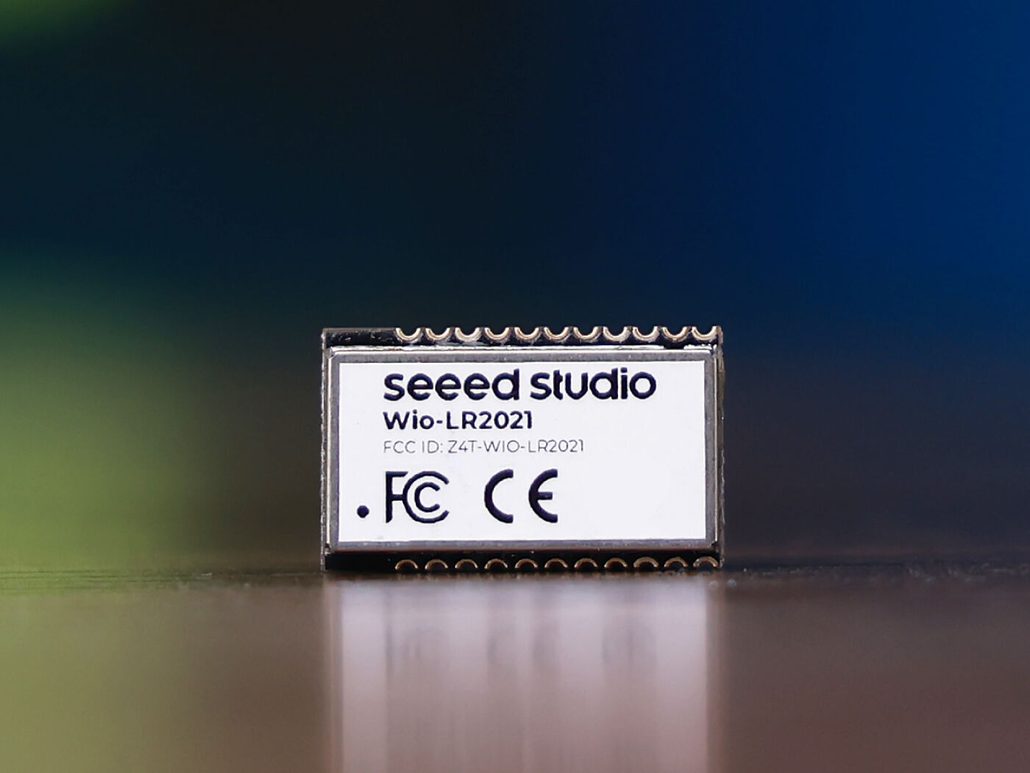
For this project, Seeed Studio uses the Wio-LR2021 Dev Kit, which pairs the radio module with an ESP32-S3. A detachable Media HAT adds the GC2145 camera, while the ESP32-S3 provides the processing and memory needed for image handling and local inference. The two chips have distinct jobs: the ESP32-S3 works with the visual data, and the LR2021 sends the resulting JPEG images wirelessly.
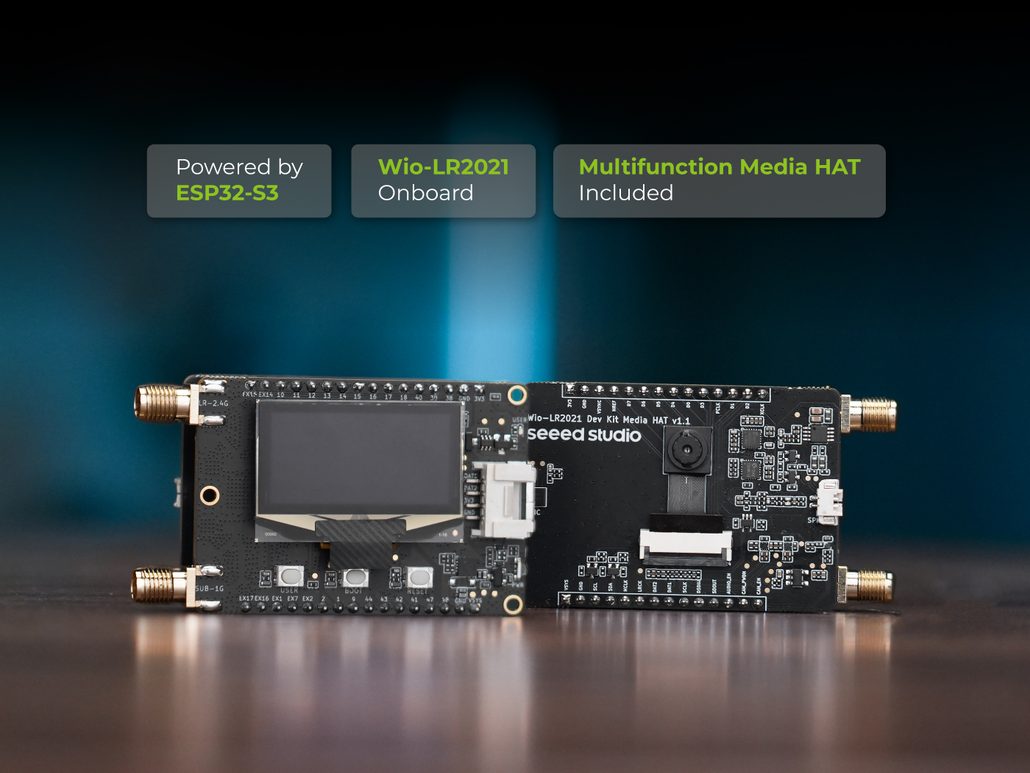
One board sees. The other receives. This demo uses two Wio-LR2021 Dev Kits to bring on-device AI and FLRC image transmission together: one captures and interprets the image, while the other receives it for viewing.
Want to try the setup yourself? Buy two or more Wio-LR2021 Dev Kits and save $8. Only 100 sets are available.
How the System Works
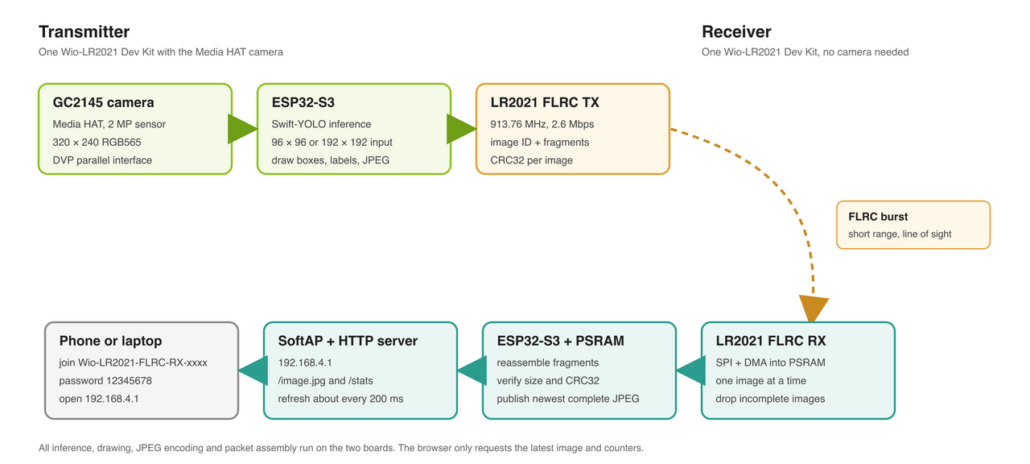
We use two Wio-LR2021 Dev Kits, one as the transmitter and one as the receiver. The transmitter carries the camera Media HAT. At the other end, the receiver collects the image data over FLRC and uses the ESP32-S3’s Wi-Fi interface to show completed frames in a browser. Both boards run on USB power in this demonstration. Each AI mode has its own transmitter firmware build, but all four modes share the same receiver firmware.
Transmitter: Capture, Infer, Annotate, Transmit
The image starts at the transmitter’s GC2145 camera, which captures a 320 × 240 RGB565 frame. The ESP32-S3 then resizes the frame for the chosen Swift-YOLO model and runs inference locally. It draws the results onto the image before sending it. Depending on the mode, viewers can see bounding boxes, class labels, confidence percentages, or, in the water-meter example, detected digits and a reconstructed READING line.
Once the ESP32-S3 has added the annotations, it compresses the image into JPEG and divides it into smaller fragments. The transmitter assigns an image ID and includes a CRC32 integrity check before sending the fragments over the LR2021’s FLRC link. LoRa trades data rate for range. FLRC does the opposite: it sends a short burst at a high rate and accepts a shorter range. At 2.6 Mbps, one 320 × 240 JPEG takes a fraction of a second of air time. That is what makes a camera demo possible on a LoRa-class radio.
Note: The 2.6 Mbps figure is the FLRC air rate, not the frame rate. Capture, inference, JPEG encoding, transmission and reassembly all add time. The Performance section shows the receiver-side rates measured in the clips.
Receiver: Reassemble and Display
The receiver side listens on the matching FLRC frequency, uses SPI DMA to move incoming packets into PSRAM, and pieces the JPEG fragments back together. Before showing a frame, it checks the image size and CRC32. If an image is incomplete, the receiver drops it instead of showing a partial picture.
To view the results, a phone or laptop connects to the receiver’s local Wi-Fi access point and opens its HTTP page. The page shows the most recent complete JPEG, along with the completed-frame count, image ID, and the frame rate measured by the receiver. It checks for new images and counters about every 200 ms. What viewers see is a sequence of still images rather than continuous video, and the transmitter has already finished all AI inference and annotation before each image crosses the radio link.
Four Demonstration Modes
All four modes follow the same path from camera capture to browser display. What changes is the work the ESP32-S3 does on each frame. By comparing the three AI modes with a raw-camera version that skips inference, we can see how different visual tasks affect the rate of completed images.
Notes: To help track the results, the receiver’s web page displays three values above each image:
Received frames: 174 (image 23)
FPS: 2.22
- Received frames counts the JPEG images the receiver has completed.
- image is the image ID assigned by the transmitter.
- FPS is the end-to-end rate the receiver measures.
1. Face Detection
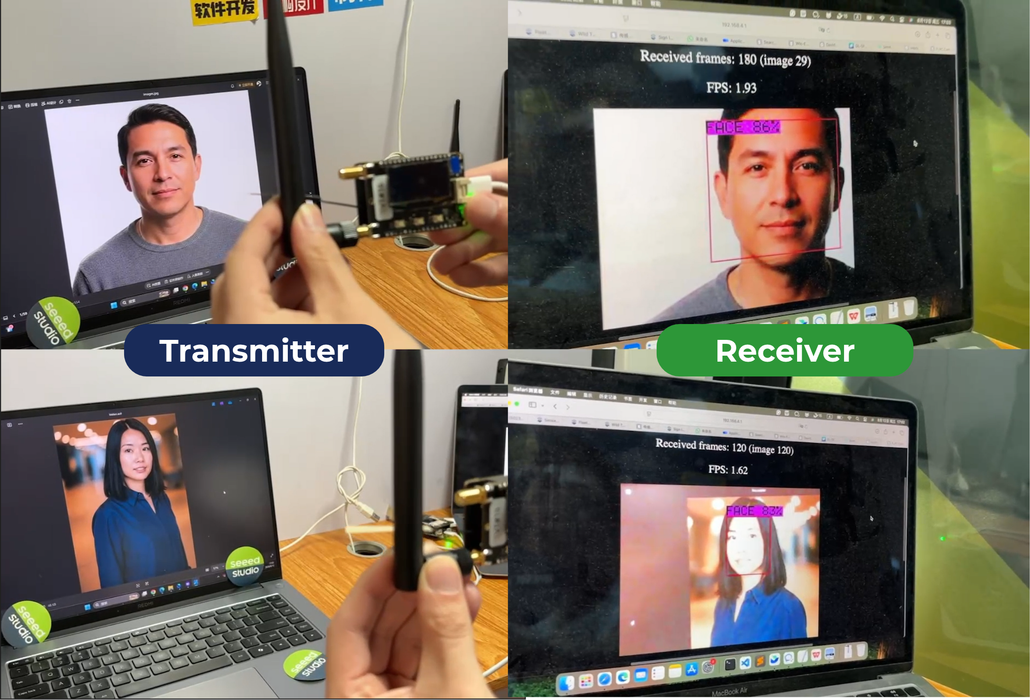
In the face-detection mode, the ESP32-S3 runs a model with a 96 × 96 input. When it finds a face, the transmitter draws a magenta box around it and adds the label ‘face’ with a confidence percentage. This model looks for the presence and position of a face. It does not identify who the person is, and the demo does not provide face authentication. The receiver simply shows the annotated image.
2. Gesture Recognition
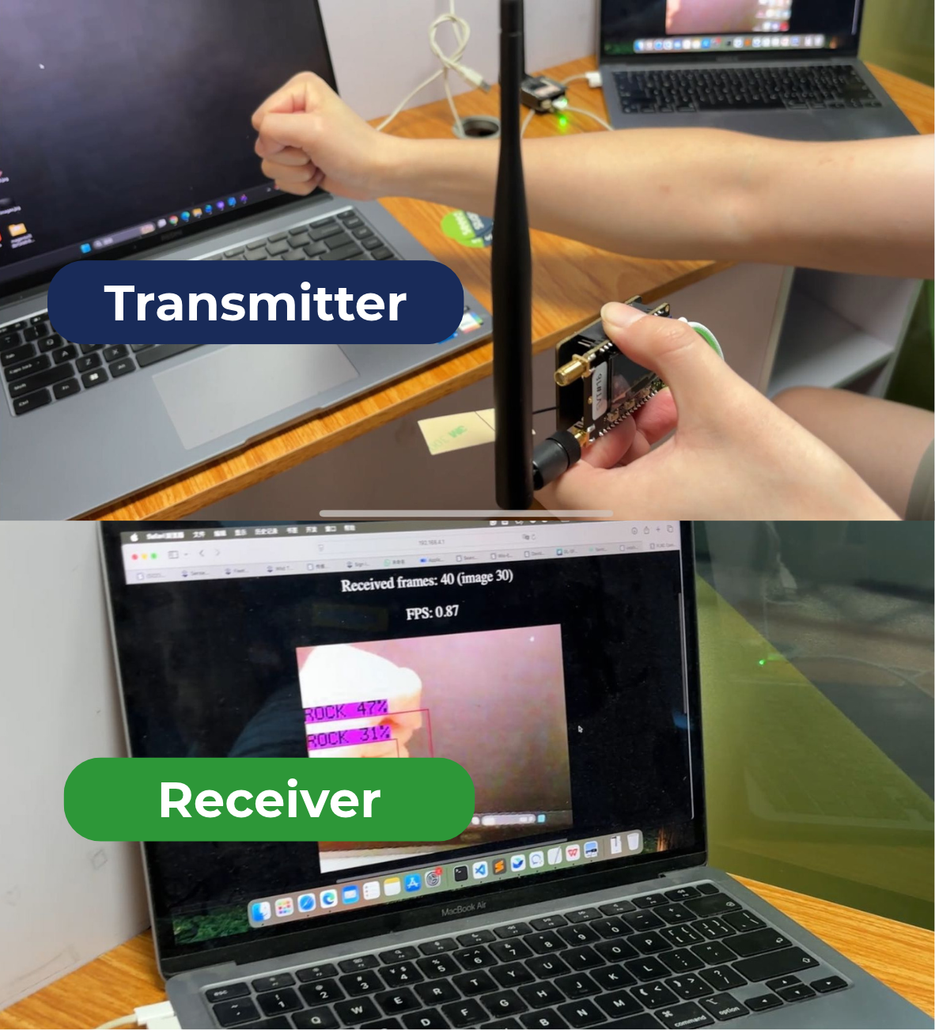
With gesture recognition, the system looks for one of three familiar hand signs: ‘paper,’ ‘rock,’ or ‘scissors.’ The model uses a 192 × 192 input, and the transmitter adds detection boxes and labels to the image. One moment in the recorded demo shows two overlapping detections on the same fist. The firmware draws both because it does not merge duplicate candidates. A single clearly visible hand and a fairly simple background give the model a better view; it does not attempt to recognize every possible hand pose.
3. Water-Meter Reading
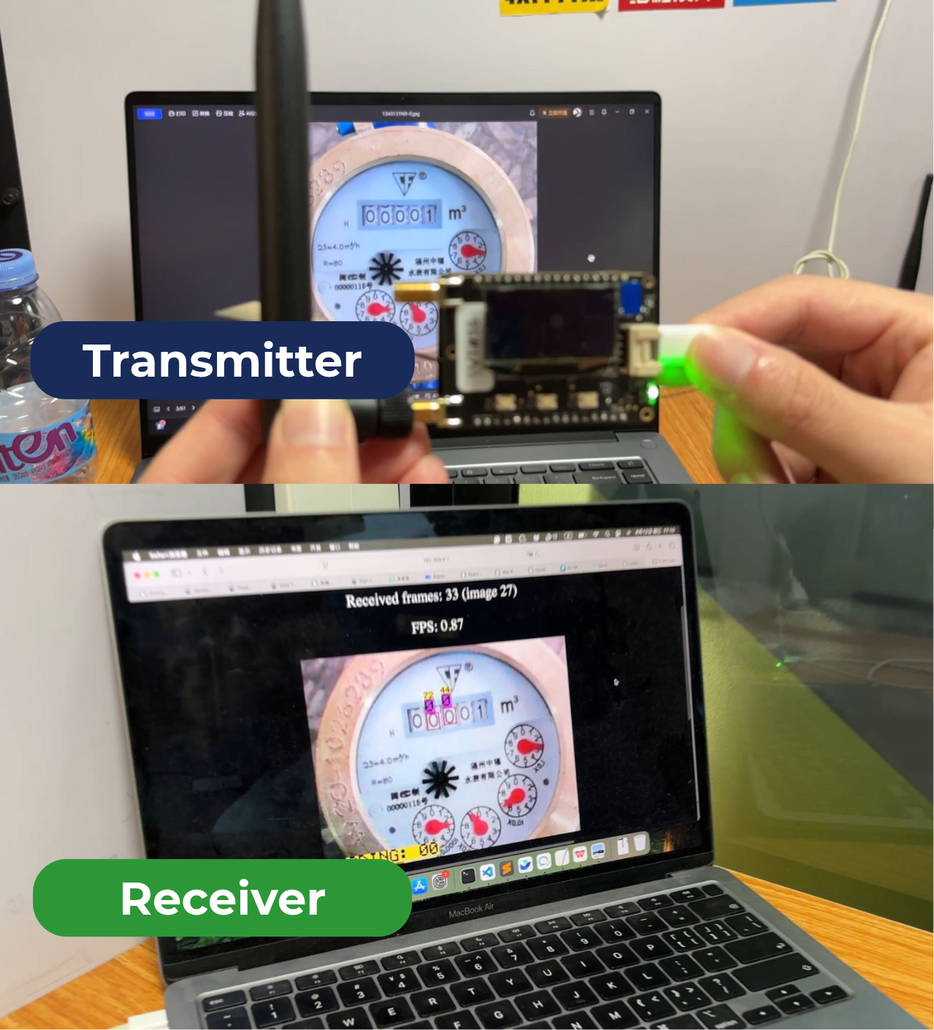
The water-meter mode uses another 192 × 192 model, this time to find individual digits on a meter face. The ESP32-S3 draws a box and confidence score around each digit, then combines the detected numbers into a yellow ‘READING:’ line on the image. This example goes a little further than locating an object: the device interprets what it sees as a possible measurement before sending the frame. The recorded reading can change between frames when the camera angle shifts or part of a digit becomes hard to see. It is a demonstration of visual reading, not a certified system for billing or formal metering.
4. Raw Camera Baseline
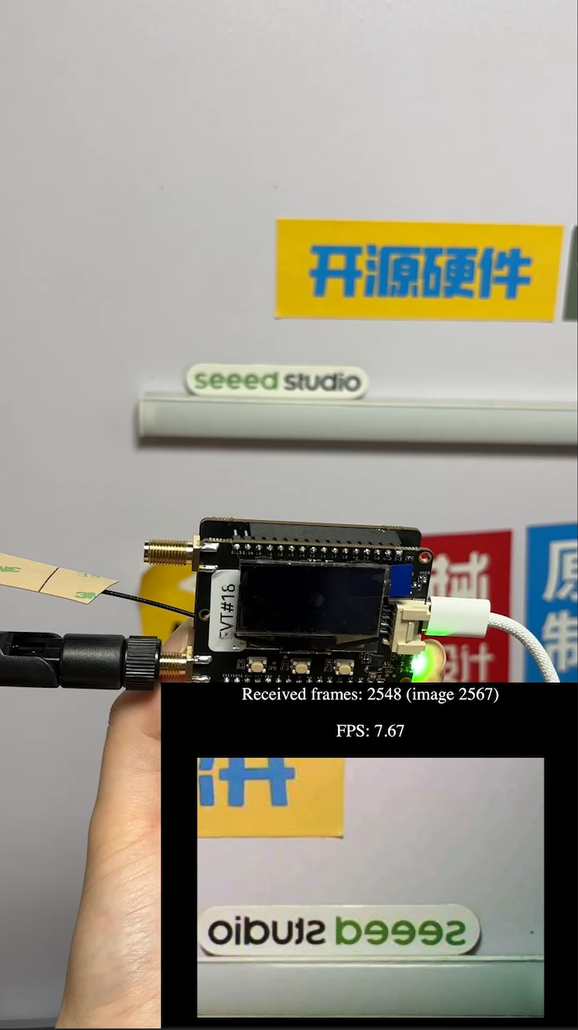
The fourth configuration turns AI inference off and sends JPEG camera images directly. That makes it the fastest mode in the recorded test and gives us a baseline for comparison. The raw-camera clip also shows an inverted image, because the receiver displays the JPEG without rotating it.
These four modes point to different ways visual information could become useful in day-to-day operations. Face detection could alert staff when someone enters an area that needs attention, while gesture recognition could provide a simple, touch-free way to issue commands near equipment. Water-meter reading could turn a photographed dial into a suggested reading for an operator to review, and the camera-only mode shows how an unannotated image could provide visual context when a decision needs human confirmation.
What Seeed Studio has shown is a practical starting point: a device can interpret a scene locally, then use FLRC to share an image that makes its output visible and reviewable. As teams develop applications around that approach, remote monitoring could move beyond reporting measurements to helping people understand what is happening on site and decide what to do next.
Looking Ahead: Extending Edge AI Across Wireless IoT
For Seeed Studio, this demonstration is one practical way to explore what happens when visual intelligence meets wireless connectivity. On a compact development platform, we bring together camera capture, local AI inference, annotated JPEG transmission, and browser-based viewing. The four modes also make the trade-off visible: changing the work performed at the edge changes how quickly complete images arrive.
We want to keep building on this foundation. Seeed Studio will continue developing accessible hardware, firmware examples, and technical resources around Wio-LR2021 so more teams can explore embedded AI alongside different wireless communication needs. There is still plenty to learn about the balance between local processing, image size, transmission performance, and reliability. Sharing working demos and measurable results is one way we can help the LoRa and industrial IoT communities explore those questions together.
See what you can build at the edge. Pick up two or more Wio-LR2021 Dev Kits to explore your own AI and wireless image demo, and save $8 while the limited offer lasts. Only 100 sets are available. Start building →
About Author
