Edge AI Box vs AI Camera: A Retail Deployment Guide
This guide shows system integrators how to choose between centralized processing, on-camera inference, and a hybrid setup for after-hours alerts and checkout queue monitoring.
Do any of these requirements sound familiar?
At 11 p.m., the supermarket is closed. Someone enters the checkout area. The manager wants an immediate alert and an on-site voice prompt. The next afternoon, a queue builds at the checkout. The store manager wants staff to open another lane before customers start complaining.
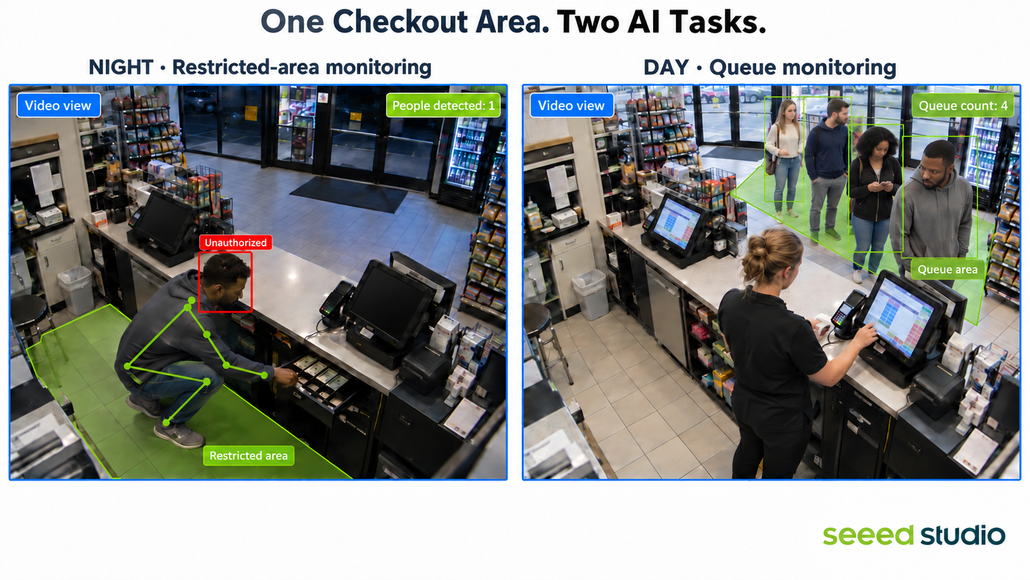
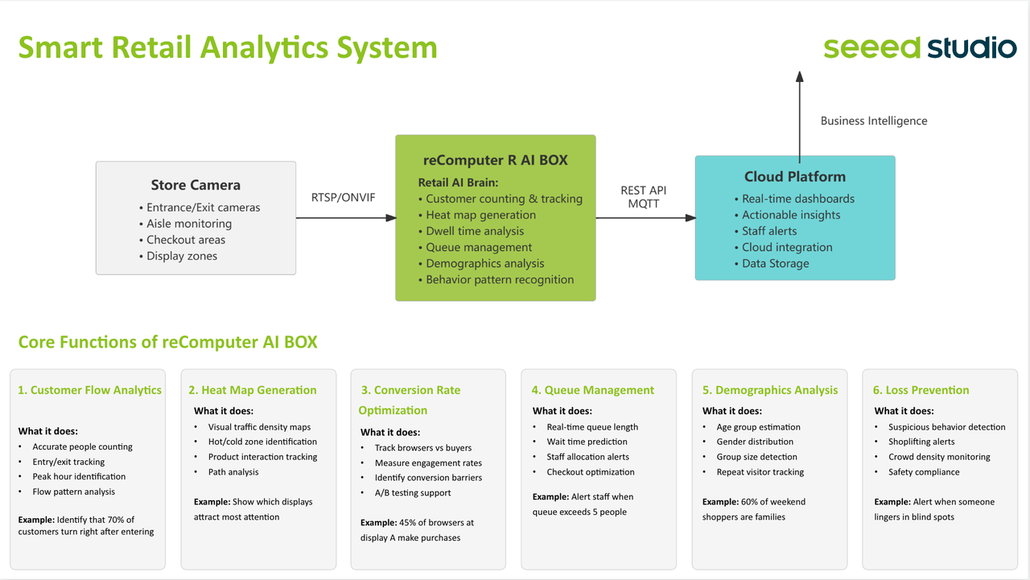
Retail vision AI can support much more than security alerts. It can detect unauthorized entry, analyze whether shoppers notice in-store signage, identify product interest without purchase, detect out-of-stock shelves, and more. Modern vision AI can perform these tasks with high accuracy.
Even better, the same AI hardware can run different applications. You do not need to buy extra hardware for each task—you simply deploy a different application to the same device. But with so many AI devices and solutions available, how do you choose?
To select the right hardware, start by defining the requirement.
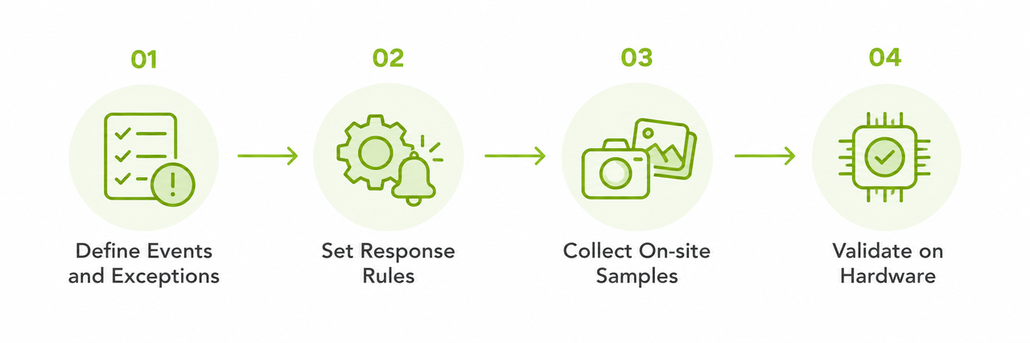
Step 1: Turn store needs into testable tasks
Start with three questions: What should the system detect? How quickly should it respond? Who needs to act? The answers help you choose the hardware and plan the work.
“Person detected” is only part of the requirement. After closing, define which areas should be empty, when cleaners may enter, and how long someone must remain before an alert is sent.
During opening hours, the system needs to distinguish queueing customers from people passing by, and determine whether congestion persists long enough to require backup. These two tasks have different requirements for analysis speed and policy. Define them clearly first: what condition deserves an alert, how quickly a response is needed, and who handles it.
For example, if someone crouches in the checkout area, they may be cleaning or picking something up. You cannot determine improper behavior from this action alone. What you actually need to monitor may be unauthorized entry into the checkout area after closing and opening of the cash drawer. In this case, define allowed access hours, the basis for authorization, cash drawer status, and whether the trigger should request review or activate an on-site alarm. “Unauthorized” also needs to be supported by records or system information—not judged by appearance alone.
Queue management also needs agreed rules: how many people, how long, or how fast the queue must grow before staff are notified to open another lane. Once the rules are clear, use on-site samples from normal business, cleaning operations, and simulated exceptions to test detection performance, false alerts, and response time on the hardware over multiple rounds. Confirm that the solution meets the business requirement.
Step 2: Edge AI Box vs AI Camera, plus a hybrid option
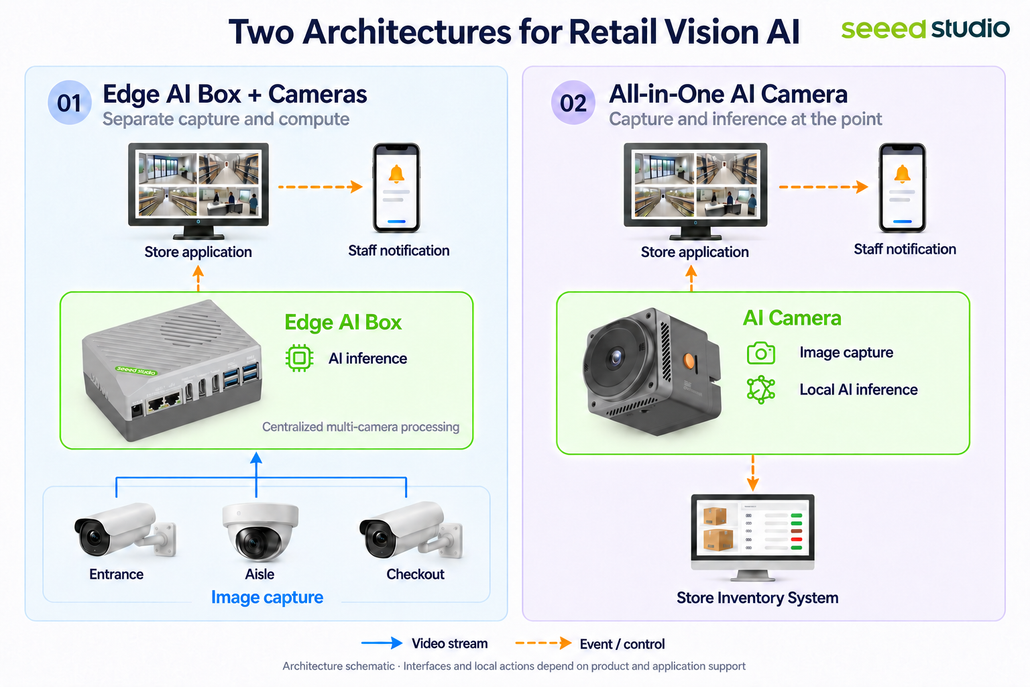
A retail vision workflow can be simple: Image capture → AI analysis → Business rules → notification or system action → staff response and confirmation.
Cameras provide images suitable for analysis. Models output detection results. Business rules decide whether action is needed. The store application then routes events to the right person. Next, compare where analysis runs: on an AI Box, on an AI Camera, or split between both.
Option 1: Keep existing cameras and add an Edge AI Box
If the store already has several cameras with suitable views and image quality, an Edge AI Box is worth evaluating first.
The cameras continue to send video. The box runs the analysis and sends events to the store’s systems. This lets you reuse existing cameras and cabling, share computing power across video streams, and support tasks that use more than one camera.
Systems Integrator should confirm whether video can be ingested reliably, whether the device can handle the target workload, and how notifications and business systems connect. For example: how many video streams need person detection; how many additional behavior analytics; how many frames per second each stream needs; and which tasks must run at the same time.
The actual effort also depends on whether the selected box already provides mature video ingestion and application software.
For stores with many usable cameras, adding centralized compute may be more suitable than replacing cameras. But if existing images cannot clearly show the queue area, or moving people are badly blurred at night, fix the capture side first.
Option 2: Add an AI Camera for a dedicated location
If the project needs a new camera location with local analysis, consider an AI Camera that integrates image capture and inference.It offers three practical benefits.
Simplify the equipment at the location. When the camera can handle the target application, you may avoid adding a separate compute unit for that location. This helps simplify device planning for space-constrained or distributed locations. During selection, still confirm power, installation environment, and required audio or control interfaces; these vary by product.
Process suitable tasks on site. A compatible person-detection or region-counting application can run at the camera, with rules triggering the next action. Test accuracy and response time with the full application running, and establish which functions continue when network connectivity changes.
Connect results to the customer’s workflow. Choose a product that supports the required event outputs and system interfaces, so detection results can connect to staff notifications, on-site devices, or store applications. If the project requires custom models and business rules, further evaluate the open AI Camera’s development tools, on-site data access, and update capabilities. Not all AI cameras support these functions.
When evaluating an AI Camera, ask four questions:
- Can it capture the right image? Check field of view, target size, mounting angle, and low-light performance.
- Can it run the required model and application? Validate compatibility, analysis frequency, and resource use with tracking and rules enabled.
- Can you adapt it to the customer’s requirements? Check support for custom models, application development, and updates.
- Can it connect to the required workflow? Verify event output, local actions, and interfaces to the customer’s systems.
Option 3: Combined deployment—let AI Box and AI Camera each handle suitable tasks
A store does not need to use the same architecture at every location. Existing entrance and aisle cameras can feed an AI Box, while a new checkout or rear-door location uses an AI Camera for a suitable local task.
Results from both sides can connect to the same store application through their supported interfaces: the Box handles tasks that need centralized compute or cross-camera correlation, while Pro provides point-level events and local response. The store application presents location, time, and event status in one view and routes notifications to the right owner.
If you want the AI Box to also aggregate events, deploy an application on the box to receive and process Pro outputs, and validate protocols, authentication, event fields, and retry mechanisms. Combined deployment is an integration design—two devices will not automatically work together just because they are connected. For the same event, agree which side triggers the notification to avoid duplicate alerts.
For the same checkout area, AI cameras can first perform point-level detection and pass results that need further processing to the store application or a service on the Box. Design data transmission only when extra analysis is needed; what to send and how often should be driven by the task requirements.
At night: From presence detection to an on-site prompt
Start with a rule that has a clear meaning:
After-hours rule active → Person remains in the defined area → Play an on-site prompt → Notify the responsible person.
Voice prompts can use pre-recorded files triggered by the application to play through a speaker.
Low-light imaging should be validated under real closed-store conditions, including remaining lighting, person distance, and clarity while people are moving.
If the customer also needs posture or behavior analytics, treat it as a further development feature. Bending down, crouching, or reaching out alone is not enough to determine theft. In phase one, build rules around time, area, and person presence; this makes alert meaning clearer and acceptance easier.
Compute requirements should change with features. After adding behavior models, re-measure processing speed and alert latency. Do not reuse performance conclusions from person detection only.
Daytime: Analyze at the frequency the queue task requires
During business hours, use another set of rules:
People in the defined queue area exceed a threshold and remain there for a period → notify staff to open another lane → end the reminder when the queue returns to normal.
For example, a pilot can start with “more than five people for one minute.” It focuses on sustained congestion, so you can test different analysis for requencies and choose a configuration that reflects queue changes in time without unnecessary compute load.
If you only need to know whether an area remains congested, focus on people count and duration. If you need to estimate each customer’s wait time, add tracking and timing logic.
Daytime queue monitoring and after-hours restricted-area alerts can be scheduled by business hours. Whether the required switching method is supported and whether it runs reliably after switching should be part of application validation. If tasks do not need to run at the same time, you do not have to plan capacity as if they were all concurrent all day.
Later, area occupancy data can be connected to lighting systems for energy-saving strategies, but this requires additional control integration and validation.
Edge AI Box vs AI Camera: How to choose and combine for easier delivery
| Store requirement | Evaluate first | Key checks |
| Add analysis to several existing cameras | Edge AI Box | Video connections, number of streams, processing speed, and alert delay |
| Add a new location with local analysis and response | AI Camera | Image quality, model support, rules, and connections |
| Use existing video and add new local tasks | AI Box and AI Cameras together | Task ownership, shared events, duplicate alerts, and recovery after failures |
For a complete Edge AI Box vs AI Camera cost comparison, include devices, accessories, installation, software licenses or subscriptions, model adaptation, system integration, on-site commissioning, and ongoing maintenance. Shared compute across multiple streams and integrated vision points each have value. Comparing only the purchase price of a box and a camera can miss major delivery costs.
FAQ
Q1: Does AI need to analyze every frame from a camera running at 25 or 30 fps?
The right analysis rate depends on the task. For persistent conditions such as queue congestion, test whether a lower rate still meets your response requirements. For fast movement across a zone or brief actions, focus on the risk of missed detections when frames are skipped.
Analyzing fewer frames can reduce the inference workload. However, in systems that receive compressed video, decoding and other processing loads may not decrease proportionally. Test the complete system, rather than relying on model speed alone.
Q2: Do I need to replace my existing cameras with AI Cameras?
Not necessarily. If your existing cameras provide suitable footage, you can keep them and evaluate an AI Box. For new locations that need local decision-making and on-site responses, consider adding an AI Camera. If the solution needs to connect to an existing recording or business system, verify compatibility with the specific interfaces and functions required.
Q3: Can an AI Camera and an AI Box work together directly?
Integration requires compatible data interfaces supported by both applications, along with aligned event fields, authentication, notification rules, and retry handling. Deploying them together does not automatically make the solution plug-and-play. Define which device makes decisions, which sends notifications, and how duplicate alerts will be prevented.
Q4: Can detection and alerts keep working if the network goes down?
Local inference and rules implemented on the device can be designed to operate without external computing services. Local actions, such as on-site audio alerts, should also be validated in the actual application.
Remote notifications still require a communication link. Event storage, notification retries, and delivery of pending notifications after connectivity returns depend on the application implementation. Include these capabilities in your pilot checklist.
Q5: What else do I need to prepare before scaling from one store to multiple locations?
Beyond model performance, define how device configuration, version updates, fault monitoring, recovery, and maintenance will be handled—and who is responsible for each. Start by packaging the model, application, and configuration validated at the first store into a reusable release. Then check camera angles, lighting, and network conditions at each additional location.
These are essential considerations for deployment at scale. A successful single-device demo does not mean a multi-store rollout is complete.
About Author
