Jetson Orin Nano vs Orin NX: How to Choose for Industrial Edge AI
A proof of concept passes on an Orin Nano: one camera, one model, 30 FPS, and the GPU sitting at 40%. Production changes the inputs. Four cameras, a recording requirement, and a second model for licence-plate recognition. Suddenly, the application struggles to keep up.
The problem isn’t necessarily compute. In a multi-stream edge AI deployment, memory, video encoding and sustained thermal performance can become limiting factors long before the TOPS figure tells the whole story.
This guide compares the Jetson Orin Nano 8GB and Orin NX 16GB for sealed, fanless edge AI deployments. Using hardware specifications and a four-stream industrial vision benchmark, we’ll look at where each module fits, what to check before deployment, and when the additional resources of the NX actually make a difference.
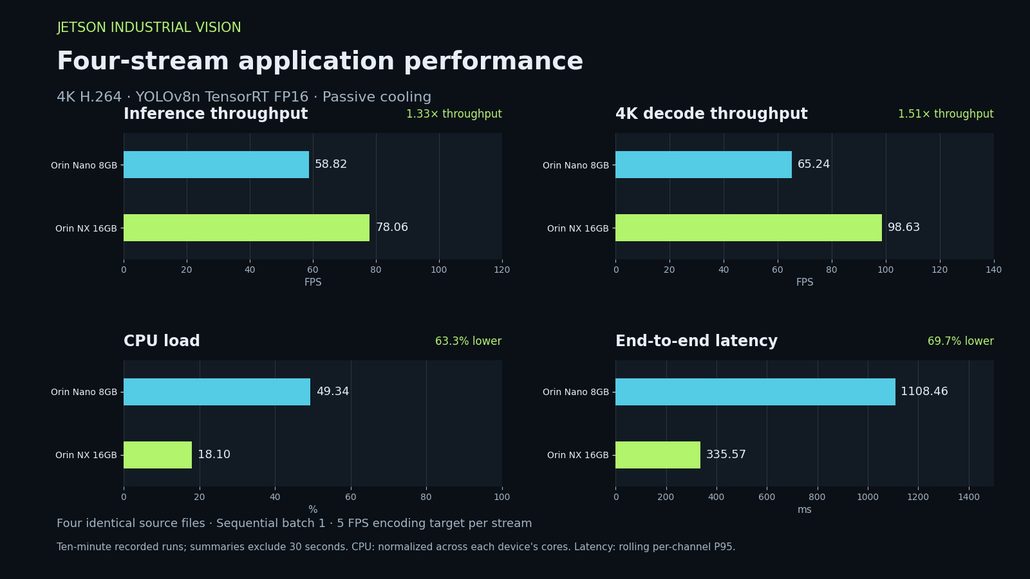
The headline from the benchmark: 1.33× inference throughput, 1.51× decode throughput, 63.3% lower CPU load and 69.7% lower end-to-end latency on the NX. Ten-minute sustained runs; summaries exclude 30 seconds of warm-up.
The Two Modules at a Glance
The reComputer Rugged J3011 and J4012 are built around the Jetson Orin Nano 8GB and Orin NX 16GB, respectively. Both use the same enclosure, M12 connector set and 19–48V power design. The main differences come from their Jetson module configurations.
| Specification | reComputer Rugged J3011 | reComputer Rugged J4012 |
| Jetson module | Orin Nano 8GB | Orin NX 16GB |
| AI performance | 40 TOPS sparse / 20 dense | 100 TOPS sparse / 50 dense |
| GPU | 1024 CUDA / 32 Tensor Cores @ 625 MHz | 1024 CUDA / 32 Tensor Cores @ 918 MHz |
| CPU | 6× Cortex-A78AE @ 1.5 GHz | 8× Cortex-A78AE @ 1.98 GHz |
| Memory | 8GB LPDDR5, 68 GB/s | 16GB LPDDR5, 102.4 GB/s |
| Video encoding | Software encoding, no NVENC | 1× NVENC, up to 4K60 |
| Video decoding (H.265 Main/Main10) | 1× 4K60 / 2× 4K30 / 5× 1080p60 / 11× 1080p30 | 1× 8K30 / 2× 4K60 / 4× 4K30 / 9× 1080p60 / 18× 1080p30 |
| Power modes | 7W / 15W | 10W / 15W / 25W |
Specifications are based on the module configurations used in the J3011 and J4012. Power modes are not directly comparable to measured system power.
Two details matter when reading the table. Sparse TOPS assumes 2:1 weight sparsity, so compare sparse-to-sparse or dense-to-dense figures. Decode capacity also depends on the codec: the Nano supports up to 5× 1080p60 in H.265 Main/Main10, but 3× 1080p60 in H.264. Check your camera’s actual output before planning stream counts.
Both modules have 1024 CUDA cores and 32 Tensor Cores. The NX clocks them higher and adds CPU cores, memory bandwidth and a hardware video encoder. These differences are more relevant to a sustained application than TOPS alone.

Same enclosure, same connector set, same power design. The J3011 and J4012 differ in the Jetson module inside — and that module is what changes the available compute, memory, video-processing and power resources.
Why TOPS Alone Is Not Enough
TOPS describes peak AI compute capability, not the throughput of a complete edge AI application.
A deployed vision system needs to decode camera streams, move frames through memory, preprocess images, run inference, postprocess results, record video and deliver previews. Each stage consumes resources, and the bottleneck can move depending on the workload.
In a sealed enclosure, four resources deserve particular attention:
- Memory: How much of the available RAM can your models, buffers and application actually occupy?
- Video encoding: Does recording rely on a dedicated hardware encoder or compete for CPU resources?
- Decode and processing throughput: Can the complete pipeline sustain the required camera count and frame rate?
- Thermal budget: Can the system maintain its operating point in the enclosure and ambient conditions of the deployment?
The following sections look at the first three through our benchmark and explain what the results mean for hardware selection.
Memory: Capacity and Bandwidth Matter
The Orin Nano provides 8GB LPDDR5 at 68 GB/s. The Orin NX doubles the memory capacity to 16GB and increases bandwidth to 102.4 GB/s.
Memory capacity determines what the system can keep resident at the same time. An edge AI application needs space for the operating system, application processes, model weights, frame buffers, intermediate tensors and queues. Adding another model or increasing queue depth can change the memory footprint substantially.
A single detection model may fit comfortably on the Nano. Multiple models, high-resolution streams and additional application processes can make the 8GB pool increasingly restrictive. Larger vision-language models also tend to favor the NX, although model size, quantization and runtime configuration determine what is feasible.
Our four-stream 4K benchmark provides a useful reference point.
| Memory metric | Orin Nano 8GB | Orin NX 16GB |
| Device RAM usage, start | 35.6% | 37.3% |
| Device RAM usage, end | 71.2% | 43.6% |
| Application RSS, start | ~2,108 MiB | — |
| Application RSS, end | ~4,695 MiB | ~1,277 MiB |
Ten-minute sustained run. Device RAM usage represents the measured system memory footprint; application RSS is the resident memory of the benchmark application.
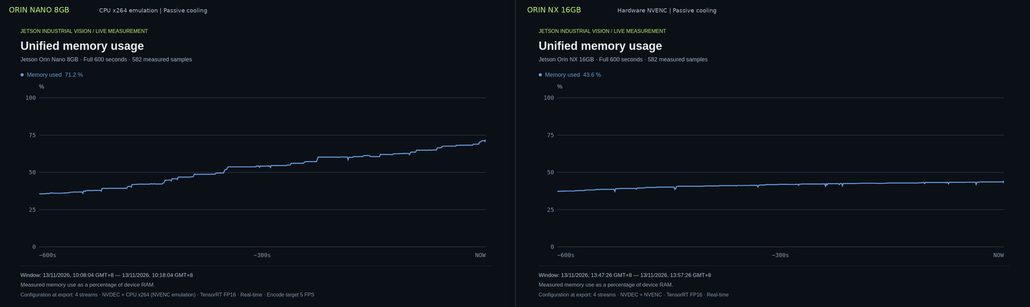
Unified memory over the same ten-minute four-stream run. The Nano climbs to 71.2% of 8 GB and is still rising; the NX holds around 43.6% of 16 GB.
The Nano’s memory usage increased considerably during the run, while the NX remained within a smaller fraction of its available memory. The cause and long-term plateau of the Nano’s growth remain unresolved in this measurement, so the result should not be interpreted as a confirmed memory leak or as evidence of long-term instability.
It does, however, illustrate why memory headroom matters. A ten-minute run is not a substitute for monitoring memory over a full shift or a longer endurance test.
Bandwidth is another part of the equation. Four 1080p NV12 streams at 30 FPS require roughly 370 MB/s of decode writes, which is small relative to the Nano’s nominal memory bandwidth. But the full application also moves model weights, intermediate tensors, resized frames and buffers through the memory system.
When throughput stalls despite relatively low GPU utilization, memory activity, CPU preprocessing, synchronization and data movement are all worth investigating.
How to check: Use tegrastats during your peak workload. Monitor RAM, CPU load, GR3D_FREQ, EMC_FREQ and available NVDEC/NVENC metrics together. Low GPU utilization alone does not identify the bottleneck.
The NX’s 102.4 GB/s bandwidth and 16GB memory pool provide more room for multi-model applications and larger workloads. Whether that extra capacity is necessary depends on what your application needs to keep resident and how much headroom it requires.
Video Encoding: A Difference in the Application Pipeline
The Orin Nano does not include a hardware video encoder. H.264 recording therefore relies on software encoding, which competes for CPU resources alongside preprocessing, postprocessing and application logic.
The Orin NX includes one NVENC hardware encoder, supporting encoding up to 4K60 under the specified codec configuration. It can handle the H.264 bitstream encoding independently of CPU-based encoding, leaving more CPU resources available for other application tasks.
This difference becomes more significant when recording is part of a multi-stream AI workload.
What our four-stream benchmark measured
Both modules processed four native 4K H.264 video streams through NVDEC, a TensorRT FP16 YOLOv8n detector, an H.264 recording branch and a preview dashboard. The detector used 640×640 letterboxed input, while video decode and recording retained native 4K resolution.
During the ten-minute sustained runs, both systems used a 5 FPS recording target per stream.
| Metric | Orin Nano 8GB | Orin NX 16GB |
| Aggregate decode throughput | 65.24 FPS | 98.63 FPS |
| Aggregate inference throughput | 58.82 FPS | 78.06 FPS |
| Aggregate encoding throughput | 13.24 FPS | 20.00 FPS |
| CPU load, core-normalized average | 49.34% | 18.10% |
| GPU load | 30.49% | 54.68% |
| Module input power | 11.02W | 15.76W |
Ten-minute sustained runs, with the first 30 seconds excluded as warm-up. CPU load is normalized across the respective module’s cores. Encoding throughput represents completed frames.
The Nano used CPU-based x264 encoding, while the NX used NVENC. Under these configurations, the NX sustained higher inference and recording throughput with substantially lower normalized CPU load.
The CPU figures represent the entire application pipeline, not encoding alone. They should not be interpreted as a direct measurement of the CPU cost of x264 versus NVENC in isolation.
Latency matters, too
The benchmark also measured end-to-end latency from decoder input to completed detection postprocessing.
| Metric | Orin Nano 8GB | Orin NX 16GB |
| End-to-end latency | 1,108.46 ms | 335.57 ms |
Time-weighted mean of the worst rolling per-channel P95 end-to-end latency over the sustained run.
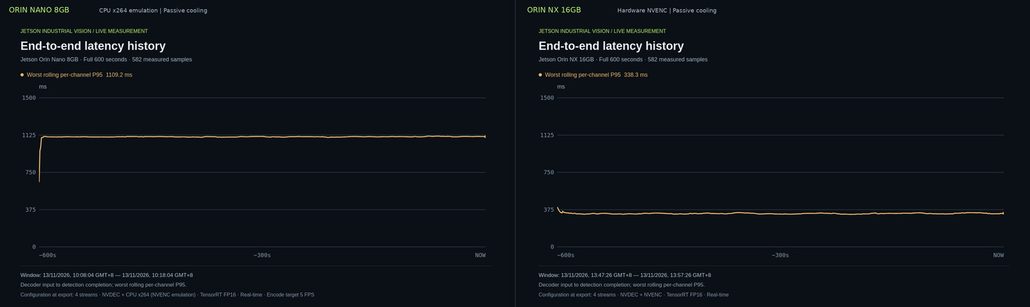
Time-weighted mean of the worst rolling per-channel P95 end-to-end latency, decoder input to detection completion: 1,108 ms on the Nano, 336 ms on the NX.
The NX recorded 69.7% lower latency in this statistic. This is a complete-pipeline measurement, not isolated TensorRT inference time. Scheduling, preprocessing, postprocessing, recording and the software encoding workload all contribute to the result.
In a real-time application, throughput and latency are related but not interchangeable. A system may process a large number of frames while still delivering results too late for the application’s requirements. Both need to be measured.
What the NX’s encoder headroom looks like
In a separate short capacity test, the NX recorded 98.51 aggregate FPS of 4K H.264 while inference continued at 75.63 FPS. Normalized CPU load was 12.79%, and module input power was 16.88W.
This was a roughly 100-second capacity segment with the recording cap removed and dynamic inference batching enabled. It was not a ten-minute endurance test or a like-for-like comparison with the Nano’s sustained run.
The practical takeaway is straightforward: if your deployment requires sustained video recording alongside AI inference, the NX’s hardware encoder provides a more flexible recording path. The Nano can still support recording workloads, but you need to budget for software encoding and validate the resulting CPU and application throughput.
Power and Thermal Performance in a Sealed Enclosure
Power modes describe available operating configurations. They do not guarantee that a module can sustain its peak performance inside a sealed enclosure.
The J3011 offers 7W and 15W modes, while the J4012 offers 10W, 15W and 25W modes. In a fanless IP66 system, the operating point depends on the heat generated by the Jetson module, storage, power conversion and connected peripherals, as well as how efficiently the enclosure dissipates that heat.
The J4012 is rated for operation from −20°C to 60°C with 0.7 m/s airflow across the enclosure. Deployment conditions that provide less airflow may reduce the available thermal margin.
Our benchmark also illustrates the difference between a configured power budget and a sustained operating point. The Nano used a configured 25W power budget during the benchmark, rather than the J3011’s listed 7W/15W modes. Its measured average module input power was 11.02W.
The NX’s sustained benchmark run used passive cooling and CPU/GPU frequency limits of 1.50 GHz and 816 MHz, respectively. It reached a peak measured temperature of 97.38°C, compared with 58.19°C on the Nano. Neither module recorded sampled thermal-throttling events during the run.
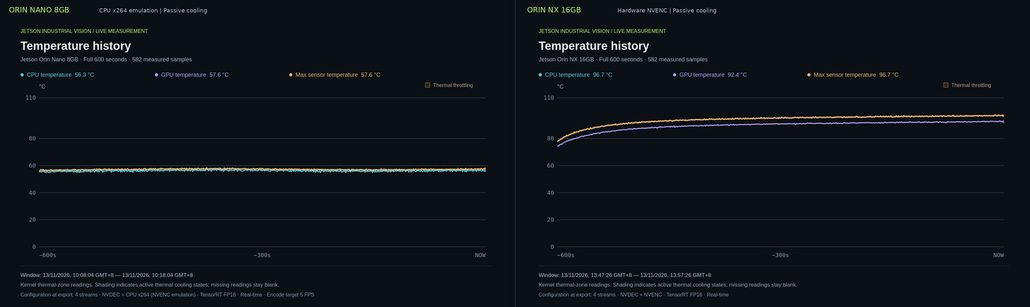
Peak sensor temperature: 97.38 °C on the NX (held at 1.50 GHz CPU / 816 MHz GPU), 58.19 °C on the Nano. These are module-level measurements under the documented benchmark configurations, not a thermal qualification of the J3011 or J4012 product enclosure. Ambient temperature and equivalent cooling assemblies were not controlled.
The higher-power NX configuration needs an appropriate thermal budget. More compute and encoding resources are useful only if the system can sustain the operating point required by the application.
For a sealed deployment, validate the workload at the power mode and cooling conditions you intend to use. Peak clock specifications alone are not a reliable basis for sustained performance.
A Four-Step Workload Check Before You Choose
Before ordering hardware, work through four questions. Each one helps identify a constraint that TOPS alone cannot answer.
| Step | What to check | When it points toward NX |
| 1. Decode | Camera count, resolution, FPS, codec and profile | Multiple streams approach decode limits, especially with 4K sources |
| 2. Inference | Required model throughput at the target frame rate, with planning headroom | Sustained inference throughput exceeds Nano’s measured capacity |
| 3. Encode | Whether recording or streaming is required, and at what rate | Software encoding crowds out CPU resources needed by inference or application logic |
| 4. Residency | Models, frame queues, application processes and headroom within available memory | Multiple models, larger VLMs or growing memory usage leave insufficient headroom |
Step 1: Check the decode budget
Start with the camera specifications, not the number of ports on the computer.
Four cameras do not automatically mean four full-rate inference streams. Codec, profile, resolution, frame rate and concurrent processing all matter. Hardware decode limits are also not guarantees of whole-pipeline performance.
Our benchmark illustrates the gap: the NX decoded 98.63 FPS across four 4K H.264 streams while sustaining 78.06 FPS of inference. Decode throughput did not translate into an equal number of completed inference frames.
If the decode requirements exceed the module’s limits, reduce resolution, frame rate or camera count, or evaluate a different platform.
Step 2: Check inference throughput
Estimate the inference workload using the actual model and required frame rate. The model’s benchmark FPS should be measured on the target module, software stack and input resolution.
Leave some planning headroom for workload variation and future changes. A 20–30% headroom target can be a useful starting point, but it is a planning guideline rather than a universal threshold.
If the Nano cannot sustain the required inference throughput with the desired margin, the NX may be a better fit. Alternatively, consider a smaller model, lower inference rate or event-driven inference.
Step 3: Check recording requirements
Ask whether recording is required, how many streams need to be recorded, and at what resolution and frame rate.
The Nano’s software encoder shares CPU resources with the rest of the application. Low-resolution or low-frame-rate recording may still be manageable, but sustained multi-stream recording needs to be tested against the actual CPU budget.
The NX’s NVENC offers a dedicated encoding path and generally provides more room for recording alongside inference.
Step 4: Check memory residency
Account for the operating system, models, frame queues, application processes and any additional runtime components. Monitor memory under the complete workload rather than estimating from model weights alone.
If the workload is approaching the Nano’s memory limit, consider reducing queue depth, removing unnecessary resident models or moving to the NX’s 16GB pool.
Put the Workload Check to Work
Consider four 1080p30 cameras, one detection model and three recording streams.
| Requirement | What to evaluate |
| Decode | Verify codec and profile against both modules’ decode limits |
| Inference | Measure the detector at the required frame rate across the four cameras |
| Recording | Three streams require encoding alongside inference and application logic |
| Memory | Confirm model residency, frame queues and application memory under sustained load |
The Nano may be able to run this workload, depending on the model, recording settings and required inference throughput. However, three software-encoded streams will add CPU load alongside the rest of the application. This is the part that deserves the closest attention and measurement.
The NX offers a dedicated encoding path and more memory, CPU and bandwidth headroom. If sustained recording and inference are both important, it is the stronger candidate to validate.
That does not mean every four-camera deployment needs the NX.
Consider the opposite case: one camera, one fixed detection model, no recording, and a workload that is unlikely to change. If the Nano meets the required throughput and memory budget with sufficient headroom, it may be the better choice. The unused resources of a more capable module do not automatically improve the application.
The goal is to select the smallest module that reliably meets the actual workload, not the largest one available.
Choosing Between the reComputer Rugged J3011 and J4012
The reComputer Rugged J3011 and J4012 share an IP66 enclosure, M12 industrial interfaces, a 19–48V power design and a fanless deployment approach. The main difference is the Jetson module configuration.
Choose the reComputer Rugged J3011 when:
- A single or limited number of AI models fit comfortably within 8GB memory.
- Inference throughput requirements are within the Nano’s measured capability.
- Recording requirements are limited or can be accommodated through software encoding.
- The workload has sufficient CPU, memory and thermal headroom.
Consider the reComputer Rugged J4012 when:
- Sustained multi-stream inference requires more throughput.
- Recording is an important part of the application and benefits from hardware encoding.
- Multiple models or larger vision-language models require more memory.
- Additional CPU and memory bandwidth are needed to support the complete application pipeline.
Explore the reComputer Rugged J4012 and reComputer Rugged J3011 to evaluate the hardware configurations for your deployment.
FAQ
Can the Jetson Orin Nano run four cameras?
It depends on the codec, resolution, frame rate, model and recording requirements. The Nano supports multiple video decode streams, but decode capability does not guarantee that inference, recording and application logic can all run at the required throughput. Validate the complete workload on the target hardware.
Does the Jetson Orin Nano have a hardware video encoder?
No. The Orin Nano does not include NVENC. H.264 encoding relies on software encoding, which consumes CPU resources. The Orin NX includes one NVENC hardware encoder supporting up to 4K60 under the specified codec configuration.
Is 40 TOPS enough for edge AI detection?
It can be sufficient for many single-model detection applications. Whether 40 TOPS is enough depends on the model, input resolution, camera count, inference frame rate and the rest of the application pipeline. Measure the actual workload rather than using TOPS as the only selection criterion.
Can I start with the J3011 and upgrade to the J4012 later?
Treat an upgrade as a validation project rather than assuming it is a direct swap. Hardware compatibility, BSP, drivers, power requirements and thermal performance need to be verified. If workload growth is likely, evaluate the additional resources of the NX before committing to the original deployment.
Conclusion
Choosing between the Jetson Orin Nano 8GB and Orin NX 16GB is not simply a comparison of 40 TOPS against 100 TOPS.
For sealed edge AI deployments, the more useful questions are whether the module can decode your camera streams, sustain inference, handle recording and keep the required models and application components resident in memory. Power and thermal conditions determine whether that performance can be maintained.
The Nano is a capable option for bounded workloads with clear requirements. The NX provides additional memory, CPU and bandwidth resources, as well as hardware video encoding, that can make more demanding multi-stream applications easier to accommodate.
Start with the workload. Measure the pipeline. Then choose the module.
For more details on the test configuration, measurement methodology and benchmark results, see 4K Industrial Vision Benchmark on Jetson Orin Nano and Orin NX.
About Author
