Any robotic arm with a LeRobot robot class can run a fine-tuned Pi0.5 (π0.5) policy, because π0.5 is implemented in LeRobot as the policy type pi05 and adapts automatically to your robot’s motor states, motor actions, and number of cameras — this information is stored in the LeRobot dataset you record.
Robotic Arms Recommendation to Train and Run Pi0.5
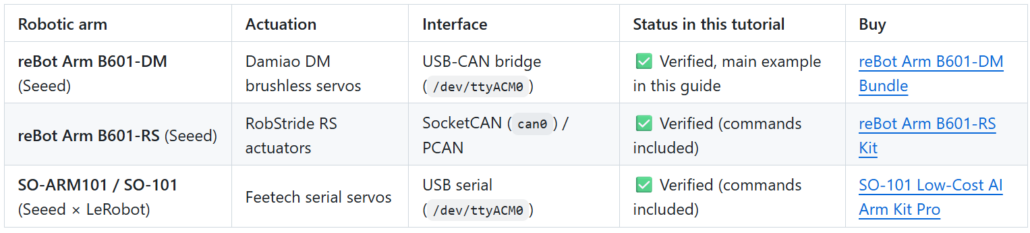
Seeed Studio reBot Arm B601-DM, reBot Arm B601-RS, and SO-ARM101 are verified to run π0.5 fine-tuning end-to-end.
Check out this GitHub tutorial to see how Pi0.5 (π0.5) is deployed across these three robotic arms, complete with a full step-by-step guide.

Why are the reBot Arm Series and SO-ARM101 recommended for running Pi0.5?
- Verified End-to-End Pi0.5 Workflow: All three models are fully verified in LeRobot (pi05 policy) with dedicated robot classes, ready-to-use CLI commands, and compatible camera mounts—taking you smoothly from calibration and teleoperation to dataset recording, fine-tuning, and real-arm deployment.
- Hardware Tiers for Every Budget & Need:
- SO-ARM101: Ultra-low-cost entry point powered by Feetech serial servos (so101_follower). Payload < 200 g, ideal for budget-conscious beginners.
- reBot Arm B601-DM: Low-cost, high-value robotic arm, plug-and-play, a drop-in replacement for YAM and Openarm with identical joint actuators. Payload: 1.5 kg (without gripper). Matches with the reBot Arm 102 leader.
- reBot Arm B601-RS: High-rigidity structure equipped with RobStride RS QDD actuators — high burst torque, high responsiveness, higher payload. Payload: 2.5 kg continuous / 5 kg peak (without gripper), with native SocketCAN (can0) / PCAN support for demanding control tasks.
- 100% Open-Source & Commercially Friendly: Unlike costly proprietary bimanual platforms, the reBot Arm series is 100% open-source robotic arm (commercial use and reproduction allowed), drastically lowering the barrier to deploying VLA models.
- No-Code & Free Training Ecosystem: Both series work out of the box with free Seeed AI Robotics Academy tutorials and the SenseCraft Robotics desktop client, enabling no-code data collection and cloud training without needing a local GPU.
How to choose?
In short, choose SO-ARM101 for the easiest, lowest-cost Pi0.5 entry. reBot Arm B601-DM for plug-and-play USB-CAN robotic development. And reBot Arm B601-RS for high-rigidity, SocketCAN-based deployment.
See it run
🚀 Give the robot an instruction. Watch it execute. We tested this with reBot Arm B601-DM + π0.5: collect multi-task demos, merge them into one dataset, train in the cloud, then switch instructions at runtime. One robot. One dataset. Multiple tasks. 👉 https://t.co/hSvGrFRFVK 🎁 New users can claim 1,000 credits once for cloud training & inference. #SenseCraftRobotics #reBotArm #VLA #Robotics
— Seeed Studio (@seeedstudio) November 14, 2026
Learn how to use SenseCraft Robotics with SO-ARM and π0.5 through a desktop tidying example. This tutorial walks through arm and camera setup, teleoperation data collection, dataset review and merging, cloud training, and running the trained model.
References
-
π0.5 paper: π0.5: a Vision-Language-Action Model with Open-World Generalization (Physical Intelligence)
-
Seeed paper-reading deep-dive: π0.5 — Open-World Generalization
-
Source wiki tutorials: reBot Arm B601-DM with LeRobot · reBot Arm B601-RS with LeRobot · SO-ARM101 in LeRobot
-
No-code platform: SenseCraft Robotics · wiki guide
FAQ
Could not connect on port /dev/ttyUSB0 or /dev/ttyACM0
you forgot serial permissions: sudo chmod 666 /dev/ttyUSB* /dev/ttyACM*.
No valid stream found in input file
install ffmpeg 7.1.1: conda install ffmpeg=7.1.1 -c conda-forge.
How long does training take?
Fine-tuning π0.5 for 3000 steps takes a few hours on an RTX 4090 / A100; smaller GPUs work with train_expert_only=true + reduced batch_size, or use cloud training / SenseCraft Robotics.
The arm fails to grasp after training
check data quality first: camera positions, angles and lighting must stay stable during collection; reduce background changes and pedestrians in frame; verify the object was visible in both cameras; and record enough episodes (50+).
Keyboard shortcuts don't respond during recording
downgrade pynput: pip install pynput==1.6.8 (and verify $DISPLAY is set).
Camera image errors
do not connect USB cameras through a hub; plug them directly into the machine.
Which repository should I clone?
Use https://github.com/Seeed-Projects/lerobot.git (the verified fork this tutorial targets). The upstream huggingface/lerobot moves fast and may differ in dataset versions and commands.
Software or environment issues you can't resolve?
Check the LeRobot GitHub issues( https://github.com/huggingface/lerobot ), join the LeRobot Discord ( https://discord.gg/8TnwDdjFGU ), or the Seeed discussion ( https://github.com/Seeed-Studio/wiki-documents/discussions/69 ).
About Author
Liyan Gong
10 years in the IoT hardware industry. I’m here to share practical guides on Home Assistant, NVIDIA Jetson, Meshtastic/Meshcore, Raspberry Pi, LoRa, PCB/PCB Assembly and more to help bring your creative ideas to life.
Tags: open source robotic arm