Why Clear Audio Doesn’t Always Mean Accurate Transcription: The Role of Audio Quality in AI
Why Clear Audio Doesn’t Always Mean Accurate Transcription: The Role of Audio Quality in AI
Have you ever recorded a meeting that sounded perfectly clear when you played it back, only to find that the AI transcription was full of errors? Names were misspelled, technical terms disappeared, and entire sentences lost their original meaning. This common experience highlights an important point: clear audio does not always guarantee high AI transcription accuracy.
Human hearing and automatic speech recognition (ASR) systems process audio differently. While people can use context, familiarity, and situational awareness to understand imperfect speech, AI models rely on acoustic signals and language patterns to identify words. As a result, an audio recording that sounds acceptable to a person may still contain challenges for an AI transcription system.
Understanding this difference matters more than ever. From meeting notes and interviews to voice assistants and AI-powered knowledge management, the quality of audio input can influence the reliability of the entire AI workflow.
So, what makes audio suitable for AI transcription, and how can better recording practices improve the results?
Audio Clarity vs. AI Transcription Accuracy: What’s the Difference?
Audio clarity and transcription accuracy are closely related, but they describe two different things.
Audio clarity generally refers to how clearly a person can hear and understand a recording. Factors such as volume, background noise, and sound balance shape this experience.
AI transcription accuracy, on the other hand, measures how correctly a speech recognition system converts spoken words into text. A recording may sound clear overall but still contain acoustic details that confuse an ASR model.
For example, imagine a speaker discussing a technical product in a quiet office. The recording sounds natural to a colleague. However, the ASR system may misinterpret an unfamiliar product name or technical abbreviation because its language model has limited exposure to that term.
In a busy café, people can use the context of the conversation and visual cues such as lip movements to follow what’s being said. An audio-only transcription system works from the recording, where background noise and nearby conversations can mask parts of the speech.
Therefore, good audio capture is not simply about making recordings sound pleasant. It is about preserving the speech information that AI models need to recognize words correctly.
What Affects AI Transcription Accuracy?
Several factors influence how accurately an AI system can recognize speech. Improving microphone quality helps, but the recording environment, speaker behavior, and recognition model also play important roles.
Background Noise and Environmental Interference
Background noise is one of the most common causes of transcription errors.
Air conditioners, keyboard sounds, traffic, music, and conversations nearby can interfere with speech signals. When unwanted sounds overlap with a speaker’s voice, an ASR model may struggle to distinguish individual words, especially quiet consonants and short expressions.
A useful concept here is the signal-to-noise ratio (SNR). It describes the relative strength of the desired speech signal compared with background noise. Generally, a higher SNR makes speech easier to distinguish from environmental sounds.
However, not all noise affects speech recognition in the same way. Continuous background noise, sudden impacts, and competing voices present different challenges.
Microphone Placement and Speaking Distance
The distance between a speaker and a microphone directly affects the captured voice.
When a microphone sits too far away, the speaker’s voice may become weaker relative to room noise and reverberation. Furthermore, an unsuitable microphone position can lead to inconsistent recording levels when the speaker moves or changes direction.
For wearable recorders, placement also matters. Clothing friction, movement, and changes in orientation may introduce unwanted sounds or alter the captured voice.
Consequently, choosing a suitable microphone and maintaining a practical recording position can help preserve more useful speech information.
Multiple Speakers and Overlapping Speech
Meetings and group discussions introduce another challenge: people rarely take perfectly separated turns.
When two or more speakers talk simultaneously, their voices overlap in the audio signal. This makes it harder for an ASR model to identify individual words. It can also complicate speaker diarization, the process of determining who spoke and when.
Even when a transcription system recognizes most of the words, incorrect speaker attribution can make meeting notes and action items unreliable.
Accents, Speaking Speed, and Technical Vocabulary
Speech recognition models also face linguistic challenges.
Different accents, speaking speeds, pronunciation habits, and language variations can affect recognition results. In addition, industry-specific vocabulary, product names, personal names, and abbreviations may not appear frequently in a model’s training data.
For example, a conversation about embedded systems may contain terms such as GPIO, NPU, and RK3588. A general-purpose transcription model might recognize everyday language well but struggle with these less common expressions.
In such cases, even a clean recording cannot completely eliminate recognition errors.
ASR Models and Audio Processing Pipelines
Finally, transcription accuracy depends on the software processing the recording.
Different ASR models vary in their supported languages, training data, acoustic modeling, and handling of noisy environments. The same audio file can therefore produce different transcripts across different models.
Pre-processing techniques also influence the result. Noise suppression, voice activity detection (VAD), and other audio enhancement methods can help prepare recordings for recognition. However, aggressive processing may remove speech details along with unwanted noise.
In other words, better transcription requires a suitable combination of audio capture, processing, and recognition technology.
Why Poor Audio Quality Can Increase AI Processing Costs
Transcription errors do more than create inaccurate text. They can also introduce additional work throughout an AI workflow.
More Errors Mean More Correction Work
Consider an AI meeting assistant that converts recordings into summaries, decisions, and action items.
If the original transcript contains incorrect names, missing technical terms, or incomplete sentences, the AI may misunderstand important details. As a result, users need to review the transcript, correct mistakes, and sometimes listen to the original recording again.
This creates extra manual work and reduces the convenience that AI tools should provide.
More importantly, errors can spread into downstream outputs. An incorrect transcript may lead to an inaccurate summary, a missing action item, or a misleading record of a business discussion.
Repeated Processing Can Add Computational Costs
Poor input quality may also increase the computational resources required by an AI application.
For example, users may need to run another transcription model, apply additional audio enhancement, or repeat parts of the processing pipeline. Depending on the system architecture, these extra steps can increase processing time and API usage.
It is worth clarifying that background noise does not automatically increase the token count of an audio input. Actual costs depend on the model, input format, processing method, and workflow design.
Nevertheless, when poor recordings lead to repeated transcription, additional model calls, or more complex correction processes, the overall cost of an AI application can increase.
Better Audio Input Supports More Reliable AI Workflows
A more usable audio recording gives downstream systems a better starting point.
When the input preserves speech clearly, ASR models have a better opportunity to recognize words correctly. Subsequently, LLMs can work with more reliable transcripts when generating summaries, extracting information, or identifying action items.
Better audio capture does not guarantee perfect AI output. However, it helps reduce avoidable problems at the beginning of the workflow.
How to Improve Audio Quality for AI Transcription
Users do not always need a complicated recording setup to improve transcription results. A few practical steps can make a meaningful difference.
Choose a Microphone That Fits Your Recording Scenario
Different recording scenarios require different microphone setups.
A desktop microphone may work well for individual dictation, while meetings, interviews, and mobile conversations may benefit from a portable recording device. Consider microphone placement, pickup characteristics, recording distance, and portability before choosing a solution.
Minimize Background Noise and Maintain a Consistent Distance
Whenever possible, choose a quieter recording environment. Avoid placing microphones near noisy equipment, ventilation outlets, or sources of strong vibration.
For wearable devices, also check the recording position. Keep the microphone unobstructed and minimize contact between the device and clothing.
Apply Audio Processing When Necessary
Audio processing technologies can help improve speech recordings under specific conditions.
| Technology | Primary Function |
|---|---|
| Noise Suppression (NS) | Reduces unwanted background noise |
| Automatic Gain Control (AGC) | Adjusts input levels to maintain more consistent volume |
| Acoustic Echo Cancellation (AEC) | Reduces echo caused by speaker-to-microphone feedback |
| Beamforming | Focuses microphone sensitivity toward a target direction |
| Voice Activity Detection (VAD) | Identifies speech segments within an audio stream |
These technologies solve different problems. For instance, AEC mainly addresses acoustic echo, while VAD identifies when speech occurs. They are not interchangeable, and not every recording scenario requires all of them.
The key is to use appropriate processing without unnecessarily altering the original speech signal.
Bringing Better Audio Capture into Everyday AI Workflows with reSpeaker Clip
Reliable AI transcription starts with useful audio input. Therefore, choosing a practical recording device is an important part of building an effective voice-based AI workflow.
Seeed Studio reSpeaker Clip is a compact, wearable AI voice recorder designed for everyday voice capture. Its portable form makes it suitable for scenarios such as meetings, interviews, sales conversations, and personal voice notes.
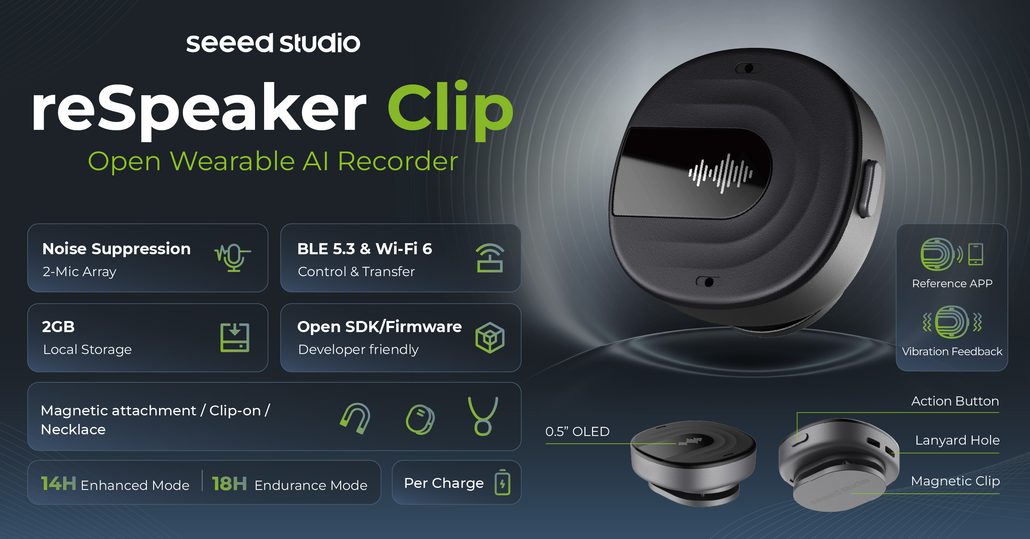
Beyond recording, reSpeaker Clip also offers flexibility for developers who want to explore their own AI voice applications.
A Portable Device for Everyday Voice Capture
Traditional recording setups often require users to carry a larger device or stay close to a fixed microphone. A wearable recorder offers another approach: users can capture conversations while moving through their daily activities.
With its compact design, reSpeaker Clip provides a convenient way to collect voice recordings for later transcription and analysis.
Of course, recording position and environmental conditions still matter. Users should place the device appropriately and consider the acoustic environment to get more useful recordings.
Open Firmware and Flexible AI Integration
For developers, the ability to customize a voice recorder can be just as important as its physical design.
reSpeaker Clip features open firmware and SDK support, giving developers more flexibility to explore custom applications and integrations. Rather than relying on a single fixed workflow, they can investigate how recorded audio connects with external speech recognition services, LLMs, and other AI tools.
This creates opportunities for applications such as:
- Automated meeting transcription and summarization
- Personal knowledge management
- Sales conversation analysis
- Interview recording and information extraction
- Custom AI workflows built around recorded audio
From Voice Recording to Actionable AI Insights
A typical AI voice workflow may follow several stages:
reSpeaker Clip serves as the voice capture entry point in this process. Developers can then connect the recordings to suitable audio processing tools, ASR models, and LLM applications.
The final results depend on the complete system, including recording conditions and the selected AI models. Still, starting with a practical and flexible recording device makes it easier to experiment with different voice AI workflows.
Conclusion: Better AI Starts with Better Audio Input
Clear audio and accurate transcription are not the same thing. Although a recording may sound perfectly understandable to a person, background noise, microphone placement, overlapping speech, accents, and model limitations can all affect AI transcription accuracy.
For this reason, improving voice AI applications requires attention to the entire pipeline, from audio capture to speech recognition and downstream language processing.
Better input quality cannot solve every recognition problem, but it can reduce avoidable errors, improve the usability of transcripts, and support more reliable AI workflows.
Whether you are building a meeting assistant, a personal knowledge management tool, or a custom voice AI application, the recording stage deserves more attention than it often receives.
With its compact wearable design and open firmware ecosystem, reSpeaker Clip offers developers and everyday users a flexible starting point for exploring new voice-based AI applications.
Explore more products in the reSpeaker series:
https://www.seeedstudio.com/respeaker-series
Frequently Asked Questions
Does clearer audio always mean more accurate AI transcription?
No. Clearer audio can help an ASR model recognize speech, but transcription accuracy also depends on accents, speaking speed, overlapping voices, vocabulary, and the recognition model itself.
What causes AI transcription errors?
Common causes include background noise, distant microphones, overlapping speech, unclear pronunciation, unfamiliar technical terms, and limitations in the ASR model.
Does microphone quality affect speech recognition accuracy?
Yes. Microphone characteristics and placement influence how well a recording captures speech. However, even a high-quality microphone cannot eliminate every environmental or linguistic challenge.
Can background noise affect AI transcription?
Yes. Background noise can mask speech details and make it harder for speech recognition systems to distinguish words. Noise suppression may help, although its effectiveness depends on the noise type and processing method.
Does better audio quality reduce AI processing costs?
It can reduce some downstream costs by limiting repeated transcription, additional processing, and manual correction. However, it does not automatically reduce token usage or the cost of every AI model call.
How can I improve AI transcription accuracy for meetings?
Use a suitable microphone, keep it at a practical distance from speakers, minimize background noise, and avoid overlapping conversations when possible. You can also compare different ASR models to find one that performs well with your language and recording conditions.
About Author
