Talk to Your SO-101: Exploring Robot Learning with LeRobot v0.7
Robot imitation learning used to follow a simple pattern: demonstrate one task, train one policy, and run that behavior again. It works—but changing the task often means stopping the robot, editing the configuration, or loading another checkpoint.
Released on November 5, 2026, LeRobot v0.7 makes this workflow more interactive. A compatible robot policy can stay loaded while the operator changes a subtask, asks what the robot sees, or lets a vision-language model plan the next step. Large robot datasets can be streamed, while demanding Vision-Language-Action (VLA) models can run on a remote GPU.
For the low-cost SO-101 robot arm, this creates an accessible path from basic learning from demonstration toward language-controlled robot manipulation and Physical AI experiments.
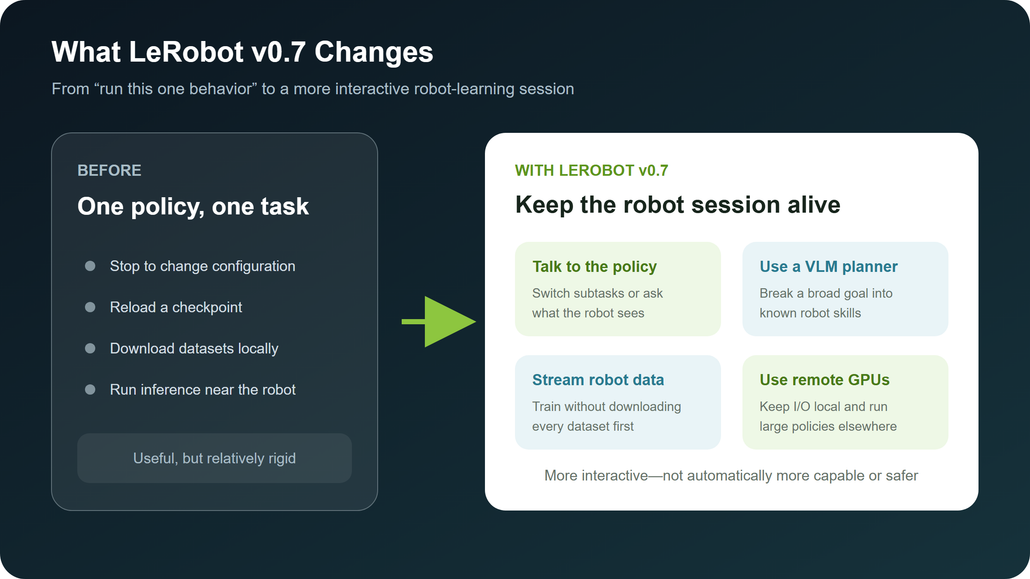
LeRobot v0.7 makes the robot-learning session more interactive; it does not remove the need for good demonstrations, calibration, or safety validation.
From One Demonstration to One Fixed Robot Skill
The classic robot imitation learning pipeline is still the best place to begin:
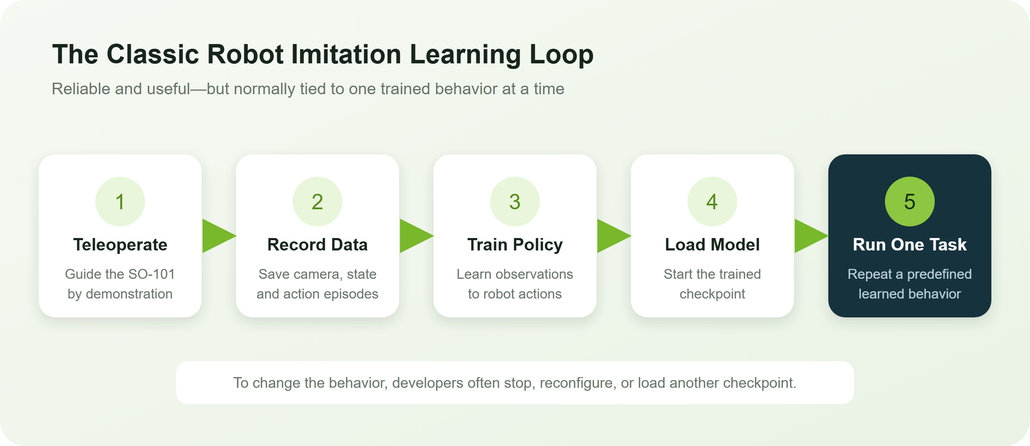
The limitation is flexibility. A policy trained only to pick up a red cube does not automatically know how to clear a table. New language instructions are useful only when the robot has already learned the required skills and the wording matches its training data.
LeRobot v0.7 adds an interactive layer around this proven workflow instead of replacing it.
What “Language in the Loop” Actually Means
Text does not directly control SO-101 motors. Language selects or plans a learned behavior; the action policy still converts camera images and robot state into joint commands.
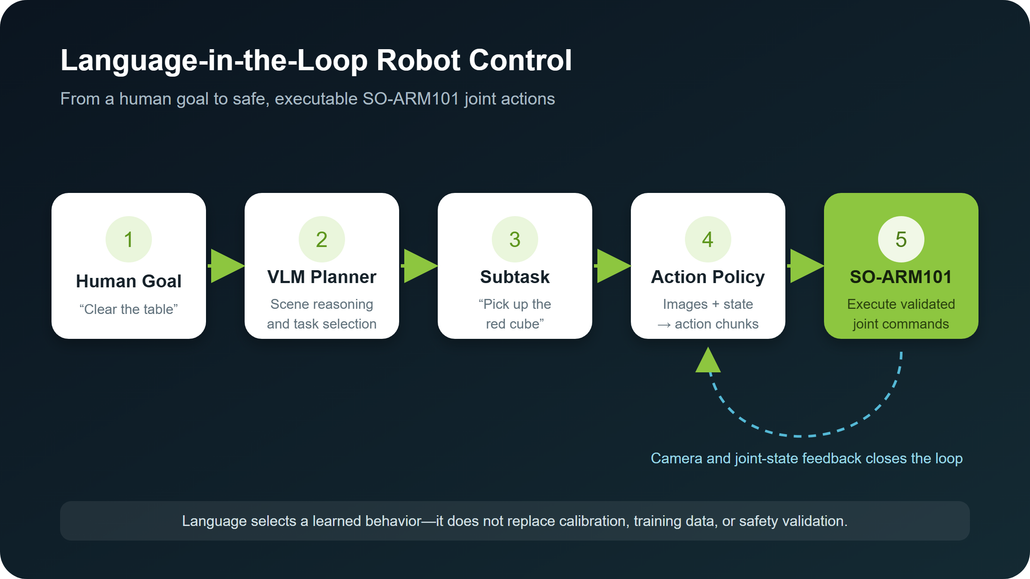
A high-level goal such as “clear the table” may become a sequence of shorter instructions:
pick up the red cube → place it in the green bin → repeat → stopThis creates two distinct responsibilities:
- A VLM planner interprets the scene and chooses a subtask.
- A VLA or imitation-learning policy executes a skill it has already learned.
The planner may suggest a sensible action, but that does not prove the robot can execute it. Keep the allowed instruction vocabulary small and validate every skill independently.
Interactive Rollouts in One Minute
LeRobot v0.7 adds interactive operation to lerobot-rollout. The robot and policy stay connected, but movement begins only after an explicit command.
| Command | What it does | Important limitation |
|---|---|---|
/start | Starts or restarts policy execution | Check the workspace before every start |
/subtask pick up the red cube | Changes the current language instruction | The policy must understand that instruction |
/vqa is the cube in the box? | Asks what the model or external VLM sees | Reports an answer; it does not command motion |
/autosteer clear the table | Lets a planner choose successive subtasks | Restrict it to validated skills |
/stop | Stops the current run | The robot should enter its configured hold behavior |
/vqa and /autosteer require either a text-generating policy or an external VLM planner. For current configuration details, use the official LeRobot interactive rollout documentation.
Four Useful SO-101 Experiments
SO-101 is well suited to small tabletop robot-learning experiments where objects, cameras, and task vocabulary can be carefully controlled.
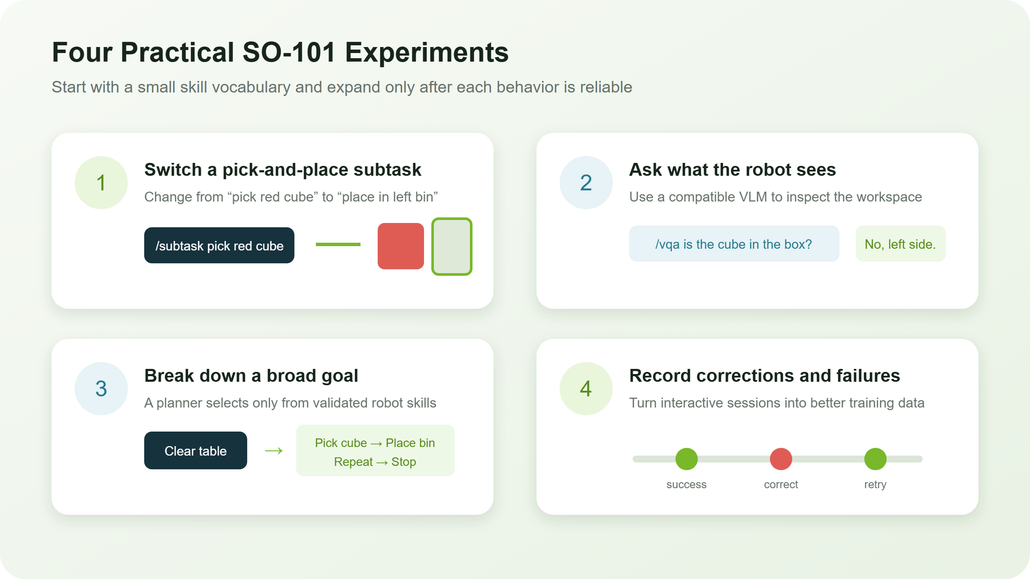
1. Switch between learned subtasks
Train a policy on a small set such as “pick red cube,” “pick blue cube,” “place left,” and “place right.” Use /subtask to switch without reloading the model.
2. Ask visual questions
Use /vqa with a compatible model to check object color, count, or location before requesting another action. This can expose perception errors early.
3. Decompose a simple goal
Allow a VLM planner to select only from known commands. A broad goal becomes a controlled sequence rather than an unrestricted free-form instruction.
4. Record corrections
Save interactive sessions to review failures and improve labels or future human-in-the-loop robot-learning datasets.
Remote Inference: Run Large Models Away from the Robot
Large VLA and robot foundation models may exceed the compute available beside the robot. LeRobot v0.7 can separate hardware control from model inference:
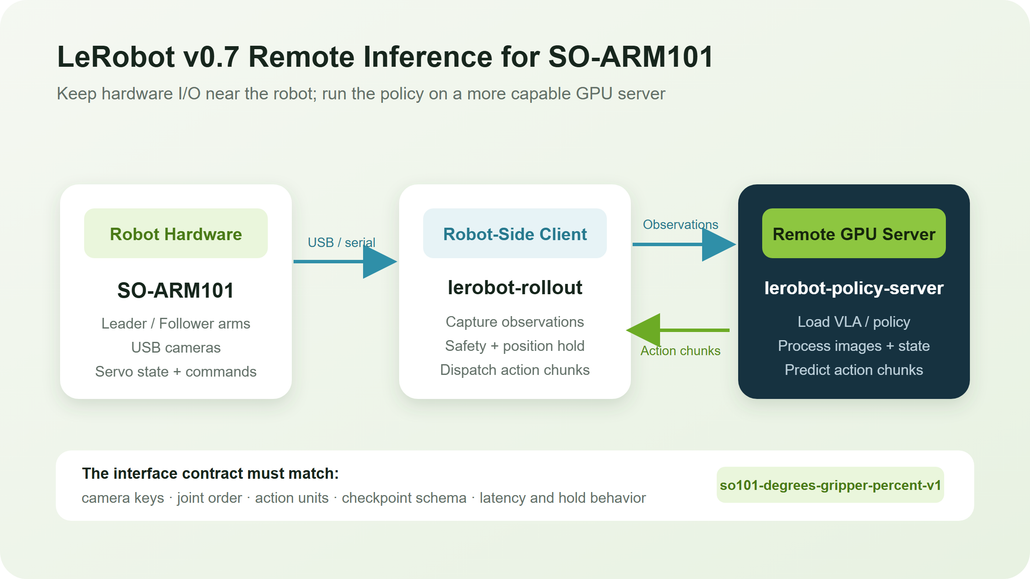
The robot-side client captures cameras and joint state, maintains safety and hold behavior, and dispatches the returned action chunks. The GPU server loads the policy and performs inference.
The official LeRobot remote-inference documentation includes SO-101-specific settings such as:
--robot.type=so101_follower
--robot.use_degrees=true
--inference.semantics=so101-degrees-gripper-percent-v1
The camera keys, checkpoint schema, joint order, action units, and server configuration must match. Validate a working local task before adding network latency and remote execution. See the LeRobot v0.7 remote-inference guide.
A Practical Starting Path
Avoid combining every new feature in the first experiment. Use this order:
- Calibrate the SO-101 and verify stable teleoperation.
- Record clean demonstrations for one pick-and-place task.
- Train and validate a conventional robot imitation-learning policy.
- Add two to four consistent language labels.
- Test
/subtaskonly with known instructions. - Add VQA or a constrained VLM planner.
- Move inference to a remote GPU only after local execution is stable.
This staged approach makes failures easier to diagnose: hardware, visual perception, task labels, policy behavior, planning, or networking.
Learning Resources for SO-101
If you want to reproduce the workflow rather than only read about it, start with the course that matches your goal.
| Robot imitation learning and Physical AI | Simulation, datasets, and models |
|---|---|
| 22-Chapter Physical AI Course | Sim-to-Real Course for SO-101 |
| Classic Algorithms and Paper Reproduction Course | SO-101 Datasets |
| SO-101 LeRobot Setup and FAQ | Pre-trained Models for SO-101 |
For readers who need a complete hardware setup for teleoperation and data collection, the SO-101 Imitation Learning Kit combines the robot arms with camera and mounting accessories. Check the current package contents and power specifications before ordering.
What LeRobot v0.7 Means for SO-101
LeRobot v0.7 does not turn SO-101 into a general-purpose autonomous robot overnight. Its real value is a better experimental loop:
- keep the robot policy loaded between instructions;
- switch among validated robot skills;
- combine a VLM planner with a VLA policy;
- ask visual questions during an interactive session;
- stream large Physical AI datasets;
- move demanding robot inference to a remote GPU.
That makes SO-101 more than a low-cost pick-and-place robot arm. It becomes a practical platform for exploring language-conditioned robot control, robot imitation learning, VLA deployment, and the next generation of Physical AI workflows.
Read the official LeRobot v0.7 release announcement for the full list of new models, datasets, and platform changes.
About Author
