MeshCore or Meshtastic: Which one is better?
The LoRa mesh community is buzzing right now. If you’re following this trend, you’ve likely come across two names: Meshtastic and MeshCore.
Both protocols are incredibly popular, but they approach networking in fundamentally different ways. What exactly is the difference? And more importantly, how do you choose the right one for your next build? Here is a quick recommedation:
- Choose Meshtastic if you need a plug-and-play, collective network for hiking, skiing, or tactical teams where every device is a team player.
- Choose MeshCore if you are building a robust, high-capacity urban backbone that requires massive hop counts and dedicated infrastructure without the noise.
Now, Let’s break down the architecture, device roles, and ideal use cases to help you decide.
MeshCore vs Meshtastic: What are they?
Meshtastic is an open-source, decentralized off-grid mesh networking protocol built on LoRa (Long Range) radio technology. It enables low-power, long-range text communication between devices without relying on cell towers, Wi-Fi, or the internet. If you’re new to this, check out our deep dive into Meshtastic here.
MeshCore is another LoRa mesh protocol built with a different philosophy in mind. It focuses on high-efficiency, structured routing for larger-scale deployments.
Before diving into the differences, let’s briefly look at what they share:
- Both utilize LoRa radio technology to send text messages and GPS coordinates without cellular towers, Wi-Fi, or the internet.
- Both create a “mesh,” meaning devices can bounce messages off each other to extend the network’s overall range.
- Both can run on the same high-performance LoRa hardware.
However, how they bounce those messages is where the two protocols diverge.
What is the difference between Meshtastic and MeshCore?
The Core Difference: How message travels
The core difference between Meshtastic and MeshCore lies in their message transmission logic.
In Meshtastic network, every device can act as a repeater.
It utilizes a routing protocol known as a “managed flood”. When your Meshtastic node sends a text, it essentially broadcasts the packet to every other node in range. Those receiving nodes then rebroadcast the signal to everyone they can reach until the message finds its target. This system is incredibly resilient—if one node drops offline, it doesn’t matter, because others are already echoing your message. Everyone is an equal participant in keeping the network alive.
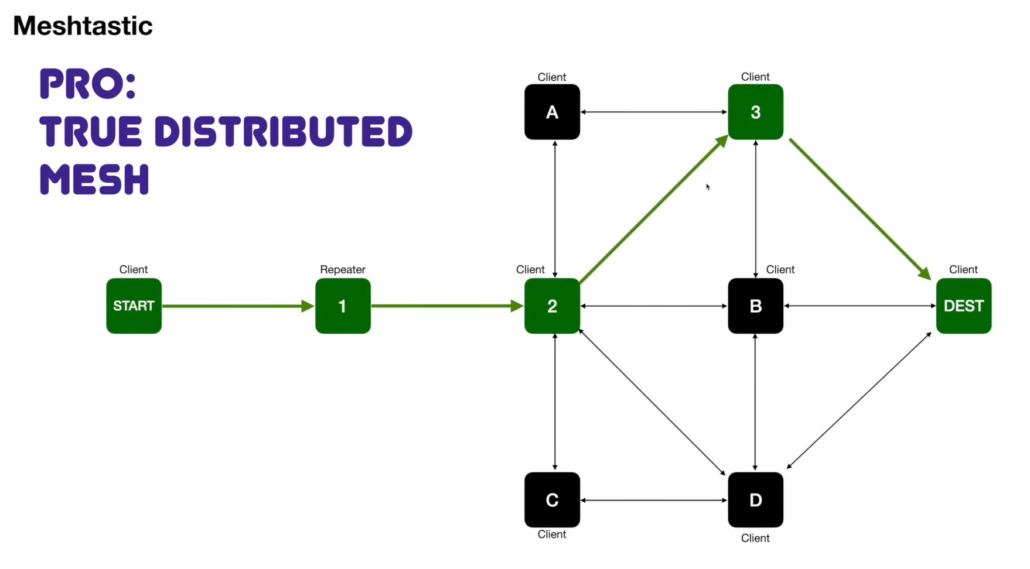
(Diagram credit: Vivian van Zyl)
MeshCore, on the other hand, utilizes structured routing where only specifically designated nodes act as repeaters.
Instead of broadcasting to everyone, MeshCore calculates the most efficient path through the network and sends the message only along that specific route. To achieve this, MeshCore networks require a hierarchy of device roles:
- Companions (End-User Devices): These are the personal nodes you carry with you (like a handheld tracker connected to your phone). They send and receive your data, but they absolutely do not route traffic for anyone else.
- Repeaters (The Backbone): These are always-on, fixed infrastructure nodes (usually mounted high up) responsible for maintaining routing paths and efficiently forwarding packets to their exact destination. For a detailed guide on choosing and setting up repeater hardware, check out our MeshCore Repeater Hardware Recommendation and Build Guide here.
- Room Servers (Offline Storage): Dedicated nodes that act as bulletin boards. They handle public group chats and store messages for users who are currently offline.
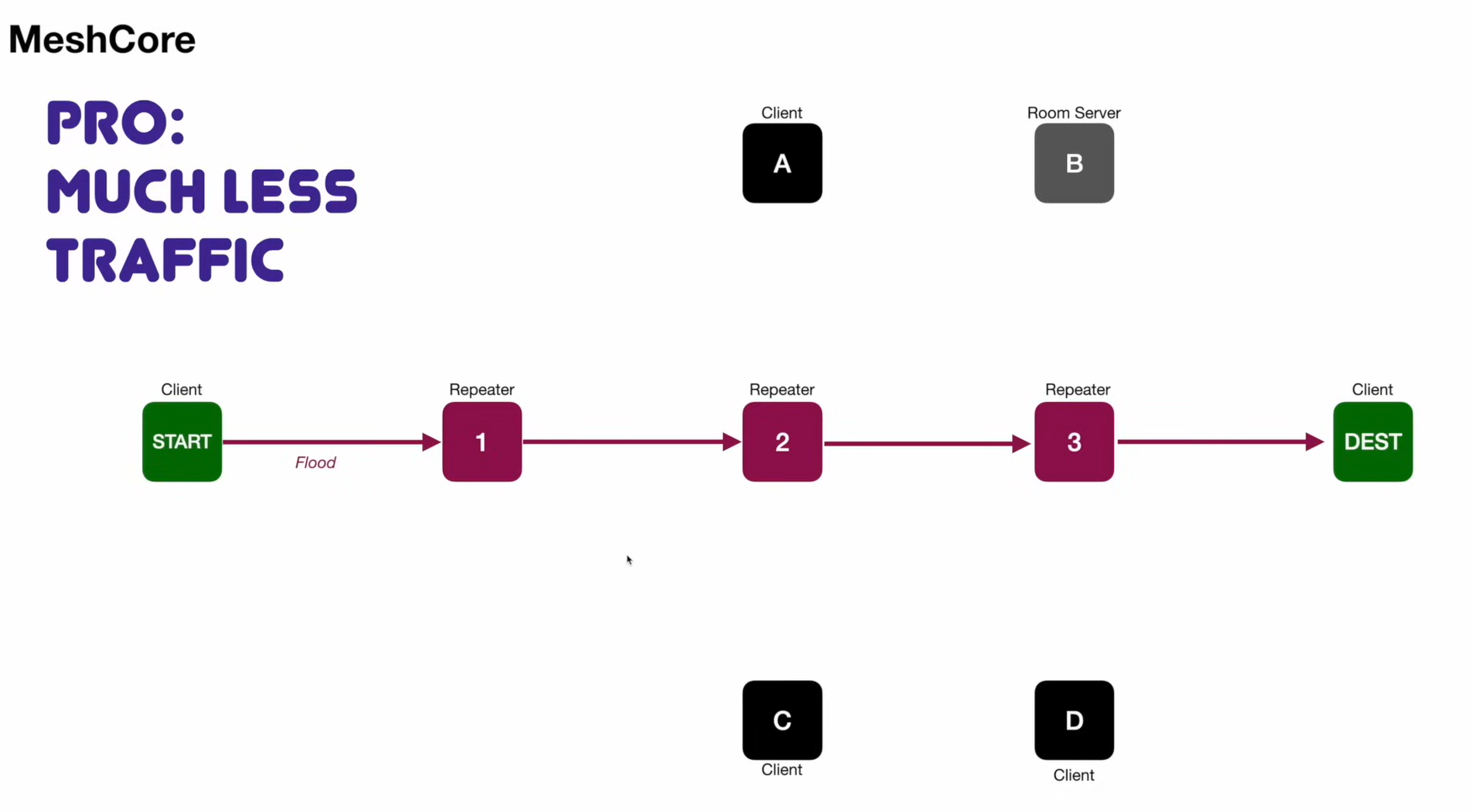
(Diagram credit: Vivian van Zyl)
When you follow the logic of “broadcasting to everyone” versus “using a structured pathway,” you quickly realize that it creates a domino effect on the actual user experience. Let’s explore how this core routing difference dictates the features you actually care about.
Message Hops and Maximum Range
The routing logic directly dictates how many times your message can “hop” (be rebroadcast) before it dies, and how far it can ultimately travel.
- Meshtastic (3-7 Hops): Meshtastic strictly defaults to 3 hops (with a maximum of 7) to prevent network crashes. It prevents radio congestion and keeps spontaneous, zero-setup networks running smoothly, which makes it perfect for groups on the move.
- MeshCore (Up to 64 Hops): MeshCore supporst up to 64 hops. Your message can travel through a chain of repeaters across entire cities or regions without causing congestion. It is the best choice if you want to build a permanent, city-wide grid.
Network Scale, Congestion, and Stability
As a local mesh grows, you inevitably hit two bottlenecks: hardware memory and radio congestion.
- Meshtastic (The Decentralized Crowd): Every device must memorize every other node in the area. Standard hardware usually maxes out at around 100 nodes before it starts “forgetting” devices. Additionally, stability relies entirely on good user behavior. If one person accidentally spams the network with frequent GPS updates, everyone else’s device is forced to rebroadcast it, quickly congesting the local mesh.
- MeshCore (The Managed Grid): With structured routing, your personal handheld doesn’t need to memorize the whole city. This offloads the heavy memory lifting to the fixed infrastructure, allowing the network to scale almost infinitely. Additionally, a single user’s bad settings cannot force the entire system to spam.
MeshCore vs Meshtastic Comparison
Ultimately, these core routing differences—alongside their distinct development philosophies—create a massive ripple effect across the entire user experience. To help you visualize these trade-offs, here is a side-by-side breakdown of how the two platforms stack up.
| Feature | Meshtastic | MeshCore |
| Routing Protocol | Managed Flood | Source Routing |
| Network Architecture | Peer-to-peer | Hierarchical |
| Maximum Hops | Up to 7 | Up to 64 |
| Device Roles | Dynamic / All nodes relay | Fixed / Only repeaters relay |
| Handheld Battery Drain | Higher | Very Low |
| Message History | Real-time only | Supported via Room Servers |
| Packet Overhead | 16 bytes | 64+ bytes |
| License & Cost | 100% Free & Open-Source | Freemium & Partially Proprietary |
How to choose between MeshCore and Meshtastic?
Now that we’ve broken down the technical specs and feature differences, the most important question remains: Which one is better?
The honest answer? Neither. One isn’t inherently “superior” to the other—they just dominate in completely different worlds. Choosing the right one depends entirely on your specific goals and what you need your network to achieve.
MeshCore or Meshtastic? Use Cases and Hardware recommendations
- Meshtastic: ad-hoc, mobile communication
Meshtastic is the ultimate plug-and-play tool for SHTF (Shit Hits The Fan) survival, overlanding, and backcountry sports. If the cellular grid goes down, you can simply hand out nodes to your family or hiking group, and you instantly have a working, self-healing network that moves with you.
For these everyday carry scenarios, the Wio Tracker L1 Pro and the SenseCAP Card Tracker T1000-E are both great fitst. The L1 Pro gives you an OLED screen and GPS out of the box, while the T1000-E is slimmer, waterproof, and barely noticeable in your pocket.
- MeshCore: permanent, reliable backbone
MeshCore shines in fixed deployments like city-wide community grids, smart agriculture, or large campus operations. If your goal is to mount solar-powered relays on rooftops to provide stable, low-congestion coverage for hundreds of users—complete with offline message storage—MeshCore is your absolute winner.
For the repeater layer, the SenseCAP Solar Node P1-Pro is a natural choice — solar-powered, weatherproof, and basically zero maintenance once mounted. And since MeshCore End Nodes don’t need to relay traffic, the T1000-E and L1 Pro work just as well here as they do on a Meshtastic network.
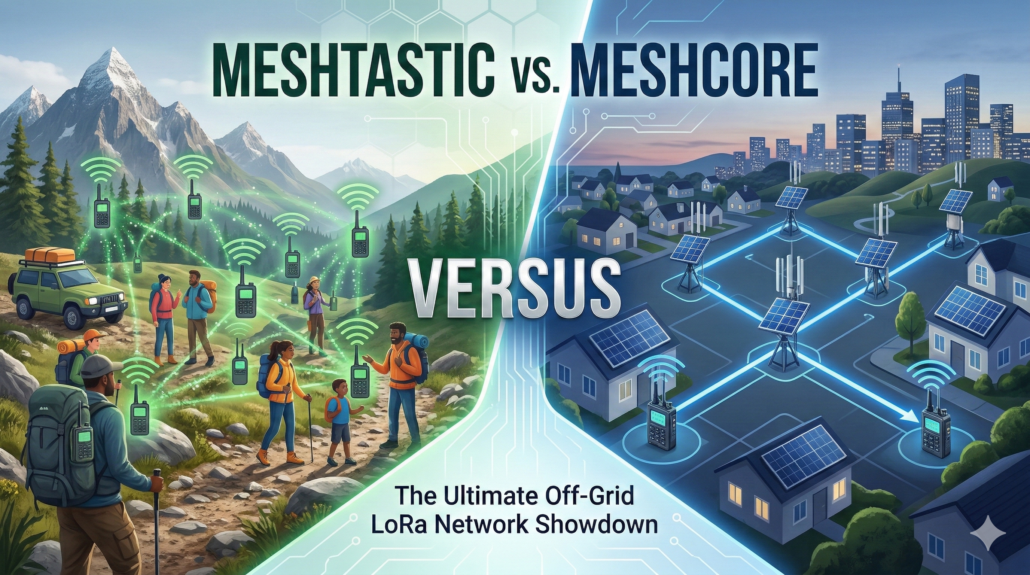
3 Questions to Decide Your Setup
If you are torn between the two, ask yourself these three simple questions:
1.Are you moving or staying put?
If your group is highly mobile (hiking, off-roading, skiing) and the network needs to move with you, go with Meshtastic. If you want to cover a fixed geographic area (a farm, a campus, or a city), MeshCore is your winner.
2.Do you want “Zero Setup” or are you willing to build infrastructure?
If you just want to turn on your radios and start texting immediately, choose Meshtastic. If you have the time, budget, and access to rooftops to install permanent, solar-powered Repeater nodes, MeshCore will reward your effort.
3. Is it for a tight-knit group or a massive community?
For a private, tactical group of 10-50 people where everyone shares the relay load, Meshtastic thrives. If you are building a public network where hundreds of strangers might join, MeshCore prevents the network from collapsing under its own weight
The Best Part? You Don’t Have to Choose Just One
The beauty of modern LoRa hardware is its versatility. You can use the exact same node for both protocol.
Most of Seeed’s popular communication boards natively support both Meshtastic and MeshCore. To make things even easier for your initial setup, we’ve specialized the hardware options:
- Pre-flashed Versions: For a true “out-of-the-box” experience, devices like the Wio Tracker L1 Pro are available in two dedicated versions—one pre-flashed with Meshtastic and another with MeshCore.
- Total Freedom to Reflash: If you change your mind later, don’t worry—you are never stuck. You can take a board you bought for Meshtastic today and reflash it into a MeshCore Companion or Repeater in just a few minutes, and vice versa. Check out our quick step-by-step tutorial here.
About Author
