LoRaWAN & BLE Tracking: How to Ensure Data Consistency and SOS in Intermittent Networks
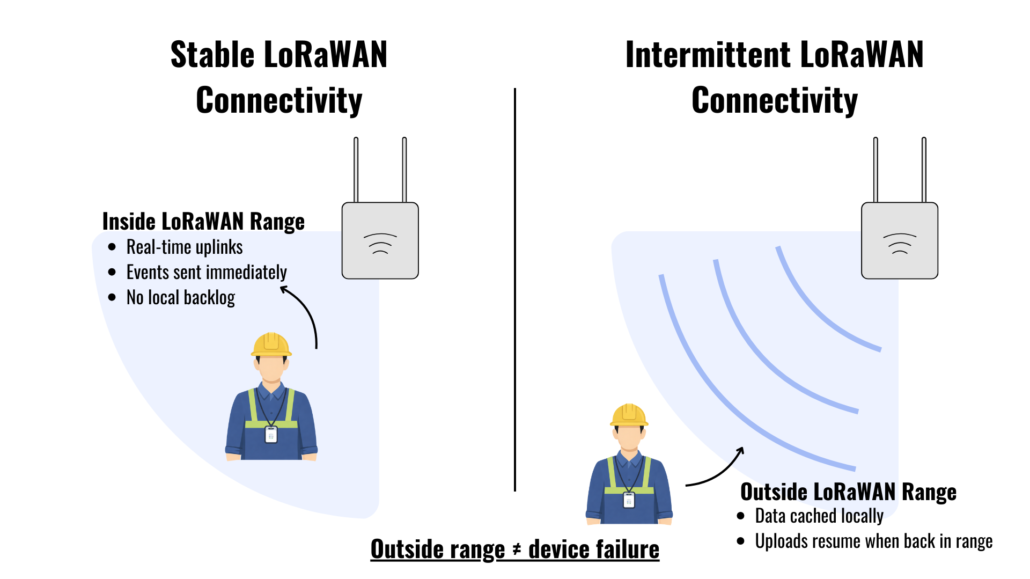
In real-world deployments such as mines, industrial sites, or large campuses, LoRaWAN intermittent connectivity is common. Badges may operate outside LoRaWAN coverage before re-entering a gateway zone, which can result in delayed uploads, batched records, or questions around SOS and BLE behavior.
This FAQ explains how LoRaWAN and BLE badges behave under unstable network conditions, clarifying what happens to location updates, SOS events, and BLE records based on real field deployments.
For an overview of how BLE and LoRaWAN work together in wearable safety deployments, see Wearable BLE + LoRaWAN Trackers: The Ultimate Hybrid for Seamless Indoor Personal Safety
Below are the most common questions we receive during LoRaWAN and BLE badge deployments in environments with intermittent network coverage.
LoRaWAN Connectivity and Offline Behavior
1. What happens when a LoRaWAN tracker goes out of coverage?
When a badge moves outside LoRaWAN coverage, it continues operating normally and can still generate records such as location updates, SOS events, and BLE data. However, these records cannot be uploaded to the platform until the device reconnects to a LoRaWAN gateway.
By default, the device caches records locally while offline and uploads them after reconnection. If local caching is disabled, any data generated while the badge is out of coverage will not be stored and will be permanently lost.
2. How does offline data caching work and reconnection work?
While offline, all records are stored in an internal circular buffer with a fixed capacity. The buffer stores different record types together without priority. If the buffer becomes full, older records are overwritten by newer ones. When connectivity is restored, stored records are uploaded in the order they were generated.
The amount of data retained depends on how long the badge remains offline and the configured uplink reporting interval. Longer reporting intervals reduce how quickly the internal buffer fills during periods without coverage.
Data Upload and Event Priority
3. Can urgent events like SOS be prioritized over other records?
By default, when the device is within good LoRaWAN coverage, SOS events are treated as high-priority transmissions. If an SOS event and a periodic uplink are generated at the same time, the device will prioritize sending the SOS event first.
However, once the device moves out of LoRaWAN coverage, SOS events are handled the same way as other records. They are stored in the same internal buffer and uploaded in the order they were generated. If an SOS is triggered after a long offline period, it may be uploaded after older stored records once the badge reconnects.
There is no built-in mechanism to prioritize SOS events or send the most recent records first after reconnection. Changing upload priority or message ordering during offline recovery would require custom firmware.
4. How should uplink intervals be configured for intermittent coverage?
In environments where badges frequently move in and out of coverage, longer uplink reporting intervals are generally recommended. Increasing the interval reduces how quickly records accumulate while offline and helps prevent large backlogs when connectivity is restored.
Short reporting intervals can generate a high volume of stored records during outages, which increases the likelihood that older records will be overwritten and may also slow recovery and increase congestion when multiple devices reconnect at the same time.
Note: In addition to network conditions, device power state can also affect uplink behavior. If a badge enters low-power mode due to low battery voltage, uplinks may stop even if coverage is available.
5. What can and cannot be controlled remotely over LoRaWAN?
Some devices parameters can be adjusted remotely using LoRaWAN downlink commands, allowing configuration changes without physical access to the badge. However, downlink delivery is not guaranteed and changes are not applied in real time, especially in environments with intermittent coverage.
Core behaviors such as offline data buffering, upload order, event prioritization, and storage capacity are defined at the firmware level and cannot be modified remotely. Changes to these behaviors require custom firmware rather than standard configuration updates.
6. What happens if multiple devices reconnect at the same time?
When multiple devices reconnect at the same time, they share the same network airtime and gateway capacity. In small-scale deployments (for example, tens of devices), simultaneous reconnections typically do not cause noticeable delays.
In larger deployments involving hundreds or thousands of devices, reconnections may be staggered, and stored records are uploaded gradually rather than all at once. This can lead to temporary delays or retransmissions, but this behavior is expected in LoRaWAN networks and helps maintain overall network stability.
7. Does LoRaWAN guarantee real-time delivery?
No. LoRaWAN does not gurantee real-time data delivery. Uplinks are transmitted on a best-effort basis and are subjected to network availability, signal quality, duty cycle limits, and device scheduling.
In environments with intermittent coverage, records may be delayed, buffered locally, and uploaded only after connectivity is restored. As a result, time-sensitive events such as SOS alerts may not appear on the platform immediately if the device is offline or recovering from a disconnection.
LoRaWAN is designed for reliable, low-power data transmission rather than continuous, real-time communication. Deployments that require strict real-time guarantees should account for this behavior during system design.
Read more: LoRaWAN vs 4G: Which Is Best for Smart Safety Tracking Solutions?
Network Quality and Recovery
8. What LoRaWAN signal quality is considered “stable”?
In field deployments, a received signal strength (RSSI) of around –90 dBm or better is generally considered the minimum threshold for stable LoRaWAN communication. Signal levels below this range can result in intermittent uplinks, delayed uploads, or missing data.
Signal stability depends on a range of factors, not only on distance, but also on gateway placement, antenna type and orientation, mounting height, and environmental factors such as terrain and surrounding structures. Improving gateway and antenna setup is often more effective than adjusting device-side settings when addressing unstable connectivity.
Read more: How Far Can BLE and LoRaWAN Signals Reach?
Remote Configuration and Control
9. What can and cannot be controlled remotely over LoRaWAN?
Some device parameters can be adjusted remotely using LoRaWAN downlink commands, allowing limited configuration changes without physical access to the badge. These typically include reporting-related settings and other non-critical parameters.
However, downlink delivery is not guaranteed and changes are not applied in real time, especially in environments with intermittent connectivity. In addition, core system behaviors such as offline data buffering, upload order, message prioritization, and storage capacity are defined at the firmware level and cannot be modified remotely.
Changes to these behaviors require custom firmware or solution-level adjustments rather than standard remote configuration.
BLE Data Handling
10. What role do BLE beacons play when LoRaWAN coverage is unavailable?
BLE beacons provide local proximity or context information, but they do not transmit data to the platform on their own. When LoRaWAN coverage is unavailable, BLE scan results are stored locally on the badge together with other records. These records are uploaded only after the badge reconnects to LoRaWAN. As a result, BLE data is not visible in real time during network outages and depends on LoRaWAN connectivity for delivery to the system.
11. How many BLE beacons can a tracker detect and store during offline periods?
The tracker can detect up to four BLE beacon MAC addresses concurrently. BLE scan records are stored locally together with other records when LoRaWAN coverage is unavailable.
Because BLE data shares the same internal buffer as location updates and SOS events, detecting more beacons increases the volume of stored records during offline periods. In extended outages, older BLE records may be overwritten as the buffer reaches capacity.
12. Are BLE messages prioritized over other data?
No. BLE messages are not prioritized over other data types. BLE scans records, location updates and SOS events are all stored in the same internal buffer and uploaded in the order they are generated.
During periods without LoRaWAN coverage, BLE data competes with other records for storage space. If the buffer reaches capacity, older records, including BLE data, may be overwritten. Prioritizing BLE messages or changing upload order would require custom firmware rather than standard configuration.
Planning a Deployment with Intermittent Connectivity?
Intermittent connectivity is a reality in mines, industrial sites, and large campuses. While this FAQ outlines default system behavior, many deployments require additional tuning to meet operational or safety expectations.
Seeed works with solution providers and enterprise teams to design, optimize, and customize LoRaWAN and BLE badge deployments, from network planning and configuration to firmware-level customization.
If you’re planning a deployment at scale, get in touch to explore how we can support your use case.
Related Reading:
Mining focus →
● How BLE + LoRaWAN Tracking Works Best in GNSS-Challenged Mining Areas
● How Mines Track Both People and Assets Using One LoRaWAN Network
Healthcare / education focus →
● Custom Hospital Wearable Panic Button: Real Scenarios and BLE + LoRaWAN Benefits
● Custom IoT Safety Badges for Schools: One Device Designed to Respond to Different Emergencies
About Author
