How to Plan BLE Beacons and LoRaWAN Gateways Placement for Smart Safety Badge Deployment
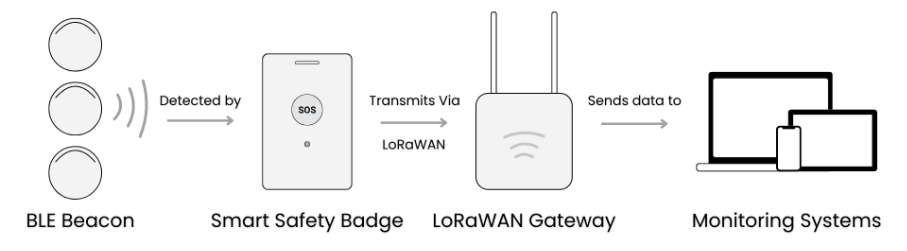
A question we often receive from our clients, “When deploying a smart safety badge alert system, what’s the minimum number of BLE beacons and LoRaWAN gateways needed for full coverage?” It’s a common concern, and a valid one. Poor planning and placement can lead to inaccurate tracking. In real safety scenarios, even a few seconds of delay can make a difference.
The Smart Safety Badge, also known as wearable panic button, is designed to send real-time alerts and location data during critical moments. Proper BLE and LoRaWAN placement for Smart Safety Badge system ensures reliable performance while reducing the number of beacons and gateways required. Optimizing coverage density not only enhances reliability but also lowers installation complexity, maintenance effort, and total cost of ownership — making deployments more efficient and scalable.
Below, we’ll share some practical tips to help you plan the placement of BLE beacons and LoRaWAN gateways for optimal coverage.
Planning BLE Beacon Placement
When deploying BLE beacons for the Smart Safety Badge system. Careful positioning is critical. Beacons broadcast Bluetooth signals (including MAC address and RSSI), which the badge uses to estimate distance and determine its location. Follow these guidelines for reliable performance:
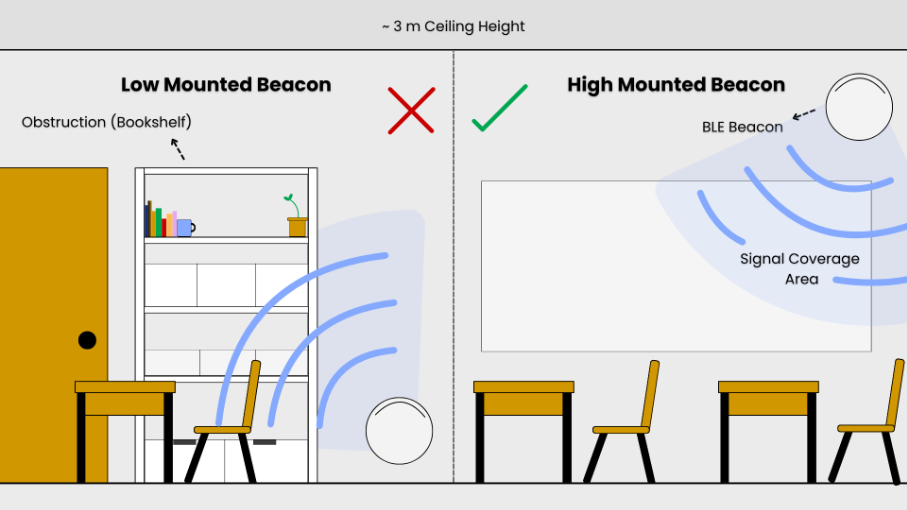
- Mount high and clear: Install beacons around 2.5 – 3 meters above ground to reduce interference and signal shadowing, since lower positions are often blocked by furniture, equipment, or people.
- Avoid reflective or obstructive surfaces: Keep beacons away from metal, glass, or corners, which can distort or block signals.
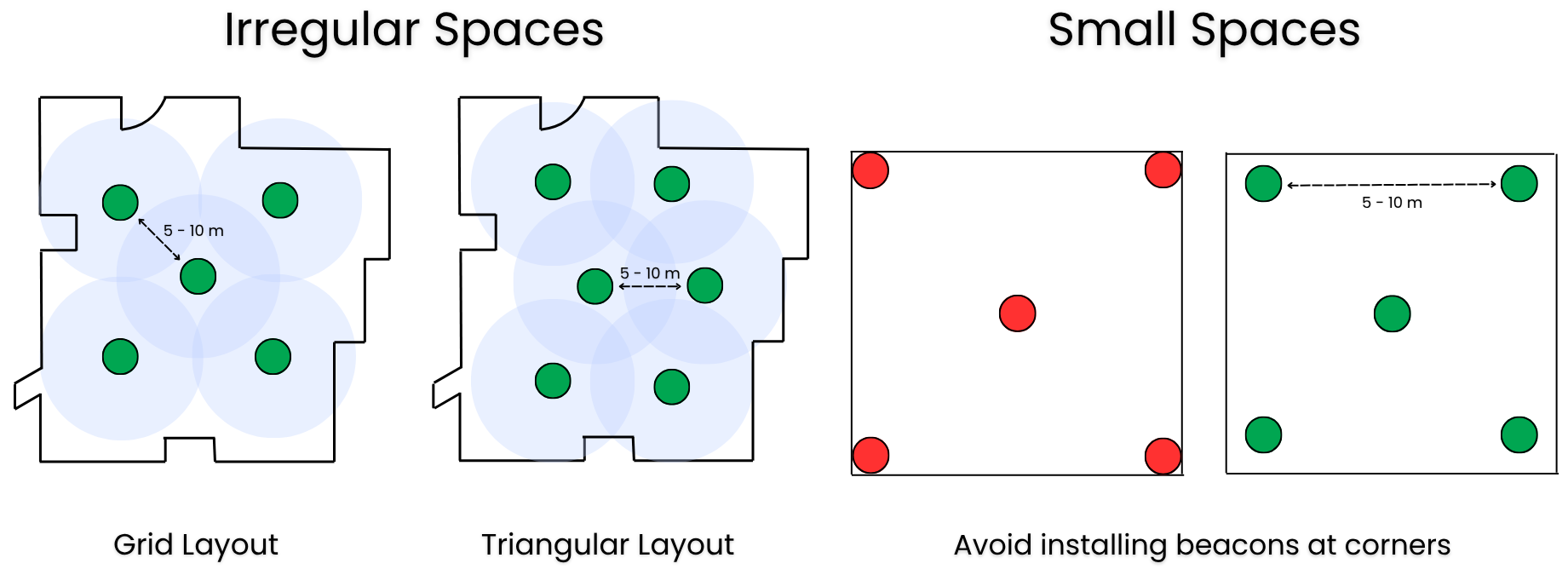
- Plan spacing carefully: For indoor coverage, a horizontal spacing of 5 – 10 meters between beacons is recommended. Use triangular or grid distribution patterns to ensure overlapping signal and reduce dead zones.
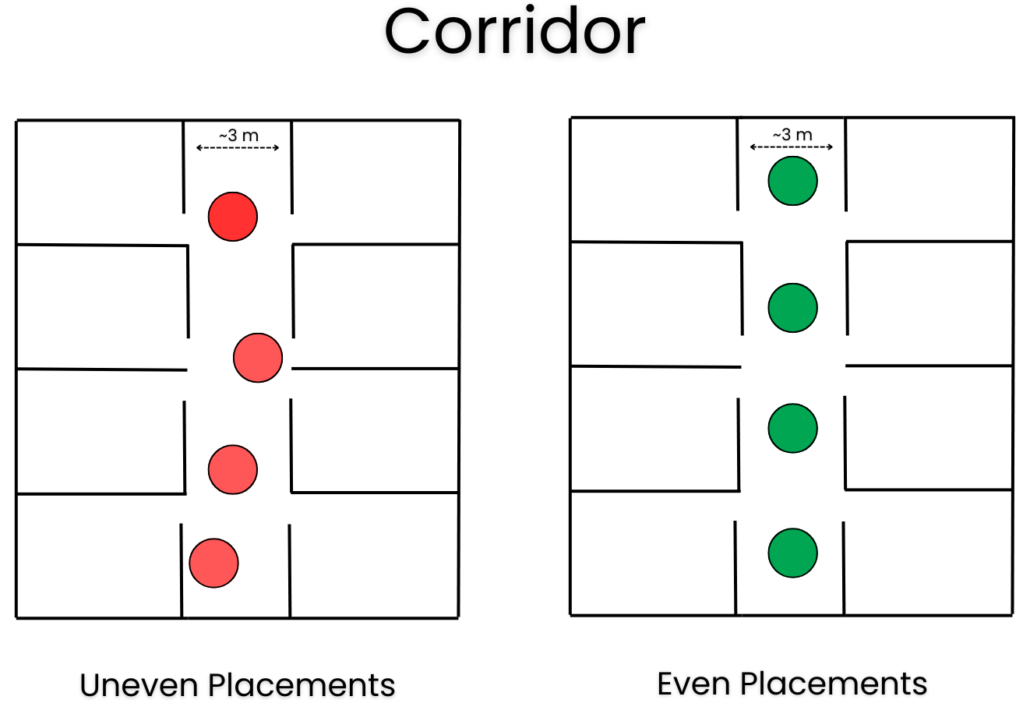
- In corridors: In narrow corridors (~3m wide), centerline deployment may work well. In wider corridors, use dual-column or offset patterns to maintain coverage.
- Account for the environment: In humid environments or outdoors, ensure devices have adequate ingress protection (IP) to avoid damage over time. Consider obstacles (walls, pillars, equipment) that may attenuate BLE signals.
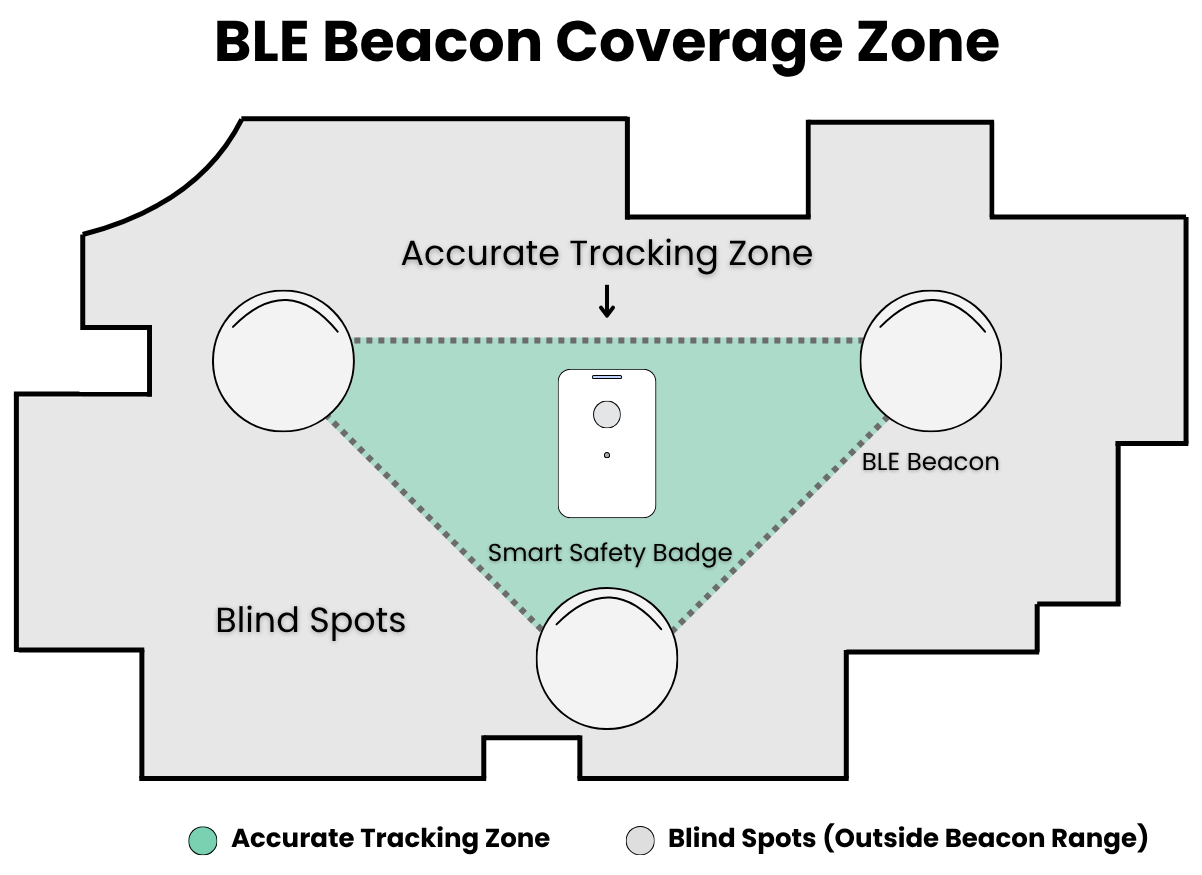
Use triangular placement for accuracy: Arrange at least three beacons around the active area so that tracked beacons stay within their signal triangle (convex hull). This ensures the device receives signals from multiple directions, improving location precision and minimizing blind zones.
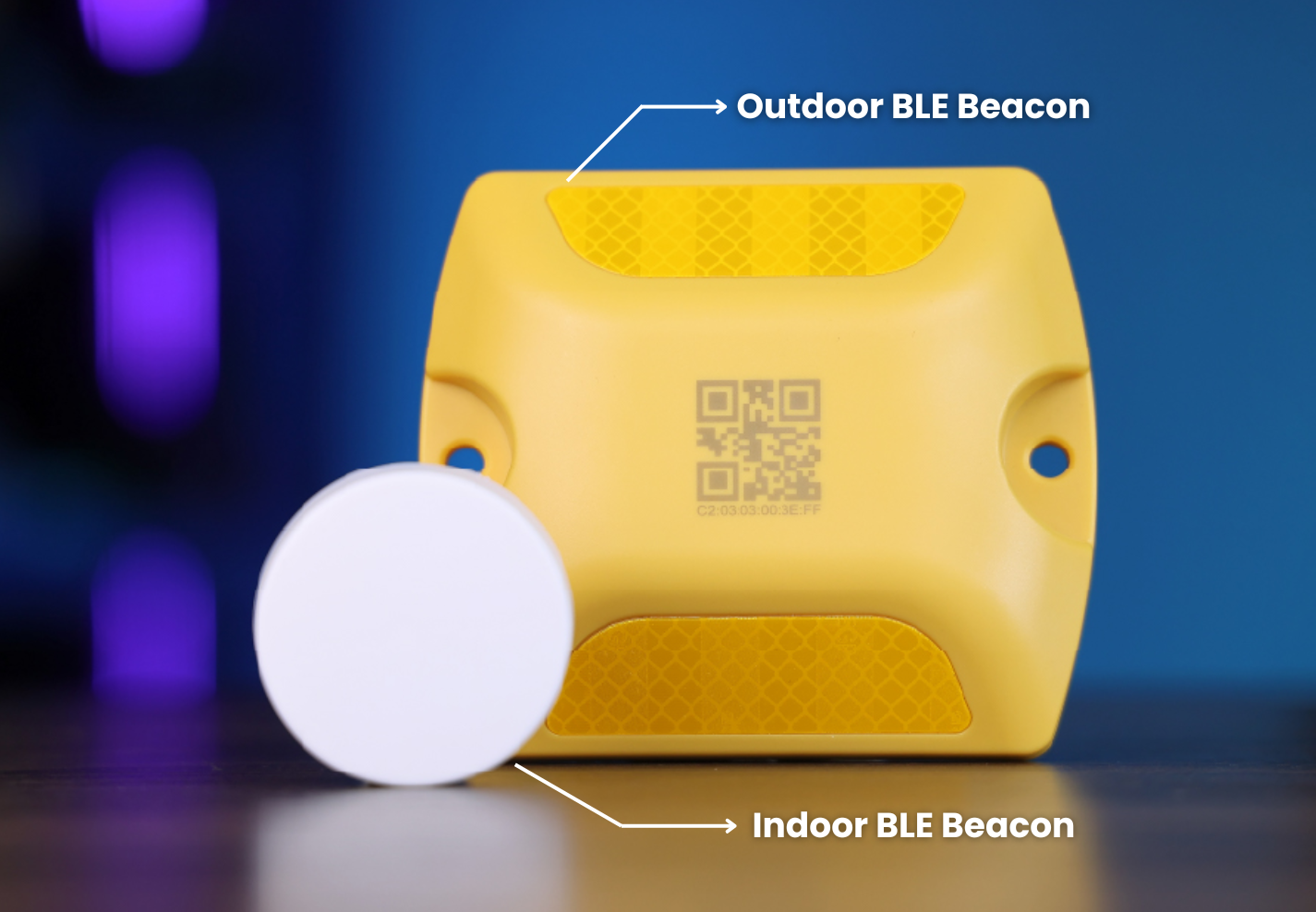
- For Outdoor Coverage: In open or semi-open areas, use weatherproof BLE beacons with durable casing and higher transmission power to maintain stable signal performance.
- Test and adjust: Before final installation, walk through the site with the Smart Safety Badge to check RSSI signal strength in different areas. If you notice weak spots, adjust beacon positions or height for better coverage.
Note: More BLE beacons don’t always mean better coverage. When too many beacons are placed close together or broadcast at similar intervals, their signals can overlap and interfere with each other. For best results, balance beacon density and transmission power based on the environment — enough to maintain overlap, but not so many that signals collide.
Planning LoRaWAN Gateway Placement
When positioning LoRaWAN gateways for your Smart Safety Badge system, these guidelines will help:
- Mount high and clear: Place gateways around 3 meters above ground, ideally on poles or walls, to reduce interference and avoid physical obstructions.
- Ensure antenna visibility: Antennas must be unobstructed by metal structures, thick walls, or equipment to maintain good signal.
- Choose devices for harsh environments: Gateways can be installed outdoors, opt for models with weatherproof enclosures and wide operating temperature ranges.
- Device Density: In areas with many active IoT devices, LoRaWAN gateways should be placed closer together. A higher device density increases network traffic, which can reduce connectivity reliability.
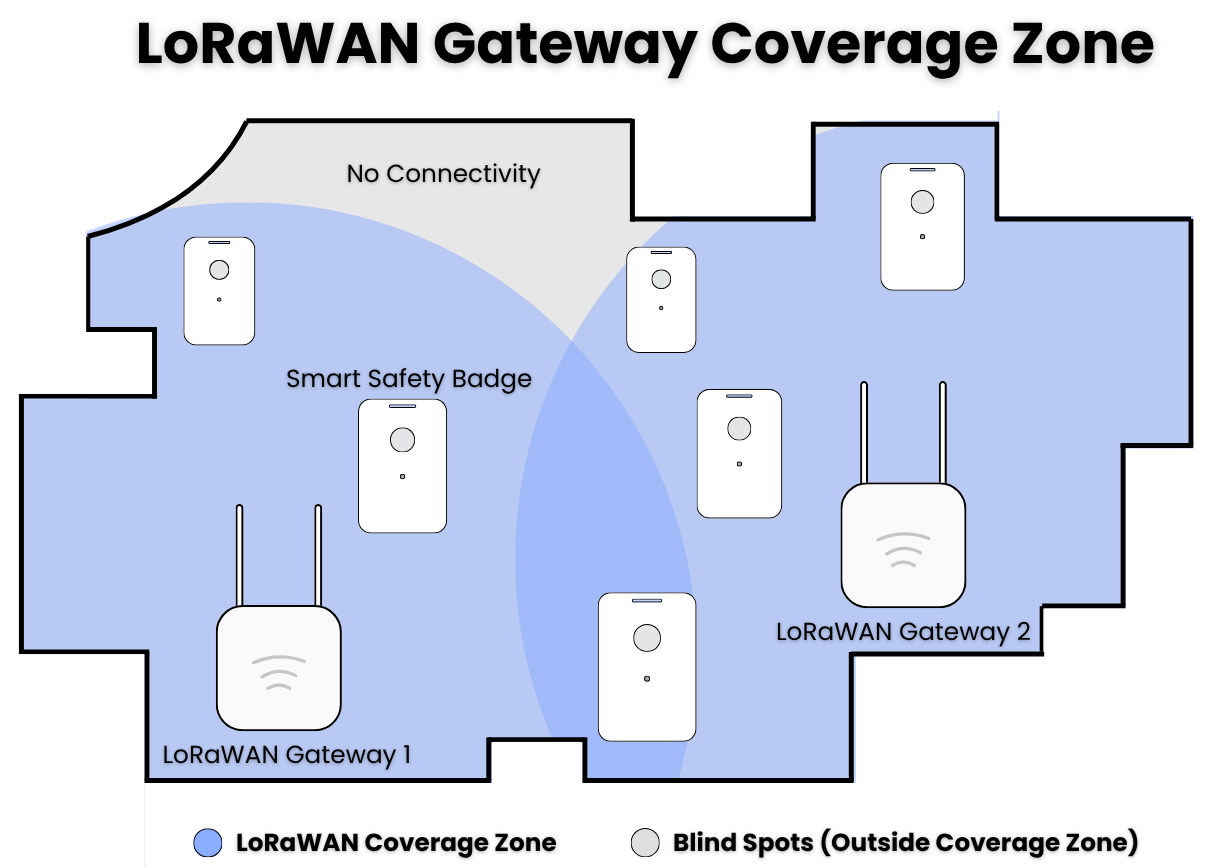
- Overlapping coverage zones: Position each gateway so their coverage areas overlap to ensure reliable signal transmission and minimize dead zones.
- Consider backhaul options: Ensure each gateway has reliable internet connectivity (Ethernet, Wi-Fi, or 4G) and power sources so alerts and data are transmitted without delay.
- Test and Readjust: After initial installation, walk through your space with Smart Safety Badge and confirm whether each gateway receives the signals reliably.
Once both your BLE beacons and LoRaWAN gateways are strategically placed, the foundation of your Smart Safety Badge system is set. Every alert, location update, and signal now has a clear path to reach the monitoring platform without delay. For a deeper look at how distance and coverage affect performance, read our full breakdown: How Far Can BLE and LoRaWAN Signals Reach
Planning for Cost and Scale
Every facility is unique and it directly affects how many BLE beacons and LoRaWAN gateways are needed, which in turn impacts both installation workload and total project cost. The number of devices also depends on the positioning accuracy you prefer — denser beacon placement provides finer indoor precision.
To help solution providers plan efficiently, Seeed offers guidance and estimation tools that calculate the ideal number of devices for your budget and environment. This ensures optimal signal coverage without overspending on hardware or maintenance.
Let’s Build the Right Setup for You
The proper placement of BLE beacons and LoRaWAN gateways depends on each site’s unique layout and requirements. Seeed offers a complete hardware solution—from Smart Safety Badges to BLE beacons to LoRaWAN gateways, and provides deployment and technical support to help you plan effectively. Share your project needs with us, and our team will design a customized IoT solution for smart safety badge that ensures full signal coverage and optimal cost efficiency.
Resources
You can explore our setup and technical resources to support BLE beacon and LoRaWAN deployment:
About Author
