How Low‑Cost Teach a Robot Arms to Work on Their Own ?
Today, we’re diving into a topic that anyone working in embodied AI will eventually encounter: Imitation Learning.
In this tutorial, you’ll learn the complete workflow for teaching a robotic arm to perform tasks—from calibration → teleoperation → dataset collection → ACT training → real-world deployment.
Even if you’re new to robotics and machine learning, you can follow this guide to build and reproduce an ALOHA-style bimanual robot learning project.
1. Project Demo
The video demonstrates the trained imitation learning policy, ACT, running on the SO-ARM101 in the real world.
The robot is no longer controlled by a human operator. Instead, the trained policy directly generates continuous action sequences and enables the robot to autonomously perform precise pick-and-place tasks.
2. What Will You Learn?
- Understand the core concepts behind leader-follower teleoperation and how demonstration data is collected for imitation learning.
- Follow the complete workflow from servo setup and calibration to teleoperation, dataset creation, model training, and deployment.
- Use the open-source LeRobot framework to train ACT (Action Chunking with Transformers) policies.
- Build your own low-cost bimanual embodied AI platform and extend it to a wide range of manipulation tasks.
3. Things Used in This Project
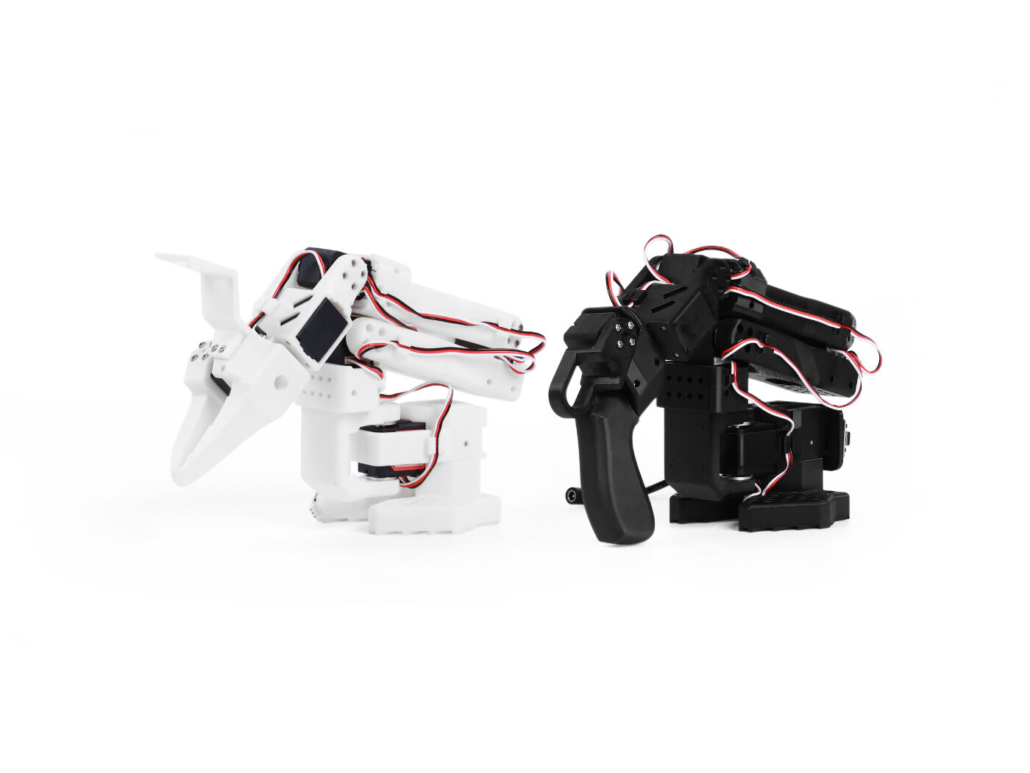 SO-ARM101 Assemble Kit SO-ARM101 Assemble Kit | https://www.seeedstudio.com/SO-ARM-101-Assembled-Kit-Pro-p-6691.html(Each kit includes one Leader arm and one Follower arm) | ×2 |
| https://www.seeedstudio.com/ET-S231-90-USB-Camera-p-6684.html | × 1~2(The exact number depends on the training task) | |
| https://www.seeedstudio.com/reComputer-Robotics-J4012-with-GMSL-extension-board-p-6537.html | ×1 |
The SO-ARM101 is officially supported by the LeRobot ecosystem, which means you can avoid a lot of low-level hardware and driver integration work and get started much faster.
Here are some of its key advantages:
- Ready-to-use leader-follower architecture: Designed for teleoperation out of the box, with no need to develop your own low-level drivers.
- A strong community and ecosystem: Standardized imitation learning dataset formats, extensive community resources, and detailed tutorials make it accessible to beginners.
- CAN FD servo motors: Stable, low-latency communication makes the platform suitable for synchronized, high-quality data collection.
- Fully open source: Includes mechanical STP files, hardware BOMs, and software SDKs.
- Affordable: Significantly more accessible than traditional research-grade bimanual robot platforms.
4. Key Concepts
4.1 Software Framework — LeRobot
LeRobot brings together what would otherwise be a collection of separate components—data collection, model training, policy evaluation, and real-robot deployment—under a unified interface.
At its core, LeRobot is a Python library. Once installed with pip, most operations can be performed through command-line tools or a few lines of Python, making it particularly convenient for developers who don’t want to spend too much time dealing with low-level robotics infrastructure.
The main components of LeRobot include:
- Datasets: Provides standardized dataset formats containing multi-camera images, joint states, action commands, and other information. It also handles time synchronization and data processing.
- Policies: Includes popular robot learning algorithms such as ACT, Diffusion Policy, and TDMPC. You can select the desired policy through configuration rather than implementing the entire model architecture from scratch.
- Trainer: Handles the training loop, learning-rate scheduling, checkpointing, resuming training, TensorBoard logging, and other common training tasks.
- Envs: Provides unified interfaces for real robots and simulation environments, making it easier to move trained policies between simulation and physical robots.
- Scripts: Provides ready-to-use command-line tools for teleoperation, dataset recording, training, model export, and real-robot rollouts.
4.2 Imitation Learning Policy — ACT
The basic imitation learning pipeline is straightforward:
Human demonstration → Data collection → Model training → Autonomous execution
For tabletop manipulation, ACT (Action Chunking with Transformers) has become one of the most widely used policy architectures.
ACT was introduced by researchers at Stanford alongside the ALOHA system. Its key idea is action chunking.
Instead of predicting only one action at a time, which can cause small errors to accumulate over a long sequence, ACT predicts a sequence of future actions—a so-called action chunk—and executes these actions as a coherent sequence.
This helps reduce the error accumulation associated with purely single-step action prediction.
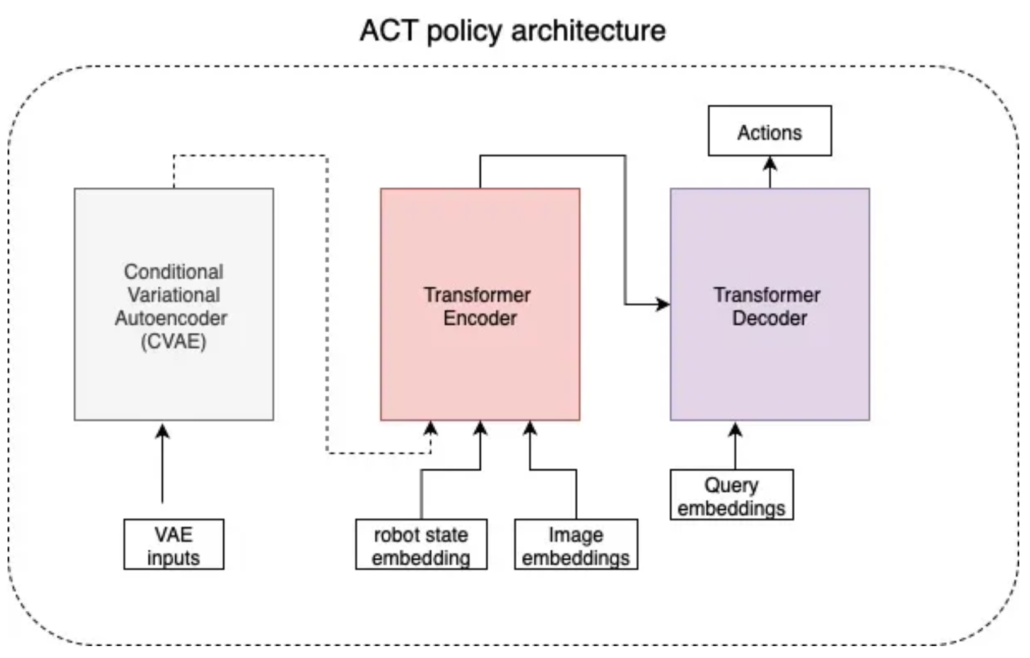
ACT has several important advantages:
- Smoother motion: Predicting a sequence of actions helps reduce the jitter that can occur when making independent frame-by-frame decisions.
- Improved robustness: Action chunking can reduce error accumulation and make long-horizon manipulation tasks more stable.
- Multimodal behavior modeling: ACT uses a CVAE-based architecture to model multiple valid ways of performing the same task.
As a commonly supported policy in robot learning frameworks such as LeRobot, ACT has been demonstrated on a variety of fine-grained manipulation tasks, including object grasping, component assembly, and cloth manipulation.
5. Complete Hands-On Workflow: Six Steps to Bimanual Imitation Learning
Follow the Wiki tutorial to reproduce the teleoperation and training workflow.
Follow the Wiki tutorial to reproduce the teleoperation and training workflow:https://wiki.seeedstudio.com/lerobot_so100m_new/
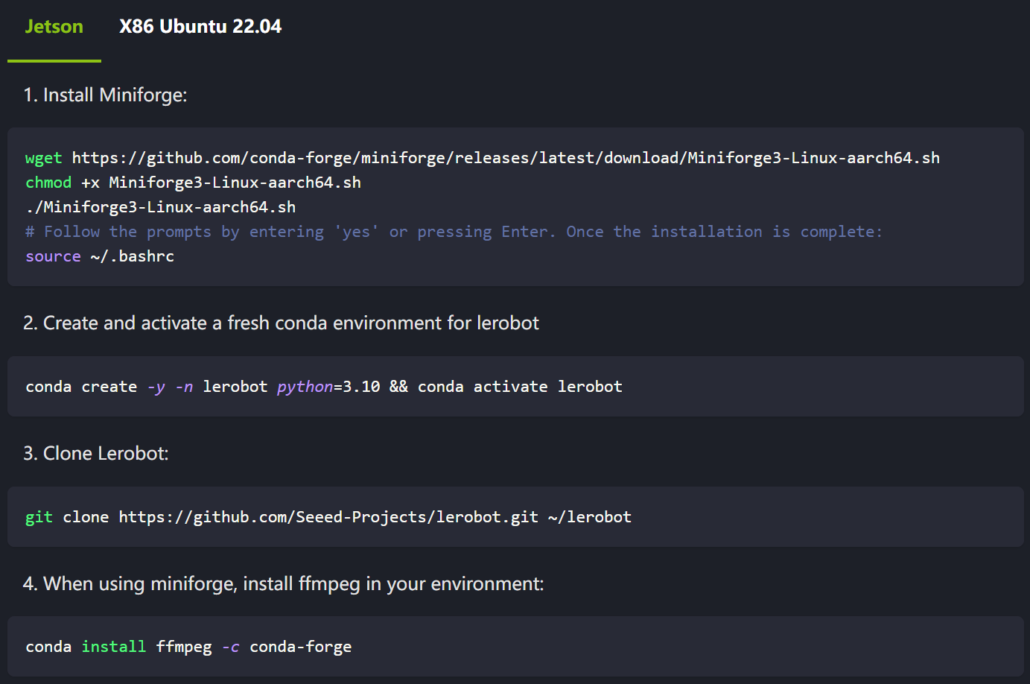
Step 0 — Set Up the LeRobot Environment
First, install the required software dependencies.
The tutorial provides installation instructions for both Jetson and Ubuntu, including the required packages and commands.
The goal of this step is to prepare the complete software environment for robot control, data collection, and model training.
Step 1 — Calibrate the Robot Arms
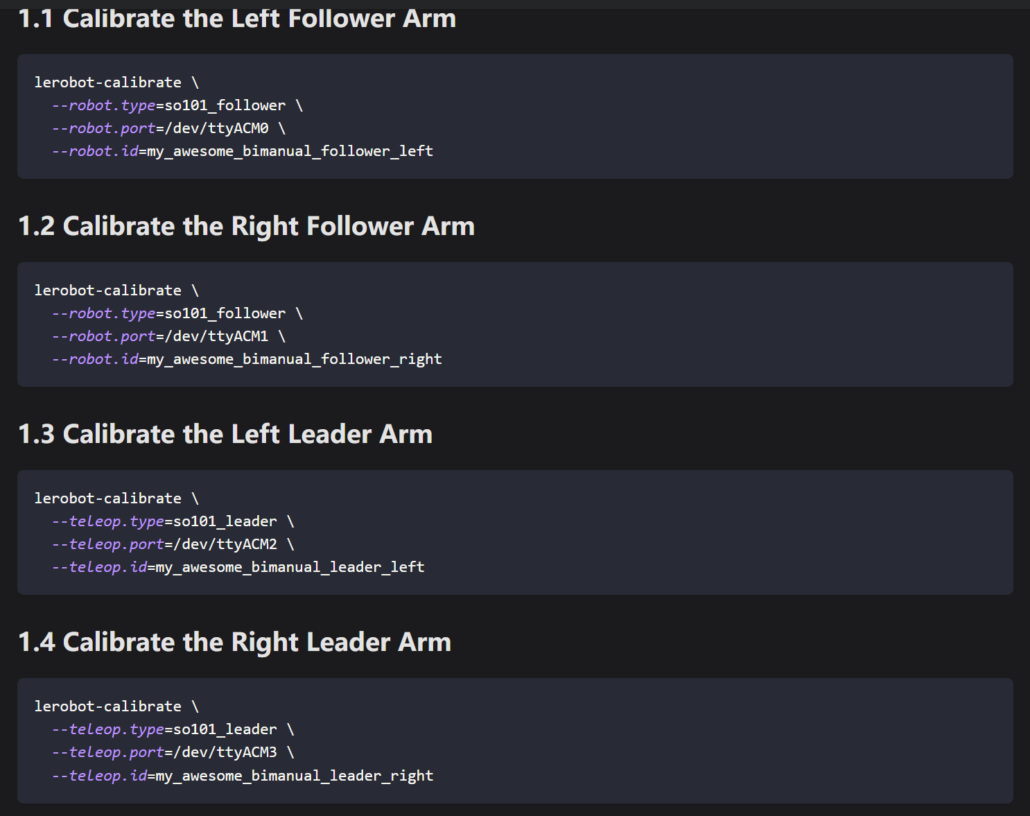
Calibrate the joints on all four arms—the two Leader arms and two Follower arms.
The purpose of calibration is to establish the correct zero positions, movement directions, and operating ranges for each joint, allowing LeRobot to correctly interpret and control the robot.
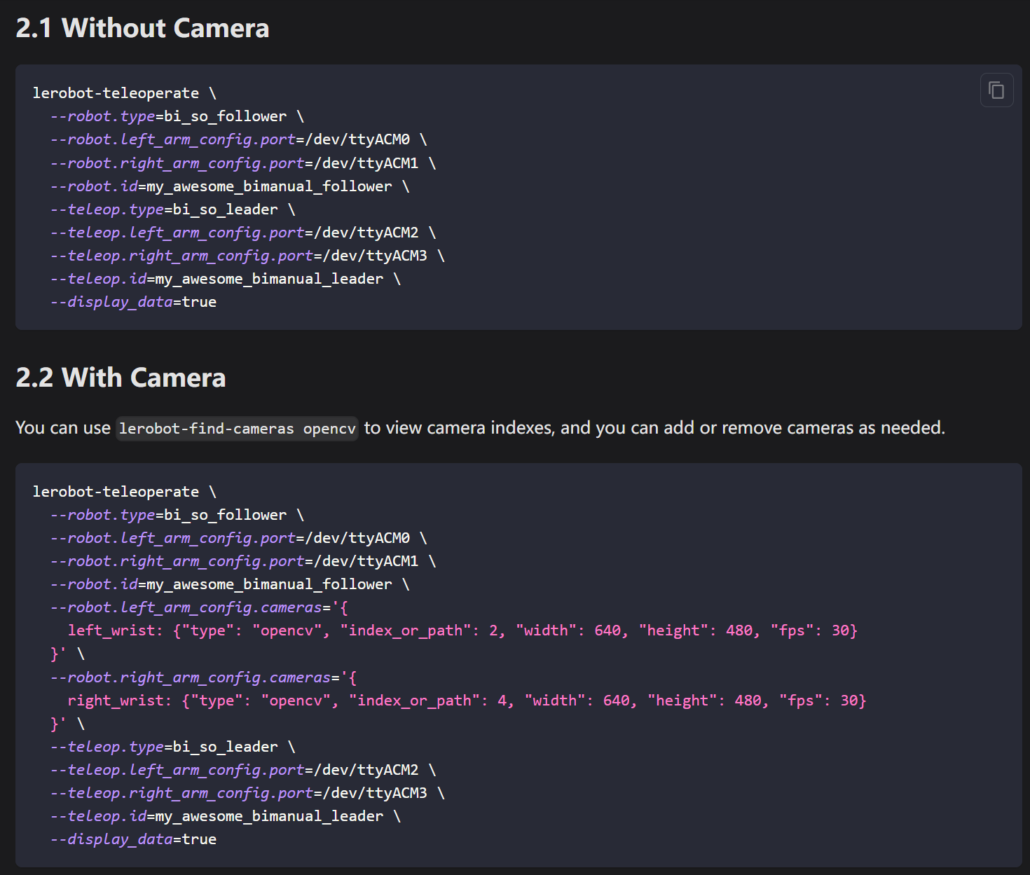
Step 2 — Leader-Follower Teleoperation
Once calibration is complete, you can start teleoperation: move the Leader arm, and the Follower arm mirrors its movements.
The teleoperation stage without cameras is mainly used to verify that the robot control pipeline works correctly.
Once cameras are added, the system can simultaneously capture visual observations and robot actions, providing the data needed for imitation learning.
Step 3 — Dataset Recording and Management
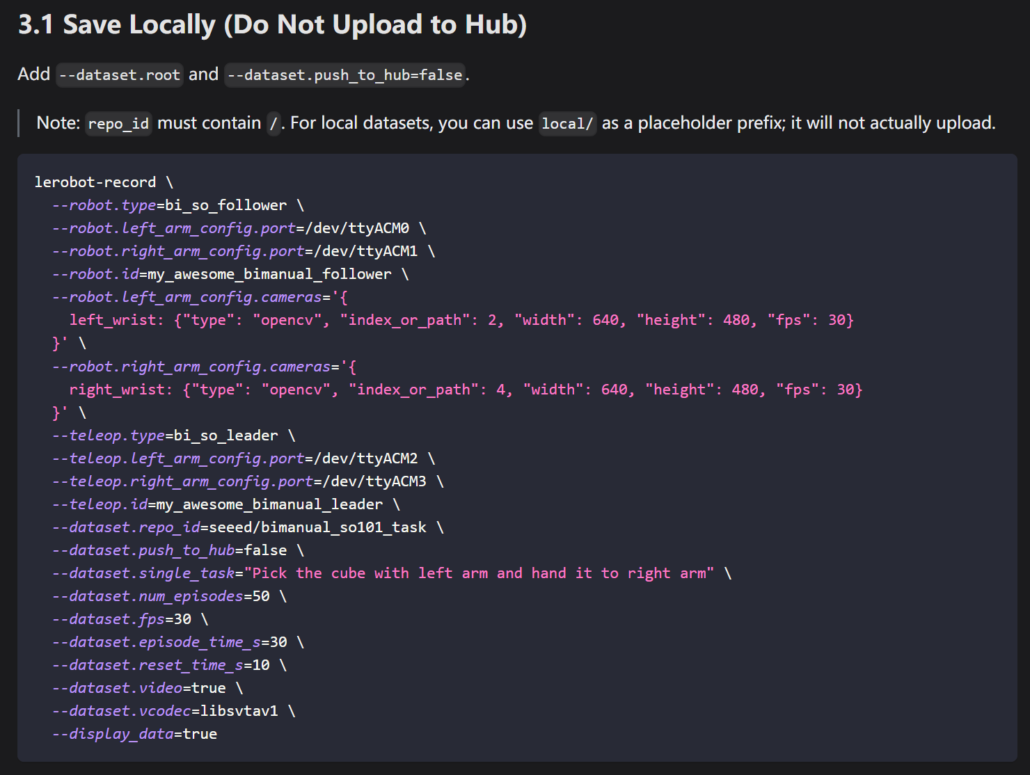
The operator performs the task through the Leader arms while the system synchronously records what the robot sees and what the robot does.
This creates the demonstration data that ACT will later learn from.
In the tutorial, 50 episodes are recorded using num_episodes=50.
The tutorial also covers how to:
- Upload datasets to the Hugging Face Hub
- Resume an interrupted recording session
- Replay recorded episodes
- Delete unwanted episodes
- Manage and inspect the collected dataset
Step 4 — Train the ACT Policy
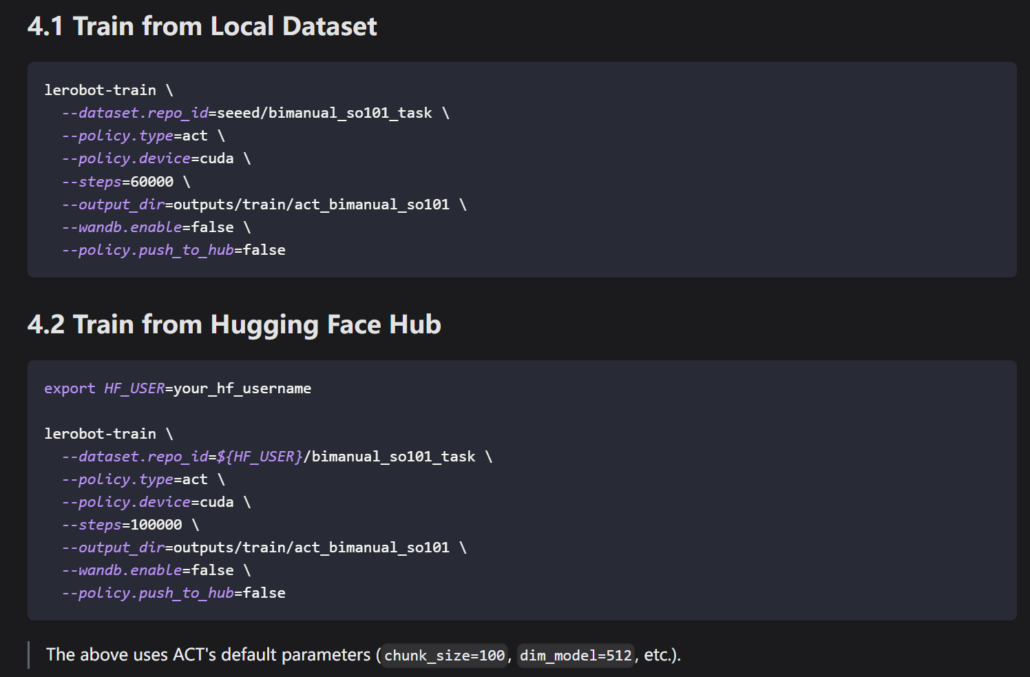
Now comes the exciting part: training!
LeRobot provides a simple training command that handles the training pipeline for you. The tutorial also introduces basic hyperparameter tuning and ways to visualize the training process.
Step 5 — Deploy the Policy on the Real Robot
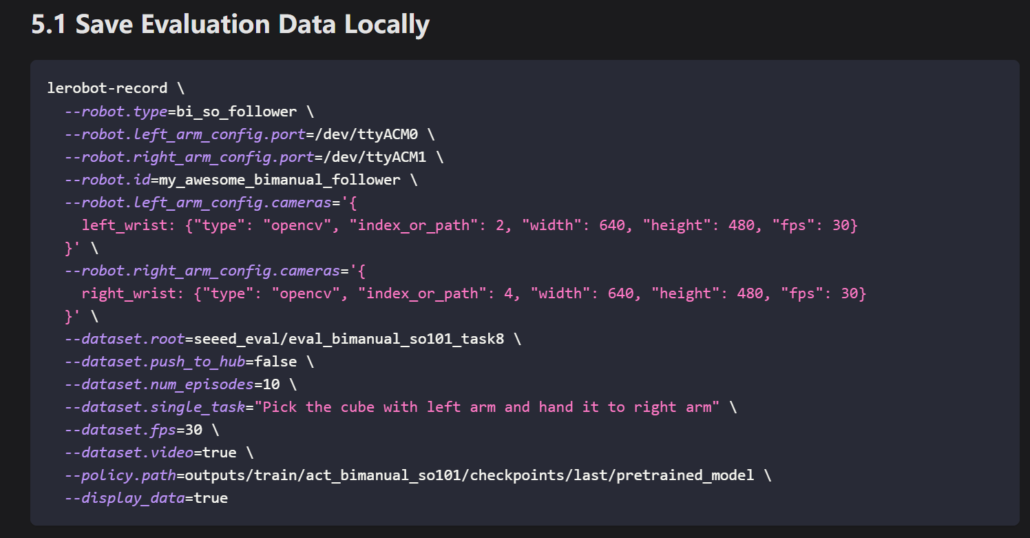
Once training is complete, you can save the trained model and evaluate it on the real robot. The tutorial also covers both local model storage and Hugging Face-based workflows.
6. FAQ
Q1: Do I need a GPU to train an ACT model with LeRobot?
An NVIDIA GPU with at least 8 GB of VRAM is recommended for a reasonable training speed. CPU training is possible, but it can be significantly slower.
The Wiki provides more detailed hardware recommendations.
Q2: Is SO-ARM101 fully compatible with ALOHA-style algorithms?
Yes. The SO-ARM101 bimanual kit is designed around the ALOHA-style leader-follower teleoperation workflow and supports ACT and related robot learning workflows within the LeRobot ecosystem without requiring additional low-level integration.
Q3: Can beginners learn imitation learning with this project?
Absolutely.
The tutorial starts with hardware connections and walks through the workflow step by step. If you have basic Linux command-line skills, you should be able to reproduce the complete pipeline.
Q4: How much does it cost to build a bimanual imitation learning platform?
The SO-ARM101 uses 3D-printed components and is designed as a low-cost robotics platform, making it an attractive option for students, researchers, and makers.
Q5: How many demonstrations do I need to train an ACT model?
For simple manipulation tasks, 25–50 demonstrations can often provide a useful starting point, although the ideal dataset size depends heavily on task complexity, scene variation, and demonstration quality.
Q6: What cameras are supported?
The system supports common USB cameras. This tutorial includes links to cameras that have been tested with the workflow.
Q7: Does SO-ARM101 support robot learning frameworks other than LeRobot?
Yes. SO-ARM101 provides standard ROS/ROS2 interfaces and a Python SDK, making it possible to integrate it with other robot learning approaches, including Diffusion Policy and VLA-based systems.
Q8: How long does ACT training take?
On a mid-range GPU, a simple task with around 50 demonstrations may take roughly 1–2 hours to train. Actual training time depends on the GPU, dataset size, task complexity, image resolution, and training configuration.
Q9: What kinds of tasks can a bimanual robot learn?
A wide range of tabletop manipulation tasks can be explored, including:
- Pick-and-place
- Object handover
- Assembly
- Sorting
- Pouring
- Two-handed manipulation
The same framework can be extended to many other tasks where demonstrations can be collected.
Q10: Do I need programming experience?
Basic Python and Linux command-line skills are helpful, but you don’t need to be an expert programmer.
Seeed Studio also provides SenseCraft, a no-code training platform with a graphical interface designed to help beginners train robot learning models without writing code.
7. Resources and Further Reading
- Getting Started with LeRobot and SO-ARM100/SO-ARM101:SO-ARM100 / SO-ARM101 LeRobot Getting Started Guide
- Seeed Projects LeRobot GitHubRepository:Seeed Projects LeRobot
- Understanding ACT:LeRobot ACT Documentation
- SO-ARM101 + AmazingHand Teleoperation Tutorial:SO-ARM101 AmazingHand Teleoperation Tutorial
About Author
