All You Need to Know About Meshtastic
What Is Meshtastic?
Meshtastic is an open-source project that leverages LoRa, a long-range radio protocol that is widely available in most regions and does not require additional licenses or certifications, unlike HAM radio. Utilizing inexpensive LoRa radios, Meshtastic provides a FREE, long-range, off-grid communication solution for areas without reliable or existing communication infrastructure.
In a simpler way, Meshtastic is a free and easy-to-use tool that lets you send messages without internet or mobile networks. It connects small, specialized devices to create a network where you can communicate over long distances, making it perfect for outdoor adventures, emergencies, or communication in remote areas. You can share short text messages, GPS locations, and even voice messages (coming soon) with others. It’s easy to set up, works on various devices, and has a supportive community if you need help.
What Are the Main Features of Meshtastic?
- Infrastructure-free communication: No internet, no cellular, no SIM, no subscription. It works entirely independent of any existing network.
- Decentralized mesh network: There is no central server or base station. Every device is equal and can relay messages for others, forming a self-organizing network.
- Multi-hop long-range coverage: Messages automatically hop between nodes, extending range far beyond a single radio link—especially useful in outdoor or distributed environments.
- Ultra low-power LoRa radio: Built on LoRa, it enables kilometer-level range with very low energy consumption, making battery-powered long-term deployment possible.
- Encrypt Communication: only the target node can view the messages, ideal for private communication.
- Optional GPS-aware networking: Many devices integrate GPS, allowing location sharing and group tracking over the mesh.
How Does Meshtastic Work?
Meshtastic works by using LoRa radio and a mesh network to let nodes communicate without internet or cellular coverage.
Each device (node) can:
- Send messages directly to nearby nodes
- Automatically relay messages from other nodes
- Extend communication range through multi-hop forwarding
When one device sends a message, it can travel across multiple devices until it reaches the destination, even if they are far apart. All nodes work together in a decentralized network, meaning there is no central server or base station needed.
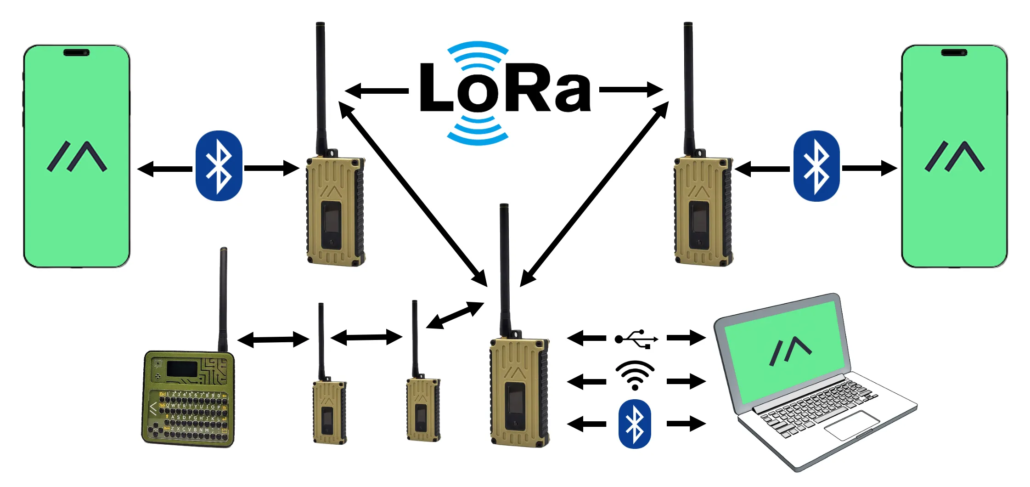
Why Meshtastic? Meshtastic vs. Other Common Communication Solutions
There are also many other options, such as the more well-known LoRa-based solutions like LoRaWAN® and Sidewalk, or the commonly used 4G/5G, and even Starlink developed by SpaceX. So, why Meshtastic?
Differences Between LoRaWAN®, Sidewalk, and Meshtastic
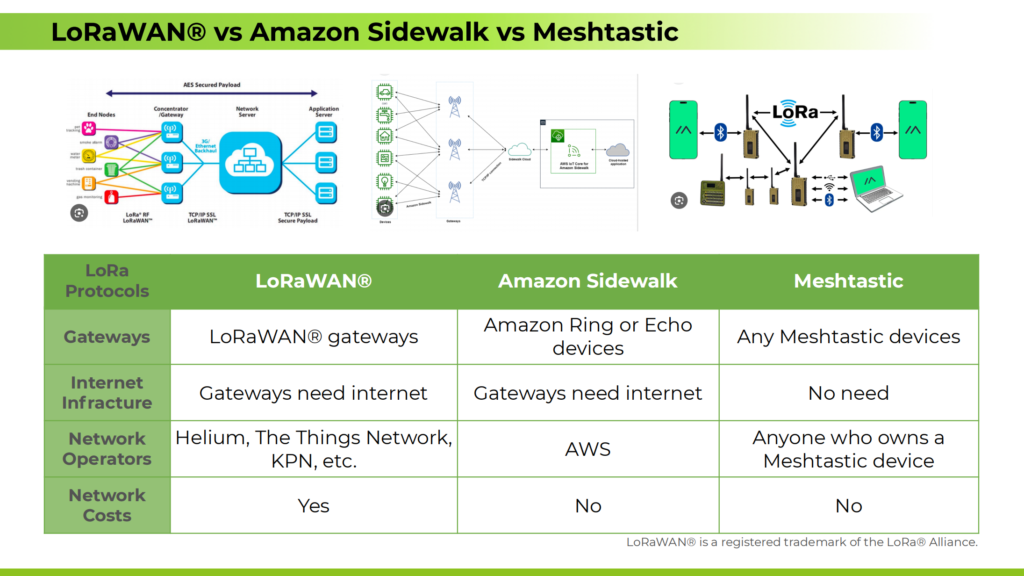
As shown above, I have listed the biggest differences between the three. Meshtastic is decentralized and doesn’t require gateways, making it better suited for flexible, independent, peer-to-peer communication scenarios, while LoRaWAN®is ideal for large-scale, centrally managed IoT applications. Amazon Sidewalk, is designed to extend the connectivity range of smart home devices using low-power, community-based networking.
Differences Between Meshtastic and 4G/5G
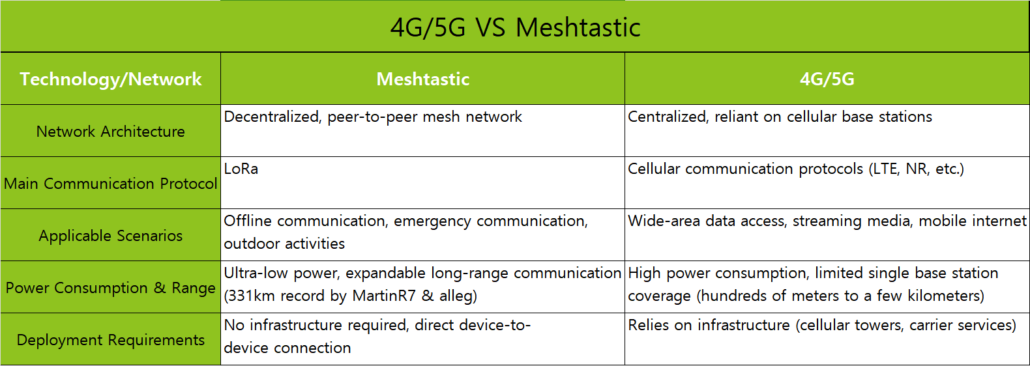
Most of us rely on 4G/5G networks in our daily lives, so how does Meshtastic compare to them? The main differences are outlined below. Simply put, Meshtastic is ideal for situations where there is no cellular signal, no infrastructure, or limited power availability, such as outdoor activities, survival scenarios, or rescue operations. On the other hand, cellular network coverage is primarily concentrated in areas with high levels of human activity, such as cities and urban regions.
Differences Between Meshtastic and Starlink
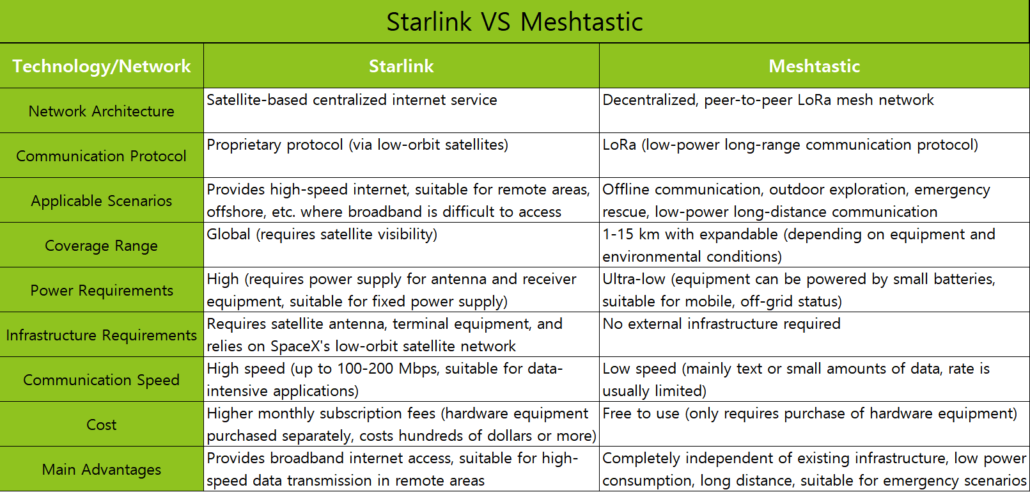
Starlink and Meshtastic are two different communication solutions, each with its own strengths. Starlink is ideal for those who need constant online connectivity and high-speed internet access, even in remote areas. However, if you need a more affordable, portable solution for offline communication, especially when power and infrastructure are limited, Meshtastic is the better choice.
Last but not least, Meshtastic is free to use—once you purchase a compatible device, you can start enjoying the free mesh network with your friends!
Meshtastic Limitations
Text messages only at the moment: Meshtastic uses LoRa, which focuses on long-range and low power. This limits bandwidth, so it can only send text—no images, videos, or large files.
Short messages: You can only send messages with 228 characters or fewer due to LoRa’s packet size limit, which isn’t enough for detailed or complex information.
What Is Meshtastic Used For? Real-World Use Cases
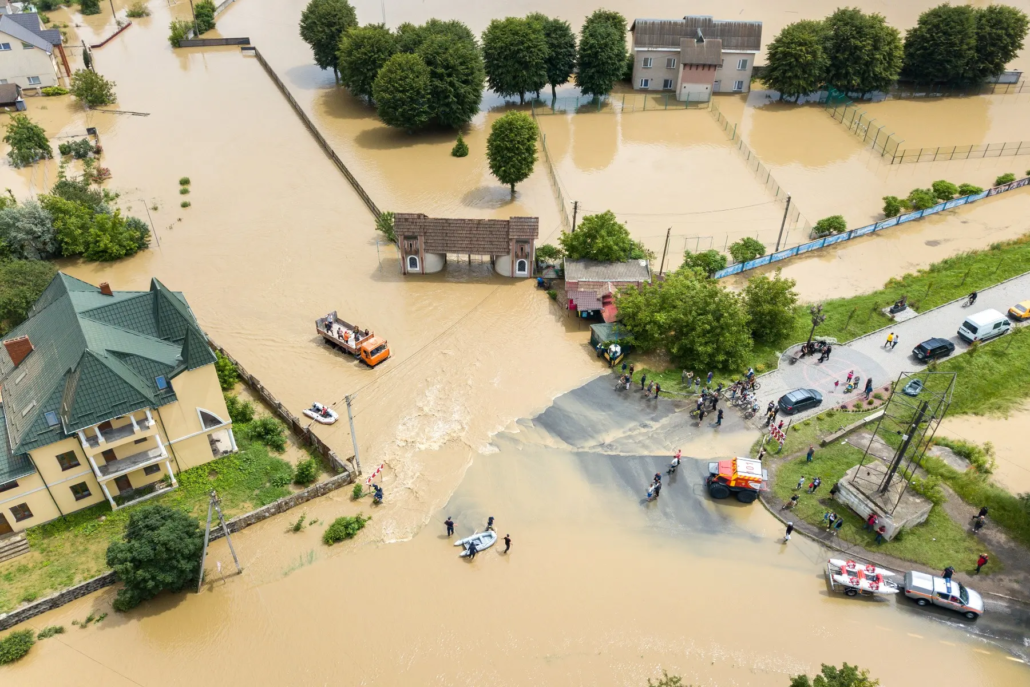
What Can Meshtastic Do? In today’s tech-focused world, it’s hard to picture a day without a steady network connection. But if you’ve ever gone hiking in a remote area and lost signal, or attended a big event where the network was too crowded to use, you know the struggle. During natural disasters like typhoons or floods, communication networks might fail, making it tough to call for help or connect with loved ones. I hope you don’t face these challenges, but it’s worth thinking about potential solutions if you do. What would you want to have in place?
This is where Meshtastic comes into play, offering a potential Plan A for those rare yet crucial instances: an emergency response solution.
So, what are the typical applications of Meshtatsic? Here are some common usages shared by passionate community members on Reddit about “What do you use Meshtastic for?“.
- calinet6: “Making new friends nearby who are equally nerdy by virtue of opting into this.”
- Jcw122: “‘Talking’ with friends at big festivals”
- spotcheck001: “We use it for family to communicate when we camp. Works out great.”
- Stroniu44: “Combined with ATAK to localise and communicate during exercise with other tanks from my platoon, especially exchange kmz data”
- jp_bennett: “Vehicle tracking across town, as well as emergency comms for emergency situations.”
- AnderlAnduel: “I share weather station data between home automation sytems with my neighbors (mqtt2mqtt bridge). This way we are independent of Internet services.”
What they’re sharing are exactly the applications that I suggest you to start your Meshtastic journey.
Outdoor Adventures
Whether you enjoy hiking, camping, survival skills, mountaineering, cycling, off-road driving, or skiing, it’s common to encounter areas with no 4G/5G during these outdoor activities. Using Meshtastic allows team members to stay in touch all the time during outdoor adventures, even in remote areas.

Crowded Events and Festivals
If you love big events like Burning Man, Coachella, or Midi Music Festival, you’ve probably dealt with weak signals and lost connections because of overloaded networks. With Meshtastic, you can easily and affordably create a portable, reliable, and self-controlled network infrastructure to stay connected with friends.

Search and Rescue
When disasters strike and signal or power infrastructure fails, Meshtastic can be a vital tool for emergency response, supporting search and rescue operations. A Meshtastic tracker, capable of precisely identifying the location of those in distress and maintaining communication with them, is an excellent choice for equipping rescue teams or ensuring everyday emergency preparedness.
Choosing Your Meshtastic Device
How to Choose a Meshtastic Device
When choosing a Meshtastic-compatible product, the key is to ensure it matches your regional frequency band and use case.
- Local regulations & frequency, different regions use different LoRa bands, always check local regulations before buying:
- 433 MHz – better range and penetration (some regions)
- 868 MHz – Europe
- 915 MHz – US and others
- Device compatibility, Make sure the device supports your required frequency band, as some products are region-specific.
- Usage scenario, different nodes have different advantages, choose the ones suitable for your use scenario.
- Antenna choice, antennas significantly affect performance, choose based on whether the device is mobile or fixed:
- Onboard / rod antennas: ~2–5 km range, good for portable nodes
- Fiberglass antennas: ~5–10 km range, better for base stations
Explore Meshtastic-Compatible Hardware
The Meshtastic ecosystem isn’t limited to a single brand. The official Meshtastic project maintains a comprehensive hardware compatibility list that covers everything from handheld communicators and GPS trackers to solar-powered repeaters and DIY development boards — including Seeed Studio’s SenseCAP Card tracker and Wio Tracker lines.
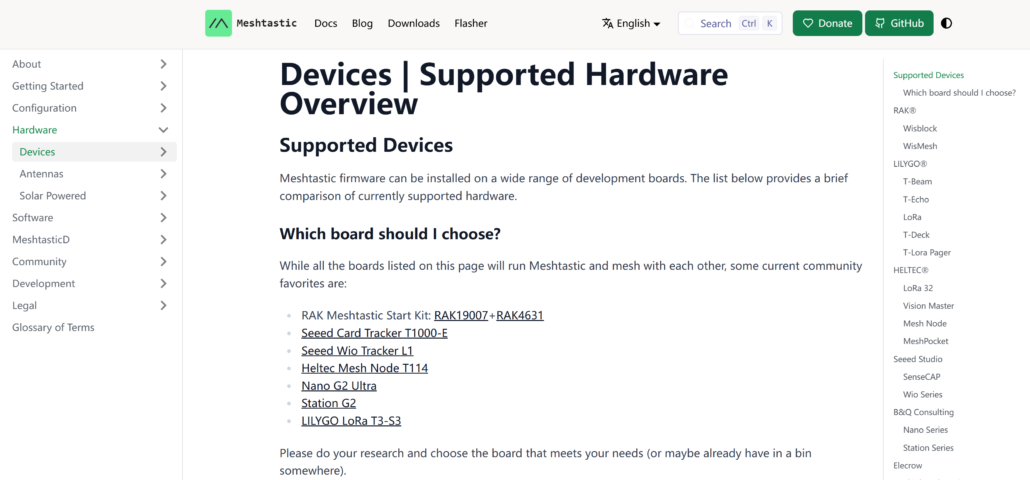
Browsing the official list is the most reliable way to see the full range of supported devices and confirm firmware compatibility before you buy.
Best Meshtastic Devices for Beginners
If you’re just starting out, the goal is to get a working node with minimal setup. Two Seeed Studio devices stand out for beginners:
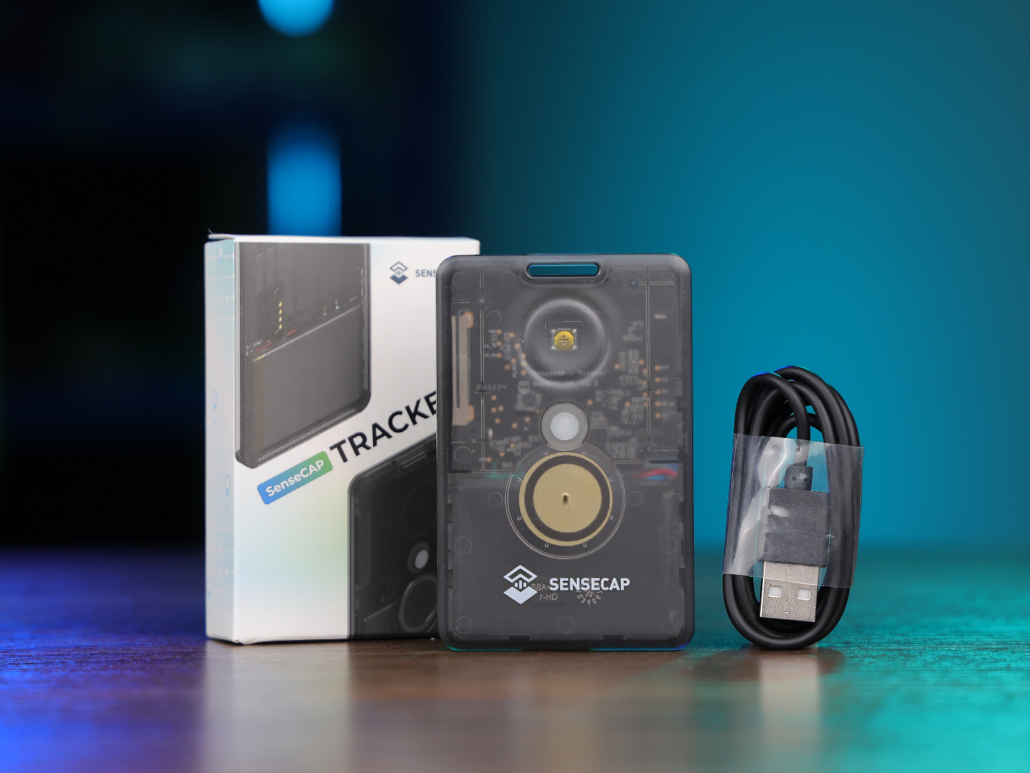
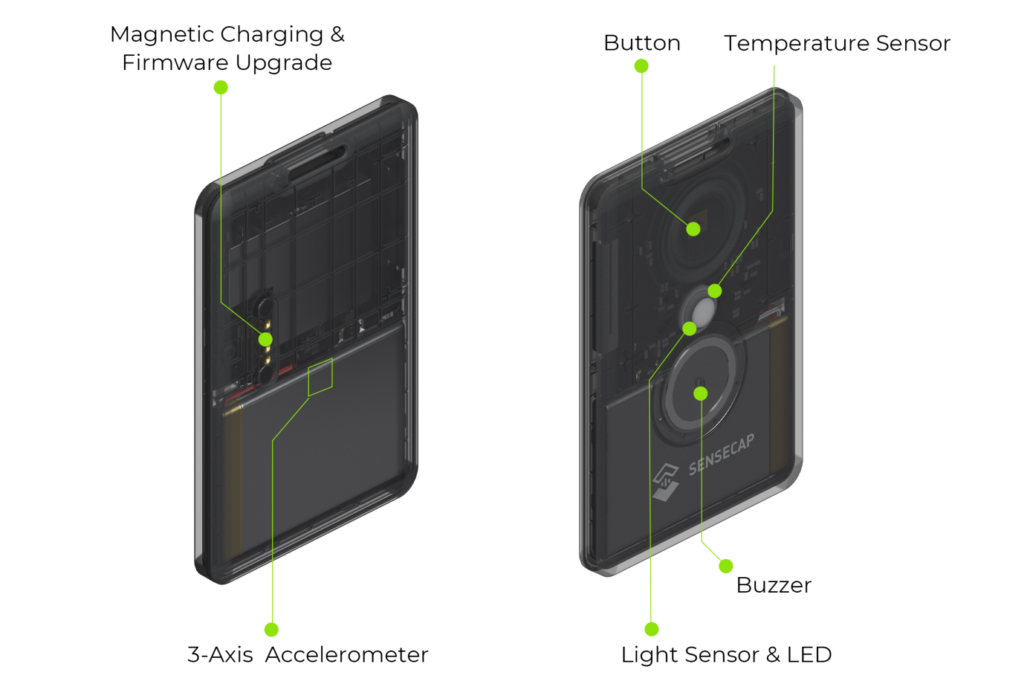
SenseCAP Card Tracker T1000-E is a credit-card-sized, plug-and-play tracker. There’s no flashing, no soldering, and no external GPS module to wire up — just charge it, pair it with the Meshtastic app, and you’re on the mesh. Its IP65-rated enclosure also makes it a practical choice for everyday carry or light outdoor use.
Wio Tracker L1 Series offers more flexibility for users who want some hands-on customization without committing to a full DIY build. The series comes in three variants — with an OLED display, an ultra-low-power E-Ink display, or no display at all — so you can match the hardware to your use case, whether that’s a simple tracker or a small DIY mesh node project.
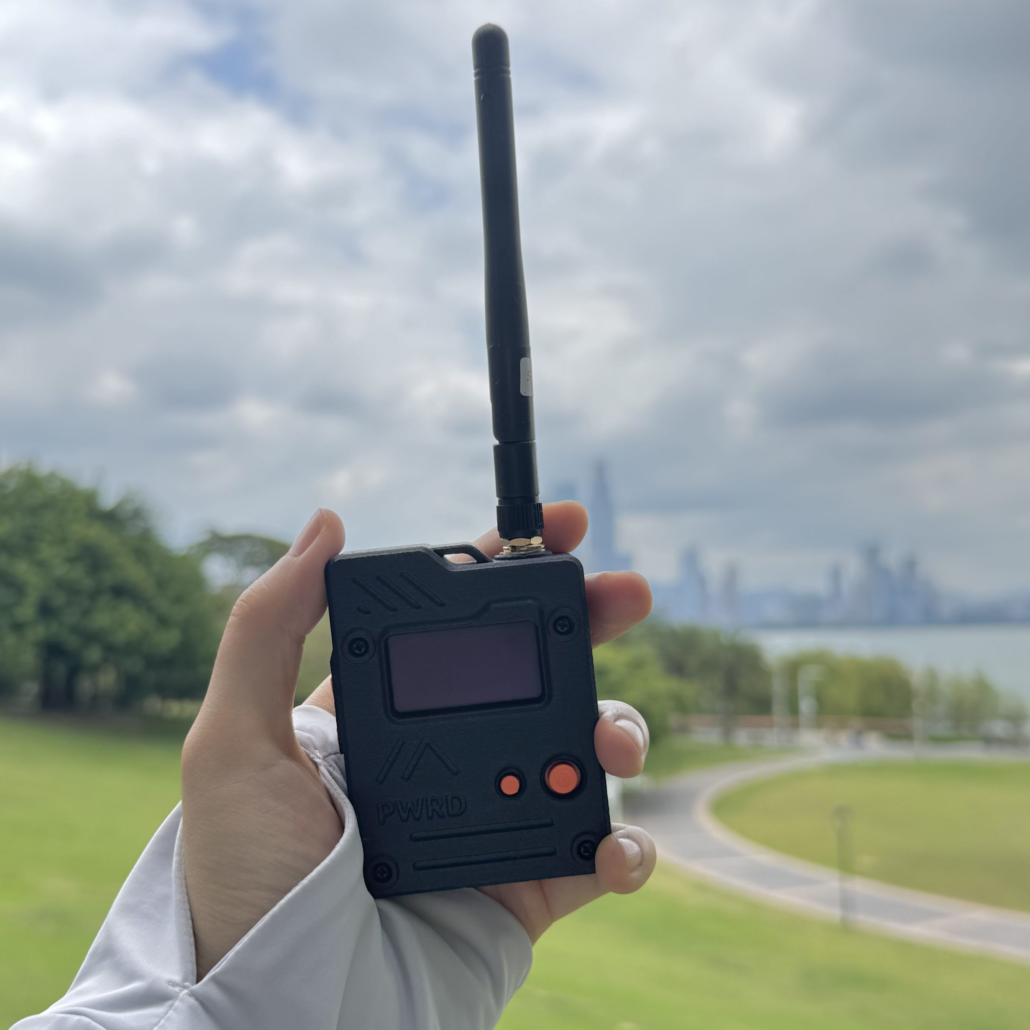
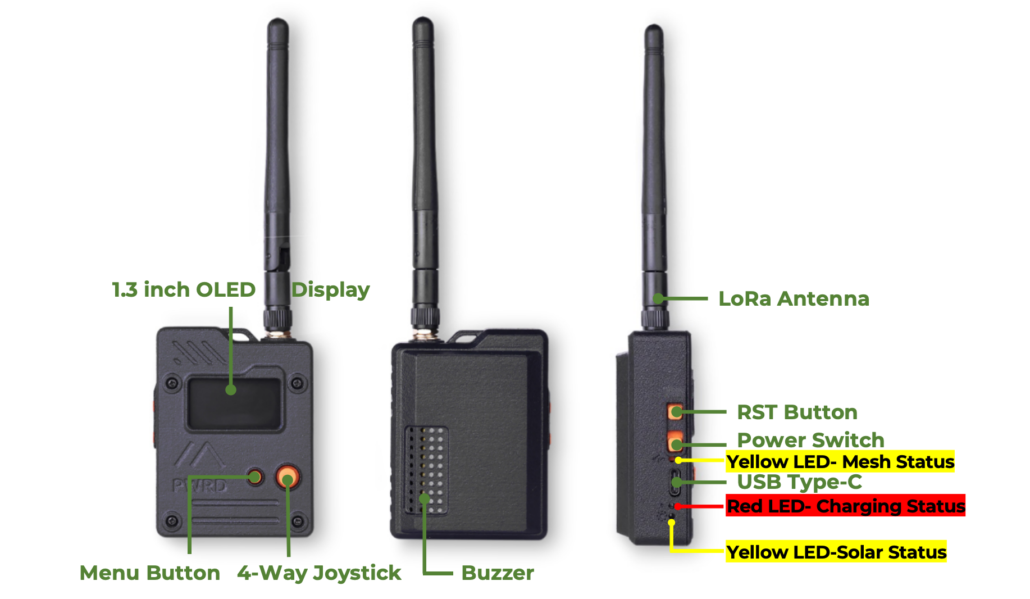
This video breaks down several popular starter options for building an off-grid mesh network:
For more product details comparison, you can check out the Google Doc.
Meshtastic Accessories
There are also some awesome accessories for Meshtastic device/kit, here are some designed by the community for your reference.
Resources for Meshtastic Beginners
Here are some resources I believe will help you better understand Meshtastic that I want to share with you:
Article/Blog/Community Posts:
- Official Documentation: Everything about Meshtastic, including an intro, supported devices, software, etc.
- Reddit Explanation: A beginner-friendly explanation of Meshtastic by the community.
- Top Meshtastic Devices: A Comprehensive Guide by Adrelien: Reviews of popular Meshtastic devices like Seeed Studio SenseCAP Card Tracker T1000-E, RAK WisBlock Meshtastic Starter Kit, Heltec LoRa 32 V3, LILYGO T-Echo, LILYGO T-Beam.
- A Basic Guide to Meshtastic by Mike Oplinger: A fun and straightforward guide to LoRa, Meshtastic, and setup tips.
Videos:
- What Is Meshtastic by Ben Meadors: Lead developer of Meshtastic Ben Meadors explains Meshtastic.
- A Whole Getting Started Guide by The Comms Channel: A YouTube playlist covering getting started, device reviews, antenna testing, and more.
FAQs for New Meshtastic Users
1. Do I need technical knowledge to use Meshtastic?
No, anyone can use Meshtastic. A basic understanding of wireless communication, hardware devices, or open-source projects can help but is not required. New users can easily learn from the documentation provided.
2. Is Meshtastic free?
Yes, Meshtastic is a free and open-source project. You only need to buy Meshtastic-powered hardware devices. Software, firmware, and official documentation are all free. If you enjoy using Meshtastic, you can support the developers by making a donation.
3. Which operating systems are supported by Meshtastic apps?
Meshtastic provides official applications for Android and iOS etc. You can download the apps here.
4. What hardware devices are supported by Meshtastic?
Check the current list of supported devices on the official website. For the latest product releases, check popular vendors such as Seeed Studio, RAK, Heltec, and Lilygo.
5. Can Meshtastic send pictures or large files?
No, Meshtastic is not suitable for large data transmissions like images, videos, or files due to LoRa’s low bandwidth (a few hundred bytes per second). It is designed for short text messages and simple data transmission.
6. What is the communication range of Meshtastic?
The communication range depends on the environment and hardware configuration:
- Urban areas (with obstacles): 1-5 km
- Open areas (e.g., outdoors): Up to 10 km or more
By using the mesh network, the range can be extended by relaying messages through intermediate nodes.
7. Why can‘t my devices communicate with each other?
Common reasons for communication issues include:
- Differing channel settings (channel name and encryption key must match).
- Devices are out of range (exceeded LoRa signal coverage).
- Hardware connection issues (e.g., antenna misinstallation).
- Firmware version incompatibility (ensure all devices use the same version).
8. How does the Meshtastic mesh network work?
Meshtastic uses a Mesh Network (LoRa-based), where every device(also called node) acts as both a transmitter and a repeater. Messages are automatically routed through multiple nodes until they reach their destination. Even if a node is out of direct communication range, other nodes in the mesh can relay messages and extend the coverage.
9. Where can I view official FAQs?
You can find the official FAQs here.
10. Where can I find help?
For support and community interaction, check the following:
Other recommended communities include:
Discord:
- Meshtastic Official Discord
- Seeed Meshtastic Discord
- Andy Kirby Discord
Facebook groups:
- Meshtastic
- Meshtastic UK
- Meshtastic Taiwan Community 臺灣鏈網
- Meshtastic USA Community
- Meshtastic PH
- Meshtastic Australia
>> Read more:
About Author
