What Is an AI Camera and What Does It Do?
What is an AI Camera and How Does It Differ from USB Cameras and IP Cameras?
When we talk about AI camera today, we’re referring to intelligent imaging standalone devices with built-in AI processing capabilities. Unlike conventional USB cameras or IP cameras (IPCs) that simply capture and transmit video data, AI camera can analyze, understand, and make decisions about what they’re seeing in real-time.
Traditional IP Camera Architecture vs. AI Camera
The key difference lies in where the intelligence resides. Traditional cameras are essentially “dumb” sensors that rely on external computation, while AI camera embed the processing power directly into the device itself.
Typical Application of AI Camera
- Object Classification: Classify the entire image
- Parking Occupancy Detection: Identify available and occupied parking spaces
- People Counting: Detect and count foot traffic in crowded areas such as subways and malls.
- Restricted Area Intrusion Detection: Detect unauthorized entry into hazardous areas
- PPE Detection: Verify whether workers are wearing required personal protective equipment
- Object Tracking: Track targets and visualize their movement paths
- Fall Detection: Detect falls using human pose estimation
- Smart Fitness Assistant: Evaluate exercise form using pose estimation
- Defect Detection: Segment surface defects on parts or equipment
Why Built-in AI Processing Matters?
· Faster
Millisecond-level decision making becomes possible when processing happens locally. If you’re using conventional USB or IPC cameras, you need to send data up and down – transmitting image data to external servers for processing. In specific industries like smart manufacturing and healthcare, every second matters.
Consider a quality control scenario on a production line: a traditional camera setup might take 200-500ms to detect a defect (capture → transmit → process → respond), while an AI camera can identify and flag issues in under 50ms.
· Keeps data private
Processing happens locally on the camera, giving you complete control over how data is handled. For example:
- Image Anonymization: Automatically blur faces or sensitive areas before any data leaves the device
- Results-Only Transmission: Instead of sending images, only transmit detection results like “person detected” or “anomaly found”
- Data DELETE after Processing: Analyze key frames and immediately delete them after extracting insights, leaving no trace. This local-first approach ensures sensitive visual data never leaves your premises, meeting strict compliance requirements in healthcare, finance, and government applications.
This local-first approach ensures sensitive visual data never leaves your premises, meeting strict compliance requirements in healthcare, finance, and government applications.
· Significant Cost Benefits
Let’s use 640 x 480 images as an example. 108,000 images – equivalent to 1 hour of 30fps video – to compare different cloud service costs:
Calculation Foundation:
- Video duration: 1 hour at 30fps = 3,600 seconds × 30 frames = 108,000 images
- Image specification: 640 x 480 (VGA, 0.31MP)
- Processing requirement: Real-time object detection and analysis
Pricing data as of March 2026
| Cloud Service Provider | Cost per Image | 1-Hour Video Cost | Daily Cost(24-hour operation) | Monthly Cost(24x30 operation) |
| AWS Rekognition | $0.001 | $108.00 | $2,592.00 | $77,760 |
| Google Cloud Vision | $0.0015 | $162.00 | $3,888.00 | $116,640 |
| Azure Computer Vision | $0.002 | $216.00 | $5,184.00 | $155,520 |
| OpenAI GPT-4 Vision | $0.00255* | $275.40 | $6,609.60 | $198,288 |
| Edge AI | $0.000 | $0.00 | $0.00 | $0.00 |
*OpenAI VGA image requires only 1 tile of 512×512, $0.00255 per image
Typical Medium-sized Retail Store usage
- Operating hours: 12 hours daily
- Security cameras: 4 units (640×480)
- Annual processing: 12 hours × 4 cameras × 365 days = 17,520 hours of video
- Equivalent images: 17,520 × 108,000 = 1.89 billion images
- Even using the cheapest cloud service (AWS Rekognition): Estimated annual cost: $1,890,000
The numbers speak for themselves:
For businesses looking to deploy AI vision at scale, edge computing isn’t just cost-effective—it’s the only economically viable long-term solution for high-volume video analytics.
Edge Computing Deployment Options: AI Camera vs AI Box
In practice, edge AI is typically deployed in two ways: either by using a dedicated AI camera with built-in intelligence, or by adding an AI box behind existing camera systems to enable on-device processing.
Choose AI Camera when:
- New Projects – No existing camera infrastructure,Greenfield deployments, new installations
- Complete Upgrades – Current cameras are outdated and need replacement
- Simplified Deployment – Want to reduce wiring complexity and device count
- Harsh Environments – Need better protection ratings and reliability
- Low Power Requirements – Battery-powered or solar applications
- Space Constraints – Tight installation spaces, unsuitable for additional devices
- Security Considerations – Reduce network nodes and attack surface
- Long-term Cost – Large-scale deployment, simplified maintenance management
Choose AI Boxes when:
- Investment Protection – Extensive existing cameras still functional
- Flexible Upgrades – Phased modernization of existing systems
- Multi-camera Processing – One AI Box handles multiple video streams
- High Computing Demands – Need more powerful processing capabilities
- Rapid Algorithm Iteration – Frequent AI model updates required
- Centralized Management – Unified data processing and storage needs
*This article focuses on AI cameras – we’ll cover AI box solutions in a separate upcoming article.
Seeed’s Vision for Developer-Focused AI Camera
As an AI hardware company, Seeed constantly asks ourselves:
- How can we enable developers to easily integrate AI hardware into their systems and validate quickly?
- How do we build products not just for use, but for flexible creation?
We’ve defined an AI camera product series – reCamera – where our philosophy is deeply integrated into the product’s characteristics. Beyond basic local computing power, it should also be:
Feature 1: Open Source
This demonstrates our commitment. We believe the ultimate solution for privacy is edge AI + open source. Open source allows users to monitor the entire program operation, ensuring no secret data collection, no hidden algorithms and No black box data processing.
Feature 2: Protocol & Interface Openness
Supporting different protocols with customizable output formats ensures seamless integration across diverse systems.
Communication Protocols:
- HTTP/HTTPS RESTful API
- MQTT (IoT messaging protocol)
- WebSocket (real-time bidirectional communication)
- TCP/UDP Socket
- ONVIF (camera industry standard)
- RTSP/RTP (video streaming protocols)
Physical Connections:
- Standard interfaces – USB, Ethernet, GPIO
- Wireless connectivity – WiFi, WiFi Halow,Bluetooth, LoRa, 4G/5G
- Video outputs – USB-C, network streaming
Feature 3:Microphone embedded, multi-modal supported
Supporting multi-modal applications with integrated microphone enables vision + audio combined applications. For example, triggering video recording upon detecting the sound of breaking glass, or combining visual person detection with voice commands for enhanced security applications.
Feature 4:Multiple Configuration Methods
Beyond the C SDK, we provide various configuration approaches like Web UI and Node-RED to accommodate different developer preferences and use cases
Feature 5:Custom AI Model Support
Supporting custom AI models and algorithms is crucial for specialized applications. We deeply understand the pain points of running models on edge devices. To eliminate environment dependency headaches, we’ve launched a model quantization tool where you can directly upload ONNX models and receive an optimized model ready to run on Seeed devices within minutes.
Feature 6:Rich Documentation & Application Library
Pre-built Application Templates:
- Retail analytics (people counting, heat mapping)
- Security monitoring (intrusion detection, face recognition)
- Industrial automation (defect detection, assembly verification)
- Smart building (occupancy monitoring, energy optimization)
Feature 7:Modular Design
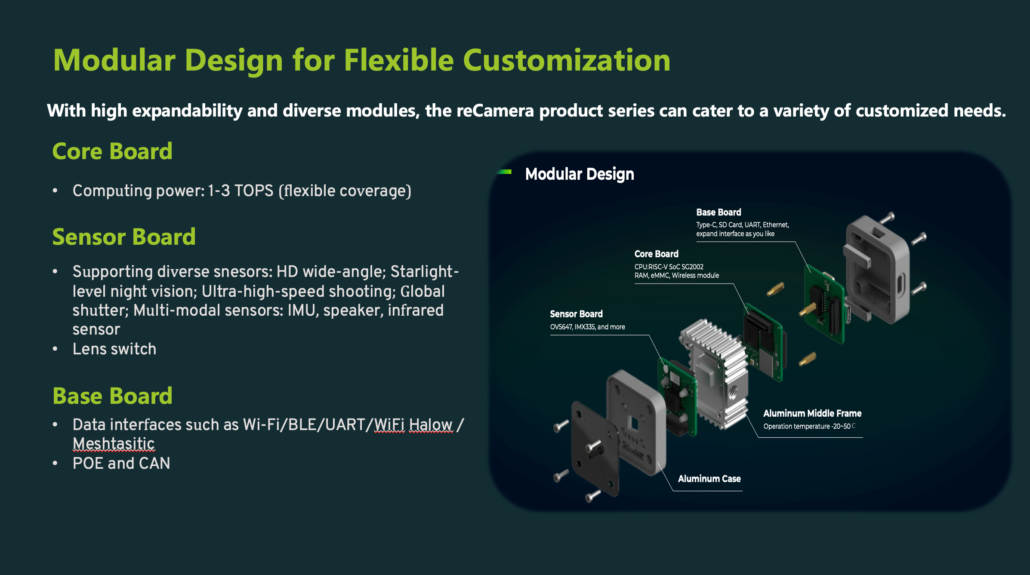
reCamera: The Shortest Pathway to Build A Market-ready AI Camera
Seeed Studio reCamera series is a fully open-sourced, modular AI Camera. Featuring 1-3 TOPS, built-in YOLO & Node-RED, Linux-based, supports custom AI models, modular design with interchangeable sensors and lenses. reCamera is the go-to AI Camera for YOLO at the edge.
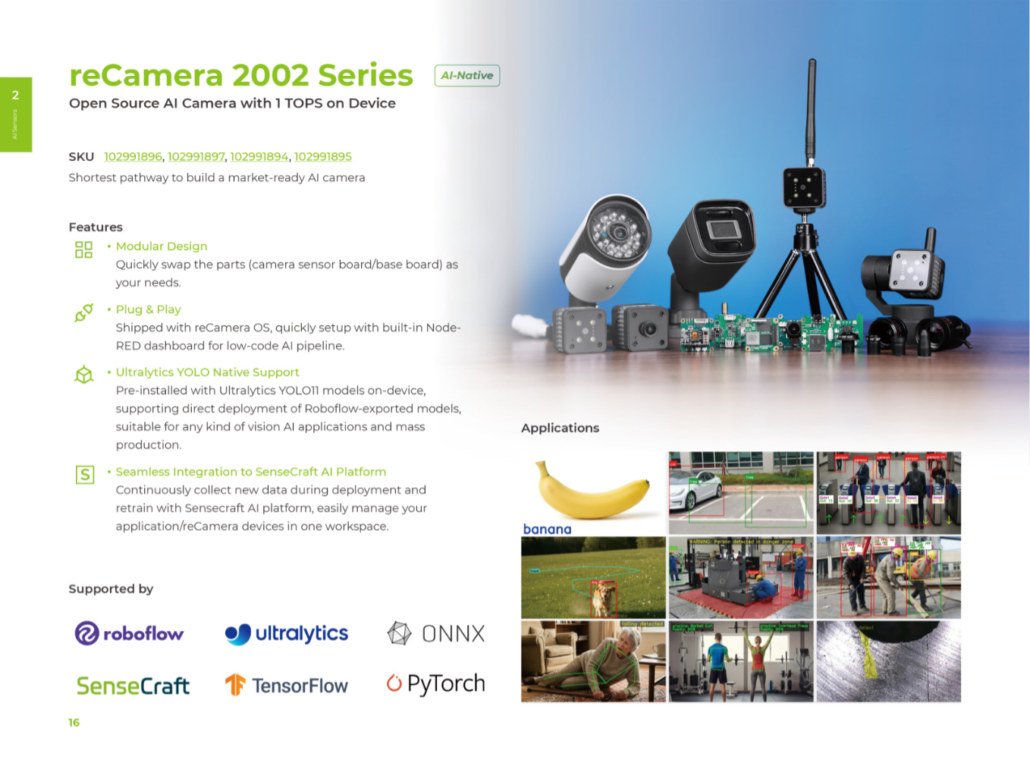
Here’s a look at the current reCamera lineup:
reCamera 2002
Featuring 1 TOPS @ INT8, with built-in YOLOv11 and Node-RED, along with a 5MP camera for ready-to-deploy edge AI applications.
reCamera Gimbal
An AI camera equipped with brushless pan-tilt motors, supporting 360° yaw and 180° pitch for dynamic tracking scenarios.
reCamera 2002 PoE
Designed for networked deployments, it features a 1/2.9” CMOS sensor, replaceable M12 lenses (90° FOV by default), along with PoE and GPIO support—making it a flexible smart vision node for various systems.
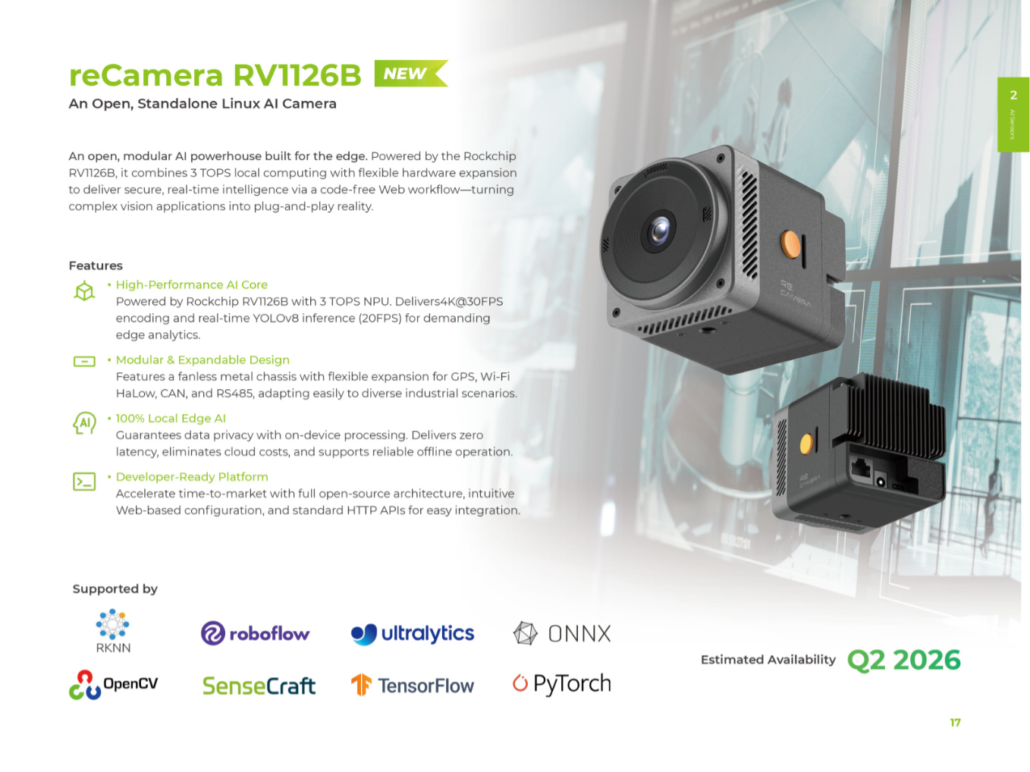
Looking ahead, we plan to launch the reCamera RV1126B, powered by Rockchip, in mid-2026. Stay tuned.
About Author
