JetPack 7.2 Solves OOM with Software Memory Upgrade for Edge LLMs — Here’s How to Spend It Wisely
You flashed your Jetson Orin Nano 8 GB, fired up an LLM, and watched it die during engine load or prefill. The reflex move is to buy a module with more DRAM. But in 2026, with DRAM supply tight and prices climbing, that’s an expensive reflex — and often the wrong one.
JetPack 7.2 gives you something better than a bigger stick of memory: it gives you back memory you already own.
This article walks through what changed in JetPack 7.2, how to turn an 8 GB (or 32 GB) module into a real LLM deployment budget, and — just as important — what JetPack 7.2 does not do, so you don’t credit the platform for things the runtime did, or blame the platform for things your config did.
Bookmark this one or check the wiki tutorial. It’s the map you’ll want open the next time an OOM kills your edge deployment.
First, Why Jetson Memory Is Different
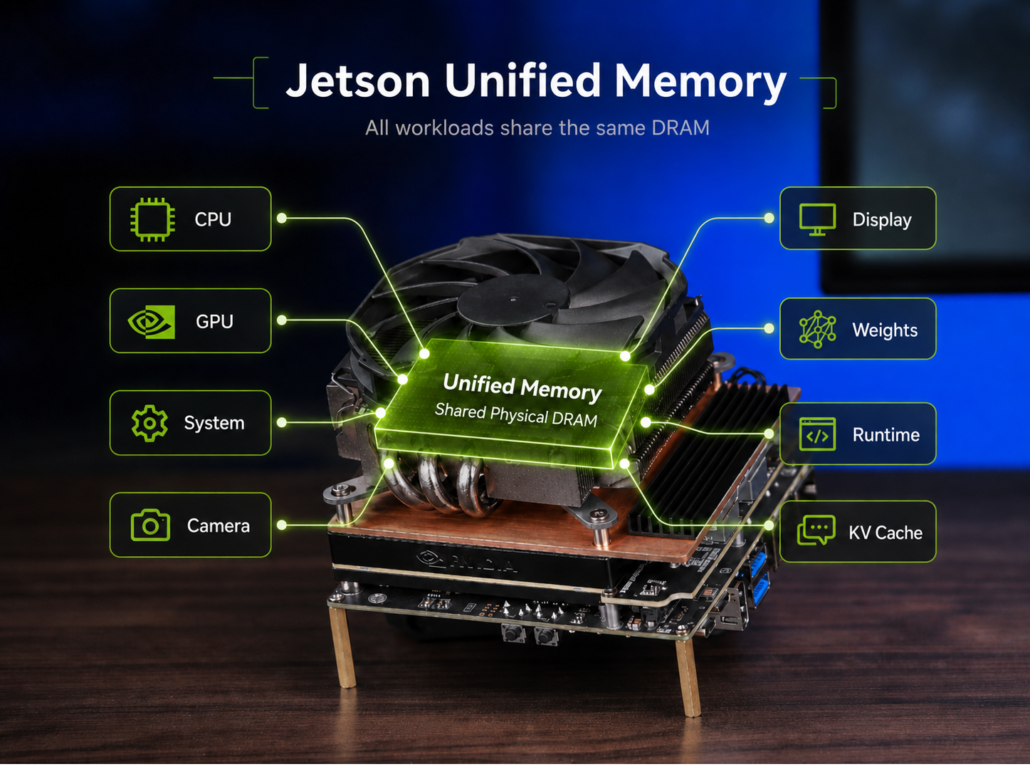
On a desktop PC, the GPU has its own VRAM and the CPU has its own DRAM. On Jetson, there is only one pool of physical DRAM, shared by everything: CPU processes, the GPU, system services, camera and display pipelines, your model weights, the inference runtime, and the KV cache.
This is “unified memory.” It means every megabyte matters twice: your LLM isn’t competing with just other apps — it’s competing with the operating system, the display server, and every background service, all drawing from the same bank.
It also means the system footprint at boot is the first line of your LLM budget. Which brings us to JetPack 7.2.
What JetPack 7.2 Actually Delivers
JetPack 7.2 ships Jetson Linux 39.2, Ubuntu 24.04, Linux kernel 6.8, CUDA 13.2.1, and TensorRT 10.16.2. It does not add DRAM to your module, automatically shrink your model, or turn on KV-cache reuse by itself. What it does is hand you a leaner baseline and better tooling to measure what you have:
- A leaner boot footprint. In one measured Orin Nano 8 GB comparison, the settled idle state used about 1.4 GiB on JetPack 6.2 and a little over 800 MiB on JetPack 7.2 — roughly 600 MiB recovered, in that specific image and service configuration. That’s memory that stays available for weights, workspace, and KV cache instead of being eaten before your app starts.
- Official Yocto support. When the Ubuntu dev image carries software you don’t need, a production team can now build a tailored, reproducible image with only the required services, drivers, and libraries.
- A current CUDA + TensorRT stack, which is the baseline for the TensorRT Edge-LLM toolchain (more on that below).
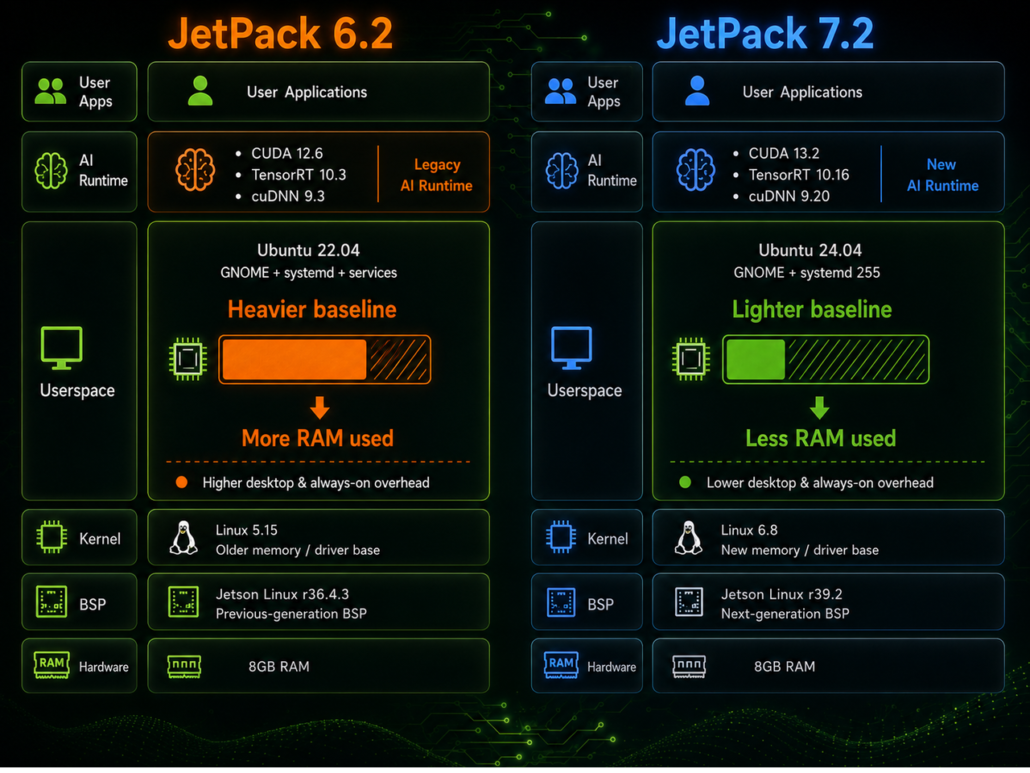
Hence “software memory upgrade”: same physical DRAM, more of it actually usable.
One caveat before you get excited: the boot-footprint gain is not automatic for every image. Desktop mode, enabled services, containers, display and camera paths, carrier-board BSP settings, and where you take the measurement all move the baseline. Measure the settled idle state on your device before you assign that recovered headroom to a bigger model.
The LLM Memory Budget: Six Chunks You Must Account For
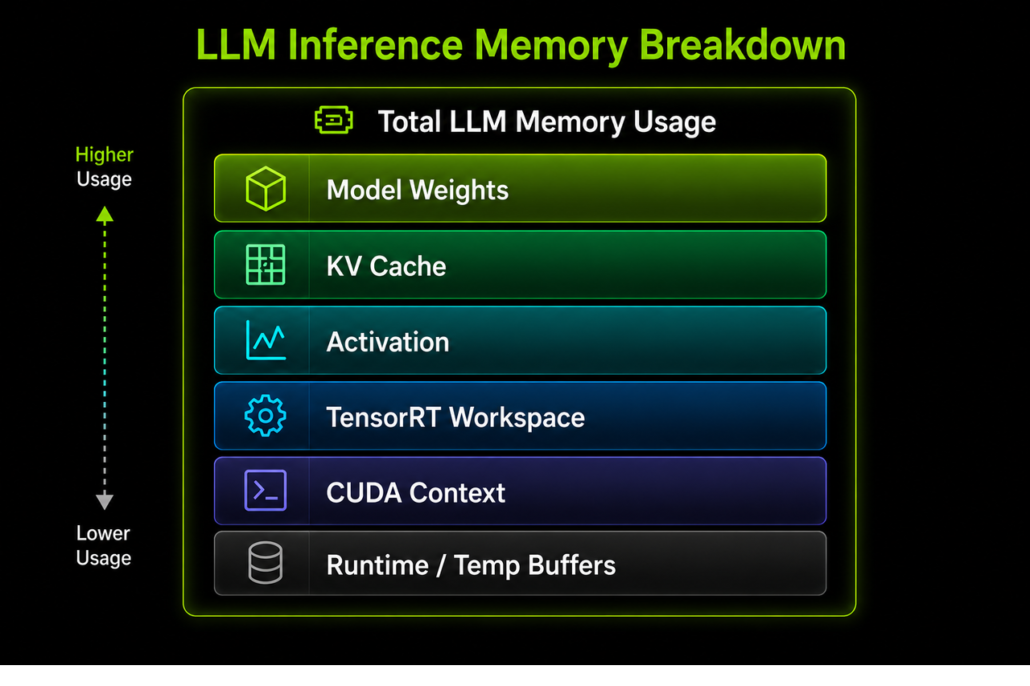
An LLM doesn’t just “load the model.” Split your usable memory into these chunks before you change a single setting:
| Chunk | What it is | Behavior |
|---|---|---|
| Model weights | The trained parameters | Biggest fixed cost; scales with model size and precision |
| KV cache | The model’s memory of the conversation so far | Grows with context, batch, and concurrency |
| Activations | Temporary tensors created and discarded mid-layer | Transient |
| TensorRT workspace | Scratch space for engine prep and execution | Runtime-dependent |
| CUDA context | The GPU “session” (context, streams, internal state) | Fixed startup cost |
| Runtime / temp buffers | I/O buffers, copy regions, intermediate scratch | Short-lived |
Get into the habit of thinking in these six lines. Every optimization you’ll ever apply on Jetson targets one of them.
Weights: The 75% Discount Called INT4
Weights are usually the first stable allocation to account for. For a 4-billion-parameter model, rough weight-only storage looks like this (your mileage varies with architecture):
| Precision | Bytes per parameter | 4B model, weights only |
|---|---|---|
| FP16 | 2 | ~8 GB |
| INT8 | 1 | ~4 GB |
| INT4 | 1/2 | ~2 GB |
Moving from FP16 to INT4 cuts theoretical weight storage by about 75%. Note that quantization scales, metadata, runtime buffers, and the KV cache come on top of these numbers — but on an 8 GB module, INT4 is often the difference between “won’t load” and “ships.”
“It’s 4-bit” Is Not a Memory Number: GGUF vs. TensorRT Edge-LLM
Here’s a trap that bites experienced developers too: a Q4_K_M GGUF file run by llama.cpp and an INT4 AWQ checkpoint run through TensorRT Edge-LLM are not equivalent deployments, even on the same JetPack 7.2 image with the same model.
| GGUF / llama.cpp | TensorRT Edge-LLM | |
|---|---|---|
| Quantization artifact | A GGUF file (e.g. Q4_K_M) | A supported INT4 AWQ checkpoint and its exported artifacts |
| Inference engine | llama.cpp | Model export → TensorRT engine |
| GPU execution | Kernels selected by the llama.cpp build and backend | TensorRT engine with supported fusion, memory planning, plugins, CUDA Graphs |
| Fair comparison | Match model, context, GPU offload, batch, power mode, version | Match the same variables plus engine and workspace use |
TensorRT Edge-LLM is more than an INT4 model reader: it turns a supported checkpoint into an engine optimized for NVIDIA GPUs — memory planning, KV-cache management, kernel fusion, CUDA Graphs. But it’s a separate runtime and toolchain, not a feature JetPack enables automatically, and its available features depend on the model, engine build, and version. Always check the supported-model matrix.
And if you’re comparing JetPack 6.2 vs 7.2: rebuild or revalidate both paths on their respective stacks. Reusing an old engine and calling the delta “a JetPack 7.2 gain” is how false benchmarks are born.
KV Cache: The Budget That Grows With Every Token
When a Transformer emits its first token, it processes the prompt and stores the attention keys and values it computed. For every later token, the runtime reuses those instead of recomputing the whole history. That’s why decoding is practical at all — but the cache grows as the conversation grows.
The planning formula to burn into memory:
KV-cache bytes ≈ 2 × layers × KV heads × head dimension × tokens × batch × bytes per element
Every term in that product is a decision you control. And it’s why the same INT4 model can run comfortably at 4K context and then run out of memory at 32K. JetPack 7.2 can leave you more usable headroom, but it does not cap KV-cache growth. Weight quantization lowers the fixed cost; context, batch, and concurrency define the growing part.
Prefix Reuse: Turn the KV Cache into a Managed Resource
If your workload repeats the same prompt prefix — a long system prompt for an agent, a repeated document prefix in RAG, the same image prefix in VLM requests — TensorRT Edge-LLM can cache and reuse matching prefixes across requests, instead of re-prefetching the repeated prefix every time.
| Request | Without prefix reuse | With prefix reuse |
|---|---|---|
| First request | System prompt + user prompt prefetched, written to KV cache | Same initial prefill required |
| Later request, same system prompt | The repeated prefix is prefetched again | The cached prefix is reused; only the new part gets prefilled |
Details that matter in the field:
- The cache is local to one runtime instance and keyed by prefix content — only the shared part of a prompt can be reused. Change the prompt, image, or image order, and reuse breaks for that prefix.
- In the current Edge-LLM implementation, this feature requires an FP16KV cache and must be explicitly enabled for the selected engine and runtime.
- The main win is lower repeated prefill work and shorter time-to-first-token — not lower peak memory. Retained cache pages still consume DRAM.
- Verify, don’t assume: build enough page-pool capacity for the contexts you intend to retain, enable context reuse at runtime, and check the runtime profile — a cache hit should report a positive reused-token count.
Kernel Fusion and CUDA Graphs: What They Do — and Don’t — Save
Two more mechanisms round out the runtime picture. Neither makes your model smaller, and neither is a “JetPack 7.2 memory number” — but both run on the CUDA 13.2.1 / TensorRT 10.16.2 stack that 7.2 ships.
Kernel fusion. A Transformer layer chains normalization, quant/dequant, matmul, activation, and attention. Execute them as separate kernels and each one writes an intermediate tensor to DRAM only for the next kernel to immediately read it back. Fuse them and that round-trip disappears: less bandwidth use, fewer temporary allocations, fewer kernel launches. Fusion reduces intermediate traffic — it does not change weights or KV-cache size, and available fusions depend on your model graph and engine build. Profile the resulting engine on your actual Jetson.
CUDA Graphs. During decode, the LLM generates one or a few tokens per iteration while a similar GPU sequence executes over and over. Conventionally the CPU submits that sequence repeatedly. CUDA Graph records the sequence once and replays it with a single graph launch. Fusion reduces memory traffic; CUDA Graph reduces repeated CPU-to-GPU launch overhead — which matters on Jetson, where CPU resources and power budget are as limited as the GPU.
Put together, the runtime stack forms one coherent picture:
- Quantization lowers the fixed weight cost
- KV-cache settings control the growing context cost
- Fusion reduces intermediate traffic
- CUDA Graphs reduce repeated decode scheduling
The Decision Map: Print This Table
| Layer / mechanism | Relationship to JetPack 7.2 | Deployment decision | What to measure |
|---|---|---|---|
| Platform baseline | Supplies OS, CUDA, TensorRT versions; reproducible starting point | Record release, service set, desktop target, power mode | Settled idle memory, device config |
| Yocto / trimmed image | Direct 7.2 production option | Include only required services, drivers, libraries | Idle memory + required-function validation |
| Low-precision weights | Model choice within the 7.2 runtime | Pick a supported checkpoint, validate output quality | Engine-load memory, task quality |
| KV-cache capacity & reuse | Optional runtime feature, not an automatic OS feature | Set context, batch, page-pool, retention limits | Prefill peak, steady decode memory, reused-token count, TTFT |
| TensorRT fusion + CUDA Graphs | Compatible engines exploit the 7.2 stack | Build and profile on the target device | Runtime peak, decode latency, throughput |
Work it in order: establish the image and platform budget → measure the runtime and model footprint → expand context and concurrency only while the complete workload still has headroom.
Measure Like You Mean It: One Variable, Four States
When comparing a JetPack 6.2 result against 7.2, treat the release as exactly one variable. Hold the module, carrier board, model checksum, command, GPU offload, context, generated-token count, power mode, jetson_clocks state, desktop target, service set, temperature, and sampling point fixed. Record the L4T, CUDA, and TensorRT versions with every run.
And measure the four memory states that matter:
- Settled idle — after boot, after services settle
- Engine / model loaded — weights and engine in memory
- Prompt prefill — often the true peak
- Steady decode — the sustained working set
A number taken at only one state cannot prove that JetPack 7.2, CUDA, or TensorRT caused a whole-workload memory improvement. If you remember nothing else from this article, remember that sentence.
About Author
