Arduino Interaction and Low Power
This guide covers Sticky’s touch input, RTC, microphone, and deep sleep through standalone examples. A three-page demo then combines these features with the onboard peripherals from the previous guide for page navigation, data refresh, and button wake-up.
Before You Start
Complete the setup in Arduino Basics and Display. Select File > New Sketch and replace the default code with the complete code for the example you want to run. Uploading replaces the program on the device.
Touch and the complete demo use the Seeed_GFX2 library installed in the first guide. Other libraries are listed in the relevant sections. To view serial output, select the CH343P port and open Tools > Serial Monitor at 115200 baud.
Touch: Draw Dots with Partial Refresh
This example reads tap positions from the GT911 touch controller, draws black dots on the screen, and prints their coordinates over serial.
| Signal | Setting |
|---|---|
| I2C SDA / SCL | GPIO3 / GPIO2, 400 kHz |
| Touch power enable | GPIO42, active HIGH |
| RESET | GPIO41 |
| INT | GPIO21 |
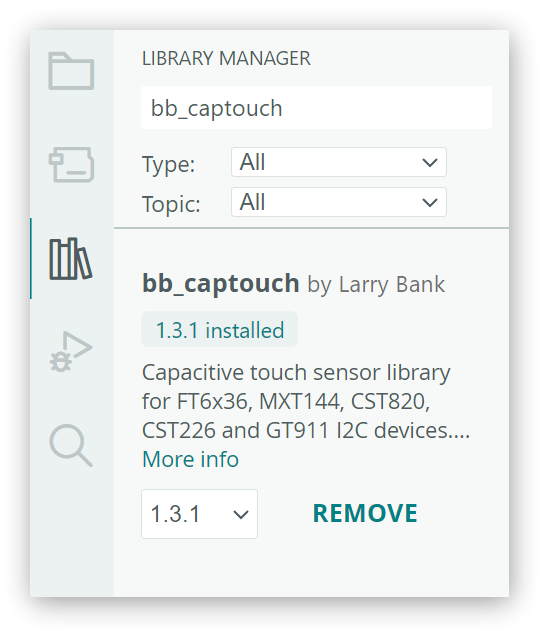
Step 1. Install bb_captouch by Larry Bank in Library Manager (reference version 1.3.1). Keep the Seeed_GFX2 library and board profile from the first guide.
Step 2. Copy the complete code into a new sketch, compile, and upload. Place the device with its physical buttons at the top and wait for the white screen to finish refreshing.
Show complete sketch
/*
 * reTerminal Sticky - GT911 Touch Example
 *
 * Prints GT911 touch coordinates and draws a black dot at each touched position.
 */

#include <Arduino.h>
#include <Wire.h>
#include <Seeed_GFX.h>
#include <bb_captouch.h>

// CH343P UART: ESP32-S3 RX on GPIO44, TX on GPIO43.
constexpr int PIN_SERIAL_RX = 44;
constexpr int PIN_SERIAL_TX = 43;

// Main power hold and power lock signals, both active HIGH.
constexpr int PIN_POWER_HOLD = 45;
constexpr int PIN_POWER_LOCK = 46;

// Onboard GT911 on ESP32-S3 I2C0: GPIO3 -> SDA, GPIO2 -> SCL.
constexpr int PIN_TOUCH_SCL = 2;
constexpr int PIN_TOUCH_SDA = 3;
constexpr int PIN_TOUCH_ENABLE = 42;
constexpr int PIN_TOUCH_INTERRUPT = 21;
constexpr int PIN_TOUCH_RESET = 41;
constexpr uint32_t TOUCH_I2C_FREQUENCY = 400000;

constexpr int DISPLAY_WIDTH = 800;
constexpr int DISPLAY_HEIGHT = 480;
constexpr int TOUCH_DOT_RADIUS = 3;

Seeed_GFX display(Seeed_Product::reTerminal_Sticky);
BBCapTouch touch;

void keepPowerOn() {
  pinMode(PIN_POWER_HOLD, OUTPUT);
  pinMode(PIN_POWER_LOCK, OUTPUT);
  digitalWrite(PIN_POWER_HOLD, HIGH);
  digitalWrite(PIN_POWER_LOCK, HIGH);
}

int scaleCoordinate(int value, int inputMaximum, int outputMaximum) {
  value = constrain(value, 0, inputMaximum);
  return static_cast<int>((static_cast<int32_t>(value) * outputMaximum +
                           inputMaximum / 2) /
                          inputMaximum);
}

void convertTouchCoordinates(int rawX, int rawY, int& x, int& y) {
  // Convert the GT911's portrait 480x800 coordinates to the display's
  // landscape 800x480 coordinates and its default 180-degree rotation.
  x = DISPLAY_WIDTH - 1 - scaleCoordinate(rawY, 800, DISPLAY_WIDTH - 1);
  y = DISPLAY_HEIGHT - 1 - scaleCoordinate(rawX, 480, DISPLAY_HEIGHT - 1);
}

void setup() {
  keepPowerOn();

  Serial1.begin(115200, SERIAL_8N1, PIN_SERIAL_RX, PIN_SERIAL_TX);
  delay(200);
  Serial1.println();
  Serial1.println("reTerminal Sticky Touch Example");

  pinMode(PIN_TOUCH_ENABLE, OUTPUT);
  digitalWrite(PIN_TOUCH_ENABLE, HIGH);
  delay(250);

  if (!display.begin()) {
    Serial1.println("Display initialization failed");
    while (true) {
      delay(1000);
    }
  }

  display.fillScreen(TFT_WHITE);
  display.refresh();

  // Initialize the GT911 on I2C0 using the onboard touch pins.
  if (touch.init(PIN_TOUCH_SDA, PIN_TOUCH_SCL, PIN_TOUCH_RESET,
                 PIN_TOUCH_INTERRUPT, TOUCH_I2C_FREQUENCY, &Wire) !=
          CT_SUCCESS ||
      touch.sensorType() != CT_TYPE_GT911) {
    Serial1.println("GT911 initialization failed");
    Serial1.println("Check the touch library and reset the device.");
    while (true) {
      delay(1000);
    }
  }

  Serial1.println("GT911 initialized on I2C0");
  Serial1.println("Tap the screen to draw a black dot.");
}

void loop() {
  static bool touchHandled = false;
  TOUCHINFO touchInfo = {};

  const bool isTouched = touch.getSamples(&touchInfo) == 1 &&
                         touchInfo.count > 0;
  if (isTouched && !touchHandled) {  // Draw once per touch, not every poll.
    int x = 0;
    int y = 0;
    convertTouchCoordinates(touchInfo.x[0], touchInfo.y[0], x, y);

    Serial1.print("Touch X: ");
    Serial1.print(x);
    Serial1.print(", Y: ");
    Serial1.println(y);

    display.fillCircle(x, y, TOUCH_DOT_RADIUS, TFT_BLACK);

    // Refresh the dot's window instead of the full 800x480 screen.
    const int refreshX = max(0, x - TOUCH_DOT_RADIUS - 2);
    const int refreshY = max(0, y - TOUCH_DOT_RADIUS - 2);
    const int refreshWidth = min(DISPLAY_WIDTH - refreshX,
                                 (TOUCH_DOT_RADIUS + 2) * 2 + 1);
    const int refreshHeight = min(DISPLAY_HEIGHT - refreshY,
                                  (TOUCH_DOT_RADIUS + 2) * 2 + 1);
    display.refreshPartial(refreshX, refreshY, refreshWidth, refreshHeight);

    touchHandled = true;
  } else if (!isTouched) {
    touchHandled = false;
  }

  delay(20);
}
Code Explanation
touch.init()initializes the GT911 using the interfaces listed above.convertTouchCoordinates()swaps and maps the touch coordinates to the 800 × 480 display with the buttons at the top.- The sketch reads the first touch point, draws a dot with
fillCircle(), and callsrefreshPartial()to update the surrounding area.touchHandledprevents repeated handling of the detected touch. Release after each tap and wait for the refresh to finish.
Expected Output
Open Serial Monitor and tap the center and near each corner, releasing and waiting for refresh completion between taps. A black dot appears at each position, and Serial Monitor prints the corresponding Touch X and Y. This example is intended for individual taps, not continuous drawing by dragging. Restarting clears the screen.
reTerminal Sticky Touch Example
GT911 initialized on I2C0
Tap the screen to draw a black dot.
Touch X: 9, Y: 14
Touch X: 795, Y: 8
Touch X: 9, Y: 475
Touch X: 795, Y: 475
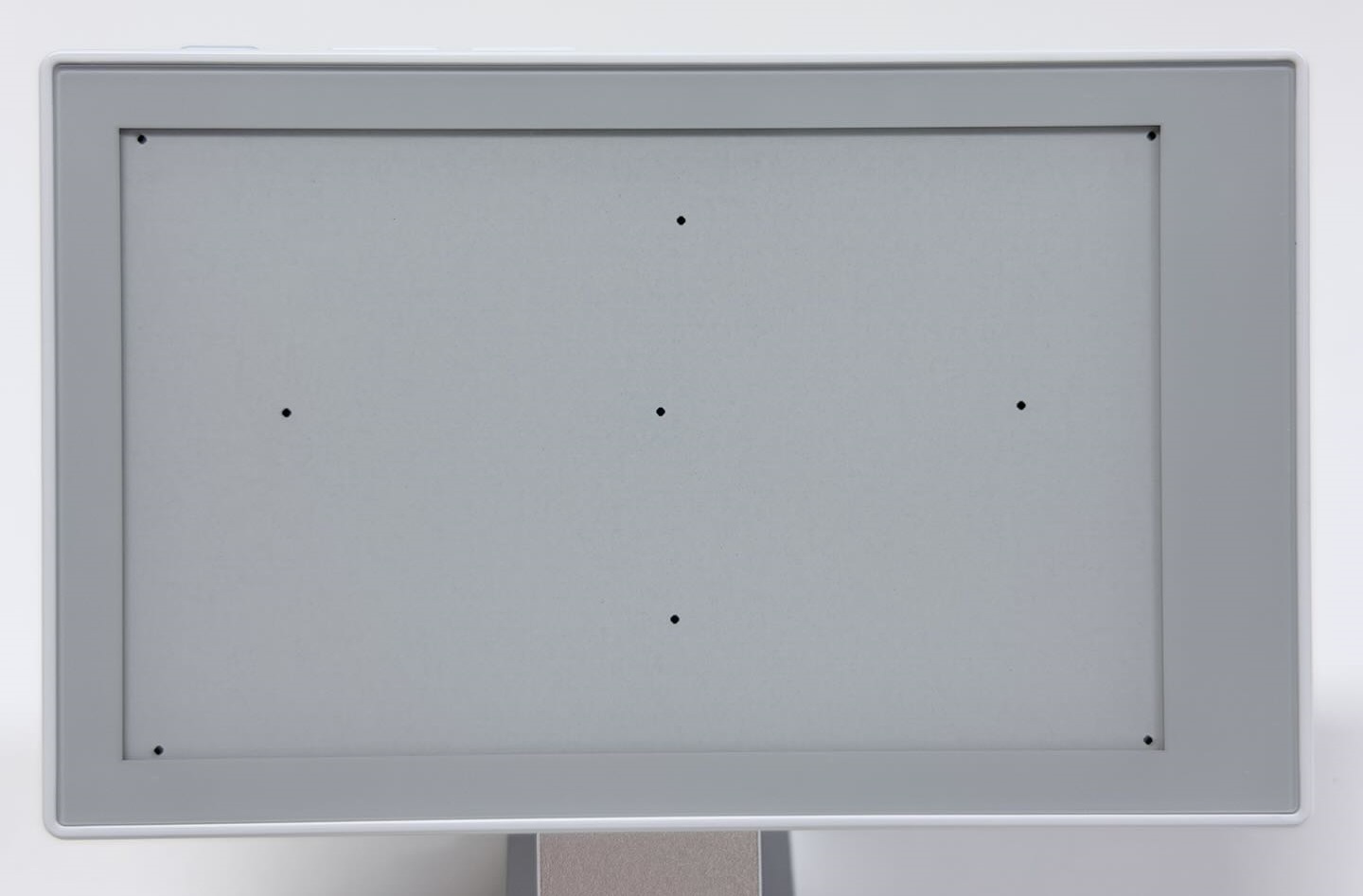
The program waits while the display refreshes, so rapid taps may be missed.
RTC: Read Date and Time
This example reads the onboard PCF8563 real-time clock and prints its date and time about once a second. It does not update the display.
| Setting | Value |
|---|---|
| I2C SDA / SCL | GPIO1 / GPIO0, 400 kHz |
| PCF8563 address | 0x51 |
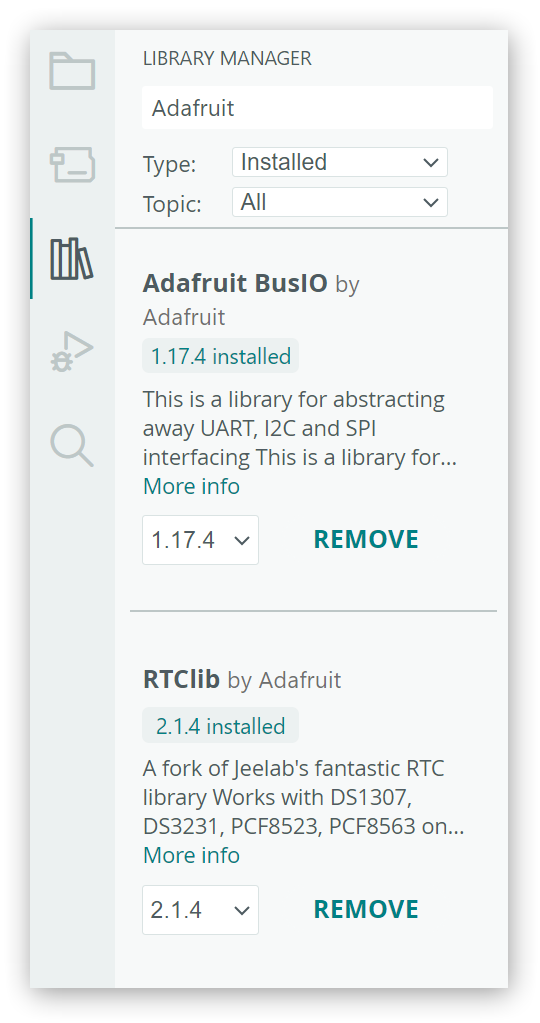
Step 1. Install RTClib by Adafruit in Library Manager, along with its Adafruit BusIO dependency. Reference versions are 2.1.4 and 1.17.4, respectively.
Step 2. Copy the complete code into a new sketch, compile, and upload.
Show complete sketch
/*
 * reTerminal Sticky - RTC Example
 *
 * Reads and prints the date and time stored by the onboard PCF8563 RTC.
 */

#include <Arduino.h>
#include <Wire.h>
#include <RTClib.h>

// CH343P UART: ESP32-S3 RX on GPIO44, TX on GPIO43.
constexpr int PIN_SERIAL_RX = 44;
constexpr int PIN_SERIAL_TX = 43;

// Main power hold and power lock signals, both active HIGH.
constexpr int PIN_POWER_HOLD = 45;
constexpr int PIN_POWER_LOCK = 46;

// Onboard sensor I2C bus: GPIO1 -> SDA, GPIO0 -> SCL.
constexpr int PIN_I2C_SDA = 1;
constexpr int PIN_I2C_SCL = 0;
constexpr uint32_t I2C_FREQUENCY = 400000;

RTC_PCF8563 rtc;

uint8_t daysInMonth(uint16_t year, uint8_t month) {
  static const uint8_t DAYS_PER_MONTH[] = {
    31, 28, 31, 30, 31, 30, 31, 31, 30, 31, 30, 31
  };

  if (month < 1 || month > 12) {
    return 0;
  }

  if (month == 2) {
    const bool leapYear = (year % 4 == 0 && year % 100 != 0) ||
                          (year % 400 == 0);
    return leapYear ? 29 : 28;
  }

  return DAYS_PER_MONTH[month - 1];
}

bool isDateTimeValid(const DateTime& dateTime) {
  const uint8_t month = dateTime.month();
  const uint8_t maximumDay = daysInMonth(dateTime.year(), month);

  return dateTime.isValid() &&
         month >= 1 && month <= 12 &&
         dateTime.day() >= 1 && dateTime.day() <= maximumDay &&
         dateTime.hour() <= 23 &&
         dateTime.minute() <= 59 &&
         dateTime.second() <= 59;
}

void keepPowerOn() {
  pinMode(PIN_POWER_HOLD, OUTPUT);
  pinMode(PIN_POWER_LOCK, OUTPUT);
  digitalWrite(PIN_POWER_HOLD, HIGH);
  digitalWrite(PIN_POWER_LOCK, HIGH);
}

void printTwoDigits(uint8_t value) {
  if (value < 10) {
    Serial1.print('0');
  }
  Serial1.print(value);
}

void setup() {
  keepPowerOn();

  Serial1.begin(115200, SERIAL_8N1, PIN_SERIAL_RX, PIN_SERIAL_TX);
  delay(200);
  Serial1.println();
  Serial1.println("reTerminal Sticky RTC Example");

  Wire.begin(PIN_I2C_SDA, PIN_I2C_SCL, I2C_FREQUENCY);

  if (!rtc.begin(&Wire)) {
    Serial1.println("PCF8563 initialization failed");
    Serial1.println("Check the I2C connection and reset the device.");
    while (true) {
      delay(1000);
    }
  }

  const bool powerWasLost = rtc.lostPower();
  const DateTime storedTime = rtc.now();
  const bool storedTimeIsValid = isDateTimeValid(storedTime);

  // Preserve stored time unless power was lost or the date is invalid.
  if (powerWasLost || !storedTimeIsValid) {
    if (powerWasLost) {
      Serial1.println("RTC power-loss flag is set.");
    }
    if (!storedTimeIsValid) {
      Serial1.println("RTC contains an invalid date or time.");
    }

    const DateTime compileTime(__DATE__, __TIME__);
    rtc.adjust(compileTime);
    Serial1.println("RTC automatically initialized from the sketch compile time.");
  } else {
    Serial1.println("RTC stored time is valid; automatic initialization was not needed.");
  }

  Serial1.println("Reading the stored RTC date and time...");
}

void loop() {
  const DateTime now = rtc.now();

  Serial1.print(now.year());
  Serial1.print('-');
  printTwoDigits(now.month());
  Serial1.print('-');
  printTwoDigits(now.day());
  Serial1.print(' ');
  printTwoDigits(now.hour());
  Serial1.print(':');
  printTwoDigits(now.minute());
  Serial1.print(':');
  printTwoDigits(now.second());
  Serial1.println();

  delay(1000);
}
Code Explanation
rtc.begin(&Wire)initializes the PCF8563, andrtc.now()reads the date and time. If initialization fails, the sketch prints an error and stops.- At startup, the sketch checks
rtc.lostPower()and validates the stored date and time. It callsrtc.adjust()with the compile time from__DATE__and__TIME__only if the power-loss flag is set or the date and time are invalid. Otherwise, it preserves the stored time.
Expected Output
Open Serial Monitor. The date and time are printed about once a second in year-month-day hour:minute:second format. Startup messages indicate whether initialization was needed. In this output, the stored time was valid and was preserved:
reTerminal Sticky RTC Example
RTC stored time is valid; automatic initialization was not needed.
Reading the stored RTC date and time...
2026-11-03 11:42:45
2026-11-03 11:42:46
This example does not synchronize time over the network or convert time zones. If the RTC holds a valid but incorrect time, restarting or reuploading this sketch will not correct it. Set the RTC separately.
Microphone: Observe Sound Level
This example uses ESP_I2S to read the onboard PDM microphone and report sound levels over serial. ESP_I2S is included in the ESP32 board package; no additional library is needed.
| Signal | GPIO |
|---|---|
| PDM CLK | GPIO19 |
| PDM DATA | GPIO20 |
| Microphone power enable | GPIO38, active HIGH |
Copy the complete code into a new sketch, compile, and upload.
Show complete sketch
/*
 * reTerminal Sticky - Microphone Example
 *
 * Samples the onboard PDM microphone and prints a volume value every 5 seconds.
 */

#include <Arduino.h>
#include <ESP_I2S.h>
#include <math.h>

// CH343P UART: ESP32-S3 RX on GPIO44, TX on GPIO43.
constexpr int PIN_SERIAL_RX = 44;
constexpr int PIN_SERIAL_TX = 43;

// Main power hold and power lock signals, both active HIGH.
constexpr int PIN_POWER_HOLD = 45;
constexpr int PIN_POWER_LOCK = 46;

// Onboard PDM microphone: GPIO19 -> CLK, GPIO20 -> DATA, GPIO38 -> power.
constexpr int PIN_MICROPHONE_CLOCK = 19;
constexpr int PIN_MICROPHONE_DATA = 20;
constexpr int PIN_MICROPHONE_ENABLE = 38;

constexpr uint32_t SAMPLE_RATE = 16000;
constexpr size_t SAMPLE_COUNT = 16000;  // One second of mono audio.
constexpr size_t SAMPLES_PER_BLOCK = 512;
constexpr unsigned long REPORT_INTERVAL_MS = 5000;

I2SClass microphone;

void keepPowerOn() {
  pinMode(PIN_POWER_HOLD, OUTPUT);
  pinMode(PIN_POWER_LOCK, OUTPUT);
  digitalWrite(PIN_POWER_HOLD, HIGH);
  digitalWrite(PIN_POWER_LOCK, HIGH);
}

bool startMicrophone() {
  pinMode(PIN_MICROPHONE_ENABLE, OUTPUT);
  digitalWrite(PIN_MICROPHONE_ENABLE, HIGH);
  delay(20);

  microphone.setPinsPdmRx(PIN_MICROPHONE_CLOCK, PIN_MICROPHONE_DATA);
  return microphone.begin(I2S_MODE_PDM_RX, SAMPLE_RATE,
                          I2S_DATA_BIT_WIDTH_16BIT, I2S_SLOT_MODE_MONO);
}

void stopMicrophone() {
  microphone.end();
  digitalWrite(PIN_MICROPHONE_ENABLE, LOW);
}

bool measureVolume(float& rms, int& peak, int& volumePercent) {
  int16_t samples[SAMPLES_PER_BLOCK];
  size_t samplesReadTotal = 0;
  double centeredSquares = 0.0;
  peak = 0;

  while (samplesReadTotal < SAMPLE_COUNT) {
    const size_t samplesNeeded =
        min(SAMPLES_PER_BLOCK, SAMPLE_COUNT - samplesReadTotal);
    const size_t bytesNeeded = samplesNeeded * sizeof(int16_t);
    const size_t bytesRead = microphone.readBytes(
        reinterpret_cast<char*>(samples), bytesNeeded);

    if (bytesRead == 0) {
      return false;
    }

    const size_t samplesRead = bytesRead / sizeof(int16_t);
    int64_t blockSum = 0;
    for (size_t i = 0; i < samplesRead; ++i) {
      blockSum += samples[i];
    }

    // Remove the PDM signal's DC offset before calculating RMS and peak.
    const float blockMean = static_cast<float>(blockSum) / samplesRead;
    for (size_t i = 0; i < samplesRead; ++i) {
      const int centered = static_cast<int>(samples[i] - blockMean);
      centeredSquares += static_cast<double>(centered) * centered;
      peak = max(peak, abs(centered));
    }
    samplesReadTotal += samplesRead;
  }

  rms = sqrt(centeredSquares / samplesReadTotal);
  // A relative demo level, not a calibrated sound-pressure measurement.
  volumePercent = constrain(static_cast<int>(rms * 100.0f / 8192.0f), 0, 100);
  return true;
}

void setup() {
  keepPowerOn();

  Serial1.begin(115200, SERIAL_8N1, PIN_SERIAL_RX, PIN_SERIAL_TX);
  delay(200);
  Serial1.println();
  Serial1.println("reTerminal Sticky Microphone Example");
  Serial1.println("Make a sound near the microphone.");
}

void loop() {
  const unsigned long measurementStart = millis();

  if (!startMicrophone()) {
    Serial1.println("PDM microphone initialization failed");
    digitalWrite(PIN_MICROPHONE_ENABLE, LOW);
  } else {
    float rms = 0.0f;
    int peak = 0;
    int volumePercent = 0;

    if (measureVolume(rms, peak, volumePercent)) {
      Serial1.print("Volume: ");
      Serial1.print(volumePercent);
      Serial1.print(" %, RMS: ");
      Serial1.print(rms, 1);
      Serial1.print(", Peak: ");
      Serial1.println(peak);
    } else {
      Serial1.println("Unable to read microphone samples");
    }

    stopMicrophone();
  }

  const unsigned long elapsed = millis() - measurementStart;
  if (elapsed < REPORT_INTERVAL_MS) {
    delay(REPORT_INTERVAL_MS - elapsed);
  }
}
Code Explanation
startMicrophone()starts 16 kHz, 16-bit mono PDM capture.measureVolume()reads about one second of audio per cycle. After capture,stopMicrophone()stops sampling and switches microphone power off.- The sketch removes the DC offset from each block, then calculates the root-mean-square amplitude
RMSand absolute peak amplitudePeak.Volumeis a relative value mapped from RMS and limited to 0–100, not a decibel measurement. This example does not save a recording.
Expected Output
Open Serial Monitor. Stay quiet first, then speak near the microphone for several seconds and compare successive readings. Volume, RMS, and Peak are printed about every five seconds. Louder sound generally raises the readings.
reTerminal Sticky Microphone Example
Make a sound near the microphone.
Volume: 10 %, RMS: 822.6, Peak: 7927
Volume: 10 %, RMS: 831.0, Peak: 18318
Each cycle captures only about one second, so a brief clap may fall between captures. Use sustained speech for testing.
If compilation cannot find ESP_I2S.h, check that the installed Espressif Systems ESP32 board package supports this API.
Deep Sleep: Wake with a Button
This example enters deep sleep about five seconds after startup and wakes when you press the AI button. It uses the ESP32 board package’s sleep and GPIO APIs; no extra library is needed. The display is left unchanged, so follow the sleep and wake sequence in Serial Monitor.
| Signal | Setting |
|---|---|
| AI button | GPIO4, LOW when pressed |
| Wake source | EXT1, active LOW |
Copy the complete code into a new sketch, compile, and upload.
Show complete sketch
/*
 * reTerminal Sticky - Low Power Example
 *
 * Enters deep sleep after disabling peripherals and wakes with the AI / OK button.
 */

#include <Arduino.h>
#include <esp_sleep.h>
#include <driver/gpio.h>

// CH343P UART: ESP32-S3 RX on GPIO44, TX on GPIO43.
constexpr int PIN_SERIAL_RX = 44;
constexpr int PIN_SERIAL_TX = 43;

// Main power hold and power lock signals, both active HIGH.
constexpr int PIN_POWER_HOLD = 45;
constexpr int PIN_POWER_LOCK = 46;

// AI / OK button on GPIO4, active LOW and used as the deep-sleep wake source.
constexpr int PIN_WAKE_BUTTON = 4;

// Peripheral signals placed at their inactive levels before deep sleep.
constexpr int PIN_EPD_ENABLE = 47;       // ePaper power, active HIGH.
constexpr int PIN_TOUCH_ENABLE = 42;     // Touch power, active HIGH.
constexpr int PIN_TOUCH_RESET = 41;      // Touch reset, held LOW.
constexpr int PIN_MICROPHONE_ENABLE = 38;  // Microphone power, active HIGH.
constexpr int PIN_BUZZER = 48;           // Buzzer output, held LOW.

constexpr unsigned long SLEEP_DELAY_MS = 5000;

void releaseDeepSleepHolds() {
  gpio_deep_sleep_hold_dis();
  gpio_hold_dis(static_cast<gpio_num_t>(PIN_POWER_HOLD));
  gpio_hold_dis(static_cast<gpio_num_t>(PIN_POWER_LOCK));
  gpio_hold_dis(static_cast<gpio_num_t>(PIN_EPD_ENABLE));
  gpio_hold_dis(static_cast<gpio_num_t>(PIN_TOUCH_ENABLE));
  gpio_hold_dis(static_cast<gpio_num_t>(PIN_TOUCH_RESET));
  gpio_hold_dis(static_cast<gpio_num_t>(PIN_MICROPHONE_ENABLE));
  gpio_hold_dis(static_cast<gpio_num_t>(PIN_BUZZER));
  gpio_hold_dis(static_cast<gpio_num_t>(PIN_WAKE_BUTTON));
}

void setAndHoldOutput(int pin, int level) {
  gpio_hold_dis(static_cast<gpio_num_t>(pin));
  pinMode(pin, OUTPUT);
  digitalWrite(pin, level);
  gpio_hold_en(static_cast<gpio_num_t>(pin));
}

void keepPowerOn() {
  pinMode(PIN_POWER_HOLD, OUTPUT);
  pinMode(PIN_POWER_LOCK, OUTPUT);
  digitalWrite(PIN_POWER_HOLD, HIGH);
  digitalWrite(PIN_POWER_LOCK, HIGH);
}

void waitForWakeButtonRelease() {
  pinMode(PIN_WAKE_BUTTON, INPUT_PULLUP);
  while (digitalRead(PIN_WAKE_BUTTON) == LOW) {
    delay(10);
  }
  delay(30);
}

void preparePeripheralPowerForSleep() {
  // Hold power-control pins through deep sleep so peripherals remain off.
  setAndHoldOutput(PIN_POWER_HOLD, HIGH);
  setAndHoldOutput(PIN_POWER_LOCK, HIGH);
  setAndHoldOutput(PIN_EPD_ENABLE, LOW);
  setAndHoldOutput(PIN_TOUCH_ENABLE, LOW);
  setAndHoldOutput(PIN_TOUCH_RESET, LOW);
  setAndHoldOutput(PIN_MICROPHONE_ENABLE, LOW);
  setAndHoldOutput(PIN_BUZZER, LOW);
}

void setup() {
  releaseDeepSleepHolds();  // Deep-sleep wake restarts setup().
  keepPowerOn();

  Serial1.begin(115200, SERIAL_8N1, PIN_SERIAL_RX, PIN_SERIAL_TX);
  delay(200);
  Serial1.println();
  Serial1.println("reTerminal Sticky Low Power Example");

  if (esp_sleep_get_wakeup_cause() == ESP_SLEEP_WAKEUP_EXT1) {
    Serial1.println("Wake-up reason: AI / OK button");
  } else {
    Serial1.println("Wake-up reason: power-on or reset");
  }

  Serial1.println("Mode: ESP32-S3 deep sleep");
  Serial1.println("Entering deep sleep in 5 seconds...");
  Serial1.println("Press the AI / OK button to wake the device.");

  delay(SLEEP_DELAY_MS);
  waitForWakeButtonRelease();
  preparePeripheralPowerForSleep();

  pinMode(PIN_WAKE_BUTTON, INPUT_PULLUP);
  gpio_hold_en(static_cast<gpio_num_t>(PIN_WAKE_BUTTON));
  esp_sleep_enable_ext1_wakeup_io(1ULL << PIN_WAKE_BUTTON,
                                  ESP_EXT1_WAKEUP_ANY_LOW);
  gpio_deep_sleep_hold_en();  // Keep the selected pin levels during sleep.

  Serial1.println("Entering deep sleep now.");
  Serial1.flush();
  delay(50);
  esp_deep_sleep_start();
}

void loop() {
}
Code Explanation
- The sketch waits for the AI button to be released, disables selected peripherals, and holds the power-control levels. It configures GPIO4 as a low-level wake source and calls
esp_deep_sleep_start(). - After a button wake-up,
setup()runs again to release the GPIO holds and reinitialize the device. The sketch enters deep sleep again after about five seconds. If AI remains pressed, the sketch waits for release before sleeping.
Expected Output
Open Serial Monitor, wait for Entering deep sleep now., then briefly press and release the AI button. Initial power-on or a regular reset reports Wake-up reason: power-on or reset; button wake-up reports Wake-up reason: AI / OK button. The following log shows a button wake-up followed by another sleep:
reTerminal Sticky Low Power Example
Wake-up reason: AI / OK button
Mode: ESP32-S3 deep sleep
Entering deep sleep in 5 seconds...
Press the AI / OK button to wake the device.
Entering deep sleep now.
Deep sleep is not complete power-off. The retained ePaper image does not indicate whether the device is awake.
Complete Demo: Advanced Example
The complete demo combines this guide’s features with the onboard peripherals from the previous guide in three information pages. It supports button and touch navigation, data refresh, and sleep. Try the standalone examples before this optional section.
| Page | Contents | When data is updated |
|---|---|---|
| SYSTEM | RTC time, temperature and humidity, battery percentage, voltage, external-power status | On entry, manual refresh, or about 60 seconds after the previous refresh finishes |
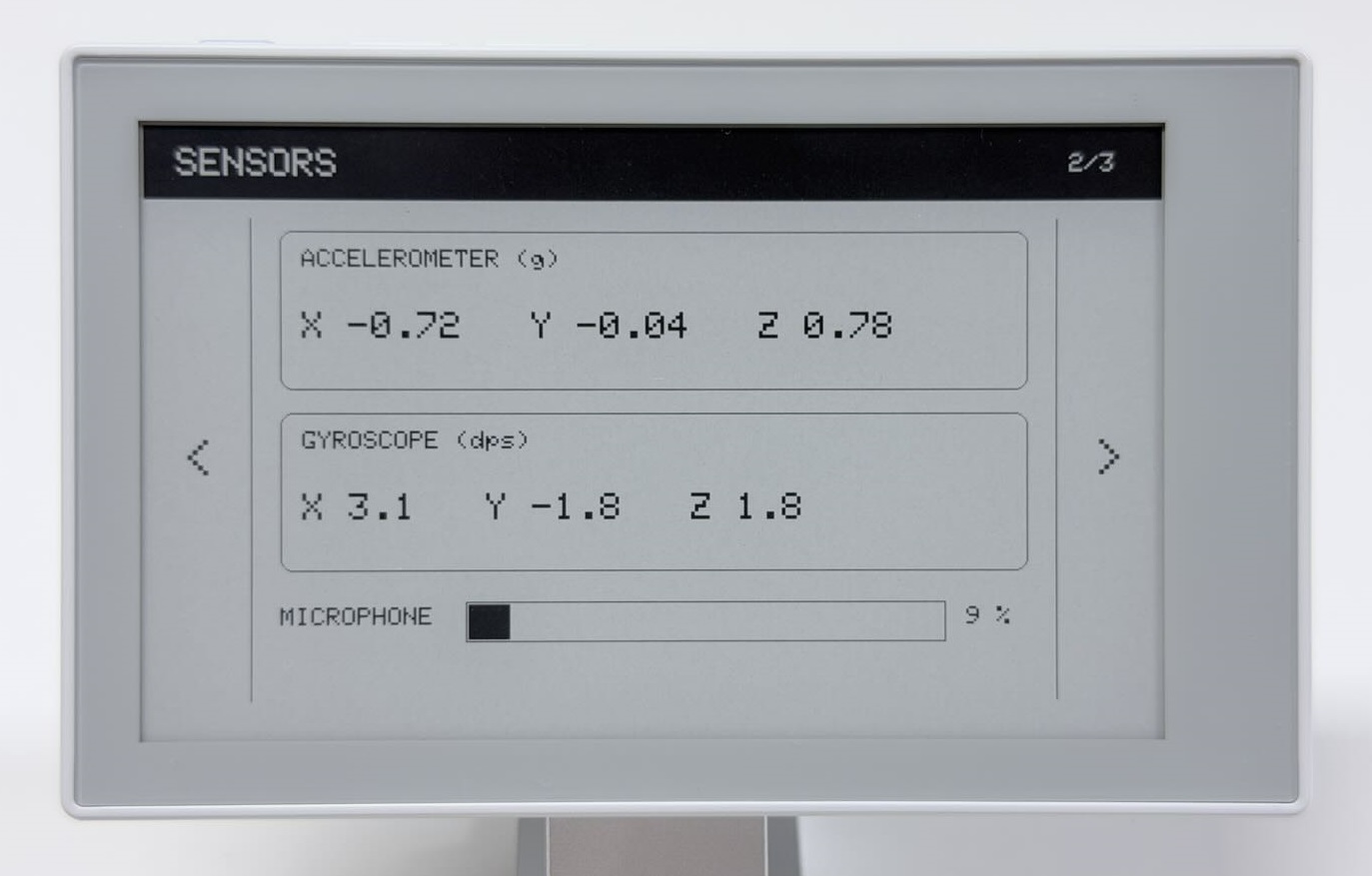
| SENSORS | Three-axis acceleration, angular velocity, microphone level bar | On entry, manual refresh, or about 60 seconds after the previous refresh finishes |
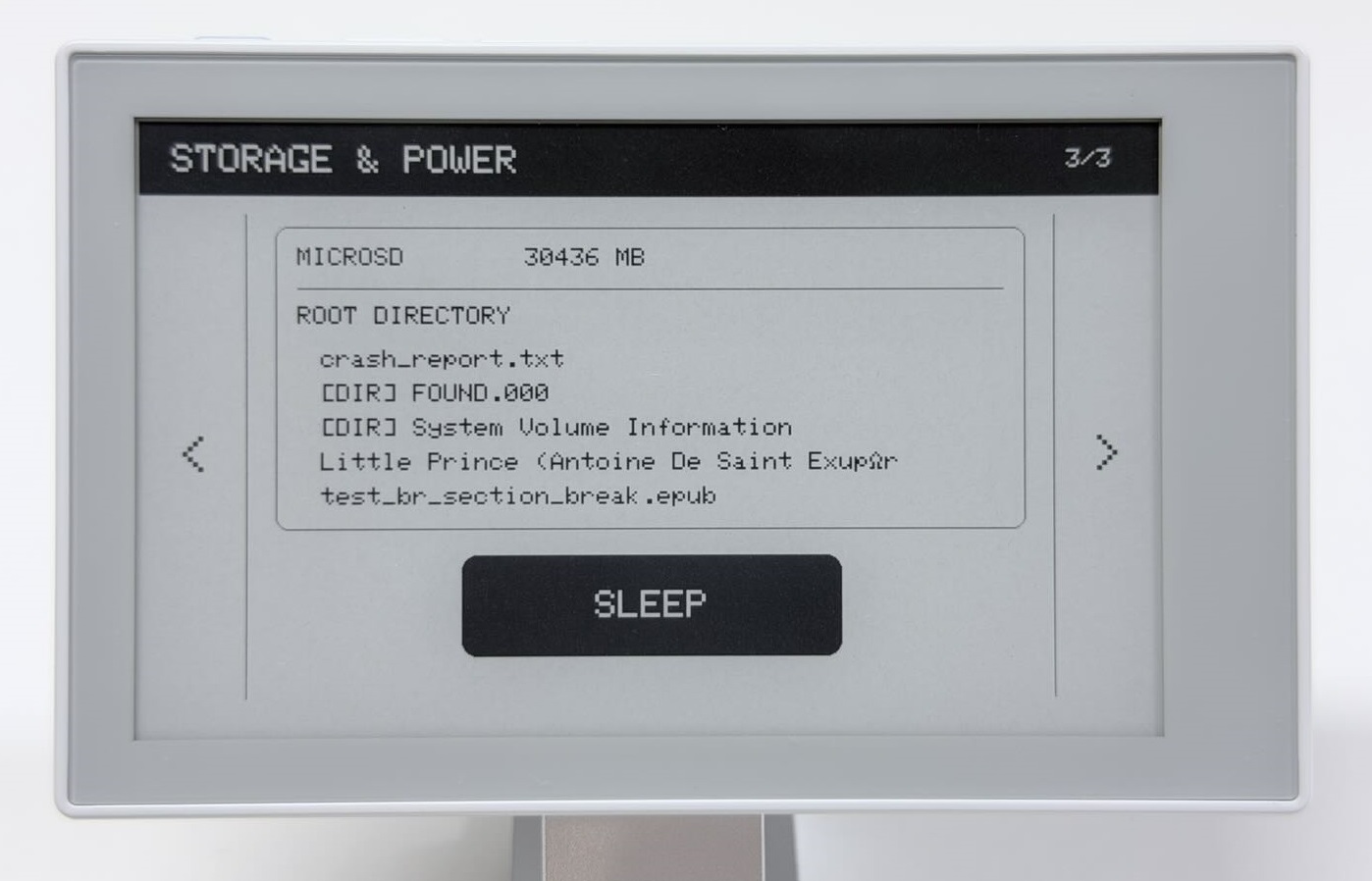
| STORAGE & POWER | SD card capacity, up to five root entries, SLEEP button | On entry or manual refresh |
Step 1: Prepare Dependencies and Upload
Check that the Seeed_GFX2 library from the first guide and the libraries below are installed. Version numbers are provided as a setup reference.
| Library | Author | Reference version | Dependency |
|---|---|---|---|
| Sensirion I2C SHT4x | Sensirion | 1.1.2 | Sensirion Core 0.7.3 |
| Seeed Arduino LSM6DS3 | Seeed Studio | 2.0.7 | — |
| RTClib | Adafruit | 2.1.4 | Adafruit BusIO 1.17.4 |
| bb_captouch | Larry Bank | 1.3.1 | — |
To view storage information, insert a microSD card you have successfully tested with the second guide’s MicroSD example. The demo also runs without a card. Keep the board profile from the first guide and select OPI PSRAM under Tools > PSRAM.
Copy the complete code below into a new sketch, compile, and upload.
Show the complete integrated demo sketch
/*
 * reTerminal Sticky - Complete Hardware Demo
 *
 * Shows system, sensor, storage, touch, button, buzzer, and low-power features.
 */

#include <Arduino.h>
#include <Wire.h>
#include <SPI.h>
#include <FS.h>
#include <SD.h>
#include <Seeed_GFX.h>
#include <bus/Bus_SPI.h>
#include <bb_captouch.h>
#include <SensirionCore.h>
#include <SensirionI2cSht4x.h>
#include <LSM6DS3.h>
#include <RTClib.h>
#include <ESP_I2S.h>
#include <esp_sleep.h>
#include <driver/gpio.h>
#include <math.h>

// CH343P UART: ESP32-S3 RX on GPIO44, TX on GPIO43.
constexpr int PIN_SERIAL_RX = 44;
constexpr int PIN_SERIAL_TX = 43;

// Main power hold and power lock signals, both active HIGH.
constexpr int PIN_POWER_HOLD = 45;
constexpr int PIN_POWER_LOCK = 46;

// Onboard buttons, active LOW.
constexpr int PIN_BUTTON_AI = 4;
constexpr int PIN_BUTTON_UP = 5;
constexpr int PIN_BUTTON_DOWN = 6;

// Onboard buzzer.
constexpr int PIN_BUZZER = 48;

// Onboard sensor I2C bus: GPIO1 -> SDA, GPIO0 -> SCL.
constexpr int PIN_SENSOR_SDA = 1;
constexpr int PIN_SENSOR_SCL = 0;

// Onboard GT911 touch bus: GPIO3 -> SDA, GPIO2 -> SCL.
constexpr int PIN_TOUCH_SDA = 3;
constexpr int PIN_TOUCH_SCL = 2;
constexpr int PIN_TOUCH_ENABLE = 42;
constexpr int PIN_TOUCH_INTERRUPT = 21;
constexpr int PIN_TOUCH_RESET = 41;
constexpr uint32_t I2C_FREQUENCY = 400000;

// Battery charger and external-power detection.
constexpr int PIN_BATTERY_CHARGE_ENABLE = 39;  // Active LOW.
constexpr int PIN_EXTERNAL_POWER = 9;          // HIGH when power is present.

// The microSD card shares the display SPI bus.
constexpr int PIN_SPI_SCK = 13;
constexpr int PIN_SPI_MISO = 12;
constexpr int PIN_SPI_MOSI = 14;
constexpr int PIN_SD_CS = 8;
constexpr int PIN_SD_ENABLE = 10;  // Active HIGH.
constexpr int PIN_SD_DETECT = 11;  // Active LOW.
constexpr int PIN_EPD_CS = 15;
constexpr int PIN_EPD_ENABLE = 47;

// Onboard PDM microphone.
constexpr int PIN_MICROPHONE_CLOCK = 19;
constexpr int PIN_MICROPHONE_DATA = 20;
constexpr int PIN_MICROPHONE_ENABLE = 38;

constexpr uint8_t SHT40_ADDRESS = 0x44;
constexpr uint8_t IMU_ADDRESS = 0x6A;
constexpr uint8_t BQ27220_ADDRESS = 0x55;
constexpr uint8_t REG_BATTERY_VOLTAGE = 0x08;
constexpr uint8_t REG_BATTERY_SOC = 0x2C;

constexpr int DISPLAY_WIDTH = 800;
constexpr int DISPLAY_HEIGHT = 480;
constexpr unsigned long DEBOUNCE_MS = 30;
constexpr unsigned long AUTO_REFRESH_INTERVAL_MS = 60000;

constexpr uint32_t MICROPHONE_SAMPLE_RATE = 16000;
constexpr size_t MICROPHONE_SAMPLE_COUNT = 16000;
constexpr size_t MICROPHONE_BLOCK_SIZE = 512;

constexpr int PAGE_COUNT = 3;
constexpr int TOUCH_LEFT_WIDTH = 100;
constexpr int TOUCH_RIGHT_START = 700;
constexpr int SLEEP_X = 250;
constexpr int SLEEP_Y = 340;
constexpr int SLEEP_W = 300;
constexpr int SLEEP_H = 80;

Seeed_GFX display(Seeed_Product::reTerminal_Sticky);
BBCapTouch touch;
SensirionI2cSht4x sht40;
LSM6DS3 imu(I2C_MODE, IMU_ADDRESS);
RTC_PCF8563 rtc;
I2SClass microphone;

enum Page {
  PAGE_SYSTEM = 0,
  PAGE_SENSORS,
  PAGE_STORAGE_POWER
};

// Retain only the active page across ESP32 deep sleep.
RTC_DATA_ATTR int retainedPageIndex = PAGE_SYSTEM;

struct SystemData {
  DateTime dateTime;
  uint16_t batteryPercent = 0;
  uint16_t batteryVoltage = 0;
  bool charging = false;
  float temperature = 0.0f;
  float humidity = 0.0f;
  bool rtcOk = false;
  bool batteryOk = false;
  bool sht40Ok = false;
};

struct SensorData {
  float accelX = 0.0f;
  float accelY = 0.0f;
  float accelZ = 0.0f;
  float gyroX = 0.0f;
  float gyroY = 0.0f;
  float gyroZ = 0.0f;
  int microphoneVolume = 0;
  bool imuOk = false;
  bool microphoneOk = false;
};

struct StorageData {
  bool cardPresent = false;
  bool mounted = false;
  uint64_t capacityMb = 0;
  int entryCount = 0;
  char entries[5][40] = {};
};

Page currentPage = PAGE_SYSTEM;
SystemData systemData;
SensorData sensorData;
StorageData storageData;

constexpr int BUTTON_PINS[] = {
  PIN_BUTTON_AI, PIN_BUTTON_UP, PIN_BUTTON_DOWN
};
bool buttonLastReading[3];
bool buttonStableState[3];
unsigned long buttonLastChange[3];
bool touchHandled = false;
unsigned long lastScreenRefresh = 0;
bool imuReady = false;
bool rtcReady = false;

// Power / Buttons / Buzzer --------------------------------------------------

void keepPowerOn() {
  pinMode(PIN_POWER_HOLD, OUTPUT);
  pinMode(PIN_POWER_LOCK, OUTPUT);
  digitalWrite(PIN_POWER_HOLD, HIGH);
  digitalWrite(PIN_POWER_LOCK, HIGH);
}

void initializeButtons() {
  for (int i = 0; i < 3; ++i) {
    pinMode(BUTTON_PINS[i], INPUT_PULLUP);
    buttonLastReading[i] = digitalRead(BUTTON_PINS[i]);
    buttonStableState[i] = buttonLastReading[i];
    buttonLastChange[i] = millis();
  }
}

void playPageTone() {
  tone(PIN_BUZZER, 900, 80);
  delay(100);
  noTone(PIN_BUZZER);
}

// I2C bus selection ---------------------------------------------------------

void selectSensorBus() {
  Wire.end();  // Sensors and touch use different pins on the same Wire instance.
  delay(5);
  Wire.begin(PIN_SENSOR_SDA, PIN_SENSOR_SCL, I2C_FREQUENCY);
}

bool selectTouchBus() {
  Wire.end();
  delay(5);
  const bool ok =
      touch.init(PIN_TOUCH_SDA, PIN_TOUCH_SCL, PIN_TOUCH_RESET,
                 PIN_TOUCH_INTERRUPT, I2C_FREQUENCY, &Wire) == CT_SUCCESS &&
      touch.sensorType() == CT_TYPE_GT911;
  if (!ok) {
    Serial1.println("GT911 initialization failed");
  }
  return ok;
}

// System sensors / Battery --------------------------------------------------

uint8_t daysInMonth(uint16_t year, uint8_t month) {
  static const uint8_t DAYS_PER_MONTH[] = {
    31, 28, 31, 30, 31, 30, 31, 31, 30, 31, 30, 31
  };
  if (month < 1 || month > 12) return 0;
  if (month == 2) {
    const bool leapYear = (year % 4 == 0 && year % 100 != 0) ||
                          (year % 400 == 0);
    return leapYear ? 29 : 28;
  }
  return DAYS_PER_MONTH[month - 1];
}

bool isDateTimeValid(const DateTime& value) {
  const uint8_t maximumDay = daysInMonth(value.year(), value.month());
  return value.isValid() && value.month() >= 1 && value.month() <= 12 &&
         value.day() >= 1 && value.day() <= maximumDay &&
         value.hour() <= 23 && value.minute() <= 59 && value.second() <= 59;
}

bool readBQ27220Word(uint8_t registerAddress, uint16_t& value) {
  Wire.beginTransmission(BQ27220_ADDRESS);
  Wire.write(registerAddress);
  if (Wire.endTransmission(false) != 0) return false;
  if (Wire.requestFrom(BQ27220_ADDRESS, static_cast<uint8_t>(2)) != 2) {
    return false;
  }
  const uint8_t lowByte = Wire.read();
  const uint8_t highByte = Wire.read();
  value = static_cast<uint16_t>(lowByte) |
          (static_cast<uint16_t>(highByte) << 8);
  return true;
}

void initializeSensorDevices() {
  selectSensorBus();
  sht40.begin(Wire, SHT40_ADDRESS);

  imuReady = imu.begin() == 0;
  Serial1.println(imuReady ? "IMU initialized" : "IMU initialization failed");

  rtcReady = rtc.begin(&Wire);
  if (!rtcReady) {
    Serial1.println("RTC initialization failed");
    return;
  }

  const DateTime storedTime = rtc.now();
  if (rtc.lostPower() || !isDateTimeValid(storedTime)) {  // Do not trust invalid time.
    rtc.adjust(DateTime(__DATE__, __TIME__));
    Serial1.println("RTC initialized from sketch compile time");
  } else {
    Serial1.println("RTC stored time is valid");
  }
}

void readSystemData() {
  selectSensorBus();

  systemData.rtcOk = rtcReady;
  if (systemData.rtcOk) {
    systemData.dateTime = rtc.now();
    systemData.rtcOk = isDateTimeValid(systemData.dateTime);
  }

  uint16_t stateOfCharge = 0;
  uint16_t voltage = 0;
  systemData.batteryOk =
      readBQ27220Word(REG_BATTERY_SOC, stateOfCharge) &&
      readBQ27220Word(REG_BATTERY_VOLTAGE, voltage);
  if (systemData.batteryOk) {
    systemData.batteryPercent = stateOfCharge > 100 ? 100 : stateOfCharge;
    systemData.batteryVoltage = voltage;
    systemData.charging = digitalRead(PIN_EXTERNAL_POWER) == HIGH;
  }

  const uint16_t error = sht40.measureHighPrecision(
      systemData.temperature, systemData.humidity);
  systemData.sht40Ok = error == 0;

  Serial1.println("System data updated");
  if (systemData.batteryOk) {
    Serial1.print("Battery: ");
    Serial1.print(systemData.batteryPercent);
    Serial1.print(" %, ");
    Serial1.print(systemData.batteryVoltage);
    Serial1.print(" mV, Charging: ");
    Serial1.println(systemData.charging ? "YES" : "NO");
  }
  if (systemData.sht40Ok) {
    Serial1.print("Temperature: ");
    Serial1.print(systemData.temperature, 1);
    Serial1.print(" C, Humidity: ");
    Serial1.print(systemData.humidity, 1);
    Serial1.println(" %RH");
  }

  selectTouchBus();
}

// Microphone ---------------------------------------------------------------

bool startMicrophone() {
  pinMode(PIN_MICROPHONE_ENABLE, OUTPUT);
  digitalWrite(PIN_MICROPHONE_ENABLE, HIGH);
  delay(20);
  microphone.setPinsPdmRx(PIN_MICROPHONE_CLOCK, PIN_MICROPHONE_DATA);
  return microphone.begin(I2S_MODE_PDM_RX, MICROPHONE_SAMPLE_RATE,
                          I2S_DATA_BIT_WIDTH_16BIT, I2S_SLOT_MODE_MONO);
}

void stopMicrophone() {
  microphone.end();
  digitalWrite(PIN_MICROPHONE_ENABLE, LOW);
}

bool measureMicrophoneVolume(int& volumePercent) {
  int16_t samples[MICROPHONE_BLOCK_SIZE];
  size_t samplesReadTotal = 0;
  double centeredSquares = 0.0;

  while (samplesReadTotal < MICROPHONE_SAMPLE_COUNT) {
    const size_t remaining = MICROPHONE_SAMPLE_COUNT - samplesReadTotal;
    const size_t samplesNeeded = min(MICROPHONE_BLOCK_SIZE, remaining);
    const size_t bytesRead = microphone.readBytes(
        reinterpret_cast<char*>(samples), samplesNeeded * sizeof(int16_t));
    if (bytesRead == 0) return false;

    const size_t samplesRead = bytesRead / sizeof(int16_t);
    int64_t sum = 0;
    for (size_t i = 0; i < samplesRead; ++i) sum += samples[i];
    const float mean = static_cast<float>(sum) / samplesRead;
    for (size_t i = 0; i < samplesRead; ++i) {
      const int centered = static_cast<int>(samples[i] - mean);
      centeredSquares += static_cast<double>(centered) * centered;
    }
    samplesReadTotal += samplesRead;
  }

  const float rms = sqrt(centeredSquares / samplesReadTotal);
  volumePercent = constrain(static_cast<int>(rms * 100.0f / 8192.0f), 0, 100);
  return true;
}

void readSensorData() {
  selectSensorBus();
  sensorData.imuOk = imuReady;
  if (sensorData.imuOk) {
    sensorData.accelX = imu.readFloatAccelX();
    sensorData.accelY = imu.readFloatAccelY();
    sensorData.accelZ = imu.readFloatAccelZ();
    sensorData.gyroX = imu.readFloatGyroX();
    sensorData.gyroY = imu.readFloatGyroY();
    sensorData.gyroZ = imu.readFloatGyroZ();
  }
  selectTouchBus();

  sensorData.microphoneOk = false;
  sensorData.microphoneVolume = 0;
  if (startMicrophone()) {
    sensorData.microphoneOk =
        measureMicrophoneVolume(sensorData.microphoneVolume);
    stopMicrophone();
  } else {
    digitalWrite(PIN_MICROPHONE_ENABLE, LOW);
  }

  Serial1.println("Sensor data updated");
  if (sensorData.imuOk) {
    Serial1.print("Accel: ");
    Serial1.print(sensorData.accelX, 2);
    Serial1.print(", ");
    Serial1.print(sensorData.accelY, 2);
    Serial1.print(", ");
    Serial1.println(sensorData.accelZ, 2);
    Serial1.print("Gyro: ");
    Serial1.print(sensorData.gyroX, 1);
    Serial1.print(", ");
    Serial1.print(sensorData.gyroY, 1);
    Serial1.print(", ");
    Serial1.println(sensorData.gyroZ, 1);
  }
  if (sensorData.microphoneOk) {
    Serial1.print("Microphone volume: ");
    Serial1.print(sensorData.microphoneVolume);
    Serial1.println(" %");
  }
}

// MicroSD shared SPI -------------------------------------------------------

void readStorageData() {
  storageData = StorageData();
  pinMode(PIN_EPD_CS, OUTPUT);
  digitalWrite(PIN_EPD_CS, HIGH);
  pinMode(PIN_SD_CS, OUTPUT);
  digitalWrite(PIN_SD_CS, HIGH);
  pinMode(PIN_SD_ENABLE, OUTPUT);
  pinMode(PIN_SD_DETECT, INPUT_PULLUP);

  storageData.cardPresent = digitalRead(PIN_SD_DETECT) == LOW;
  if (!storageData.cardPresent) {
    digitalWrite(PIN_SD_ENABLE, LOW);
    Serial1.println("No microSD card detected");
    return;
  }

  digitalWrite(PIN_SD_ENABLE, LOW);
  delay(20);
  digitalWrite(PIN_SD_ENABLE, HIGH);
  delay(100);

  // The display and microSD share the GFX2 SPI instance. Their separate CS
  // pins keep the inactive device deselected during each SPI transaction.
  Bus_SPI& displaySpiBus =
      static_cast<Bus_SPI&>(display.panel().driver().bus());
  SPIClass* sharedSpi = displaySpiBus.spiInstance();

  storageData.mounted =
      sharedSpi != nullptr && SD.begin(PIN_SD_CS, *sharedSpi);
  if (!storageData.mounted || SD.cardType() == CARD_NONE) {
    storageData.mounted = false;
    Serial1.println("MicroSD initialization failed");
  } else {
    storageData.capacityMb = SD.cardSize() / (1024ULL * 1024ULL);
    File root = SD.open("/");
    if (root && root.isDirectory()) {
      File entry = root.openNextFile();
      while (entry && storageData.entryCount < 5) {
        snprintf(storageData.entries[storageData.entryCount],
                 sizeof(storageData.entries[storageData.entryCount]),
                 "%s%s", entry.isDirectory() ? "[DIR] " : "", entry.name());
        ++storageData.entryCount;
        entry.close();
        entry = root.openNextFile();
      }
      if (entry) entry.close();
      root.close();
    }
  }

  SD.end();  // Release the shared SPI device before refreshing the display.
  digitalWrite(PIN_SD_CS, HIGH);
  digitalWrite(PIN_SD_ENABLE, LOW);
  digitalWrite(PIN_EPD_CS, HIGH);

  if (storageData.mounted) {
    Serial1.print("MicroSD capacity: ");
    Serial1.print(storageData.capacityMb);
    Serial1.println(" MB");
  }
}

// Touch --------------------------------------------------------------------

int scaleCoordinate(int value, int inputMaximum, int outputMaximum) {
  value = constrain(value, 0, inputMaximum);
  return static_cast<int>((static_cast<int32_t>(value) * outputMaximum +
                           inputMaximum / 2) /
                          inputMaximum);
}

void convertTouchCoordinates(int rawX, int rawY, int& x, int& y) {
  // Match the display's default 180-degree rotation after swapping axes.
  x = DISPLAY_WIDTH - 1 - scaleCoordinate(rawY, 800, DISPLAY_WIDTH - 1);
  y = DISPLAY_HEIGHT - 1 - scaleCoordinate(rawX, 480, DISPLAY_HEIGHT - 1);
}

// UI drawing ---------------------------------------------------------------

void drawCenteredText(const char* text, int x, int y, int width, int height,
                      uint8_t textSize, uint16_t color) {
  display.setTextSize(textSize);
  display.setTextColor(color);
  const int16_t textWidth = display.textWidth(text);
  const int16_t textHeight = display.fontHeight();  // Seeed_GFX2 text metrics.
  display.setCursor(x + (width - textWidth) / 2,
                    y + (height - textHeight) / 2);
  display.print(text);
}

void drawHeader(const char* title, int pageNumber) {
  display.fillScreen(TFT_WHITE);
  display.fillRect(0, 0, DISPLAY_WIDTH, 58, TFT_BLACK);
  display.setTextColor(TFT_WHITE);
  display.setTextSize(3);
  display.setCursor(26, 18);
  display.print(title);
  char pageLabel[8];
  snprintf(pageLabel, sizeof(pageLabel), "%d/3", pageNumber);
  drawCenteredText(pageLabel, 690, 0, 110, 58, 2, TFT_WHITE);

  drawCenteredText("<", 0, 72, 82, 380, 4, TFT_BLACK);
  drawCenteredText(">", 718, 72, 82, 380, 4, TFT_BLACK);
  display.drawFastVLine(82, 72, 380, TFT_BLACK);
  display.drawFastVLine(717, 72, 380, TFT_BLACK);
}

void drawValueBox(int x, int y, int w, int h, const char* label,
                  const char* value) {
  display.drawRoundRect(x, y, w, h, 10, TFT_BLACK);
  display.setTextColor(TFT_BLACK);
  display.setTextSize(2);
  display.setCursor(x + 16, y + 14);
  display.print(label);
  display.setTextSize(3);
  display.setCursor(x + 16, y + 48);
  display.print(value);
}

void drawSystemPage() {
  drawHeader("SYSTEM", 1);
  char value[48];

  if (systemData.rtcOk) {
    snprintf(value, sizeof(value), "%04u-%02u-%02u  %02u:%02u",
             systemData.dateTime.year(), systemData.dateTime.month(),
             systemData.dateTime.day(), systemData.dateTime.hour(),
             systemData.dateTime.minute());
  } else {
    snprintf(value, sizeof(value), "RTC unavailable");
  }
  drawValueBox(105, 82, 590, 86, "DATE / TIME", value);

  if (systemData.batteryOk) {
    snprintf(value, sizeof(value), "%u %%", systemData.batteryPercent);
  } else {
    snprintf(value, sizeof(value), "N/A");
  }
  drawValueBox(105, 185, 180, 105, "BATTERY", value);

  if (systemData.batteryOk) {
    snprintf(value, sizeof(value), "%u mV", systemData.batteryVoltage);
  } else {
    snprintf(value, sizeof(value), "N/A");
  }
  drawValueBox(310, 185, 180, 105, "VOLTAGE", value);

  snprintf(value, sizeof(value), "%s",
           systemData.batteryOk ? (systemData.charging ? "YES" : "NO") : "N/A");
  drawValueBox(515, 185, 180, 105, "CHARGING", value);

  if (systemData.sht40Ok) {
    snprintf(value, sizeof(value), "%.1f C", systemData.temperature);
  } else {
    snprintf(value, sizeof(value), "N/A");
  }
  drawValueBox(105, 308, 285, 112, "TEMPERATURE", value);

  if (systemData.sht40Ok) {
    snprintf(value, sizeof(value), "%.1f %%RH", systemData.humidity);
  } else {
    snprintf(value, sizeof(value), "N/A");
  }
  drawValueBox(410, 308, 285, 112, "HUMIDITY", value);
}

void drawSensorPage() {
  drawHeader("SENSORS", 2);
  char value[48];

  display.drawRoundRect(105, 82, 590, 125, 10, TFT_BLACK);
  display.setTextColor(TFT_BLACK);
  display.setTextSize(2);
  display.setCursor(122, 96);
  display.print("ACCELEROMETER (g)");
  display.setTextSize(3);
  display.setCursor(122, 145);
  if (sensorData.imuOk) {
    snprintf(value, sizeof(value), "X %.2f   Y %.2f   Z %.2f",
             sensorData.accelX, sensorData.accelY, sensorData.accelZ);
  } else {
    snprintf(value, sizeof(value), "IMU unavailable");
  }
  display.print(value);

  display.drawRoundRect(105, 225, 590, 125, 10, TFT_BLACK);
  display.setTextSize(2);
  display.setCursor(122, 239);
  display.print("GYROSCOPE (dps)");
  display.setTextSize(3);
  display.setCursor(122, 288);
  if (sensorData.imuOk) {
    snprintf(value, sizeof(value), "X %.1f   Y %.1f   Z %.1f",
             sensorData.gyroX, sensorData.gyroY, sensorData.gyroZ);
  } else {
    snprintf(value, sizeof(value), "IMU unavailable");
  }
  display.print(value);

  display.setTextSize(2);
  display.setCursor(105, 378);
  display.print("MICROPHONE");
  display.drawRect(250, 374, 380, 32, TFT_BLACK);
  if (sensorData.microphoneOk) {
    const int barWidth = sensorData.microphoneVolume * 376 / 100;
    display.fillRect(252, 376, barWidth, 28, TFT_BLACK);
    snprintf(value, sizeof(value), "%d %%", sensorData.microphoneVolume);
  } else {
    snprintf(value, sizeof(value), "N/A");
  }
  display.setCursor(646, 378);
  display.print(value);
}

void drawStoragePage() {
  drawHeader("STORAGE & POWER", 3);
  char value[48];

  display.drawRoundRect(105, 82, 590, 238, 10, TFT_BLACK);
  display.setTextColor(TFT_BLACK);
  display.setTextSize(2);
  display.setCursor(122, 98);
  display.print("MICROSD");
  display.setCursor(300, 98);
  if (storageData.mounted) {
    snprintf(value, sizeof(value), "%llu MB",
             static_cast<unsigned long long>(storageData.capacityMb));
  } else if (!storageData.cardPresent) {
    snprintf(value, sizeof(value), "NO CARD");
  } else {
    snprintf(value, sizeof(value), "MOUNT FAILED");
  }
  display.print(value);

  display.drawFastHLine(122, 130, 556, TFT_BLACK);
  display.setCursor(122, 144);
  display.print("ROOT DIRECTORY");
  display.setTextSize(2);
  if (storageData.entryCount == 0) {
    display.setCursor(140, 184);
    display.print(storageData.mounted ? "(empty)" : "Unavailable");
  } else {
    for (int i = 0; i < storageData.entryCount; ++i) {
      display.setCursor(140, 178 + i * 27);
      display.print(storageData.entries[i]);
    }
  }

  display.fillRoundRect(SLEEP_X, SLEEP_Y, SLEEP_W, SLEEP_H, 12, TFT_BLACK);
  drawCenteredText("SLEEP", SLEEP_X, SLEEP_Y, SLEEP_W, SLEEP_H,
                   3, TFT_WHITE);
}

void drawDeepSleepPage() {
  display.fillScreen(TFT_WHITE);
  display.drawRoundRect(130, 105, 540, 270, 18, TFT_BLACK);
  display.fillRect(130, 105, 540, 70, TFT_BLACK);
  drawCenteredText("DEEP SLEEP", 130, 105, 540, 70, 4, TFT_WHITE);
  drawCenteredText("Press AI / OK to wake", 130, 175, 540, 200,
                   3, TFT_BLACK);
}

// Page navigation ----------------------------------------------------------

void refreshCurrentPage() {
  Serial1.print("Refreshing page ");
  Serial1.println(static_cast<int>(currentPage) + 1);

  if (currentPage == PAGE_SYSTEM) {
    readSystemData();
    drawSystemPage();
  } else if (currentPage == PAGE_SENSORS) {
    readSensorData();
    drawSensorPage();
  } else {
    readStorageData();
    drawStoragePage();
  }

  const GfxResult result = display.refresh();
  if (!result.ok()) {
    Serial1.print("Display refresh failed: ");
    Serial1.println(result.message);
  } else {
    Serial1.println("Display refresh complete");
  }
  lastScreenRefresh = millis();
}

void changePage(int direction) {
  int next = static_cast<int>(currentPage) + direction;
  if (next < 0) next = PAGE_COUNT - 1;
  if (next >= PAGE_COUNT) next = 0;
  currentPage = static_cast<Page>(next);
  Serial1.print("Page changed to ");
  Serial1.println(next + 1);
  playPageTone();
  refreshCurrentPage();
}

// Deep Sleep ---------------------------------------------------------------

void releaseDeepSleepHolds() {
  gpio_deep_sleep_hold_dis();
  const int pins[] = {
    PIN_POWER_HOLD, PIN_POWER_LOCK, PIN_EPD_ENABLE, PIN_TOUCH_ENABLE,
    PIN_TOUCH_RESET, PIN_MICROPHONE_ENABLE, PIN_BUZZER, PIN_BUTTON_AI
  };
  for (int pin : pins) {
    gpio_hold_dis(static_cast<gpio_num_t>(pin));
  }
}

void setAndHoldOutput(int pin, int level) {
  gpio_hold_dis(static_cast<gpio_num_t>(pin));
  pinMode(pin, OUTPUT);
  digitalWrite(pin, level);
  gpio_hold_en(static_cast<gpio_num_t>(pin));
}

void enterDeepSleep() {
  Serial1.println("Preparing ESP32-S3 deep sleep");
  Serial1.println("Press AI / OK to wake the device");

  retainedPageIndex = static_cast<int>(currentPage);
  playPageTone();
  drawDeepSleepPage();
  const GfxResult result = display.refresh();
  if (!result.ok()) {
    Serial1.print("Deep sleep page refresh failed: ");
    Serial1.println(result.message);
  } else {
    Serial1.println("Deep sleep page displayed");
  }
  delay(1500);

  pinMode(PIN_BUTTON_AI, INPUT_PULLUP);
  while (digitalRead(PIN_BUTTON_AI) == LOW) delay(10);
  delay(30);

  setAndHoldOutput(PIN_POWER_HOLD, HIGH);
  setAndHoldOutput(PIN_POWER_LOCK, HIGH);
  setAndHoldOutput(PIN_EPD_ENABLE, LOW);
  setAndHoldOutput(PIN_TOUCH_ENABLE, LOW);
  setAndHoldOutput(PIN_TOUCH_RESET, LOW);
  setAndHoldOutput(PIN_MICROPHONE_ENABLE, LOW);
  setAndHoldOutput(PIN_BUZZER, LOW);

  pinMode(PIN_BUTTON_AI, INPUT_PULLUP);
  gpio_hold_en(static_cast<gpio_num_t>(PIN_BUTTON_AI));
  esp_sleep_enable_ext1_wakeup_io(1ULL << PIN_BUTTON_AI,
                                  ESP_EXT1_WAKEUP_ANY_LOW);
  gpio_deep_sleep_hold_en();

  Serial1.println("Entering deep sleep now");
  Serial1.flush();
  delay(50);
  esp_deep_sleep_start();
}

void handleButtonPress(int index) {
  if (index == 0) {
    Serial1.println("AI / OK: refresh current page");
    refreshCurrentPage();
  } else if (index == 1) {
    Serial1.println("UP: previous page");
    changePage(-1);
  } else {
    Serial1.println("DOWN: next page");
    changePage(1);
  }
}

void updateButtons() {
  for (int i = 0; i < 3; ++i) {
    const bool reading = digitalRead(BUTTON_PINS[i]);
    if (reading != buttonLastReading[i]) {
      buttonLastReading[i] = reading;
      buttonLastChange[i] = millis();
    }
    if (millis() - buttonLastChange[i] >= DEBOUNCE_MS &&
        reading != buttonStableState[i]) {
      buttonStableState[i] = reading;
      if (reading == LOW) handleButtonPress(i);
    }
  }
}

void updateTouch() {
  TOUCHINFO touchInfo = {};
  const bool isTouched = touch.getSamples(&touchInfo) == 1 &&
                         touchInfo.count > 0;
  if (isTouched && !touchHandled) {
    int x = 0;
    int y = 0;
    convertTouchCoordinates(touchInfo.x[0], touchInfo.y[0], x, y);
    Serial1.print("Touch X: ");
    Serial1.print(x);
    Serial1.print(", Y: ");
    Serial1.println(y);

    if (currentPage == PAGE_STORAGE_POWER &&
        x >= SLEEP_X && x < SLEEP_X + SLEEP_W &&
        y >= SLEEP_Y && y < SLEEP_Y + SLEEP_H) {
      enterDeepSleep();
    } else if (x < TOUCH_LEFT_WIDTH) {
      changePage(-1);
    } else if (x >= TOUCH_RIGHT_START) {
      changePage(1);
    }
    touchHandled = true;
  } else if (!isTouched) {
    touchHandled = false;
  }
}

void setup() {
  releaseDeepSleepHolds();
  keepPowerOn();

  Serial1.begin(115200, SERIAL_8N1, PIN_SERIAL_RX, PIN_SERIAL_TX);
  delay(200);
  Serial1.println();
  Serial1.println("reTerminal Sticky Complete Hardware Demo");

  const bool wokeFromDeepSleep =
      esp_sleep_get_wakeup_cause() == ESP_SLEEP_WAKEUP_EXT1;
  if (wokeFromDeepSleep) {
    Serial1.println("Wake-up reason: AI / OK button");
    if (retainedPageIndex >= PAGE_SYSTEM &&
        retainedPageIndex < PAGE_COUNT) {
      currentPage = static_cast<Page>(retainedPageIndex);
    } else {
      currentPage = PAGE_SYSTEM;
    }
    Serial1.print("Restoring page ");
    Serial1.println(static_cast<int>(currentPage) + 1);
  } else {
    Serial1.println("Wake-up reason: power-on or reset");
    currentPage = PAGE_SYSTEM;
    retainedPageIndex = PAGE_SYSTEM;
  }

  initializeButtons();
  pinMode(PIN_BUZZER, OUTPUT);
  digitalWrite(PIN_BUZZER, LOW);
  pinMode(PIN_BATTERY_CHARGE_ENABLE, OUTPUT);
  digitalWrite(PIN_BATTERY_CHARGE_ENABLE, LOW);
  pinMode(PIN_EXTERNAL_POWER, INPUT);

  pinMode(PIN_TOUCH_ENABLE, OUTPUT);
  digitalWrite(PIN_TOUCH_ENABLE, HIGH);
  delay(250);

  if (!display.begin()) {
    Serial1.println("Display initialization failed");
    while (true) delay(1000);
  }

  initializeSensorDevices();
  if (!selectTouchBus()) {
    while (true) delay(1000);
  }

  Serial1.println("UP / DOWN: change page");
  Serial1.println("AI / OK: refresh current page");
  Serial1.println("Touch the left or right edge to change page");
  refreshCurrentPage();
}

void loop() {
  updateButtons();
  updateTouch();

  if (currentPage != PAGE_STORAGE_POWER &&
      millis() - lastScreenRefresh >= AUTO_REFRESH_INTERVAL_MS) {
    Serial1.println("Automatic 60-second page refresh");
    refreshCurrentPage();
  }

  delay(20);
}
Code Explanation
refreshCurrentPage()reads and draws the current page’s data, then callsdisplay.refresh()for a full-screen update. Automatic refresh on SYSTEM and SENSORS is timed from the end of the previous refresh.- Sensors and touch use the same
Wireobject.selectSensorBus()andselectTouchBus()switch to their respective I2C pins, returning to the touch interface after sensor reads. readStorageData()accesses SD through GFX2’s SPI instance. After reading, it callsSD.end(), deasserts the SD chip-select signal, and switches card power off before refreshing the screen. Preserve this bus-switching and release sequence when reusing the code.enterDeepSleep()saves the page index and displays a sleep prompt before configuring button wake-up and entering sleep. On wake-up,setup()runs again to initialize peripherals, read data, and restore the saved page. Sensor readings and other runtime data are not retained.
Step 2: Navigate and Refresh
Wait for the SYSTEM page to finish refreshing. Place the device with its buttons at the top, then try these controls:
| Action | Result |
|---|---|
| Briefly press UP / DOWN | Previous / next page, with a short tone on page changes |
| Tap the left / right screen edge | Previous / next page; this is not a swipe gesture |
| Briefly press AI | Read and refresh the current page |
Expected result
SYSTEM shows RTC time, temperature and humidity, battery percentage, voltage, and CHARGING. CHARGING reports the external power status detected on GPIO9: YES means USB/external power is connected, and NO means no external power is detected.
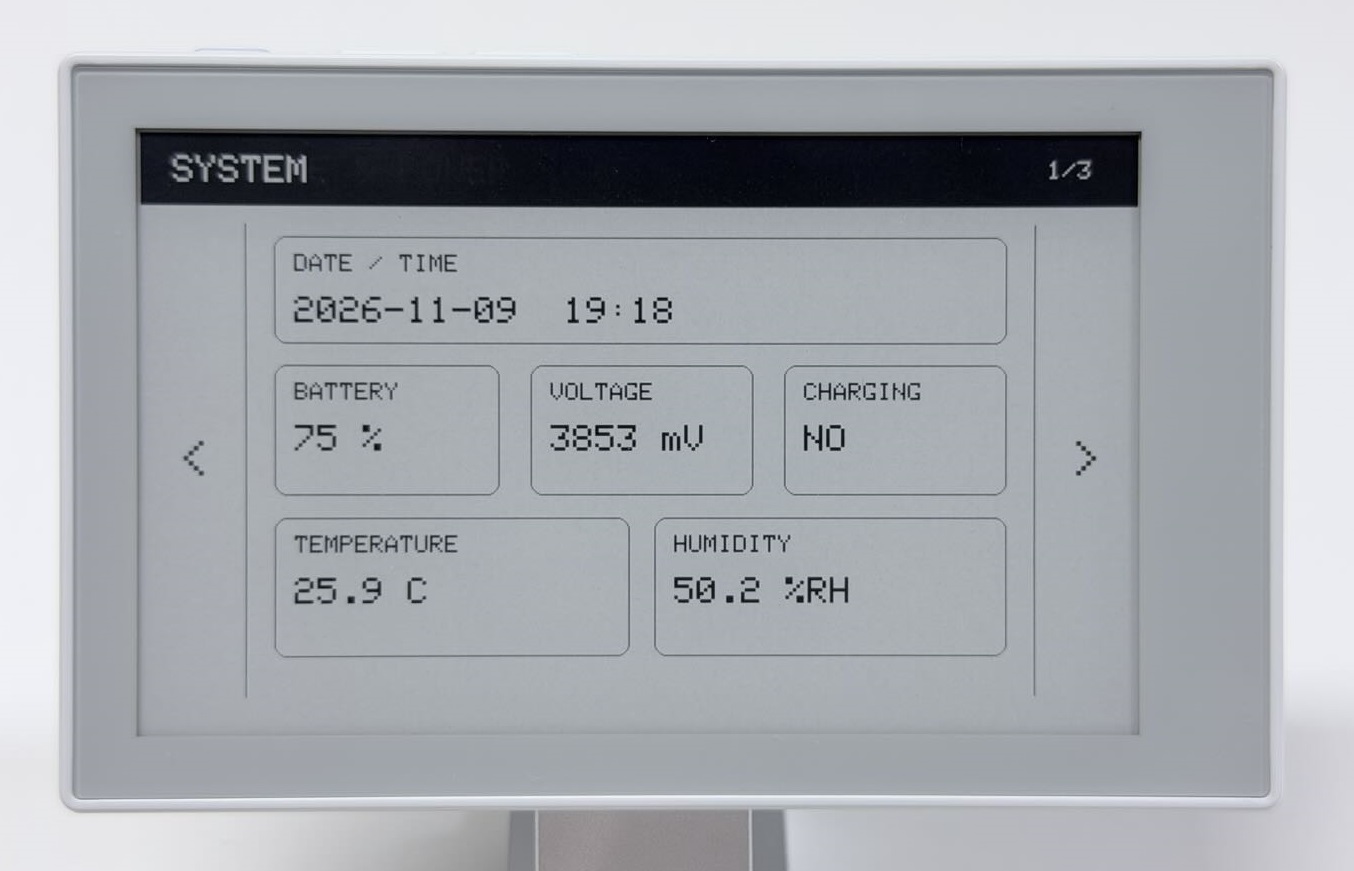
On SENSORS, change the device orientation and press AI to see updated readings. Start speaking near the microphone before refreshing and check the level bar in the new image. It updates only when the page samples and refreshes, not continuously.
Switch to STORAGE & POWER to view the card capacity and up to five root directory entries. The page shows NO CARD if no card is inserted or MOUNT FAILED if mounting fails. Storage is read on entry or manual refresh only.
All pages use a full-screen refresh, so the screen may flash when you switch pages. Wait for the refresh to finish before the next operation.
Step 3: Sleep and Restore the Page
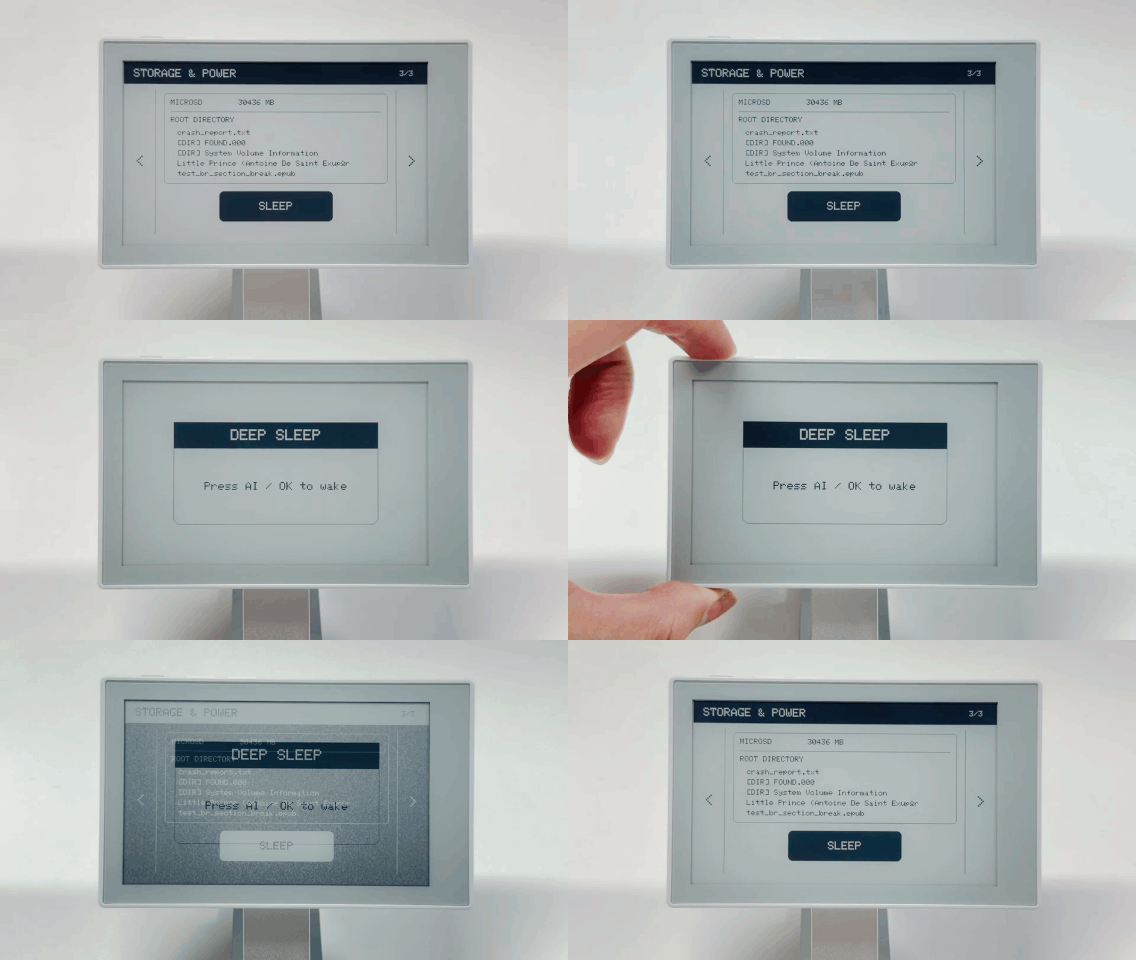
On page 3, tap SLEEP. Wait for the sleep prompt to finish refreshing and for Entering deep sleep now in Serial Monitor, then briefly press and release the AI button.
Expected result
Before sleep, the display shows DEEP SLEEP and Press AI / OK to wake.
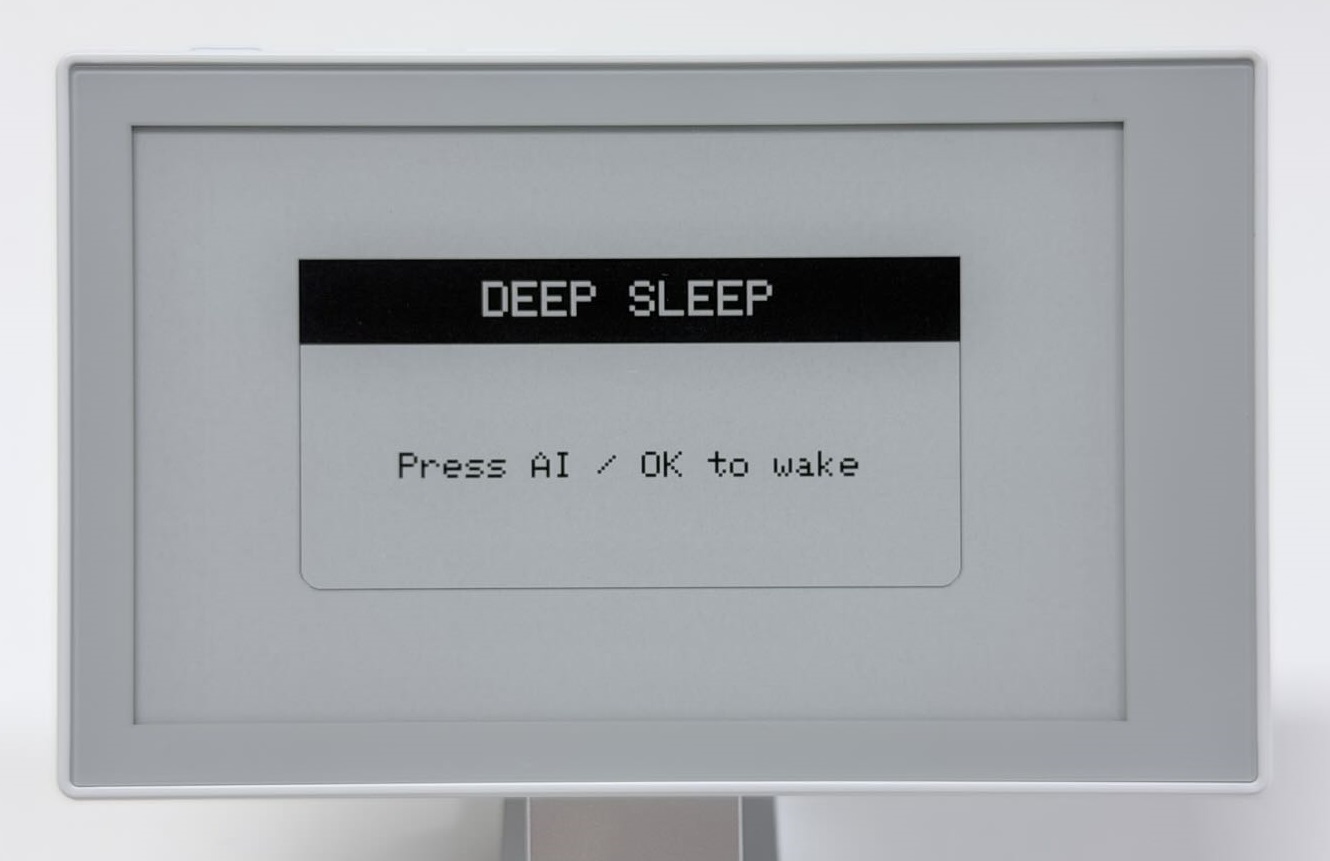
After you wake the device with the AI button, the demo reads the data again and restores page 3. Serial output shows the wake cause and Restoring page 3. A regular power-on or reset starts at SYSTEM. The page index is retained during deep sleep and is not restored after complete power loss.
FAQ
| Symptom | What to do |
|---|---|
| GT911 initialization fails | Check bb_captouch and Seeed_GFX2, and retain the full touch-power and initialization sequence |
| Coordinates print but dots are misplaced | Use the Seeed_GFX2 library and board profile from the first guide. Keep the buttons at the top and retain the original coordinate conversion without another rotation |
| RTC runs but the time is wrong | If the RTC already contains a valid time, restarting or uploading this sketch will not correct it automatically. Set the RTC separately. |
| Deep sleep does not start | Release AI; the code waits for release. In the demo, also wait for the sleep-page refresh and sleep log |
| The demo shows N/A or Unavailable | Identify the failing device in serial output and run its standalone example rather than changing all initialization or bus settings |
Keep Building
Return to Arduino Onboard Peripherals to check individual devices. For a more structured page-based project, see ESP-IDF Development Basics. Each development path has its own project and operating instructions.