Arduino 交互与低功耗
本篇继续介绍 Sticky 的触摸、RTC、麦克风和深度睡眠,每个示例均可单独运行。最后的综合 Demo 将这些功能与第二篇的板载外设结合,实现页面切换、数据刷新和按键唤醒。
开始前
请先完成 Arduino 入门与显示中的环境配置。选择 File > New Sketch,将当前实验的完整代码复制到新草图,替换原有内容。上传会替换设备当前运行的程序。
触摸和综合 Demo 使用第一篇安装的 Seeed_GFX2 库,其他库在对应章节中安装。 查看串口输出时,选择 CH343P 对应端口,打开 Tools > Serial Monitor,将波特率设为 115200 baud。
触摸:画点并局部刷新
本示例读取 GT911 触摸控制器的点按位置,在屏幕上绘制黑点,并通过串口输出坐标。
| 信号 | 配置 |
|---|---|
| I2C SDA / SCL | GPIO3 / GPIO2,400 kHz |
| 触摸供电使能 | GPIO42,HIGH 开启 |
| RESET | GPIO41 |
| INT | GPIO21 |
Step 1. 在 Library Manager 中安装 Larry Bank 的 bb_captouch(参考版本 1.3.1)。继续使用第一篇的 Seeed_GFX2 库和板型配置。
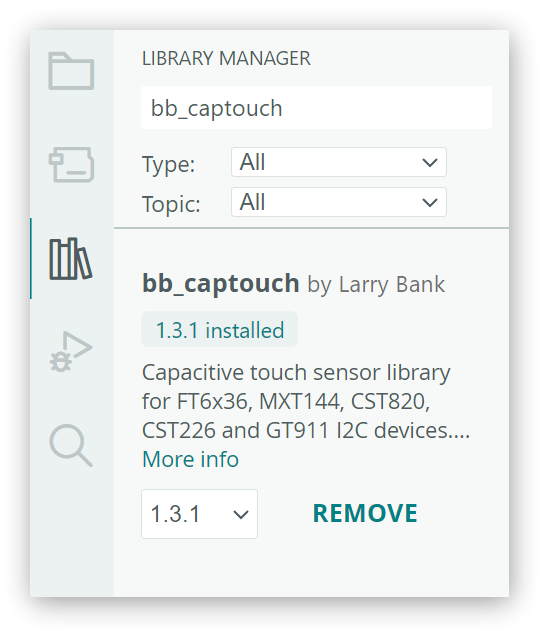
Step 2. 将完整代码复制到新草图,编译并上传。按实体按键朝上的方向摆放设备,等待白屏完成刷新。
展开完整代码
/*
 * reTerminal Sticky - GT911 Touch Example
 *
 * Prints GT911 touch coordinates and draws a black dot at each touched position.
 */

#include <Arduino.h>
#include <Wire.h>
#include <Seeed_GFX.h>
#include <bb_captouch.h>

// CH343P UART: ESP32-S3 RX on GPIO44, TX on GPIO43.
constexpr int PIN_SERIAL_RX = 44;
constexpr int PIN_SERIAL_TX = 43;

// Main power hold and power lock signals, both active HIGH.
constexpr int PIN_POWER_HOLD = 45;
constexpr int PIN_POWER_LOCK = 46;

// Onboard GT911 on ESP32-S3 I2C0: GPIO3 -> SDA, GPIO2 -> SCL.
constexpr int PIN_TOUCH_SCL = 2;
constexpr int PIN_TOUCH_SDA = 3;
constexpr int PIN_TOUCH_ENABLE = 42;
constexpr int PIN_TOUCH_INTERRUPT = 21;
constexpr int PIN_TOUCH_RESET = 41;
constexpr uint32_t TOUCH_I2C_FREQUENCY = 400000;

constexpr int DISPLAY_WIDTH = 800;
constexpr int DISPLAY_HEIGHT = 480;
constexpr int TOUCH_DOT_RADIUS = 3;

Seeed_GFX display(Seeed_Product::reTerminal_Sticky);
BBCapTouch touch;

void keepPowerOn() {
  pinMode(PIN_POWER_HOLD, OUTPUT);
  pinMode(PIN_POWER_LOCK, OUTPUT);
  digitalWrite(PIN_POWER_HOLD, HIGH);
  digitalWrite(PIN_POWER_LOCK, HIGH);
}

int scaleCoordinate(int value, int inputMaximum, int outputMaximum) {
  value = constrain(value, 0, inputMaximum);
  return static_cast<int>((static_cast<int32_t>(value) * outputMaximum +
                           inputMaximum / 2) /
                          inputMaximum);
}

void convertTouchCoordinates(int rawX, int rawY, int& x, int& y) {
  // Convert the GT911's portrait 480x800 coordinates to the display's
  // landscape 800x480 coordinates and its default 180-degree rotation.
  x = DISPLAY_WIDTH - 1 - scaleCoordinate(rawY, 800, DISPLAY_WIDTH - 1);
  y = DISPLAY_HEIGHT - 1 - scaleCoordinate(rawX, 480, DISPLAY_HEIGHT - 1);
}

void setup() {
  keepPowerOn();

  Serial1.begin(115200, SERIAL_8N1, PIN_SERIAL_RX, PIN_SERIAL_TX);
  delay(200);
  Serial1.println();
  Serial1.println("reTerminal Sticky Touch Example");

  pinMode(PIN_TOUCH_ENABLE, OUTPUT);
  digitalWrite(PIN_TOUCH_ENABLE, HIGH);
  delay(250);

  if (!display.begin()) {
    Serial1.println("Display initialization failed");
    while (true) {
      delay(1000);
    }
  }

  display.fillScreen(TFT_WHITE);
  display.refresh();

  // Initialize the GT911 on I2C0 using the onboard touch pins.
  if (touch.init(PIN_TOUCH_SDA, PIN_TOUCH_SCL, PIN_TOUCH_RESET,
                 PIN_TOUCH_INTERRUPT, TOUCH_I2C_FREQUENCY, &Wire) !=
          CT_SUCCESS ||
      touch.sensorType() != CT_TYPE_GT911) {
    Serial1.println("GT911 initialization failed");
    Serial1.println("Check the touch library and reset the device.");
    while (true) {
      delay(1000);
    }
  }

  Serial1.println("GT911 initialized on I2C0");
  Serial1.println("Tap the screen to draw a black dot.");
}

void loop() {
  static bool touchHandled = false;
  TOUCHINFO touchInfo = {};

  const bool isTouched = touch.getSamples(&touchInfo) == 1 &&
                         touchInfo.count > 0;
  if (isTouched && !touchHandled) {  // Draw once per touch, not every poll.
    int x = 0;
    int y = 0;
    convertTouchCoordinates(touchInfo.x[0], touchInfo.y[0], x, y);

    Serial1.print("Touch X: ");
    Serial1.print(x);
    Serial1.print(", Y: ");
    Serial1.println(y);

    display.fillCircle(x, y, TOUCH_DOT_RADIUS, TFT_BLACK);

    // Refresh the dot's window instead of the full 800x480 screen.
    const int refreshX = max(0, x - TOUCH_DOT_RADIUS - 2);
    const int refreshY = max(0, y - TOUCH_DOT_RADIUS - 2);
    const int refreshWidth = min(DISPLAY_WIDTH - refreshX,
                                 (TOUCH_DOT_RADIUS + 2) * 2 + 1);
    const int refreshHeight = min(DISPLAY_HEIGHT - refreshY,
                                  (TOUCH_DOT_RADIUS + 2) * 2 + 1);
    display.refreshPartial(refreshX, refreshY, refreshWidth, refreshHeight);

    touchHandled = true;
  } else if (!isTouched) {
    touchHandled = false;
  }

  delay(20);
}
代码说明
touch.init()使用上表中的接口初始化 GT911。convertTouchCoordinates()交换并转换触摸坐标,使其对应按键朝上时的 800 × 480 屏幕方向。- 程序读取第一个触点,调用
fillCircle()绘制黑点,再通过refreshPartial()更新附近区域。touchHandled用于避免重复处理已读取的触摸数据。每次点按后请松手,并等待刷新完成。
预期输出
打开串口监视器,依次点按屏幕中央和四个角附近,每次松手并等待刷新完成。屏幕在点按位置留下黑点,串口输出对应的 Touch X、Y。本示例用于离散点按,不用于连续拖动绘图。重新启动后清屏。
reTerminal Sticky Touch Example
GT911 initialized on I2C0
Tap the screen to draw a black dot.
Touch X: 9, Y: 14
Touch X: 795, Y: 8
Touch X: 9, Y: 475
Touch X: 795, Y: 475
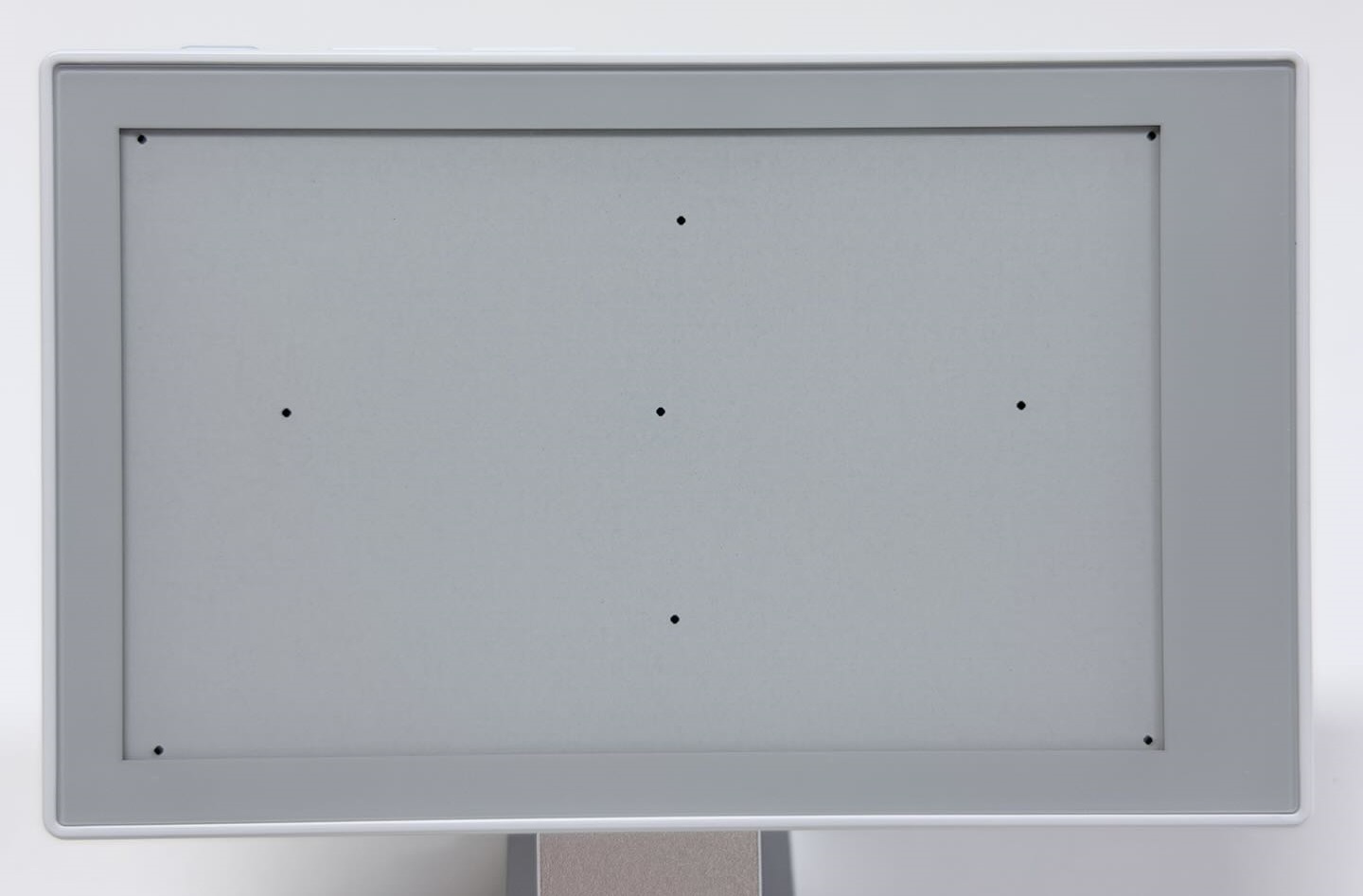
局部刷新期间程序会等待屏幕更新,快速连续点按可能被漏掉。
RTC:读取日期与时间
本示例读取板载 PCF8563 实时时钟,约每秒在串口监视器中输出日期和时间,不更新屏幕。
| 项目 | 配置 |
|---|---|
| I2C SDA / SCL | GPIO1 / GPIO0,400 kHz |
| PCF8563 地址 | 0x51 |
Step 1. 在 Library Manager 中安装 Adafruit 的 RTClib,同时安装依赖库 Adafruit BusIO。参考版本分别为 2.1.4、1.17.4。
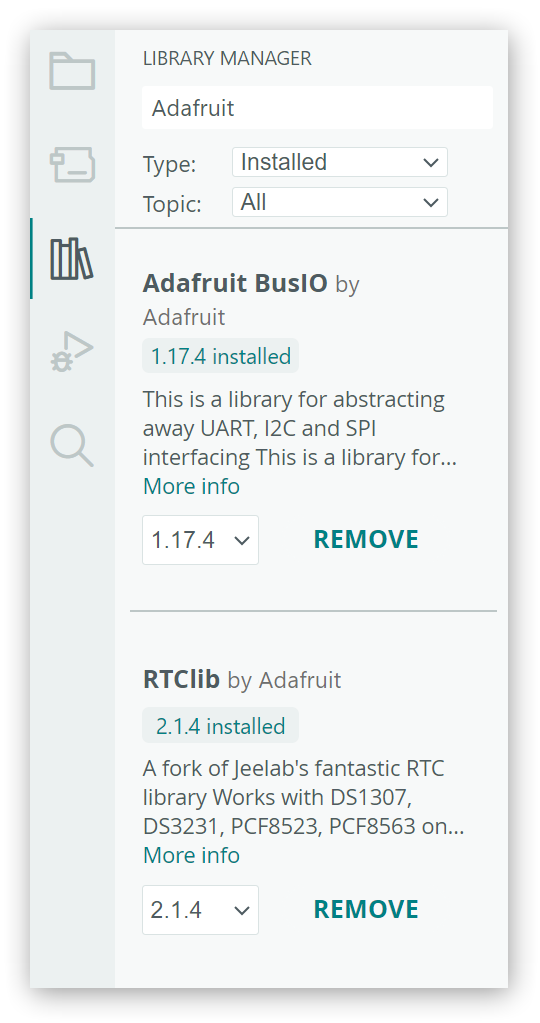
Step 2. 将完整代码复制到新草图,编译并上传。
展开完整代码
/*
 * reTerminal Sticky - RTC Example
 *
 * Reads and prints the date and time stored by the onboard PCF8563 RTC.
 */

#include <Arduino.h>
#include <Wire.h>
#include <RTClib.h>

// CH343P UART: ESP32-S3 RX on GPIO44, TX on GPIO43.
constexpr int PIN_SERIAL_RX = 44;
constexpr int PIN_SERIAL_TX = 43;

// Main power hold and power lock signals, both active HIGH.
constexpr int PIN_POWER_HOLD = 45;
constexpr int PIN_POWER_LOCK = 46;

// Onboard sensor I2C bus: GPIO1 -> SDA, GPIO0 -> SCL.
constexpr int PIN_I2C_SDA = 1;
constexpr int PIN_I2C_SCL = 0;
constexpr uint32_t I2C_FREQUENCY = 400000;

RTC_PCF8563 rtc;

uint8_t daysInMonth(uint16_t year, uint8_t month) {
  static const uint8_t DAYS_PER_MONTH[] = {
    31, 28, 31, 30, 31, 30, 31, 31, 30, 31, 30, 31
  };

  if (month < 1 || month > 12) {
    return 0;
  }

  if (month == 2) {
    const bool leapYear = (year % 4 == 0 && year % 100 != 0) ||
                          (year % 400 == 0);
    return leapYear ? 29 : 28;
  }

  return DAYS_PER_MONTH[month - 1];
}

bool isDateTimeValid(const DateTime& dateTime) {
  const uint8_t month = dateTime.month();
  const uint8_t maximumDay = daysInMonth(dateTime.year(), month);

  return dateTime.isValid() &&
         month >= 1 && month <= 12 &&
         dateTime.day() >= 1 && dateTime.day() <= maximumDay &&
         dateTime.hour() <= 23 &&
         dateTime.minute() <= 59 &&
         dateTime.second() <= 59;
}

void keepPowerOn() {
  pinMode(PIN_POWER_HOLD, OUTPUT);
  pinMode(PIN_POWER_LOCK, OUTPUT);
  digitalWrite(PIN_POWER_HOLD, HIGH);
  digitalWrite(PIN_POWER_LOCK, HIGH);
}

void printTwoDigits(uint8_t value) {
  if (value < 10) {
    Serial1.print('0');
  }
  Serial1.print(value);
}

void setup() {
  keepPowerOn();

  Serial1.begin(115200, SERIAL_8N1, PIN_SERIAL_RX, PIN_SERIAL_TX);
  delay(200);
  Serial1.println();
  Serial1.println("reTerminal Sticky RTC Example");

  Wire.begin(PIN_I2C_SDA, PIN_I2C_SCL, I2C_FREQUENCY);

  if (!rtc.begin(&Wire)) {
    Serial1.println("PCF8563 initialization failed");
    Serial1.println("Check the I2C connection and reset the device.");
    while (true) {
      delay(1000);
    }
  }

  const bool powerWasLost = rtc.lostPower();
  const DateTime storedTime = rtc.now();
  const bool storedTimeIsValid = isDateTimeValid(storedTime);

  // Preserve stored time unless power was lost or the date is invalid.
  if (powerWasLost || !storedTimeIsValid) {
    if (powerWasLost) {
      Serial1.println("RTC power-loss flag is set.");
    }
    if (!storedTimeIsValid) {
      Serial1.println("RTC contains an invalid date or time.");
    }

    const DateTime compileTime(__DATE__, __TIME__);
    rtc.adjust(compileTime);
    Serial1.println("RTC automatically initialized from the sketch compile time.");
  } else {
    Serial1.println("RTC stored time is valid; automatic initialization was not needed.");
  }

  Serial1.println("Reading the stored RTC date and time...");
}

void loop() {
  const DateTime now = rtc.now();

  Serial1.print(now.year());
  Serial1.print('-');
  printTwoDigits(now.month());
  Serial1.print('-');
  printTwoDigits(now.day());
  Serial1.print(' ');
  printTwoDigits(now.hour());
  Serial1.print(':');
  printTwoDigits(now.minute());
  Serial1.print(':');
  printTwoDigits(now.second());
  Serial1.println();

  delay(1000);
}
代码说明
rtc.begin(&Wire)初始化 PCF8563,rtc.now()读取日期和时间。初始化失败时,程序输出错误信息并停止继续运行。- 启动时检查
rtc.lostPower()和日期时间有效性。只有检测到掉电标志或无效日期时间时,才通过rtc.adjust()写入__DATE__、__TIME__对应的编译时间;否则保留 RTC 原值。
预期输出
打开串口监视器,日期和时间约每秒输出一次,格式为 年-月-日 时:分:秒。启动时还会显示是否进行了初始化。以下输出中,RTC 原有时间有效,因此没有重新初始化:
reTerminal Sticky RTC Example
RTC stored time is valid; automatic initialization was not needed.
Reading the stored RTC date and time...
2026-11-03 11:42:45
2026-11-03 11:42:46
本示例不进行网络校时或时区转换。如果 RTC 中已有有效但不准确的时间,重新启动或上传本例不会自动校正,需要另行设置 RTC。
麦克风:观察声音强弱
本示例通过 ESP_I2S 读取板载 PDM 麦克风,计算声音强弱并输出到串口。ESP_I2S 随 ESP32 开发板包提供,无需安装额外库。
| 信号 | GPIO |
|---|---|
| PDM CLK | GPIO19 |
| PDM DATA | GPIO20 |
| 麦克风供电使能 | GPIO38,HIGH 开启 |
将完整代码复制到新草图,编译并上传。
展开完整代码
/*
 * reTerminal Sticky - Microphone Example
 *
 * Samples the onboard PDM microphone and prints a volume value every 5 seconds.
 */

#include <Arduino.h>
#include <ESP_I2S.h>
#include <math.h>

// CH343P UART: ESP32-S3 RX on GPIO44, TX on GPIO43.
constexpr int PIN_SERIAL_RX = 44;
constexpr int PIN_SERIAL_TX = 43;

// Main power hold and power lock signals, both active HIGH.
constexpr int PIN_POWER_HOLD = 45;
constexpr int PIN_POWER_LOCK = 46;

// Onboard PDM microphone: GPIO19 -> CLK, GPIO20 -> DATA, GPIO38 -> power.
constexpr int PIN_MICROPHONE_CLOCK = 19;
constexpr int PIN_MICROPHONE_DATA = 20;
constexpr int PIN_MICROPHONE_ENABLE = 38;

constexpr uint32_t SAMPLE_RATE = 16000;
constexpr size_t SAMPLE_COUNT = 16000;  // One second of mono audio.
constexpr size_t SAMPLES_PER_BLOCK = 512;
constexpr unsigned long REPORT_INTERVAL_MS = 5000;

I2SClass microphone;

void keepPowerOn() {
  pinMode(PIN_POWER_HOLD, OUTPUT);
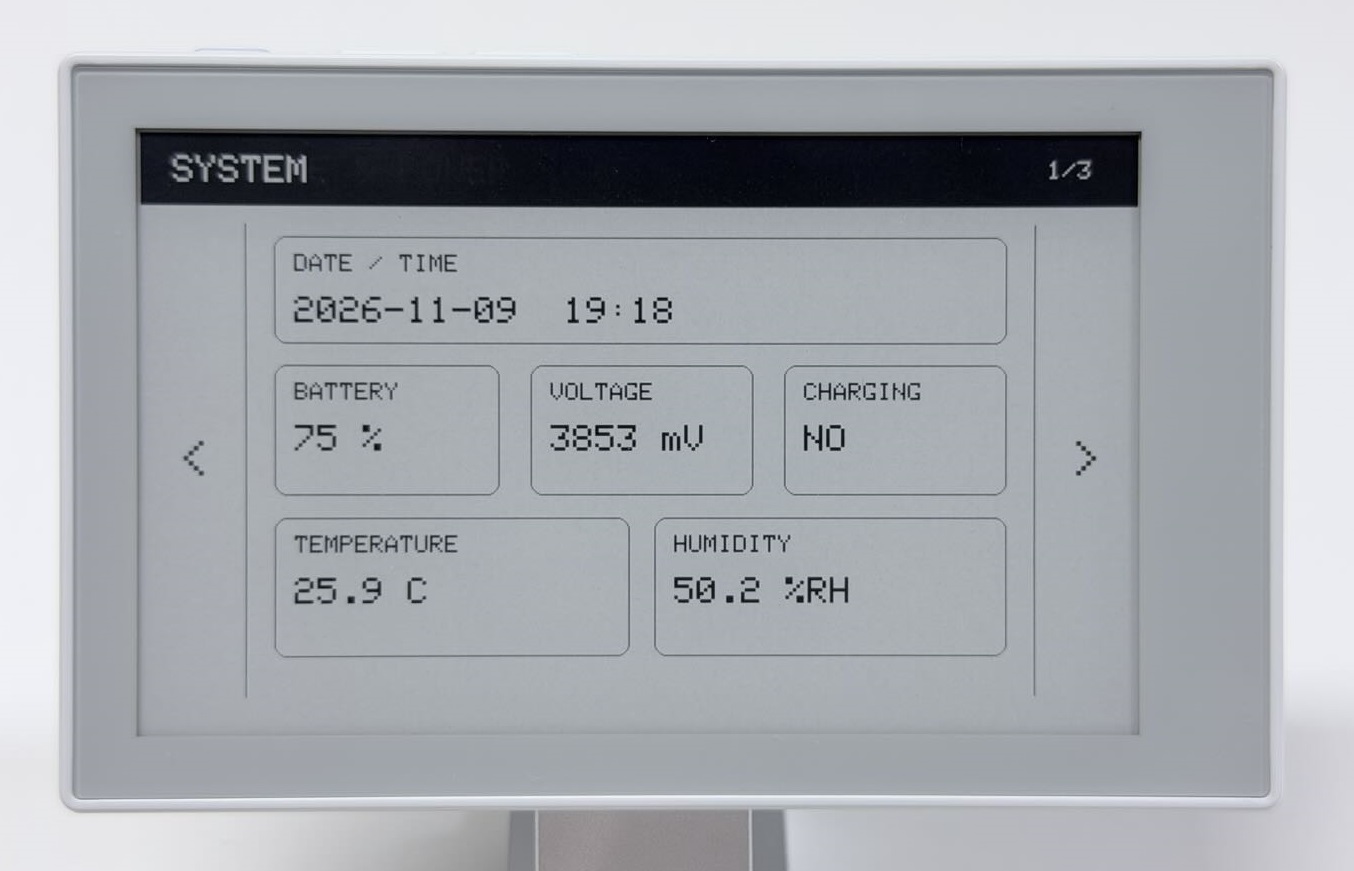
  pinMode(PIN_POWER_LOCK, OUTPUT);
  digitalWrite(PIN_POWER_HOLD, HIGH);
  digitalWrite(PIN_POWER_LOCK, HIGH);
}

bool startMicrophone() {
  pinMode(PIN_MICROPHONE_ENABLE, OUTPUT);
  digitalWrite(PIN_MICROPHONE_ENABLE, HIGH);
  delay(20);

  microphone.setPinsPdmRx(PIN_MICROPHONE_CLOCK, PIN_MICROPHONE_DATA);
  return microphone.begin(I2S_MODE_PDM_RX, SAMPLE_RATE,
                          I2S_DATA_BIT_WIDTH_16BIT, I2S_SLOT_MODE_MONO);
}

void stopMicrophone() {
  microphone.end();
  digitalWrite(PIN_MICROPHONE_ENABLE, LOW);
}

bool measureVolume(float& rms, int& peak, int& volumePercent) {
  int16_t samples[SAMPLES_PER_BLOCK];
  size_t samplesReadTotal = 0;
  double centeredSquares = 0.0;
  peak = 0;

  while (samplesReadTotal < SAMPLE_COUNT) {
    const size_t samplesNeeded =
        min(SAMPLES_PER_BLOCK, SAMPLE_COUNT - samplesReadTotal);
    const size_t bytesNeeded = samplesNeeded * sizeof(int16_t);
    const size_t bytesRead = microphone.readBytes(
        reinterpret_cast<char*>(samples), bytesNeeded);

    if (bytesRead == 0) {
      return false;
    }

    const size_t samplesRead = bytesRead / sizeof(int16_t);
    int64_t blockSum = 0;
    for (size_t i = 0; i < samplesRead; ++i) {
      blockSum += samples[i];
    }

    // Remove the PDM signal's DC offset before calculating RMS and peak.
    const float blockMean = static_cast<float>(blockSum) / samplesRead;
    for (size_t i = 0; i < samplesRead; ++i) {
      const int centered = static_cast<int>(samples[i] - blockMean);
      centeredSquares += static_cast<double>(centered) * centered;
      peak = max(peak, abs(centered));
    }
    samplesReadTotal += samplesRead;
  }

  rms = sqrt(centeredSquares / samplesReadTotal);
  // A relative demo level, not a calibrated sound-pressure measurement.
  volumePercent = constrain(static_cast<int>(rms * 100.0f / 8192.0f), 0, 100);
  return true;
}

void setup() {
  keepPowerOn();

  Serial1.begin(115200, SERIAL_8N1, PIN_SERIAL_RX, PIN_SERIAL_TX);
  delay(200);
  Serial1.println();
  Serial1.println("reTerminal Sticky Microphone Example");
  Serial1.println("Make a sound near the microphone.");
}

void loop() {
  const unsigned long measurementStart = millis();

  if (!startMicrophone()) {
    Serial1.println("PDM microphone initialization failed");
    digitalWrite(PIN_MICROPHONE_ENABLE, LOW);
  } else {
    float rms = 0.0f;
    int peak = 0;
    int volumePercent = 0;

    if (measureVolume(rms, peak, volumePercent)) {
      Serial1.print("Volume: ");
      Serial1.print(volumePercent);
      Serial1.print(" %, RMS: ");
      Serial1.print(rms, 1);
      Serial1.print(", Peak: ");
      Serial1.println(peak);
    } else {
      Serial1.println("Unable to read microphone samples");
    }

    stopMicrophone();
  }

  const unsigned long elapsed = millis() - measurementStart;
  if (elapsed < REPORT_INTERVAL_MS) {
    delay(REPORT_INTERVAL_MS - elapsed);
  }
}
代码说明
startMicrophone()以 16 kHz、16 位单声道启动 PDM 采样,measureVolume()每轮读取约一秒数据。采集结束后,stopMicrophone()关闭采样和麦克风供电。- 程序去除每个数据块的直流偏移,再计算均方根幅度
RMS和绝对峰值Peak。Volume由 RMS 换算并限制在 0–100,是相对音量值,不是分贝。本示例不保存录音。
预期输出
打开串口监视器,先保持安静,再在麦克风附近持续说话数秒,对比连续几次输出。Volume、RMS 和 Peak 约每五秒输出一次,声音增大时读数通常也会升高。
reTerminal Sticky Microphone Example
Make a sound near the microphone.
Volume: 10 %, RMS: 822.6, Peak: 7927
Volume: 10 %, RMS: 831.0, Peak: 18318
每轮只采集约一秒,短促拍手可能落在两次采样之间,建议使用持续说话的方式测试。
如果编译时找不到 ESP_I2S.h,请检查是否已安装支持该 API 的 Espressif Systems ESP32 开发板包。
深度睡眠:按键唤醒
本示例在启动约五秒后进入深度睡眠,按下 AI 按键可唤醒。使用 ESP32 开发板包自带的睡眠和 GPIO API,无需安装额外库。此例程不更新屏幕,请通过串口观察入睡和唤醒过程。
| 信号 | 配置 |
|---|---|
| AI 按键 | GPIO4,按下为 LOW |
| 唤醒方式 | EXT1,低电平唤醒 |
将完整代码复制到新草图,编译并上传。
展开完整代码
/*
 * reTerminal Sticky - Low Power Example
 *
 * Enters deep sleep after disabling peripherals and wakes with the AI / OK button.
 */

#include <Arduino.h>
#include <esp_sleep.h>
#include <driver/gpio.h>

// CH343P UART: ESP32-S3 RX on GPIO44, TX on GPIO43.
constexpr int PIN_SERIAL_RX = 44;
constexpr int PIN_SERIAL_TX = 43;

// Main power hold and power lock signals, both active HIGH.
constexpr int PIN_POWER_HOLD = 45;
constexpr int PIN_POWER_LOCK = 46;

// AI / OK button on GPIO4, active LOW and used as the deep-sleep wake source.
constexpr int PIN_WAKE_BUTTON = 4;

// Peripheral signals placed at their inactive levels before deep sleep.
constexpr int PIN_EPD_ENABLE = 47;       // ePaper power, active HIGH.
constexpr int PIN_TOUCH_ENABLE = 42;     // Touch power, active HIGH.
constexpr int PIN_TOUCH_RESET = 41;      // Touch reset, held LOW.
constexpr int PIN_MICROPHONE_ENABLE = 38;  // Microphone power, active HIGH.
constexpr int PIN_BUZZER = 48;           // Buzzer output, held LOW.

constexpr unsigned long SLEEP_DELAY_MS = 5000;

void releaseDeepSleepHolds() {
  gpio_deep_sleep_hold_dis();
  gpio_hold_dis(static_cast<gpio_num_t>(PIN_POWER_HOLD));
  gpio_hold_dis(static_cast<gpio_num_t>(PIN_POWER_LOCK));
  gpio_hold_dis(static_cast<gpio_num_t>(PIN_EPD_ENABLE));
  gpio_hold_dis(static_cast<gpio_num_t>(PIN_TOUCH_ENABLE));
  gpio_hold_dis(static_cast<gpio_num_t>(PIN_TOUCH_RESET));
  gpio_hold_dis(static_cast<gpio_num_t>(PIN_MICROPHONE_ENABLE));
  gpio_hold_dis(static_cast<gpio_num_t>(PIN_BUZZER));
  gpio_hold_dis(static_cast<gpio_num_t>(PIN_WAKE_BUTTON));
}

void setAndHoldOutput(int pin, int level) {
  gpio_hold_dis(static_cast<gpio_num_t>(pin));
  pinMode(pin, OUTPUT);
  digitalWrite(pin, level);
  gpio_hold_en(static_cast<gpio_num_t>(pin));
}

void keepPowerOn() {
  pinMode(PIN_POWER_HOLD, OUTPUT);
  pinMode(PIN_POWER_LOCK, OUTPUT);
  digitalWrite(PIN_POWER_HOLD, HIGH);
  digitalWrite(PIN_POWER_LOCK, HIGH);
}

void waitForWakeButtonRelease() {
  pinMode(PIN_WAKE_BUTTON, INPUT_PULLUP);
  while (digitalRead(PIN_WAKE_BUTTON) == LOW) {
    delay(10);
  }
  delay(30);
}

void preparePeripheralPowerForSleep() {
  // Hold power-control pins through deep sleep so peripherals remain off.
  setAndHoldOutput(PIN_POWER_HOLD, HIGH);
  setAndHoldOutput(PIN_POWER_LOCK, HIGH);
  setAndHoldOutput(PIN_EPD_ENABLE, LOW);
  setAndHoldOutput(PIN_TOUCH_ENABLE, LOW);
  setAndHoldOutput(PIN_TOUCH_RESET, LOW);
  setAndHoldOutput(PIN_MICROPHONE_ENABLE, LOW);
  setAndHoldOutput(PIN_BUZZER, LOW);
}

void setup() {
  releaseDeepSleepHolds();  // Deep-sleep wake restarts setup().
  keepPowerOn();

  Serial1.begin(115200, SERIAL_8N1, PIN_SERIAL_RX, PIN_SERIAL_TX);
  delay(200);
  Serial1.println();
  Serial1.println("reTerminal Sticky Low Power Example");

  if (esp_sleep_get_wakeup_cause() == ESP_SLEEP_WAKEUP_EXT1) {
    Serial1.println("Wake-up reason: AI / OK button");
  } else {
    Serial1.println("Wake-up reason: power-on or reset");
  }

  Serial1.println("Mode: ESP32-S3 deep sleep");
  Serial1.println("Entering deep sleep in 5 seconds...");
  Serial1.println("Press the AI / OK button to wake the device.");

  delay(SLEEP_DELAY_MS);
  waitForWakeButtonRelease();
  preparePeripheralPowerForSleep();

  pinMode(PIN_WAKE_BUTTON, INPUT_PULLUP);
  gpio_hold_en(static_cast<gpio_num_t>(PIN_WAKE_BUTTON));
  esp_sleep_enable_ext1_wakeup_io(1ULL << PIN_WAKE_BUTTON,
                                  ESP_EXT1_WAKEUP_ANY_LOW);
  gpio_deep_sleep_hold_en();  // Keep the selected pin levels during sleep.

  Serial1.println("Entering deep sleep now.");
  Serial1.flush();
  delay(50);
  esp_deep_sleep_start();
}

void loop() {
}
代码说明
- 程序等待 AI 按键松开,关闭部分外设并保持电源控制电平,再将 GPIO4 配置为低电平唤醒源,调用
esp_deep_sleep_start()。 - 按键唤醒后重新执行
setup(),解除 GPIO 保持并重新初始化,约五秒后再次入睡。按住 AI 按键时,程序会等待松手后再睡眠。
预期输出
打开串口监视器,等待 Entering deep sleep now.,然后短按并松开 AI 按键。首次上电或普通复位输出 Wake-up reason: power-on or reset;按键唤醒输出 Wake-up reason: AI / OK button。以下日志展示一次按键唤醒后再次进入睡眠的过程:
reTerminal Sticky Low Power Example
Wake-up reason: AI / OK button
Mode: ESP32-S3 deep sleep
Entering deep sleep in 5 seconds...
Press the AI / OK button to wake the device.
Entering deep sleep now.
深度睡眠不等于整机断电;电子纸保留的画面不能用于判断设备是否已经唤醒。
综合 Demo:高级示例
综合 Demo 将本篇功能与第二篇的板载外设组合为三个信息页面,支持按键和触摸切页、数据刷新及休眠。建议先运行独立示例,再尝试本节。
| 页面 | 显示内容 | 数据更新时机 |
|---|---|---|
| SYSTEM | RTC 时间、温湿度、电量、电压、外部供电状态 | 进入页面、手动刷新,或上次刷新完成约 60 秒后 |
| SENSORS | 三轴加速度、角速度、麦克风音量条 | 进入页面、手动刷新,或上次刷新完成约 60 秒后 |
| STORAGE & POWER | SD 卡容量、最多五个根目录条目、SLEEP 按钮 | 进入页面或手动刷新 |
Step 1:准备依赖并上传
确认已安装第一篇的 Seeed_GFX2 库,以及下表中的库和依赖。版本号供环境配置时参考。
| 库 | 作者 | 参考版本 | 依赖 |
|---|---|---|---|
| Sensirion I2C SHT4x | Sensirion | 1.1.2 | Sensirion Core 0.7.3 |
| Seeed Arduino LSM6DS3 | Seeed Studio | 2.0.7 | — |
| RTClib | Adafruit | 2.1.4 | Adafruit BusIO 1.17.4 |
| bb_captouch | Larry Bank | 1.3.1 | — |
如需查看存储信息,插入一张已通过第二篇 MicroSD 实验的卡;未插卡也可运行 Demo。沿用第一篇的板型配置,并在 Tools > PSRAM 中选择 OPI PSRAM。
将下方完整代码复制到新草图,编译并上传。
展开综合 Demo 完整代码
/*
 * reTerminal Sticky - Complete Hardware Demo
 *
 * Shows system, sensor, storage, touch, button, buzzer, and low-power features.
 */

#include <Arduino.h>
#include <Wire.h>
#include <SPI.h>
#include <FS.h>
#include <SD.h>
#include <Seeed_GFX.h>
#include <bus/Bus_SPI.h>
#include <bb_captouch.h>
#include <SensirionCore.h>
#include <SensirionI2cSht4x.h>
#include <LSM6DS3.h>
#include <RTClib.h>
#include <ESP_I2S.h>
#include <esp_sleep.h>
#include <driver/gpio.h>
#include <math.h>

// CH343P UART: ESP32-S3 RX on GPIO44, TX on GPIO43.
constexpr int PIN_SERIAL_RX = 44;
constexpr int PIN_SERIAL_TX = 43;

// Main power hold and power lock signals, both active HIGH.
constexpr int PIN_POWER_HOLD = 45;
constexpr int PIN_POWER_LOCK = 46;

// Onboard buttons, active LOW.
constexpr int PIN_BUTTON_AI = 4;
constexpr int PIN_BUTTON_UP = 5;
constexpr int PIN_BUTTON_DOWN = 6;

// Onboard buzzer.
constexpr int PIN_BUZZER = 48;

// Onboard sensor I2C bus: GPIO1 -> SDA, GPIO0 -> SCL.
constexpr int PIN_SENSOR_SDA = 1;
constexpr int PIN_SENSOR_SCL = 0;

// Onboard GT911 touch bus: GPIO3 -> SDA, GPIO2 -> SCL.
constexpr int PIN_TOUCH_SDA = 3;
constexpr int PIN_TOUCH_SCL = 2;
constexpr int PIN_TOUCH_ENABLE = 42;
constexpr int PIN_TOUCH_INTERRUPT = 21;
constexpr int PIN_TOUCH_RESET = 41;
constexpr uint32_t I2C_FREQUENCY = 400000;

// Battery charger and external-power detection.
constexpr int PIN_BATTERY_CHARGE_ENABLE = 39;  // Active LOW.
constexpr int PIN_EXTERNAL_POWER = 9;          // HIGH when power is present.

// The microSD card shares the display SPI bus.
constexpr int PIN_SPI_SCK = 13;
constexpr int PIN_SPI_MISO = 12;
constexpr int PIN_SPI_MOSI = 14;
constexpr int PIN_SD_CS = 8;
constexpr int PIN_SD_ENABLE = 10;  // Active HIGH.
constexpr int PIN_SD_DETECT = 11;  // Active LOW.
constexpr int PIN_EPD_CS = 15;
constexpr int PIN_EPD_ENABLE = 47;

// Onboard PDM microphone.
constexpr int PIN_MICROPHONE_CLOCK = 19;
constexpr int PIN_MICROPHONE_DATA = 20;
constexpr int PIN_MICROPHONE_ENABLE = 38;

constexpr uint8_t SHT40_ADDRESS = 0x44;
constexpr uint8_t IMU_ADDRESS = 0x6A;
constexpr uint8_t BQ27220_ADDRESS = 0x55;
constexpr uint8_t REG_BATTERY_VOLTAGE = 0x08;
constexpr uint8_t REG_BATTERY_SOC = 0x2C;

constexpr int DISPLAY_WIDTH = 800;
constexpr int DISPLAY_HEIGHT = 480;
constexpr unsigned long DEBOUNCE_MS = 30;
constexpr unsigned long AUTO_REFRESH_INTERVAL_MS = 60000;

constexpr uint32_t MICROPHONE_SAMPLE_RATE = 16000;
constexpr size_t MICROPHONE_SAMPLE_COUNT = 16000;
constexpr size_t MICROPHONE_BLOCK_SIZE = 512;

constexpr int PAGE_COUNT = 3;
constexpr int TOUCH_LEFT_WIDTH = 100;
constexpr int TOUCH_RIGHT_START = 700;
constexpr int SLEEP_X = 250;
constexpr int SLEEP_Y = 340;
constexpr int SLEEP_W = 300;
constexpr int SLEEP_H = 80;

Seeed_GFX display(Seeed_Product::reTerminal_Sticky);
BBCapTouch touch;
SensirionI2cSht4x sht40;
LSM6DS3 imu(I2C_MODE, IMU_ADDRESS);
RTC_PCF8563 rtc;
I2SClass microphone;

enum Page {
  PAGE_SYSTEM = 0,
  PAGE_SENSORS,
  PAGE_STORAGE_POWER
};

// Retain only the active page across ESP32 deep sleep.
RTC_DATA_ATTR int retainedPageIndex = PAGE_SYSTEM;

struct SystemData {
  DateTime dateTime;
  uint16_t batteryPercent = 0;
  uint16_t batteryVoltage = 0;
  bool charging = false;
  float temperature = 0.0f;
  float humidity = 0.0f;
  bool rtcOk = false;
  bool batteryOk = false;
  bool sht40Ok = false;
};

struct SensorData {
  float accelX = 0.0f;
  float accelY = 0.0f;
  float accelZ = 0.0f;
  float gyroX = 0.0f;
  float gyroY = 0.0f;
  float gyroZ = 0.0f;
  int microphoneVolume = 0;
  bool imuOk = false;
  bool microphoneOk = false;
};

struct StorageData {
  bool cardPresent = false;
  bool mounted = false;
  uint64_t capacityMb = 0;
  int entryCount = 0;
  char entries[5][40] = {};
};

Page currentPage = PAGE_SYSTEM;
SystemData systemData;
SensorData sensorData;
StorageData storageData;

constexpr int BUTTON_PINS[] = {
  PIN_BUTTON_AI, PIN_BUTTON_UP, PIN_BUTTON_DOWN
};
bool buttonLastReading[3];
bool buttonStableState[3];
unsigned long buttonLastChange[3];
bool touchHandled = false;
unsigned long lastScreenRefresh = 0;
bool imuReady = false;
bool rtcReady = false;

// Power / Buttons / Buzzer --------------------------------------------------

void keepPowerOn() {
  pinMode(PIN_POWER_HOLD, OUTPUT);
  pinMode(PIN_POWER_LOCK, OUTPUT);
  digitalWrite(PIN_POWER_HOLD, HIGH);
  digitalWrite(PIN_POWER_LOCK, HIGH);
}

void initializeButtons() {
  for (int i = 0; i < 3; ++i) {
    pinMode(BUTTON_PINS[i], INPUT_PULLUP);
    buttonLastReading[i] = digitalRead(BUTTON_PINS[i]);
    buttonStableState[i] = buttonLastReading[i];
    buttonLastChange[i] = millis();
  }
}

void playPageTone() {
  tone(PIN_BUZZER, 900, 80);
  delay(100);
  noTone(PIN_BUZZER);
}

// I2C bus selection ---------------------------------------------------------

void selectSensorBus() {
  Wire.end();  // Sensors and touch use different pins on the same Wire instance.
  delay(5);
  Wire.begin(PIN_SENSOR_SDA, PIN_SENSOR_SCL, I2C_FREQUENCY);
}

bool selectTouchBus() {
  Wire.end();
  delay(5);
  const bool ok =
      touch.init(PIN_TOUCH_SDA, PIN_TOUCH_SCL, PIN_TOUCH_RESET,
                 PIN_TOUCH_INTERRUPT, I2C_FREQUENCY, &Wire) == CT_SUCCESS &&
      touch.sensorType() == CT_TYPE_GT911;
  if (!ok) {
    Serial1.println("GT911 initialization failed");
  }
  return ok;
}

// System sensors / Battery --------------------------------------------------

uint8_t daysInMonth(uint16_t year, uint8_t month) {
  static const uint8_t DAYS_PER_MONTH[] = {
    31, 28, 31, 30, 31, 30, 31, 31, 30, 31, 30, 31
  };
  if (month < 1 || month > 12) return 0;
  if (month == 2) {
    const bool leapYear = (year % 4 == 0 && year % 100 != 0) ||
                          (year % 400 == 0);
    return leapYear ? 29 : 28;
  }
  return DAYS_PER_MONTH[month - 1];
}

bool isDateTimeValid(const DateTime& value) {
  const uint8_t maximumDay = daysInMonth(value.year(), value.month());
  return value.isValid() && value.month() >= 1 && value.month() <= 12 &&
         value.day() >= 1 && value.day() <= maximumDay &&
         value.hour() <= 23 && value.minute() <= 59 && value.second() <= 59;
}

bool readBQ27220Word(uint8_t registerAddress, uint16_t& value) {
  Wire.beginTransmission(BQ27220_ADDRESS);
  Wire.write(registerAddress);
  if (Wire.endTransmission(false) != 0) return false;
  if (Wire.requestFrom(BQ27220_ADDRESS, static_cast<uint8_t>(2)) != 2) {
    return false;
  }
  const uint8_t lowByte = Wire.read();
  const uint8_t highByte = Wire.read();
  value = static_cast<uint16_t>(lowByte) |
          (static_cast<uint16_t>(highByte) << 8);
  return true;
}

void initializeSensorDevices() {
  selectSensorBus();
  sht40.begin(Wire, SHT40_ADDRESS);

  imuReady = imu.begin() == 0;
  Serial1.println(imuReady ? "IMU initialized" : "IMU initialization failed");

  rtcReady = rtc.begin(&Wire);
  if (!rtcReady) {
    Serial1.println("RTC initialization failed");
    return;
  }

  const DateTime storedTime = rtc.now();
  if (rtc.lostPower() || !isDateTimeValid(storedTime)) {  // Do not trust invalid time.
    rtc.adjust(DateTime(__DATE__, __TIME__));
    Serial1.println("RTC initialized from sketch compile time");
  } else {
    Serial1.println("RTC stored time is valid");
  }
}

void readSystemData() {
  selectSensorBus();

  systemData.rtcOk = rtcReady;
  if (systemData.rtcOk) {
    systemData.dateTime = rtc.now();
    systemData.rtcOk = isDateTimeValid(systemData.dateTime);
  }

  uint16_t stateOfCharge = 0;
  uint16_t voltage = 0;
  systemData.batteryOk =
      readBQ27220Word(REG_BATTERY_SOC, stateOfCharge) &&
      readBQ27220Word(REG_BATTERY_VOLTAGE, voltage);
  if (systemData.batteryOk) {
    systemData.batteryPercent = stateOfCharge > 100 ? 100 : stateOfCharge;
    systemData.batteryVoltage = voltage;
    systemData.charging = digitalRead(PIN_EXTERNAL_POWER) == HIGH;
  }

  const uint16_t error = sht40.measureHighPrecision(
      systemData.temperature, systemData.humidity);
  systemData.sht40Ok = error == 0;

  Serial1.println("System data updated");
  if (systemData.batteryOk) {
    Serial1.print("Battery: ");
    Serial1.print(systemData.batteryPercent);
    Serial1.print(" %, ");
    Serial1.print(systemData.batteryVoltage);
    Serial1.print(" mV, Charging: ");
    Serial1.println(systemData.charging ? "YES" : "NO");
  }
  if (systemData.sht40Ok) {
    Serial1.print("Temperature: ");
    Serial1.print(systemData.temperature, 1);
    Serial1.print(" C, Humidity: ");
    Serial1.print(systemData.humidity, 1);
    Serial1.println(" %RH");
  }

  selectTouchBus();
}

// Microphone ---------------------------------------------------------------

bool startMicrophone() {
  pinMode(PIN_MICROPHONE_ENABLE, OUTPUT);
  digitalWrite(PIN_MICROPHONE_ENABLE, HIGH);
  delay(20);
  microphone.setPinsPdmRx(PIN_MICROPHONE_CLOCK, PIN_MICROPHONE_DATA);
  return microphone.begin(I2S_MODE_PDM_RX, MICROPHONE_SAMPLE_RATE,
                          I2S_DATA_BIT_WIDTH_16BIT, I2S_SLOT_MODE_MONO);
}

void stopMicrophone() {
  microphone.end();
  digitalWrite(PIN_MICROPHONE_ENABLE, LOW);
}

bool measureMicrophoneVolume(int& volumePercent) {
  int16_t samples[MICROPHONE_BLOCK_SIZE];
  size_t samplesReadTotal = 0;
  double centeredSquares = 0.0;

  while (samplesReadTotal < MICROPHONE_SAMPLE_COUNT) {
    const size_t remaining = MICROPHONE_SAMPLE_COUNT - samplesReadTotal;
    const size_t samplesNeeded = min(MICROPHONE_BLOCK_SIZE, remaining);
    const size_t bytesRead = microphone.readBytes(
        reinterpret_cast<char*>(samples), samplesNeeded * sizeof(int16_t));
    if (bytesRead == 0) return false;

    const size_t samplesRead = bytesRead / sizeof(int16_t);
    int64_t sum = 0;
    for (size_t i = 0; i < samplesRead; ++i) sum += samples[i];
    const float mean = static_cast<float>(sum) / samplesRead;
    for (size_t i = 0; i < samplesRead; ++i) {
      const int centered = static_cast<int>(samples[i] - mean);
      centeredSquares += static_cast<double>(centered) * centered;
    }
    samplesReadTotal += samplesRead;
  }

  const float rms = sqrt(centeredSquares / samplesReadTotal);
  volumePercent = constrain(static_cast<int>(rms * 100.0f / 8192.0f), 0, 100);
  return true;
}

void readSensorData() {
  selectSensorBus();
  sensorData.imuOk = imuReady;
  if (sensorData.imuOk) {
    sensorData.accelX = imu.readFloatAccelX();
    sensorData.accelY = imu.readFloatAccelY();
    sensorData.accelZ = imu.readFloatAccelZ();
    sensorData.gyroX = imu.readFloatGyroX();
    sensorData.gyroY = imu.readFloatGyroY();
    sensorData.gyroZ = imu.readFloatGyroZ();
  }
  selectTouchBus();

  sensorData.microphoneOk = false;
  sensorData.microphoneVolume = 0;
  if (startMicrophone()) {
    sensorData.microphoneOk =
        measureMicrophoneVolume(sensorData.microphoneVolume);
    stopMicrophone();
  } else {
    digitalWrite(PIN_MICROPHONE_ENABLE, LOW);
  }

  Serial1.println("Sensor data updated");
  if (sensorData.imuOk) {
    Serial1.print("Accel: ");
    Serial1.print(sensorData.accelX, 2);
    Serial1.print(", ");
    Serial1.print(sensorData.accelY, 2);
    Serial1.print(", ");
    Serial1.println(sensorData.accelZ, 2);
    Serial1.print("Gyro: ");
    Serial1.print(sensorData.gyroX, 1);
    Serial1.print(", ");
    Serial1.print(sensorData.gyroY, 1);
    Serial1.print(", ");
    Serial1.println(sensorData.gyroZ, 1);
  }
  if (sensorData.microphoneOk) {
    Serial1.print("Microphone volume: ");
    Serial1.print(sensorData.microphoneVolume);
    Serial1.println(" %");
  }
}

// MicroSD shared SPI -------------------------------------------------------

void readStorageData() {
  storageData = StorageData();
  pinMode(PIN_EPD_CS, OUTPUT);
  digitalWrite(PIN_EPD_CS, HIGH);
  pinMode(PIN_SD_CS, OUTPUT);
  digitalWrite(PIN_SD_CS, HIGH);
  pinMode(PIN_SD_ENABLE, OUTPUT);
  pinMode(PIN_SD_DETECT, INPUT_PULLUP);

  storageData.cardPresent = digitalRead(PIN_SD_DETECT) == LOW;
  if (!storageData.cardPresent) {
    digitalWrite(PIN_SD_ENABLE, LOW);
    Serial1.println("No microSD card detected");
    return;
  }

  digitalWrite(PIN_SD_ENABLE, LOW);
  delay(20);
  digitalWrite(PIN_SD_ENABLE, HIGH);
  delay(100);

  // The display and microSD share the GFX2 SPI instance. Their separate CS
  // pins keep the inactive device deselected during each SPI transaction.
  Bus_SPI& displaySpiBus =
      static_cast<Bus_SPI&>(display.panel().driver().bus());
  SPIClass* sharedSpi = displaySpiBus.spiInstance();

  storageData.mounted =
      sharedSpi != nullptr && SD.begin(PIN_SD_CS, *sharedSpi);
  if (!storageData.mounted || SD.cardType() == CARD_NONE) {
    storageData.mounted = false;
    Serial1.println("MicroSD initialization failed");
  } else {
    storageData.capacityMb = SD.cardSize() / (1024ULL * 1024ULL);
    File root = SD.open("/");
    if (root && root.isDirectory()) {
      File entry = root.openNextFile();
      while (entry && storageData.entryCount < 5) {
        snprintf(storageData.entries[storageData.entryCount],
                 sizeof(storageData.entries[storageData.entryCount]),
                 "%s%s", entry.isDirectory() ? "[DIR] " : "", entry.name());
        ++storageData.entryCount;
        entry.close();
        entry = root.openNextFile();
      }
      if (entry) entry.close();
      root.close();
    }
  }

  SD.end();  // Release the shared SPI device before refreshing the display.
  digitalWrite(PIN_SD_CS, HIGH);
  digitalWrite(PIN_SD_ENABLE, LOW);
  digitalWrite(PIN_EPD_CS, HIGH);

  if (storageData.mounted) {
    Serial1.print("MicroSD capacity: ");
    Serial1.print(storageData.capacityMb);
    Serial1.println(" MB");
  }
}

// Touch --------------------------------------------------------------------

int scaleCoordinate(int value, int inputMaximum, int outputMaximum) {
  value = constrain(value, 0, inputMaximum);
  return static_cast<int>((static_cast<int32_t>(value) * outputMaximum +
                           inputMaximum / 2) /
                          inputMaximum);
}

void convertTouchCoordinates(int rawX, int rawY, int& x, int& y) {
  // Match the display's default 180-degree rotation after swapping axes.
  x = DISPLAY_WIDTH - 1 - scaleCoordinate(rawY, 800, DISPLAY_WIDTH - 1);
  y = DISPLAY_HEIGHT - 1 - scaleCoordinate(rawX, 480, DISPLAY_HEIGHT - 1);
}

// UI drawing ---------------------------------------------------------------

void drawCenteredText(const char* text, int x, int y, int width, int height,
                      uint8_t textSize, uint16_t color) {
  display.setTextSize(textSize);
  display.setTextColor(color);
  const int16_t textWidth = display.textWidth(text);
  const int16_t textHeight = display.fontHeight();  // Seeed_GFX2 text metrics.
  display.setCursor(x + (width - textWidth) / 2,
                    y + (height - textHeight) / 2);
  display.print(text);
}

void drawHeader(const char* title, int pageNumber) {
  display.fillScreen(TFT_WHITE);
  display.fillRect(0, 0, DISPLAY_WIDTH, 58, TFT_BLACK);
  display.setTextColor(TFT_WHITE);
  display.setTextSize(3);
  display.setCursor(26, 18);
  display.print(title);
  char pageLabel[8];
  snprintf(pageLabel, sizeof(pageLabel), "%d/3", pageNumber);
  drawCenteredText(pageLabel, 690, 0, 110, 58, 2, TFT_WHITE);

  drawCenteredText("<", 0, 72, 82, 380, 4, TFT_BLACK);
  drawCenteredText(">", 718, 72, 82, 380, 4, TFT_BLACK);
  display.drawFastVLine(82, 72, 380, TFT_BLACK);
  display.drawFastVLine(717, 72, 380, TFT_BLACK);
}

void drawValueBox(int x, int y, int w, int h, const char* label,
                  const char* value) {
  display.drawRoundRect(x, y, w, h, 10, TFT_BLACK);
  display.setTextColor(TFT_BLACK);
  display.setTextSize(2);
  display.setCursor(x + 16, y + 14);
  display.print(label);
  display.setTextSize(3);
  display.setCursor(x + 16, y + 48);
  display.print(value);
}

void drawSystemPage() {
  drawHeader("SYSTEM", 1);
  char value[48];

  if (systemData.rtcOk) {
    snprintf(value, sizeof(value), "%04u-%02u-%02u  %02u:%02u",
             systemData.dateTime.year(), systemData.dateTime.month(),
             systemData.dateTime.day(), systemData.dateTime.hour(),
             systemData.dateTime.minute());
  } else {
    snprintf(value, sizeof(value), "RTC unavailable");
  }
  drawValueBox(105, 82, 590, 86, "DATE / TIME", value);

  if (systemData.batteryOk) {
    snprintf(value, sizeof(value), "%u %%", systemData.batteryPercent);
  } else {
    snprintf(value, sizeof(value), "N/A");
  }
  drawValueBox(105, 185, 180, 105, "BATTERY", value);

  if (systemData.batteryOk) {
    snprintf(value, sizeof(value), "%u mV", systemData.batteryVoltage);
  } else {
    snprintf(value, sizeof(value), "N/A");
  }
  drawValueBox(310, 185, 180, 105, "VOLTAGE", value);

  snprintf(value, sizeof(value), "%s",
           systemData.batteryOk ? (systemData.charging ? "YES" : "NO") : "N/A");
  drawValueBox(515, 185, 180, 105, "CHARGING", value);

  if (systemData.sht40Ok) {
    snprintf(value, sizeof(value), "%.1f C", systemData.temperature);
  } else {
    snprintf(value, sizeof(value), "N/A");
  }
  drawValueBox(105, 308, 285, 112, "TEMPERATURE", value);

  if (systemData.sht40Ok) {
    snprintf(value, sizeof(value), "%.1f %%RH", systemData.humidity);
  } else {
    snprintf(value, sizeof(value), "N/A");
  }
  drawValueBox(410, 308, 285, 112, "HUMIDITY", value);
}

void drawSensorPage() {
  drawHeader("SENSORS", 2);
  char value[48];

  display.drawRoundRect(105, 82, 590, 125, 10, TFT_BLACK);
  display.setTextColor(TFT_BLACK);
  display.setTextSize(2);
  display.setCursor(122, 96);
  display.print("ACCELEROMETER (g)");
  display.setTextSize(3);
  display.setCursor(122, 145);
  if (sensorData.imuOk) {
    snprintf(value, sizeof(value), "X %.2f   Y %.2f   Z %.2f",
             sensorData.accelX, sensorData.accelY, sensorData.accelZ);
  } else {
    snprintf(value, sizeof(value), "IMU unavailable");
  }
  display.print(value);

  display.drawRoundRect(105, 225, 590, 125, 10, TFT_BLACK);
  display.setTextSize(2);
  display.setCursor(122, 239);
  display.print("GYROSCOPE (dps)");
  display.setTextSize(3);
  display.setCursor(122, 288);
  if (sensorData.imuOk) {
    snprintf(value, sizeof(value), "X %.1f   Y %.1f   Z %.1f",
             sensorData.gyroX, sensorData.gyroY, sensorData.gyroZ);
  } else {
    snprintf(value, sizeof(value), "IMU unavailable");
  }
  display.print(value);

  display.setTextSize(2);
  display.setCursor(105, 378);
  display.print("MICROPHONE");
  display.drawRect(250, 374, 380, 32, TFT_BLACK);
  if (sensorData.microphoneOk) {
    const int barWidth = sensorData.microphoneVolume * 376 / 100;
    display.fillRect(252, 376, barWidth, 28, TFT_BLACK);
    snprintf(value, sizeof(value), "%d %%", sensorData.microphoneVolume);
  } else {
    snprintf(value, sizeof(value), "N/A");
  }
  display.setCursor(646, 378);
  display.print(value);
}

void drawStoragePage() {
  drawHeader("STORAGE & POWER", 3);
  char value[48];

  display.drawRoundRect(105, 82, 590, 238, 10, TFT_BLACK);
  display.setTextColor(TFT_BLACK);
  display.setTextSize(2);
  display.setCursor(122, 98);
  display.print("MICROSD");
  display.setCursor(300, 98);
  if (storageData.mounted) {
    snprintf(value, sizeof(value), "%llu MB",
             static_cast<unsigned long long>(storageData.capacityMb));
  } else if (!storageData.cardPresent) {
    snprintf(value, sizeof(value), "NO CARD");
  } else {
    snprintf(value, sizeof(value), "MOUNT FAILED");
  }
  display.print(value);

  display.drawFastHLine(122, 130, 556, TFT_BLACK);
  display.setCursor(122, 144);
  display.print("ROOT DIRECTORY");
  display.setTextSize(2);
  if (storageData.entryCount == 0) {
    display.setCursor(140, 184);
    display.print(storageData.mounted ? "(empty)" : "Unavailable");
  } else {
    for (int i = 0; i < storageData.entryCount; ++i) {
      display.setCursor(140, 178 + i * 27);
      display.print(storageData.entries[i]);
    }
  }

  display.fillRoundRect(SLEEP_X, SLEEP_Y, SLEEP_W, SLEEP_H, 12, TFT_BLACK);
  drawCenteredText("SLEEP", SLEEP_X, SLEEP_Y, SLEEP_W, SLEEP_H,
                   3, TFT_WHITE);
}

void drawDeepSleepPage() {
  display.fillScreen(TFT_WHITE);
  display.drawRoundRect(130, 105, 540, 270, 18, TFT_BLACK);
  display.fillRect(130, 105, 540, 70, TFT_BLACK);
  drawCenteredText("DEEP SLEEP", 130, 105, 540, 70, 4, TFT_WHITE);
  drawCenteredText("Press AI / OK to wake", 130, 175, 540, 200,
                   3, TFT_BLACK);
}

// Page navigation ----------------------------------------------------------

void refreshCurrentPage() {
  Serial1.print("Refreshing page ");
  Serial1.println(static_cast<int>(currentPage) + 1);

  if (currentPage == PAGE_SYSTEM) {
    readSystemData();
    drawSystemPage();
  } else if (currentPage == PAGE_SENSORS) {
    readSensorData();
    drawSensorPage();
  } else {
    readStorageData();
    drawStoragePage();
  }

  const GfxResult result = display.refresh();
  if (!result.ok()) {
    Serial1.print("Display refresh failed: ");
    Serial1.println(result.message);
  } else {
    Serial1.println("Display refresh complete");
  }
  lastScreenRefresh = millis();
}

void changePage(int direction) {
  int next = static_cast<int>(currentPage) + direction;
  if (next < 0) next = PAGE_COUNT - 1;
  if (next >= PAGE_COUNT) next = 0;
  currentPage = static_cast<Page>(next);
  Serial1.print("Page changed to ");
  Serial1.println(next + 1);
  playPageTone();
  refreshCurrentPage();
}

// Deep Sleep ---------------------------------------------------------------

void releaseDeepSleepHolds() {
  gpio_deep_sleep_hold_dis();
  const int pins[] = {
    PIN_POWER_HOLD, PIN_POWER_LOCK, PIN_EPD_ENABLE, PIN_TOUCH_ENABLE,
    PIN_TOUCH_RESET, PIN_MICROPHONE_ENABLE, PIN_BUZZER, PIN_BUTTON_AI
  };
  for (int pin : pins) {
    gpio_hold_dis(static_cast<gpio_num_t>(pin));
  }
}

void setAndHoldOutput(int pin, int level) {
  gpio_hold_dis(static_cast<gpio_num_t>(pin));
  pinMode(pin, OUTPUT);
  digitalWrite(pin, level);
  gpio_hold_en(static_cast<gpio_num_t>(pin));
}

void enterDeepSleep() {
  Serial1.println("Preparing ESP32-S3 deep sleep");
  Serial1.println("Press AI / OK to wake the device");

  retainedPageIndex = static_cast<int>(currentPage);
  playPageTone();
  drawDeepSleepPage();
  const GfxResult result = display.refresh();
  if (!result.ok()) {
    Serial1.print("Deep sleep page refresh failed: ");
    Serial1.println(result.message);
  } else {
    Serial1.println("Deep sleep page displayed");
  }
  delay(1500);

  pinMode(PIN_BUTTON_AI, INPUT_PULLUP);
  while (digitalRead(PIN_BUTTON_AI) == LOW) delay(10);
  delay(30);

  setAndHoldOutput(PIN_POWER_HOLD, HIGH);
  setAndHoldOutput(PIN_POWER_LOCK, HIGH);
  setAndHoldOutput(PIN_EPD_ENABLE, LOW);
  setAndHoldOutput(PIN_TOUCH_ENABLE, LOW);
  setAndHoldOutput(PIN_TOUCH_RESET, LOW);
  setAndHoldOutput(PIN_MICROPHONE_ENABLE, LOW);
  setAndHoldOutput(PIN_BUZZER, LOW);

  pinMode(PIN_BUTTON_AI, INPUT_PULLUP);
  gpio_hold_en(static_cast<gpio_num_t>(PIN_BUTTON_AI));
  esp_sleep_enable_ext1_wakeup_io(1ULL << PIN_BUTTON_AI,
                                  ESP_EXT1_WAKEUP_ANY_LOW);
  gpio_deep_sleep_hold_en();

  Serial1.println("Entering deep sleep now");
  Serial1.flush();
  delay(50);
  esp_deep_sleep_start();
}

void handleButtonPress(int index) {
  if (index == 0) {
    Serial1.println("AI / OK: refresh current page");
    refreshCurrentPage();
  } else if (index == 1) {
    Serial1.println("UP: previous page");
    changePage(-1);
  } else {
    Serial1.println("DOWN: next page");
    changePage(1);
  }
}

void updateButtons() {
  for (int i = 0; i < 3; ++i) {
    const bool reading = digitalRead(BUTTON_PINS[i]);
    if (reading != buttonLastReading[i]) {
      buttonLastReading[i] = reading;
      buttonLastChange[i] = millis();
    }
    if (millis() - buttonLastChange[i] >= DEBOUNCE_MS &&
        reading != buttonStableState[i]) {
      buttonStableState[i] = reading;
      if (reading == LOW) handleButtonPress(i);
    }
  }
}

void updateTouch() {
  TOUCHINFO touchInfo = {};
  const bool isTouched = touch.getSamples(&touchInfo) == 1 &&
                         touchInfo.count > 0;
  if (isTouched && !touchHandled) {
    int x = 0;
    int y = 0;
    convertTouchCoordinates(touchInfo.x[0], touchInfo.y[0], x, y);
    Serial1.print("Touch X: ");
    Serial1.print(x);
    Serial1.print(", Y: ");
    Serial1.println(y);

    if (currentPage == PAGE_STORAGE_POWER &&
        x >= SLEEP_X && x < SLEEP_X + SLEEP_W &&
        y >= SLEEP_Y && y < SLEEP_Y + SLEEP_H) {
      enterDeepSleep();
    } else if (x < TOUCH_LEFT_WIDTH) {
      changePage(-1);
    } else if (x >= TOUCH_RIGHT_START) {
      changePage(1);
    }
    touchHandled = true;
  } else if (!isTouched) {
    touchHandled = false;
  }
}

void setup() {
  releaseDeepSleepHolds();
  keepPowerOn();

  Serial1.begin(115200, SERIAL_8N1, PIN_SERIAL_RX, PIN_SERIAL_TX);
  delay(200);
  Serial1.println();
  Serial1.println("reTerminal Sticky Complete Hardware Demo");

  const bool wokeFromDeepSleep =
      esp_sleep_get_wakeup_cause() == ESP_SLEEP_WAKEUP_EXT1;
  if (wokeFromDeepSleep) {
    Serial1.println("Wake-up reason: AI / OK button");
    if (retainedPageIndex >= PAGE_SYSTEM &&
        retainedPageIndex < PAGE_COUNT) {
      currentPage = static_cast<Page>(retainedPageIndex);
    } else {
      currentPage = PAGE_SYSTEM;
    }
    Serial1.print("Restoring page ");
    Serial1.println(static_cast<int>(currentPage) + 1);
  } else {
    Serial1.println("Wake-up reason: power-on or reset");
    currentPage = PAGE_SYSTEM;
    retainedPageIndex = PAGE_SYSTEM;
  }

  initializeButtons();
  pinMode(PIN_BUZZER, OUTPUT);
  digitalWrite(PIN_BUZZER, LOW);
  pinMode(PIN_BATTERY_CHARGE_ENABLE, OUTPUT);
  digitalWrite(PIN_BATTERY_CHARGE_ENABLE, LOW);
  pinMode(PIN_EXTERNAL_POWER, INPUT);

  pinMode(PIN_TOUCH_ENABLE, OUTPUT);
  digitalWrite(PIN_TOUCH_ENABLE, HIGH);
  delay(250);

  if (!display.begin()) {
    Serial1.println("Display initialization failed");
    while (true) delay(1000);
  }

  initializeSensorDevices();
  if (!selectTouchBus()) {
    while (true) delay(1000);
  }

  Serial1.println("UP / DOWN: change page");
  Serial1.println("AI / OK: refresh current page");
  Serial1.println("Touch the left or right edge to change page");
  refreshCurrentPage();
}

void loop() {
  updateButtons();
  updateTouch();

  if (currentPage != PAGE_STORAGE_POWER &&
      millis() - lastScreenRefresh >= AUTO_REFRESH_INTERVAL_MS) {
    Serial1.println("Automatic 60-second page refresh");
    refreshCurrentPage();
  }

  delay(20);
}
代码说明
refreshCurrentPage()根据当前页读取数据并绘图,再调用display.refresh()全屏刷新。SYSTEM 和 SENSORS 的自动刷新从上次刷新完成后计时。- 传感器和触摸使用同一个
Wire对象。selectSensorBus()、selectTouchBus()分别切换到各自的 I2C 引脚,读取传感器后切回触摸接口。 readStorageData()使用 GFX2 的 SPI 实例访问 SD 卡,读完后调用SD.end()、释放片选并关闭卡槽供电,再刷新屏幕。复用代码时应保留总线切换与释放顺序。enterDeepSleep()保存当前页码并显示休眠提示,然后配置按键唤醒并入睡。唤醒后重新执行setup(),初始化外设、读取数据并恢复保存的页面;传感器读数等运行数据不保留。
Step 2:切换页面并刷新
启动后等待 SYSTEM 页完成刷新。按键朝上摆放设备,再尝试以下操作:
| 操作 | 结果 |
|---|---|
| 短按 UP / DOWN | 切换上一页 / 下一页,切页伴随短鸣 |
| 点按屏幕左 / 右边缘 | 切换上一页 / 下一页;不是滑动手势 |
| 短按 AI | 重新读取并刷新当前页 |
预期结果
SYSTEM 页显示 RTC 时间、温湿度、电量、电压和 CHARGING。CHARGING 表示 GPIO9 检测到的外部供电状态:YES 表示已连接 USB/外部电源,NO 表示未检测到外部供电。
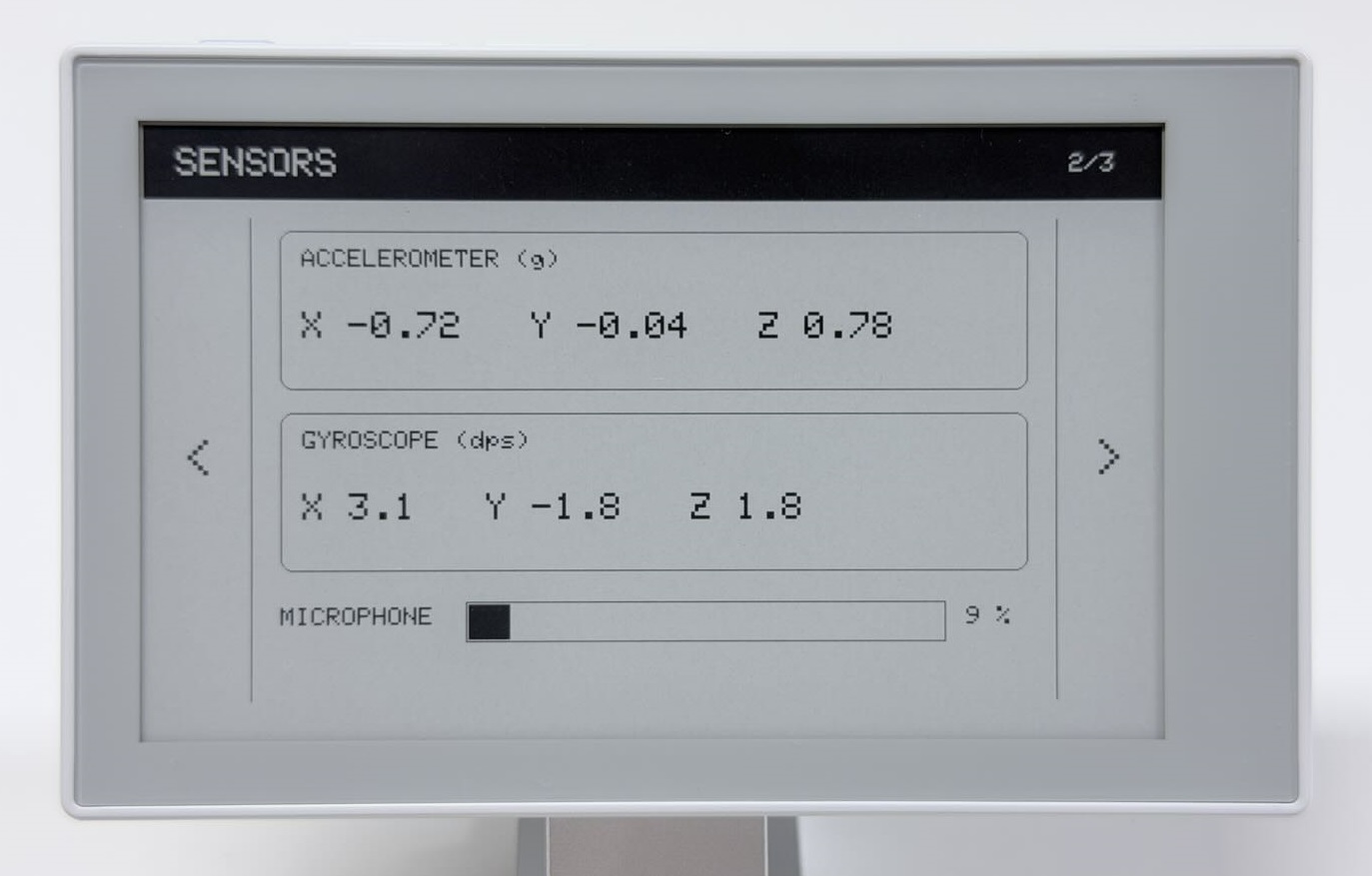
切换到 SENSORS,改变设备姿态后短按 AI,查看更新后的读数。在刷新前开始对着麦克风持续说话,观察新画面中的音量条。它只在采集和刷新时更新,不会连续变化。
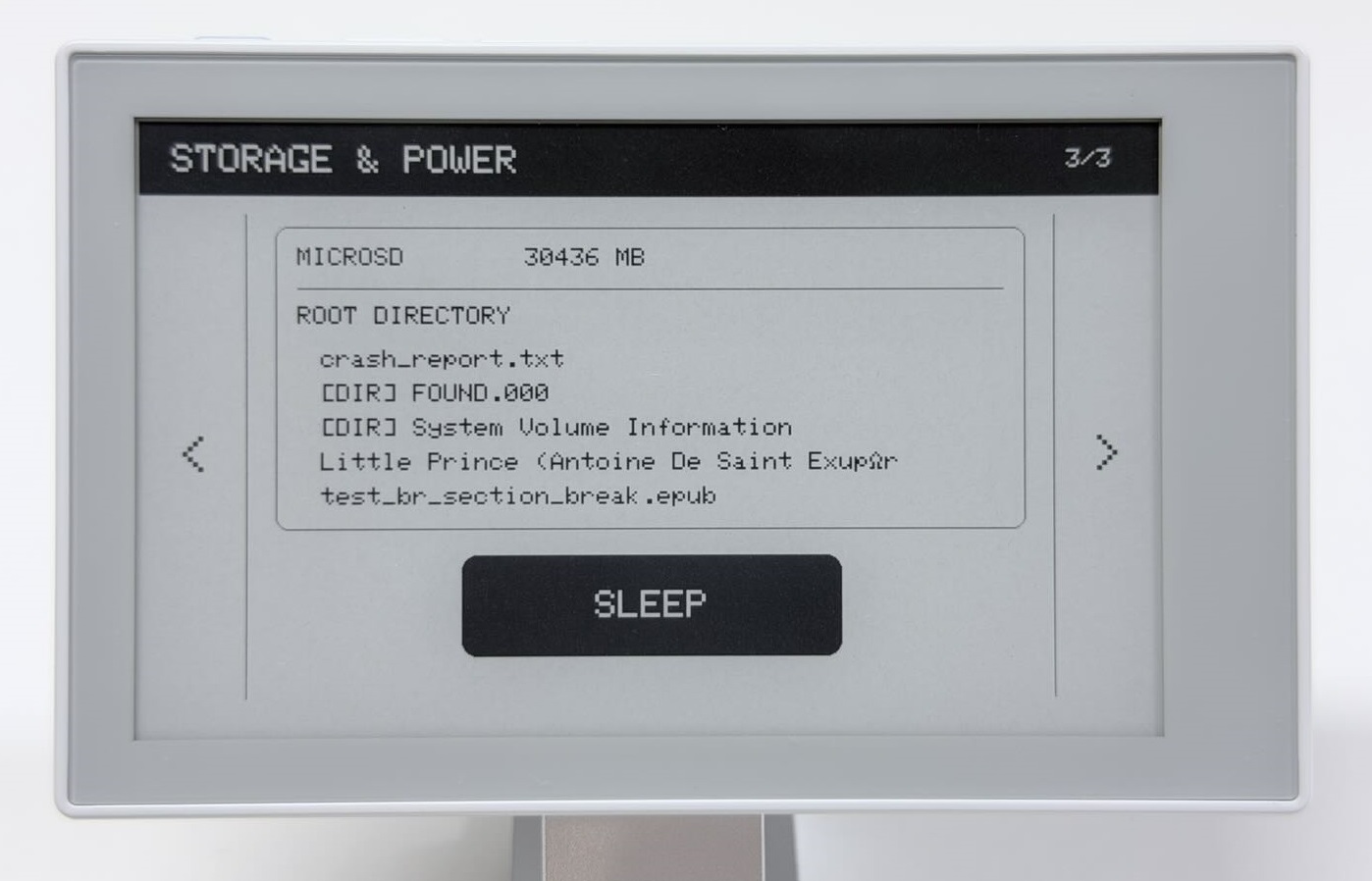
再切换到 STORAGE & POWER,查看容量和最多五个根目录条目。无卡时显示 NO CARD,挂载失败时显示 MOUNT FAILED;此页只在进入或手动刷新时读取。
所有页面都使用全屏刷新,切页时可能闪烁,请等待刷新完成后再操作。
Step 3:休眠并恢复页面
在第 3 页点按 SLEEP。等待休眠提示完成刷新、串口输出 Entering deep sleep now,再短按并松开 AI 按键。
预期结果
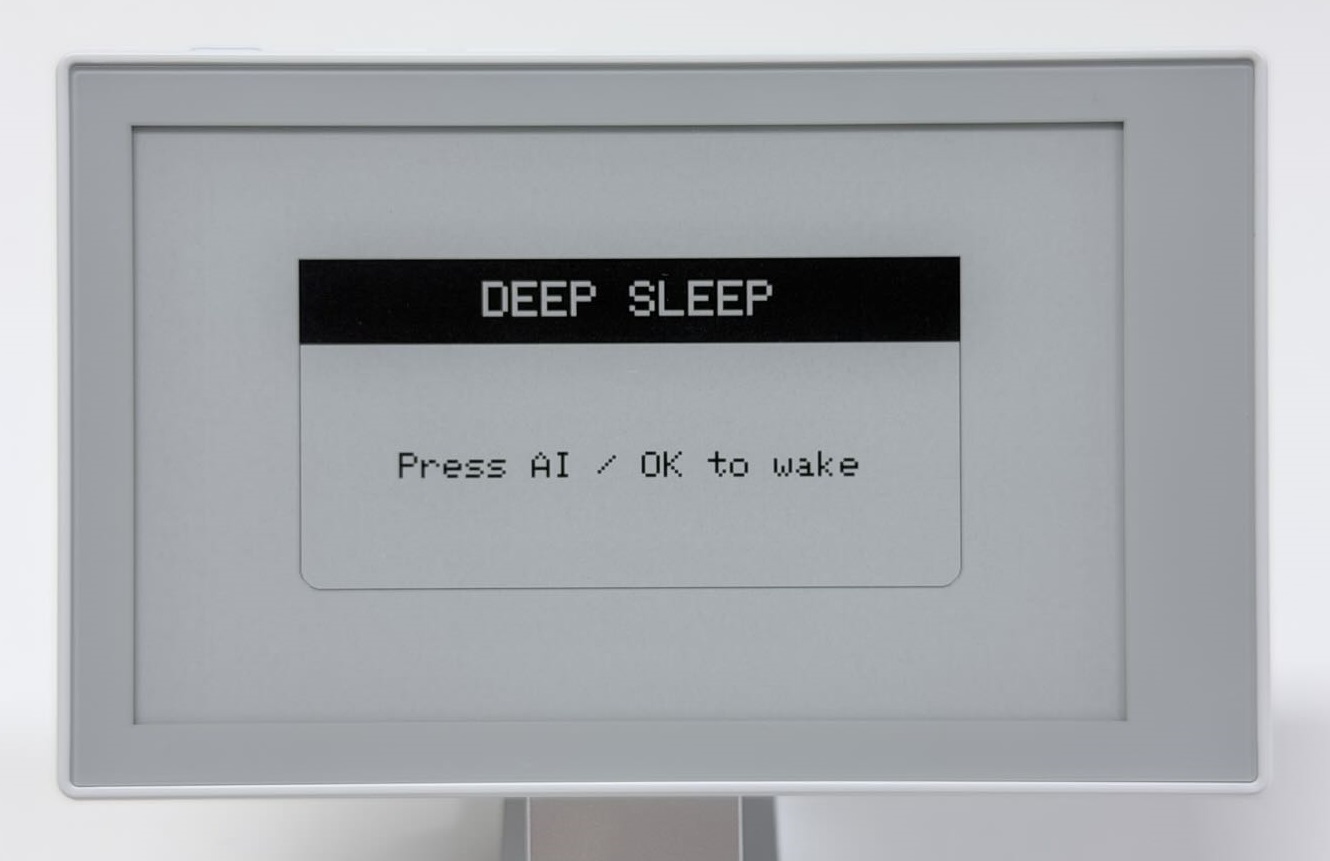
入睡前屏幕显示 DEEP SLEEP 和 Press AI / OK to wake。
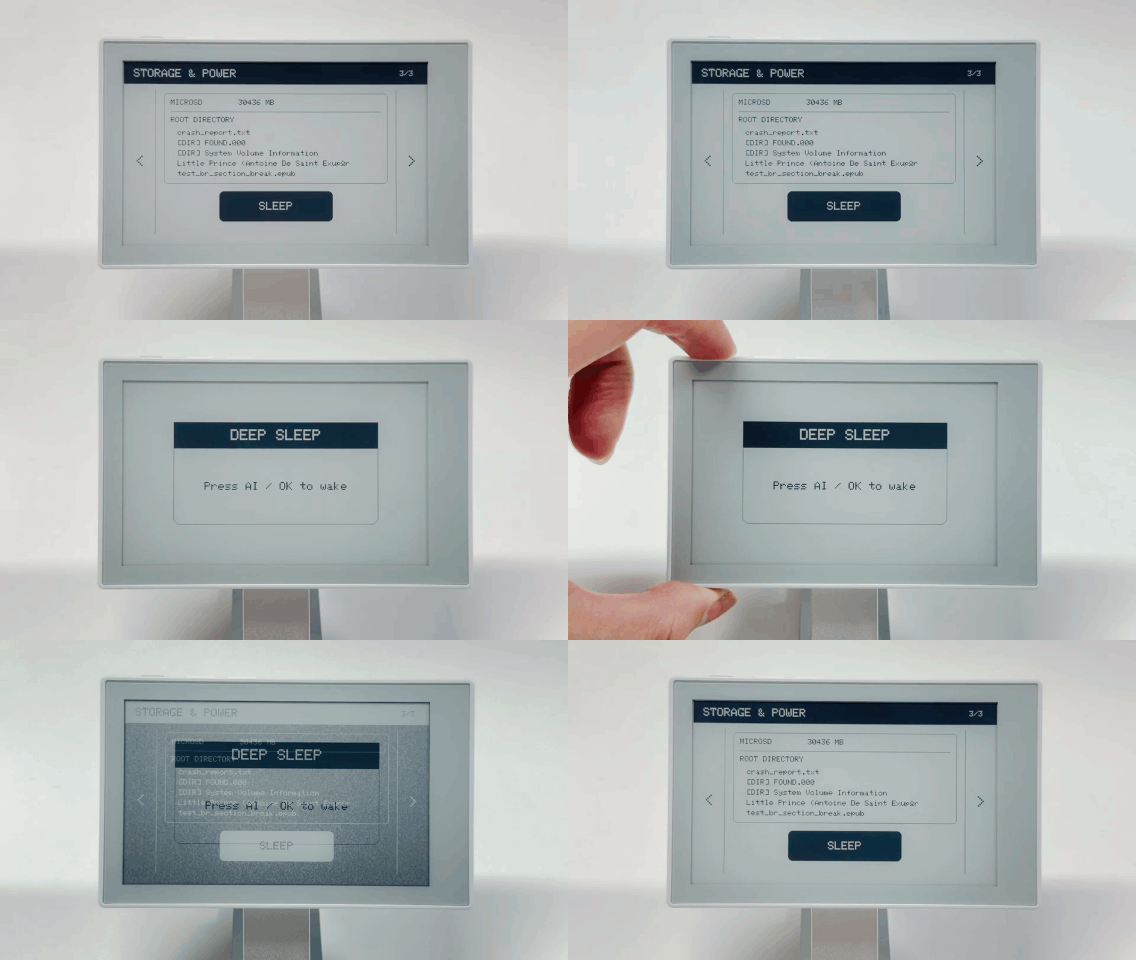
按 AI 唤醒后,Demo 重新读取数据并恢复第 3 页,串口显示唤醒原因和 Restoring page 3。普通上电或复位从 SYSTEM 页开始;页码只在深度睡眠期间保留,不会在完全断电后恢复。
常见问题
| 现象 | 处理方法 |
|---|---|
| GT911 初始化失败 | 核对 bb_captouch、Seeed_GFX2,保留完整例程中的触摸供电和初始化流程 |
| 坐标正常但黑点错位 | 确认使用第一篇安装的 Seeed_GFX2 库和板型,按键朝上摆放;保留原坐标转换,不再叠加旋转 |
| RTC 走动但时间不准确 | RTC 中已有有效时间时,重新启动或上传本例不会自动校正,需要另行设置 RTC。 |
| 没有进入深度睡眠 | 检查 AI 按键是否仍被按住,代码会等待松手;综合 Demo 还需等休眠页刷新和入睡日志 |
| 综合 Demo 出现 N/A 或 Unavailable | 根据串口找到失败器件,再运行其独立例程,不直接改全部初始化或总线配置 |
继续开发
需要单独排查器件时,返回 Arduino 板载外设。需要更完整的页面工程结构时,阅读 ESP-IDF 开发基础;两种路线的工程和操作方式以各自教程为准。