How a Jetson AGX Thor-Powered Mobile Robot Tracks and Hits a Transparent Bubble with VLA and SO-ARM
What happens when you ask a robot to play with something that is transparent, constantly moving, and surprisingly difficult for a depth camera to see?
Chaihuo Makerspace members Qi Liu and Ethan Yeang recently explored exactly that question. Instead of setting up another fixed pick-and-place task, they built a mobile robot that can perceive a moving transparent gel bubble, reposition itself, and use a robotic arm with a red paddle to interact with it.
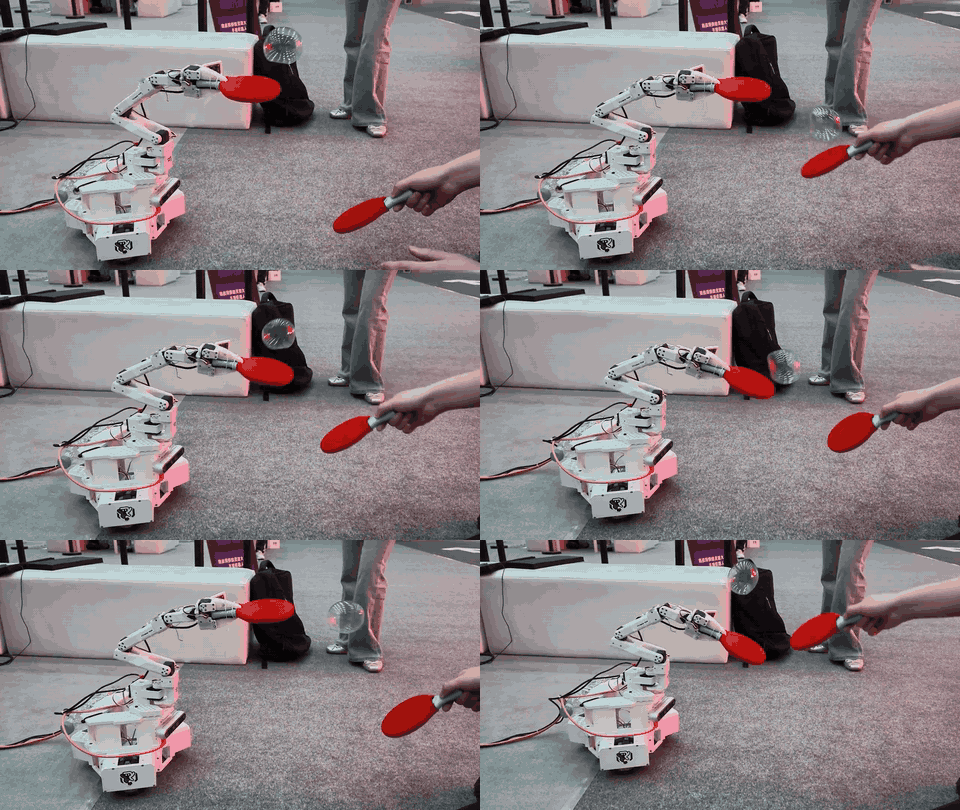
The setup brings together NVIDIA Jetson AGX Thor, Intel RealSense D455, LingBot-Depth, LingBot VLA V2, LeKiwi, and SO-ARM. On the surface, the result is easy to understand: the bubble moves, the robot follows, and the arm responds.
Behind that simple interaction, however, is a complete Physical AI workflow involving RGB-D perception, depth processing, VLA-based action decisions, edge AI computing, mobile manipulation, and closed-loop control.
That is what makes this small demo interesting.
Why Is a Transparent Bubble So Difficult for a Robot?
For a person, following a bubble through the air feels almost effortless. Our eyes continuously track its motion, our brain estimates where it is going, and our body adjusts without us consciously thinking about every step.
A robot has to break that same interaction into separate technical problems.
The first challenge is perception. Transparent and reflective objects are difficult targets for many depth-sensing systems because the light used to estimate distance may pass through the surface, refract, or return inconsistently. Instead of getting a clean depth measurement, the system may see missing areas, noisy values, or unstable spatial information.
That is already a problem with a stationary transparent object. A floating gel bubble makes things harder because its position keeps changing.
By the time the robot estimates where the bubble is, airflow may have already pushed it somewhere else. The robot therefore cannot simply detect the target once, calculate a position, execute a motion, and stop.
It needs to keep looking.
The actual task is closer to a continuous loop of observe, update, act, and observe again.
How the Robot Works: From RGB-D Perception to Physical Action
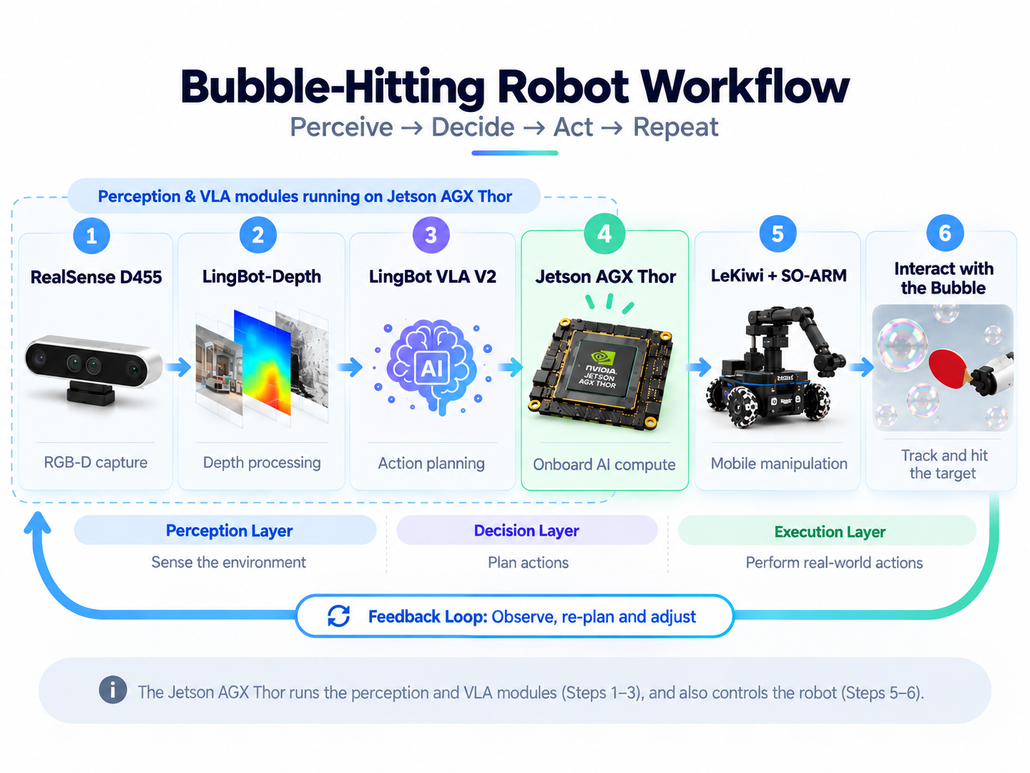
The easiest way to understand the system is as a continuous perception–decision–action loop.
The process starts with the Intel RealSense D455, which captures RGB-D information from the scene. The RGB stream tells the system what the camera sees, while the depth stream provides spatial information about the environment.
For a transparent target such as the bubble, however, raw depth data may not be reliable enough on its own. LingBot-Depth is therefore used to process the depth information and provide a more useful spatial representation for the rest of the system.
The processed scene information then feeds into LingBot VLA V2, which connects visual understanding with action decisions. Instead of replaying one predefined arm trajectory, the robot can use the current scene state to decide whether it needs to move, adjust its position, or execute an arm action.
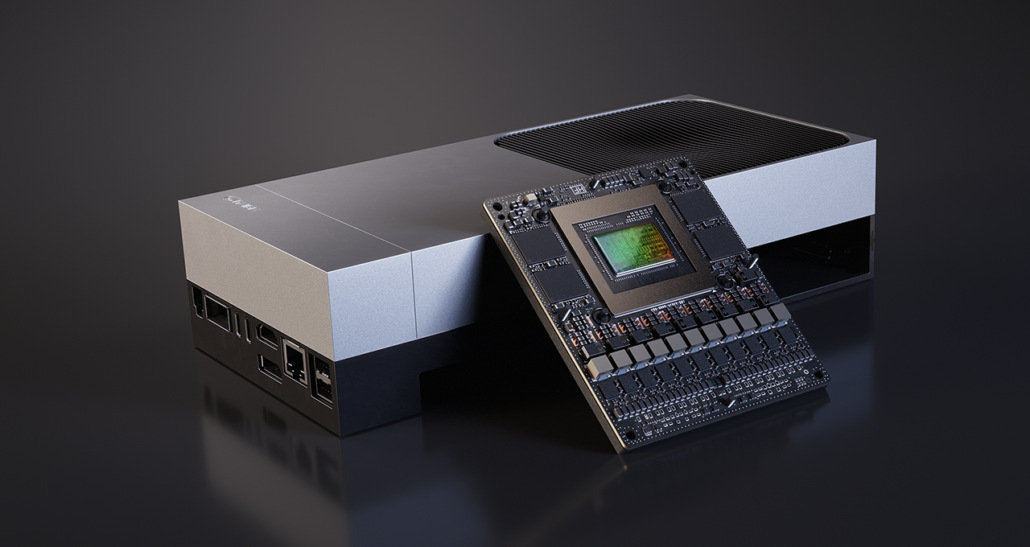
The perception and model workloads run on NVIDIA® Jetson AGX Thor™ Developer Kit Bundle, which acts as the onboard AI compute core of the robot.
Once an action has been decided, the physical system takes over. LeKiwi provides mobility so the robot can reposition itself when the bubble is outside the arm’s effective workspace, while SO-ARM101 performs the finer manipulation needed to bring the paddle toward the target.
In simplified form, the stack looks like this:
- RealSense D455 captures RGB-D data from the environment.
- LingBot-Depth processes depth information for spatial perception.
- LingBot VLA V2 uses the current scene state to generate action decisions.
- Jetson AGX Thor runs the perception, model inference, and robot-side AI workloads.
- LeKiwi moves the robot into a better operating position.
- SO-ARM101 executes the final physical interaction.
The important part is not that six technologies appear in the same demo. It is that they work as one continuously updated system.
Why Jetson AGX Thor Matters Here
In a dynamic robotics task, latency quickly becomes part of the problem.
The camera keeps producing new information. Depth processing has to update the robot’s understanding of the scene. The VLA model has to determine what should happen next, and the resulting action has to reach the mobile base or robotic arm.
Meanwhile, the bubble is still moving.
If too much time passes between perception and execution, the robot may act on a target position that is already outdated.
That is why Jetson AGX Thor plays such a central role in this setup. Rather than treating AI inference as a separate workstation task, the system brings perception, model inference, and robot-side computation onto the robot itself.
This reduces the distance between seeing a change in the physical world and responding to it.
For developers exploring Physical AI, this is an important shift in how edge AI should be understood. Jetson is not simply running an image model. Its compute is sitting inside a feedback loop where AI output directly affects the next physical action.
You can explore the hardware used in this project here:
NVIDIA® Jetson AGX Thor™ Developer Kit Bundle
The Hard Part Is Not Swinging the Paddle
Making a robot arm swing a paddle once is relatively easy. You can define a joint trajectory, execute it, and replay the same motion again.
But that robot would have no idea whether a bubble was actually there.
The more interesting problem starts when both the target and the robot are moving.
Imagine that the D455 sees the bubble slightly outside the comfortable working range of the arm. The system decides that the robot should first reposition itself using LeKiwi.
As soon as the base moves, the situation changes. The camera viewpoint is different. The relationship between the robot arm and the bubble is different. The previously estimated target position may no longer be accurate.
The robot therefore has to look again.
New RGB-D data enters the perception pipeline. LingBot-Depth updates the spatial information. LingBot VLA V2 evaluates the new state. If the robot is now in a better position, SO-ARM can execute the next action.
If the bubble moves again, the cycle continues.
This is why the demo should not be understood as a simple sequence of:
detect → move → swing
It is closer to:
sense → understand → decide → move → act → sense again
That feedback loop is what turns a collection of components into a robot that can respond to a changing environment.
Mobile Manipulation: Let the Robot Move Before the Arm Reaches
A fixed robot arm has a straightforward limitation: its workspace ends where its reach ends.
If the target moves outside that workspace, there is only so much the arm can do.
LeKiwi changes the problem by giving the robot mobility. Instead of waiting for every target to enter the arm’s workspace, the robot can first move its whole body into a better position and then perform the finer manipulation locally.
In this system, LeKiwi and SO-ARM are solving two different scales of motion.
LeKiwi answers the larger question: Where should the robot move?
SO-ARM answers the local question: Once the robot is there, how should the arm interact with the target?
That combination is the basis of mobile manipulation, an important direction for robots that need to operate beyond a single fixed workstation.
Mobility also makes the control problem more interesting. Once the base moves, camera coordinates, arm coordinates, and target position all need to be reconsidered. The system therefore depends on repeated perception rather than a one-time motion plan.
For developers interested in recreating this kind of mobile manipulation setup, the project uses the LeKiwi Full Kit.
SO-ARM Turns the Decision into a Real Motion
AI perception and action planning only become useful in robotics when the resulting decision can be executed reliably in the physical world.
That is where SO-ARM101 comes in.
In this demo, the arm acts as the final execution layer. The visual system can estimate what is happening, LingBot VLA V2 can decide what the robot should do, and Jetson AGX Thor can run the necessary compute, but the physical interaction only happens when the robotic arm converts that decision into motion.
The red paddle attached to the arm makes that relationship especially visible. The AI side of the stack works in representations, observations, and action outputs. The arm has to turn those outputs into joint motion with real motors, real timing, and real mechanical constraints.
That gap between a model deciding an action and a robot actually completing it is one of the most important parts of Physical AI.
For developers exploring robot learning, teleoperation, imitation learning, VLA, or other manipulation workflows, SO-ARM101 also provides an accessible open-source platform for testing these ideas on real hardware.
Why This Small Demo Is a Useful Physical AI Example
Physical AI is often discussed through humanoid robots, industrial automation systems, autonomous vehicles, or large research benchmarks.
Those systems are important, but small projects can sometimes make the underlying ideas easier to see.
This robot still has to do all of the fundamental things:
- observe a changing physical environment;
- extract usable spatial information from imperfect sensor data;
- decide what to do based on the current state;
- move its body or arm;
- observe the result;
- update the next action.
That is already a complete perception–action loop.
The bubble also makes the task useful because it refuses to behave like an ideal benchmark object. It is transparent, its depth information can be imperfect, and its motion changes with the surrounding environment.
The world does not stop while the robot computes.
That is precisely the kind of problem Physical AI systems eventually have to handle.
A Robotics Stack That Developers Can Take Apart and Rebuild
One of the most useful things about this project is that the workflow is easy to break down into layers.
At the perception layer, RealSense D455 and LingBot-Depth help the system observe and understand spatial information.
At the intelligence layer, LingBot VLA V2 connects the current visual state with an action decision.
At the compute layer, Jetson AGX Thor provides the robot-side AI platform needed to keep those workloads close to the hardware.
At the execution layer, LeKiwi and SO-ARM turn the decision into mobility and manipulation.
The architecture can therefore be summarized as:
Perception → Spatial Understanding → Action Decision → Edge AI Compute → Mobile Manipulation → Environmental Feedback
That structure is more reusable than the bubble task itself.
You could replace the bubble with another dynamic object, change the end effector, swap the manipulation task, or modify the perception stack while preserving the same basic development logic.
That is the part worth reproducing.
Want to Recreate a Similar Physical AI Setup?
You do not need to reproduce this demo exactly to learn from it.
A better starting point is to recreate the closed-loop architecture: build a robot that can continuously sense its environment, decide what should happen next, execute an action, and use the result as the input for the next decision.
The key hardware used in this project includes:
NVIDIA® Jetson AGX Thor™ Developer Kit Bundle
The robot-side AI compute platform used to run perception, depth processing, model inference, and related robotics workloads.
SO-ARM101
An open-source robotic arm platform for robotics learning and Physical AI development, including manipulation, teleoperation, imitation learning, LeRobot, and VLA experiments. In this project, it provides the final physical execution layer.
LeKiwi Full Kit
A mobile manipulation platform that extends the working range of the robotic arm by allowing the whole robot to reposition itself before carrying out local manipulation.
If you already have your own RGB-D camera, robotic arm, or mobile platform, the same concept can be adapted to a different stack. The key idea is not the paddle motion. It is the feedback loop connecting perception, decision, and physical action.
From a Bubble to a Bigger Physical AI Question
This project began with a playful question: can a robot interact with a transparent bubble that keeps moving?
Answering that question required much more than making an arm move.
The robot had to observe an imperfect target, update its understanding as the scene changed, run AI workloads onboard, reposition itself, and turn an action decision into real mechanical motion.
That is why demos like this are useful. They make concepts such as spatial perception, VLA, edge AI, and mobile manipulation visible in an interaction that anyone can understand.
The bubble moves. The robot sees the change. The system updates its decision. The body moves. The arm responds.
Underneath that simple interaction is a complete Physical AI system.
Building Your Own Physical AI Demo? Join the Conversation
Physical AI gets much more interesting when developers can compare setups, share experiments, troubleshoot what did not work, and show what they are building.
If you are experimenting with Jetson, SO-ARM, LeKiwi, VLA, robot vision, imitation learning, teleoperation, mobile manipulation, or your own robotics stack, come share your project with the Seeed robotics community.
A polished research prototype is welcome, but so is the first demo you managed to get running on your desk.
Join the Seeed Robotics Community on Discord
Discuss robotics development, ask technical questions, and share your latest builds.
Join the Seeed Robotics Builders WhatsApp Group
Stay closer to the community, share quick updates, and connect with other builders working on Physical AI.
Join the Seeed Studio AI Robotics Community on Facebook
Share demos, project progress, videos, questions, and ideas with the wider robotics community.
If you have already built something interesting, show us your Physical AI demo. We would love to see how you are combining AI models, sensors, compute, and robotics hardware to make machines interact with the real world in new ways.
Build it, test it, share it—and show us what your robot can do next.
About Author
