Design Testing vs. Production Testing: What to Test and How to Prepare
What should you test while developing a PCB, and what changes when you move into production? This guide explains the differences, what to test at each stage, and how to prepare for both.
Design Testing vs. Production Testing: What’s the Difference?
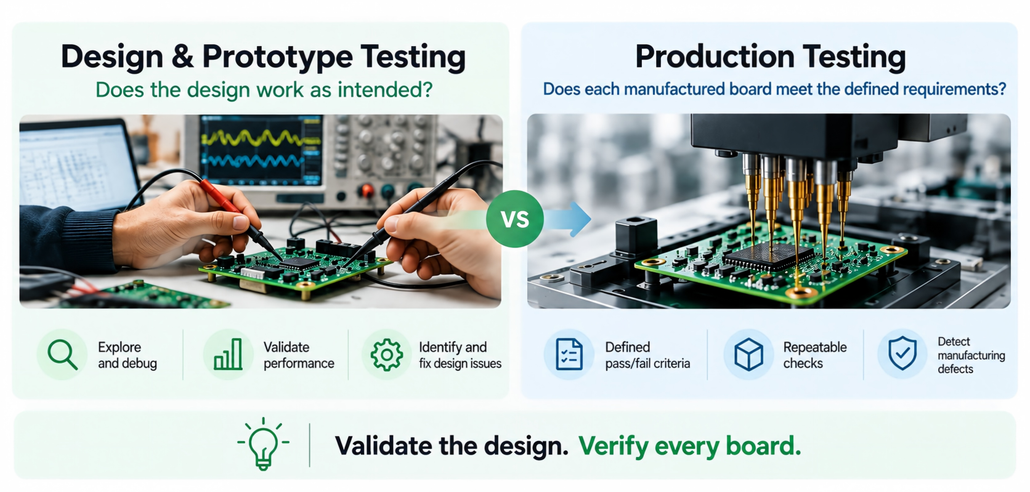
The key difference is simple:
- Design Testing: Does the design work as intended?
- Production Testing: Does each manufactured board meet the defined requirements?
During design and prototype development, engineers investigate how the circuit behaves, validate performance, and identify design issues. Testing is often exploratory, involving measurements, debugging, and repeated adjustments.
Once the design is validated, production testing focuses on identifying manufacturing defects and verifying that assembled boards consistently meet established acceptance criteria.
Example: Testing an IoT Sensor Board
Consider a PCB with a microcontroller, sensors, and wireless connectivity. The same functions may need different testing approaches at each stage.
| Function | Design & Prototype Testing | Production Testing |
| Power | Measure voltage stability and current under different loads | Check voltage and current against defined limits |
| MCU / Firmware | Debug boot, programming, and communication | Flash firmware and verify successful startup |
| Sensors | Evaluate accuracy, stability, and environmental response | Check sensor communication and readings against acceptance limits |
| Wireless | Validate signal performance and connection reliability | Verify communication with a test device |
| Reliability | Evaluate performance under expected operating conditions and conduct reliability testing where needed. | Perform specified per-unit checks and any required sampling or reliability tests. |
The takeaway: Design testing validates how well your product works. Production testing checks whether manufactured boards consistently meet the requirements established during development.
Not every design validation test needs to be repeated on every production board. The goal is to identify which checks are necessary to detect manufacturing defects and verify critical functionality.
5 Steps to Test Your PCB Prototype
Before moving to production, verify that your PCB works as intended and meets its design requirements. Follow these five steps to test your prototype, identify potential issues, and prepare for the next stage.
| Step | What to Check |
| 1. Power Check | Inspect for visible assembly defects and shorts before applying power. Use a current-limited power supply and verify voltage rails and current draw against your design specifications. |
| 2. MCU & Firmware | Program the MCU and verify boot, communication, and firmware execution. |
| 3. Functional Testing | Test sensors, interfaces, wireless connectivity, and outputs. Compare measurements against reference values when needed. |
| 4. Operating Conditions | Check performance under relevant voltage, temperature, and wireless conditions. |
| 5. Test Documentation | Record test procedures, expected results, actual measurements, and issues found. |
Tip: Define clear, measurable pass/fail criteria for tests that will be repeated during production.
How to Prepare Your PCB for Production Testing
Manual testing may work for a few prototypes, but repeating the same operations across hundreds of boards can become inefficient. Inaccessible signals or blocked programming interfaces may also require costly PCB revisions.
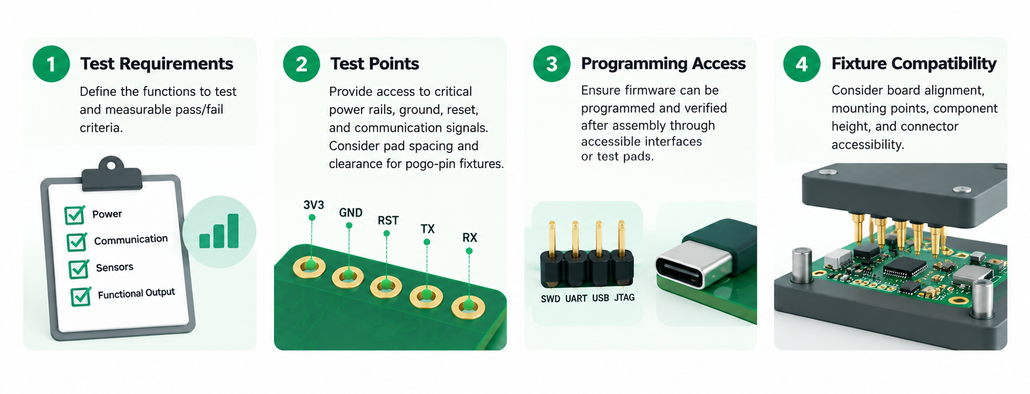
Design for Testability (DFT) helps you prepare your PCB for efficient, repeatable production testing before finalizing the layout.
What Should You Prepare Early?
When Do You Need a PCBA Test Fixture?
Manual testing may be sufficient for a few prototypes, but a custom test fixture can improve efficiency and consistency as production scales. A custom test fixture often uses spring-loaded pogo pins to make repeatable contact with designated PCB test points, enabling tasks such as firmware programming, electrical measurements, and functional testing, depending on the test setup.
Production quality checks may include AOI (Automated Optical Inspection), ICT (In-Circuit Testing), and FCT (Functional Testing), depending on the product and its test requirements.
Further Reading: Want to see how a PCBA testing system works in practice? Check out our Open-Source Modular PCBA Testing Guide.
Final Thoughts: Plan Early, Test Smarter
A smooth transition from prototype to production starts with a clear test plan. Defining your testing requirements early can help reduce rework and make production testing more efficient.
If you have questions about production testing or test fixture requirements, feel free to contact us at [email protected] or explore our PCBA Testing Solutions page for more details.
About Author
