Yocto on Jetson: Build and Flash on Seeed Carrier Boards
A completed image build leaves several questions open: does the flash package match the installed module, which carrier interfaces have been validated, and can another engineer reproduce the configuration?
For Yocto on Jetson, keep the carrier, module SKU, source revision and image recipe together through building, flashing and target validation. This guide uses reComputer Super J401 to show what to record and where to check before proceeding. The complete Seeed Wiki maintains the commands and full parameter tables.
Start with the system you need to maintain
The Yocto Project provides tools and metadata for creating custom embedded Linux systems. BitBake executes the build tasks; image recipes select system contents. A Jetson module provides the compute, while the carrier connects it to power, storage and peripherals. MACHINE selects the hardware configuration.
NVIDIA’s Yocto guidance identifies image customization, CI integration and product maintenance as reasons to use it. If your task is application exploration, start with standard JetPack. Evaluate Yocto when package selection and system configuration need to become maintained build inputs. Budget for BSP integration and target testing alongside the build itself.
Before adopting that workflow, name the system requirement you need to control: a defined package set, a repeatable application environment, or a carrier-specific configuration maintained with the product. Then decide who owns the image and how changes will be reviewed. A useful first milestone is one known hardware configuration running the required application, with enough recorded evidence for a colleague to repeat the exercise. Expanding the hardware matrix before that baseline is understood makes failures harder to isolate. Keep image development and application acceptance connected throughout the project.
Record one configuration before building
The reviewed Seeed repository snapshot uses OE4T wrynose and the meta-tegra BSP for Jetson Linux R39.2.0 / JetPack 7.2. That is this example’s scope; check the current Wiki for another release.
Use the following as a configuration record. The carrier, module and recipe are example inputs; fill in the actual source revision, artifact and results from your build.
MACHINE: recomputer-orin-super-j401
Module: Orin NX 16GB / P3767-0000
Module SKU: 0000
Image recipe: seeed-image-jetson-development
Source commit: <record your exact checkout>
Build directory: <dedicated to this carrier and module>
Flash archive and checksum: <record the generated artifact>
Target checks: <record pass / fail / not tested>
In the image-profile definitions, seeed-image-jetson-runtime is the Seeed runtime profile. The development image adds target-side nvcc, headers and build tools. The optional x86_64 cross-development SDK is a separate output; it is unnecessary merely to flash or compile directly on the Jetson.
Choose the profile according to where development happens. If engineers compile and investigate software on the target, start with the development image and verify the tools they need. For a runtime image, document which application dependencies belong in the image and which your deployment process supplies. Treat a later change of recipe as a configuration change: identify the new output and repeat the relevant target checks. This makes a missing compiler or library an image-selection question before it becomes an installation investigation.
Keep a separate build directory for each carrier/module combination. This record becomes the reference when comparing a build log, a flash archive and a target result.
Choose hardware by the evidence available
The pinned support matrix covers 16 machine configurations. Its physical-validation records have specific limits:
| Configuration | Recorded evidence |
|---|---|
recomputer-orin-super-j401 | Build, initrd flash, NVMe boot, HDMI and basic USB validated. |
reserver-agx-orin-j501x-gmsl, SKU 0004 | Build, flash and boot validated; GMSL/peripheral validation pending. |
| Other listed machines | Build validation; physical validation is not claimed. |
Treat untested interfaces as project work when estimating integration effort. A camera connector or machine definition alone does not establish that your camera works under the selected image.
Read each matrix row as evidence for the configuration and interfaces actually named. For example, a project that requires GMSL still needs a camera-validation task even when that carrier has a boot record. Likewise, a different module SKU introduces a new configuration to review. Write those open checks into the project plan before ordering several units or assigning a deployment date. This turns the support matrix into an integration-planning input rather than a general compatibility badge.
reComputer Super J401 carrier board
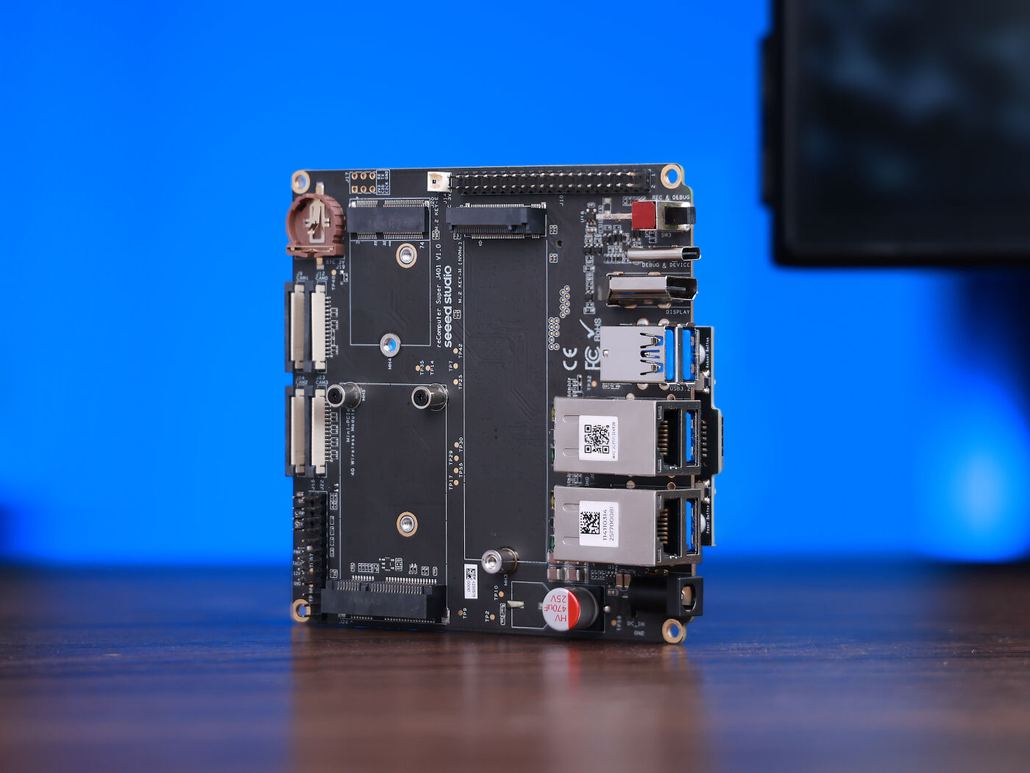
reComputer Super J401 carrier board
Orin NX / Nano carrier-board route. This is the example carrier above. Select the installed module explicitly and validate your application’s additional interfaces.
Check Super J401 specifications and purchase options.
reComputer Mini J5011 with GMSL
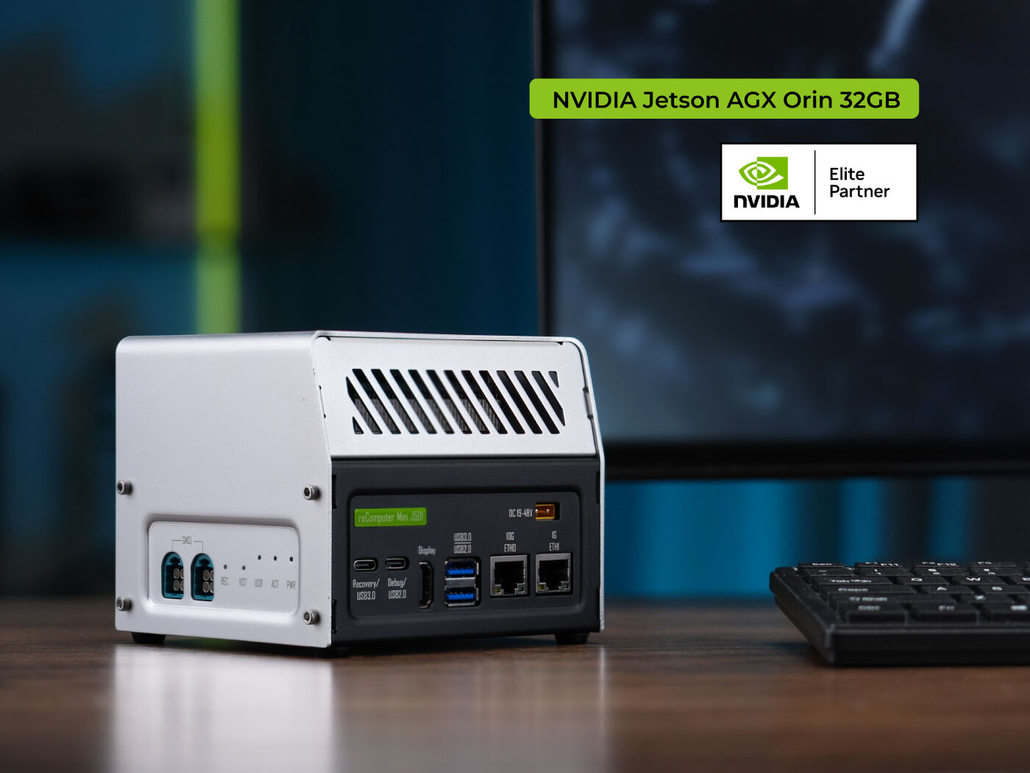
reComputer Mini J5011 with GMSL
AGX Orin 32GB complete-system route. The Mini AGX J501X machine is build-validated in the reviewed matrix; physical validation is not claimed there. Plan Yocto hardware and GMSL testing for this configuration.
Explore Mini J5011 specifications and purchase options.
For other formats, browse Seeed’s Jetson catalog, then verify the exact carrier/module pairing in the Wiki table and current support matrix. Check package contents separately from Yocto support before ordering.
Four checks from source to target
Plan around 32 GB RAM or more using the Yocto host guidance, and approximately 400 GB free storage. This path uses a physical x86_64 Linux host and a data-capable recovery USB connection.
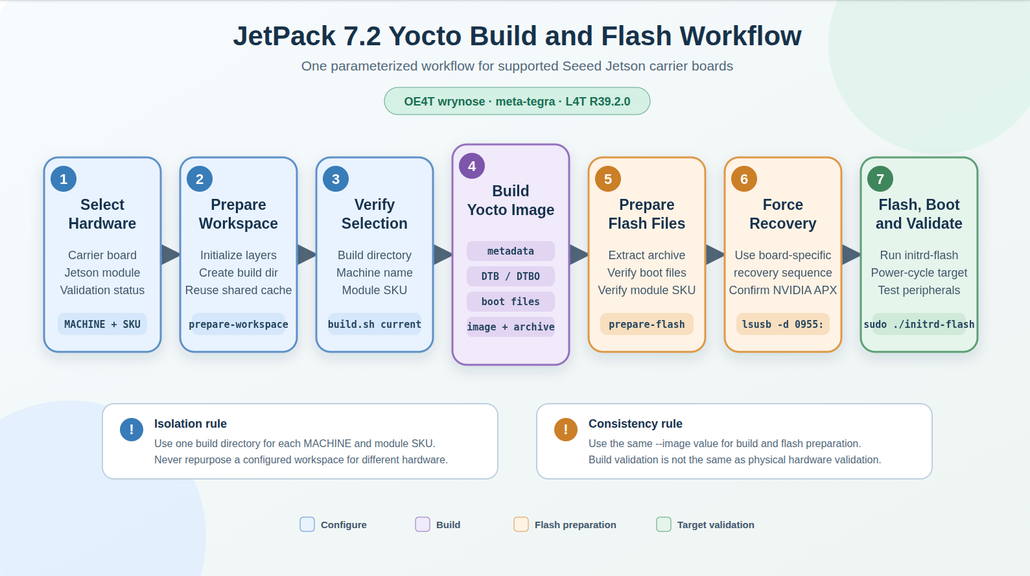
Workflow for the JetPack 7.2 / L4T R39.2.0 path. source: Seeed Wiki.
- Workspace: compare inputs before compiling. Clone the repository, record its commit and prepare the dedicated directory. The helper reference documents
build.sh currentto inspect the prepared machine and module SKU. Resolve any mismatch before building. - Build: retain an identifiable artifact.
build.sh allruns metadata, device-tree, boot-file and image stages. Record the resulting tegraflash archive, its checksum and the configuration above. Keep the reported manifest and SBOM paths with the build log so another engineer can identify the output. - Flash preparation: match the same image. Pass the same image recipe to build and preparation. The Wiki’s preparation helper checks the archive and selected boot files before presenting the flash command. Confirm the target and storage before executing a process that rewrites them. OE4T’s flashing reference explains the platform-specific mechanisms.
- Target: record what actually worked. Follow the carrier’s recovery and first-boot instructions, then test the storage and interfaces your application uses. Record each as passed, failed or untested. A booting desktop alone leaves camera, network and expansion behavior unresolved.
This review record ties an observed target result to a specific build. Keep it with your release artifacts as you add packages or change hardware.
Make the output reviewable before handoff
A directory of similarly named images is difficult to hand over. Use the helper’s reported deployment paths to identify the exact outputs, then attach a short review record:
| Review question | Evidence to retain |
|---|---|
| What produced this image? | Source commit, carrier, module SKU, recipe and build log |
| Which package was flashed? | Exact archive filename, checksum and preparation output |
| What passed on the target? | Boot/storage observations and individual interface results |
| What remains unresolved? | Untested functions, first failure, relevant logs and next investigation |
For a camera-based robotics application, an interface result should identify the camera and connection, the capture configuration, and the observation used to judge success. Include the application startup sequence and any relevant networking checks. Define acceptance criteria before testing, and record failures with the same detail as successes. These are suggested review fields, not results claimed for the example hardware.
Keep build completion, flash completion and application acceptance as separate outcomes. When a colleague receives the package, they should be able to identify its inputs, repeat the documented procedure and see which conclusions still need verification. That makes the record useful during a later regression investigation as well as the initial bring-up.
Run the complete Seeed build-and-flash workflow with your configuration record beside it.
Diagnose the first failed stage
Preserve the first error before changing configuration. These checks narrow an investigation; symptoms do not establish a single cause.
| Symptom | Check next | Save for escalation |
|---|---|---|
| Wrong machine or SKU | Prepare a new directory for the correct hardware. | Module number and build.sh current output |
| Fetch/configure/compile failure | Open the failed task’s reported log; inspect disk/RAM if the error indicates resource exhaustion. | Recipe, task and first error context |
| Missing flash archive | Compare the image name and deploy path used by build and preparation. | Selected recipe and artifact filename |
Waiting for USB storage device flashpkg | Follow the helper’s USB sequence; this stage is waiting for temporary USB-storage enumeration, before rootfs writing. | log.initrd-flash.* and host USB observations |
| Flash completes but boot or an interface fails | Check the first-boot procedure, exact support status and target logs. | Boot output and the specific failed interface |
The Yocto debugging guide locates task logs under ${WORKDIR}/temp/log.do_<task>. The USB debug notes distinguish completed recovery download from initrd enumeration and describe compiled-DTB checks. Use the documented SoC-specific path; avoid guessing a host drive name.
For a failed task, preserve its recipe name, task name and the first useful error context before rebuilding. If you change configuration, record what changed and compare the next attempt with that baseline. Avoid changing the image recipe, carrier selection and USB setup together; the next result would be difficult to interpret. When escalation is necessary, attach both the configuration record and the stage-specific log. A screenshot of the final error line alone often omits the information another engineer needs to investigate.
For example, if the system boots but nvcc is missing, compare the selected recipe with the intended development workflow before rebuilding the BSP. A runtime/development mismatch and a boot failure belong to different investigations. Similarly, when a flash archive cannot be found, first compare the build and preparation image names. Preserve the existing logs while checking those inputs. These comparisons help you decide whether the next experiment should change the image, the prepared workspace, or the target-side test, without losing the original failure context.
Help the next person who picks this up
When you verify a previously untested machine or interface, propose a repository update with the configuration record, logs and exact tests performed. A confirmed NVMe boot is useful evidence; leave untested interfaces explicitly untested.
For discussion, include the commit, carrier, module SKU, image and first failing stage. Compare setups with other builders and update the thread when you find the cause.
Resources used in this article
Hardware: Super J401 with Orin NX 16GB (P3767-0000), suitable power/storage and a data-capable recovery cable. Mini J5011 with GMSL is the comparison product.
Software: the versioned Seeed snapshot above, OE4T wrynose, meta-tegra, BitBake and seeed-image-jetson-development. These are documented example inputs; no build, flash or hardware test was performed for this article.
About Author
