Mobile Robot Full-Stack Development in Practice Ⅲ: How Does a Robot Know It Is Moving? LiDAR, IMU and Sensor Fusion
From point clouds and chassis feedback to time alignment and EKF state estimation.
In the previous article, GMSL2 cameras, calibration and bird’s-eye-view projection helped the robot observe its surroundings. Once the chassis starts moving, another set of questions appears. Why does the same wall leave a double outline in a point cloud? Why does an estimated trajectory curve while the robot is driving straight? Why can adding another sensor make the result jump?
Often, the robot has several valid-looking measurements without a consistent relationship between their times, coordinate frames and motion models.
Cameras record images, LiDAR measures surrounding geometry, encoders record wheel rotation, an IMU measures angular velocity and specific force, and GNSS provides an outdoor position reference. Each source contributes something useful, and each has limitations. Wheels slip, inertial sensors carry bias, and satellite measurements suffer from obstruction and multipath.
Robot sensor fusion combines these observations to estimate motion and state, with uncertainty attached to the result. Before combining them, we need to establish what each measurement means and whether it can be compared with the others.
Module 3 takes that process from ROS 2 data validation through point-cloud preprocessing, a common time reference and TF relationships, then a two-dimensional EKF using robot_localization. The first local experiment fuses wheel velocity and IMU yaw rate; GNSS introduces a further global-positioning layer. Raw LiDAR points do not enter this minimum EKF directly. These exercises establish the data foundation for the SLAM and mapping work in M05.
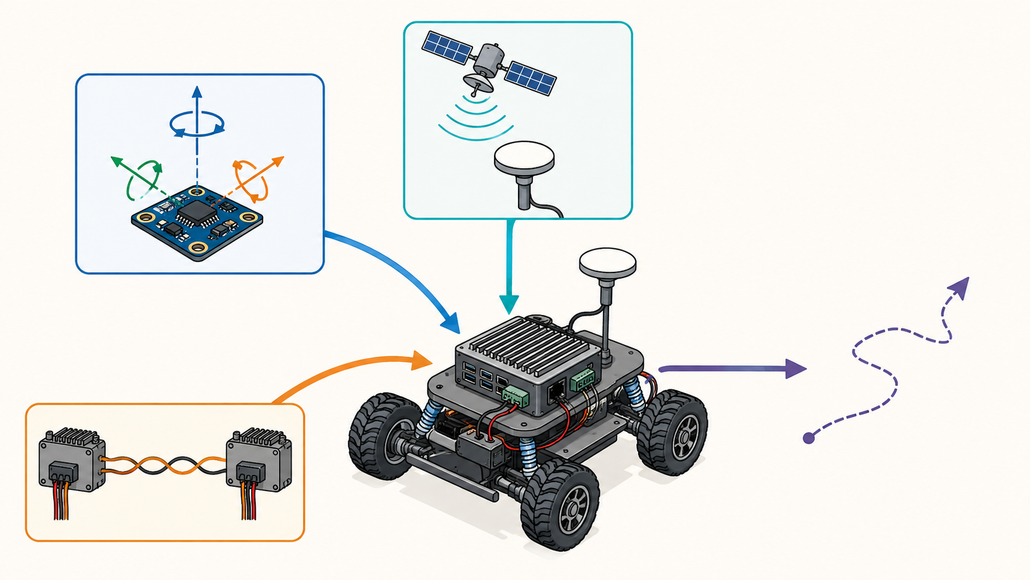
Different sensors observe different aspects of the same robot. Their units, timestamps, frames and uncertainty must be understood before fusion.
New to the series? The course introduction explains the overall learning path, while Module 1 establishes the Jetson and ROS 2 development environment. The M03 reference environment uses reComputer Robotics J501 hardware, Ubuntu 22.04 and ROS 2 Humble, with J5011 examples for sensor and chassis integration.
👉 Course GitHub — Mobile Robot Full-Stack Development in Practice
The LiDAR Sees a Wall. Why Is That Not Yet Localization?
Starting a driver and seeing a room in RViz is a satisfying first result. That display does not yet tell us whether the measurements are complete, when they were acquired, or whether their geometry remains consistent as the robot moves.
The LiDAR integration experiments begin with the RPLIDAR A1 over USB, then move to the Ethernet-connected Livox MID-360. The two paths introduce different connections and ROS message structures.
A 2D Scan Is a Sequence of Measurements
The A1 driver publishes /scan as sensor_msgs/msg/LaserScan. It sends ranges arranged by angle rather than a finished map. For sample i, its direction follows from the starting angle and angular increment:
theta_i = angle_min + i * angle_increment
x_i = range_i * cos(theta_i)
y_i = range_i * sin(theta_i)
These coordinates belong to the scanner’s frame. Moving them into the robot or map frame requires a corresponding transform.
Range validity matters too. Infinite, invalid and out-of-range returns must be handled according to the message contract. Even a finite value below the declared range_min is not a usable obstacle measurement.
After starting the configured driver and sourcing the ROS environment, inspect the interface, observed rate and message contents:
ros2 topic info /scan --verbose
ros2 topic hz /scan
ros2 topic echo /scan --once
The course’s A1 reference test records approximately 7.55 Hz while the configured target is 10 Hz. That result belongs to the documented setup: configuration and subscriber-observed publication rate are separate things to check on your own robot.
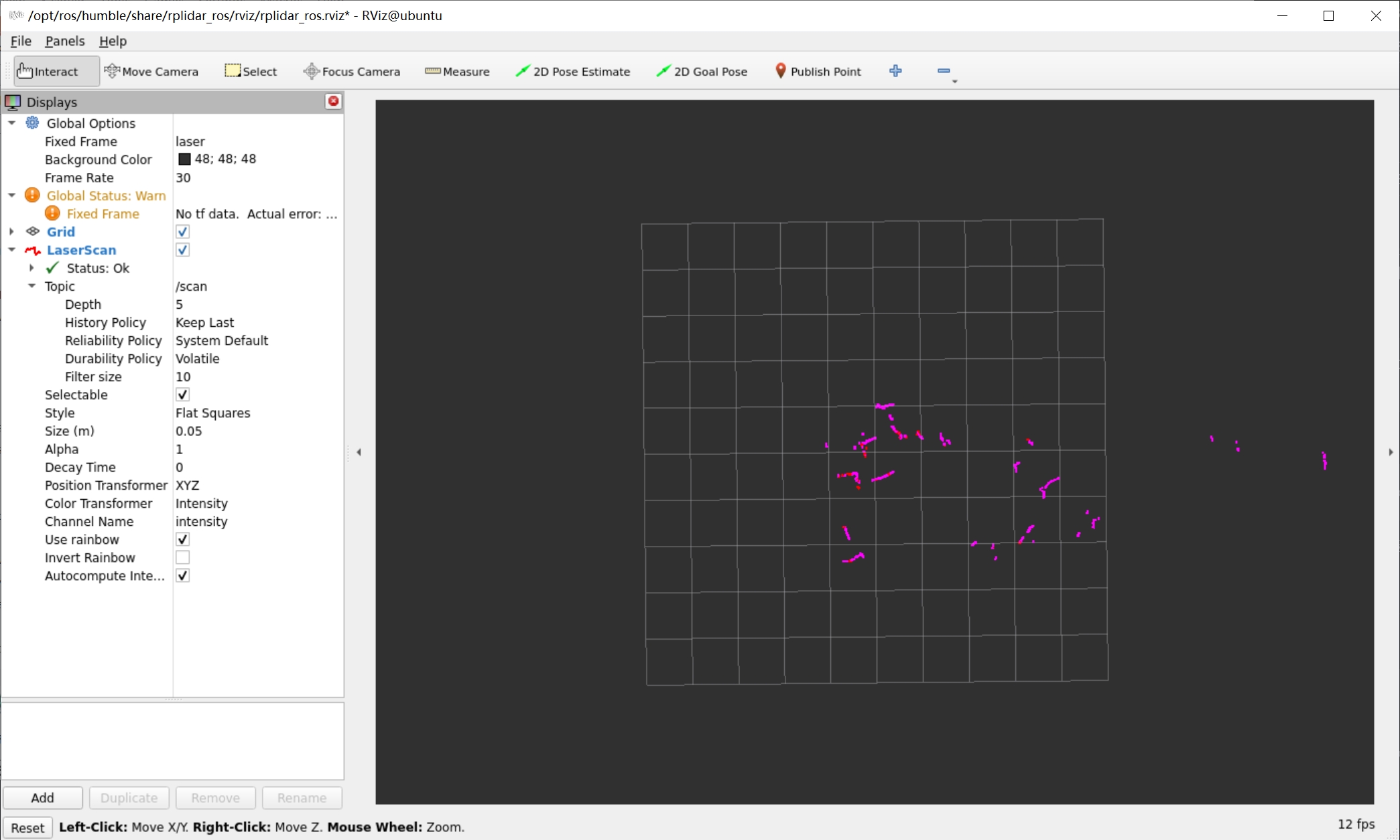
A1 scan output in laser. The visible TF warning also shows that viewing a sensor stream and completing the robot’s frame tree are separate milestones.
Ethernet Adds a Network Dependency and an Output Choice
The MID-360 sends point-cloud and IMU data over Ethernet. The sensor, the host’s wired interface and the driver’s addresses must agree, while the development machine may still need another interface for internet access. Use the address of the interface connected to the LiDAR; copying a Wi-Fi address or an example IP into the configuration can break the intended path.
The launch choice also changes the data contract. In the course, msg_MID360_launch.py provides Livox custom point-cloud messages and IMU output, while rviz_MID360_launch.py provides the standard PointCloud2 visualization path.
A topic name does not guarantee a message type. Check /livox/lidar before attaching a subscriber. If later processing needs per-point timing, verify that conversion preserves it. A representation convenient for display may omit information needed for motion correction.
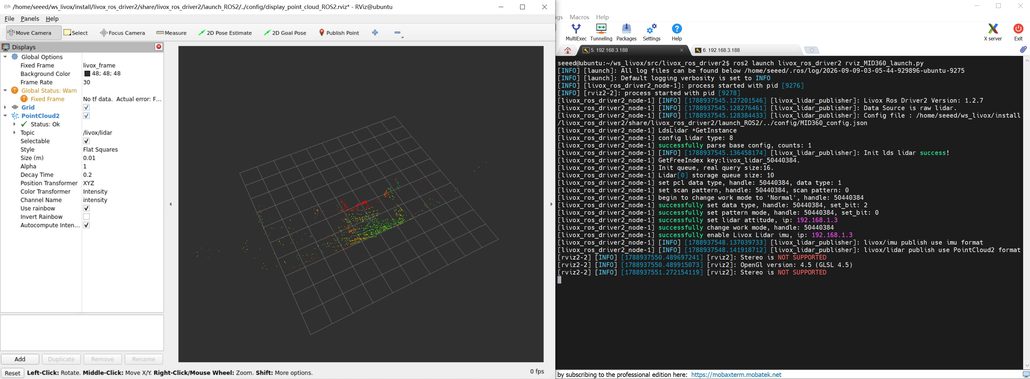
MID-360 PointCloud2 output using livox_frame. The Fixed Frame warning remains part of this sensor-preview example; TF alignment must still be checked.
Preprocessing Changes What the Next Algorithm Can See
A raw cloud can contain the robot’s own body, distant irrelevant regions and isolated noise. The course introduces range and body cropping, voxel downsampling, outlier removal and coordinate transformation.
A voxel grid divides space into cells and keeps a representative point for each occupied cell. Larger cells reduce density and processing work, but can also weaken thin poles, edges and small obstacles. Choose the resolution around the geometry the task must retain; a setting useful for large-area mapping may be unsuitable for detecting small nearby objects.
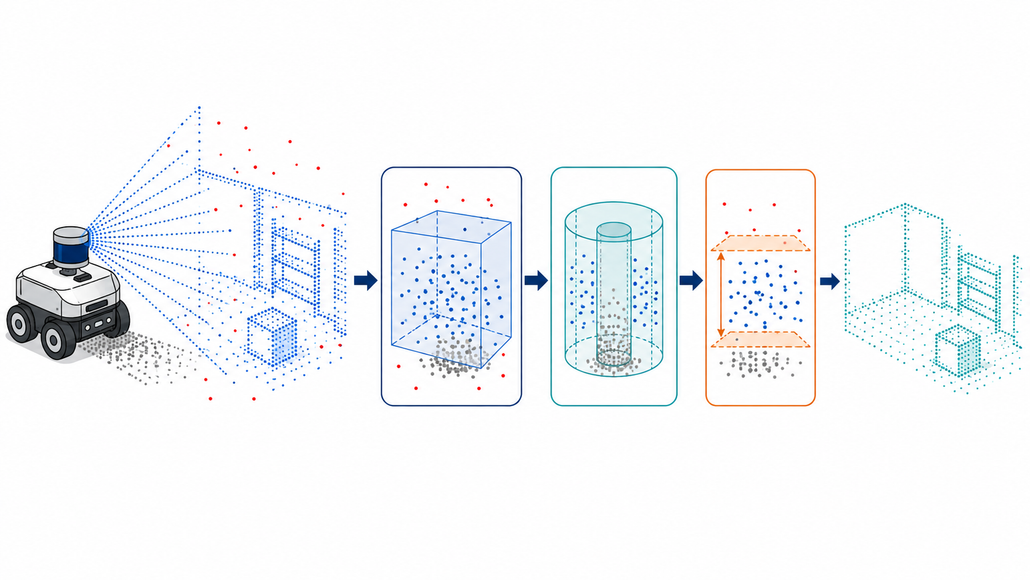
Preprocessing reduces unwanted input while preserving geometry needed downstream. This is a conceptual diagram, not a measured filtering comparison.
Motion adds another issue: the points in a scan may be acquired at different times. During a turn, the LiDAR’s pose changes between the first and last samples. Treating them as simultaneous can distort a flat wall. Deskewing uses per-point acquisition times and motion from IMU or odometry to express those points at a common reference time.
Preserving timing prepares that later processing. A working driver or a visible cloud does not establish that deskewing, LiDAR odometry or SLAM has been completed.
Why Do Wheels and an IMU Need Each Other?
Encoders provide a direct way to observe wheel rotation. Converting rotation into chassis motion depends on wheel dimensions, track width, ground contact and slip. The IMU observes a different physical process: the gyroscope measures angular velocity and the accelerometer measures specific force. It responds quickly, but bias and noise accumulate when measurements are integrated.
Understanding those measurement mechanisms makes the benefits and limits of fusion easier to explain. The IMU, GNSS and chassis integration material develops these inputs before asking a filter to use them.
CAN Frames Still Need to Become Odometry
The course introduces CAN-FD and demonstrates a J5011 connected to a dual DM-H65 motor chassis. Distinguish the interface capability from the connected device’s protocol: this DM-H65 example uses Classical CAN at 1 Mbit/s. CAN-FD settings are not interchangeable with that configuration.
CAN-FD can carry up to 64 data bytes per frame and can use a faster data phase, but it requires compatible devices and matching bus settings. Wiring, termination and the physical connection still need checking.
With the course chassis service running, inspect the interface and passively capture existing traffic:
ip -details -statistics link show can0
timeout 4s candump -L can0
A healthy interface does not prove that decoding is correct. In the course example, motor identity must also be read from payload fields rather than inferred from the CAN arbitration ID alone. Check byte order, signed values, scale factors and the left/right direction convention against the device protocol.
After converting wheel feedback to linear velocities, a differential-drive chassis follows:
v = (v_right + v_left) / 2
omega = (v_right - v_left) / track_width
Equal wheel velocities describe ideal straight motion; their difference produces rotation. A wheel-radius error changes distance scale, a track-width error changes the estimated turn, and slip breaks the relationship between rotation and displacement.
The complete path is therefore:
Protocol decoding → units and direction → chassis kinematics → timestamps and covariance → Odometry publication.
The chassis SDK and driver resources support motor-side integration. The ROS adapter must still provide the validated nav_msgs/msg/Odometry measurement contract required by the filter.
Why Can an IMU Drift While the Robot Is Stationary?
The course uses the MID-360’s built-in IMU on /livox/imu, with a reference publication rate of approximately 200 Hz. A stable rate is useful, but does not establish that the values describe the right motion.
If a stationary gyroscope retains a small bias b, its integrated angle error grows approximately as b multiplied by elapsed time. A value that looks close to zero can therefore produce a visible heading drift after several minutes.
Start with a stationary recording, then deliberately rotate the robot in a known direction. Check rad/s for angular velocity, m/s² for acceleration, the expected signs and how the sensor axes map onto the body frame. The usual ROS body convention is x forward, y left and z up. A different mounting or native convention requires the appropriate transformation.
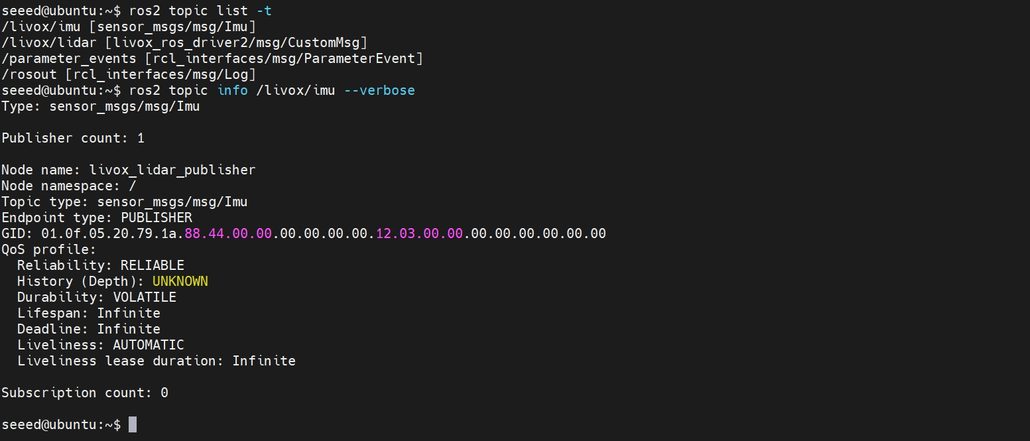
Establish the IMU interface before evaluating bias, units, axis conventions and timestamps. This launch also shows the LiDAR’s custom message type.
Check whether acceleration includes gravity and whether valid orientation is available. Gravity compensation depends on orientation; subtracting a fixed value from one axis is not a general solution as the robot tilts.
The ROS 2 Imu definition also assigns meaning to covariance fields: an all-zero matrix means uncertainty is unknown, while a first element of −1 marks the corresponding estimate unavailable. Zero-filled fields do not establish a perfect measurement or a valid absolute heading.
GNSS Quality Must Be Observed Over Time
GNSS adds an outdoor geographic position reference, but successive fixes need not have equal quality. Record position scatter, status and covariance while stationary in an open area. For RTK, distinguish Fixed, Float and standalone positioning. A momentary Fixed indication does not demonstrate sustained fixed-solution performance.
Wheel feedback supports short-term motion, the IMU captures rapid rotation, and GNSS can anchor outdoor position. They complement one another only when their current limitations are reflected in the system.
The computing platform must accommodate those drivers alongside chassis communication, ROS 2 processing, visualization and recording. The course builds around reComputer Robotics J501 hardware. For a matching development path, review the J501 Robotics interface and getting-started guide and the relevant product configuration:
👉 reComputer Robotics J5011 with GMSL — Jetson AGX Orin 32GB configuration used in the course examples.
👉 reComputer Robotics J5012 with GMSL — Jetson AGX Orin 64GB configuration to evaluate against your workload and peripheral requirements.
Why Do Correct-Looking Streams Misalign in Motion?
Individually working sensors still need to describe comparable moments in a common spatial reference. The time and spatial alignment experiments address both relationships.
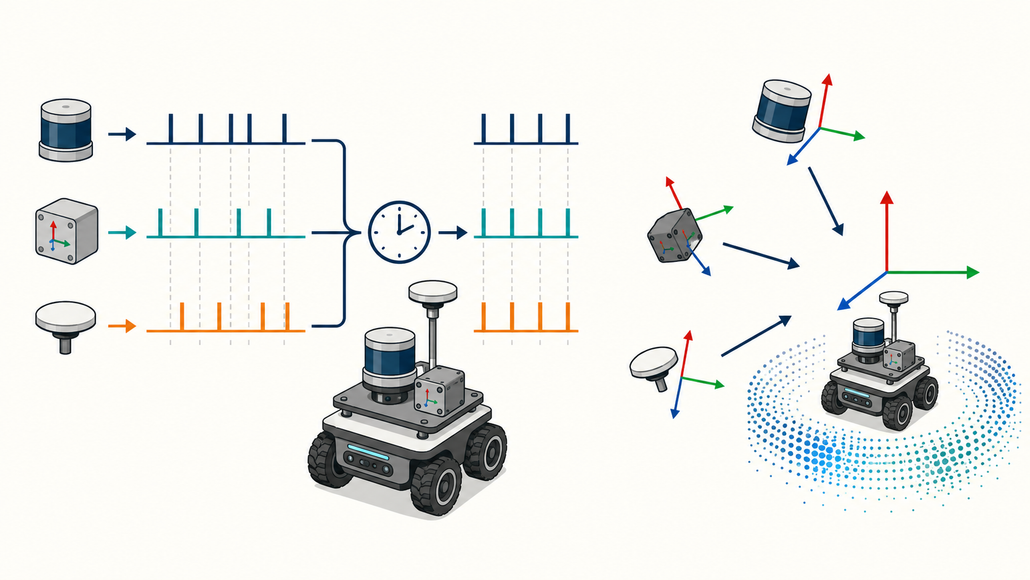
A common time reference on the left, and sensor-to-body relationships on the right. Each relationship needs its own verification.
First Establish What a Timestamp Represents
Sampling, host reception and processing happen at different times. At 1 m/s, a 100 ms difference corresponds to 10 cm of travel. During rotation, the same delay also changes the direction associated with an observation. This is a geometric illustration, not a course benchmark.
Determine whether a header contains device sampling time or host reception time, how clocks are related, and how transport and buffering affect arrival. The course introduces chrony, PTP, hardware synchronization and GNSS PPS, but their responsibilities differ.
Host clock alignment does not automatically synchronize every sensor’s internal clock. PTP depends on actual device and network-interface support. A shared hardware trigger requires compatible sampling inputs. GNSS PPS provides a second boundary, while accompanying time information identifies the absolute time; receiving position fixes alone does not synchronize all sensors.
ROS ApproximateTimeSynchronizer instead pairs messages using existing timestamps. Too small a window loses pairs; too large a window can combine observations from noticeably different instants. Increasing the tolerance cannot repair a wrong clock.
Extrinsics Need a Direction, Not Just Six Numbers
A point starts in its sensor’s coordinate frame. Expressing it in the robot body frame requires rotation R and translation t:
p_base = R_base_from_sensor * p_sensor + t_base_from_sensor
This is the same class of geometric problem as camera extrinsics in Module 2. State both the source and target frames, then use the transform in that direction.
Translation errors shift geometry; angular errors become more visible at longer range. As an illustrative calculation, a 1° orientation error creates approximately 8.7 cm of lateral displacement at 5 m. Visual inspection of a bracket cannot replace measurement.
Measure mounting position and orientation, publish the corresponding static transform, then check a floor, wall or known target. Changing only frame_id to base_link does not transform the points themselves.
A TF Tree Also Assigns Publishing Responsibility
For a local estimate, begin with:
odom → base_link → sensor frames
Rigid sensor mounts normally give fixed sensor-to-body relationships. The odom → base_link relationship changes with motion and needs one designated publisher. If the chassis node and EKF both publish that edge, adding another transform publisher will not resolve the conflict.
After publishing the measured mounting transform, inspect it:
ros2 run tf2_ros tf2_echo base_link livox_frame
ros2 run tf2_tools view_frames
Check stationary geometry first, then low-speed translation and rotation. A persistent offset at rest suggests checking extrinsics; misalignment that grows with motion calls for timing and scan-distortion checks. These patterns narrow the investigation rather than proving a single cause. For bag replay, also keep simulated time and /clock usage consistent across the relevant nodes.
How Does an EKF Help, and Why Can Fusion Make Things Worse?
Once time and coordinates are meaningful, the state-estimation experiments use robot_localization to establish a minimum wheel-plus-IMU EKF.
An Extended Kalman Filter repeatedly predicts the next state from a motion model, then corrects that prediction with observations.
Understand Prediction Before Editing the Configuration
Consider a simplified planar model for explanation: position x and y, heading theta, forward speed v and yaw rate omega. Over a small interval dt:
x_next = x + v * cos(theta) * dt
y_next = y + v * sin(theta) * dt
theta_next = theta + omega * dt
The trigonometric terms make this relationship nonlinear. An EKF linearizes around the current estimate to propagate state and uncertainty, then incorporates new observations. This illustration explains the mechanism; it is not a replacement for the package’s full state definition.
Slip, unmodeled motion and measurement error keep prediction from being exact. The filter therefore compares the actual observation with the observation expected from its predicted state:
innovation = actual_observation - predicted_observation
updated_state = predicted_state + Kalman_gain * innovation
The gain depends on uncertainty in the prediction and observation. A smaller measurement covariance generally gives that observation more influence. Process noise Q describes uncertainty left by the motion model; measurement covariance R describes uncertainty in the observation. These are different responsibilities.
An unrealistically small covariance can let a biased sensor dominate the estimate. A very large one can make its contribution negligible. Parameter selection therefore needs an explanation of why an input deserves that weight, beyond how smooth the path looks.
Start with Inputs Whose Roles You Can Explain
The course’s minimum local configuration uses wheel forward velocity and IMU yaw rate, with two_d_mode constraining planar motion. Wheel feedback supplies translation information, while the IMU supplies turning information.
The odom0_config and imu0_config arrays select the fused variables. Read their variable order rather than copying a Boolean list without understanding it. The example /imu/data input also needs to match the actual /livox/imu output through configuration or remapping.
Avoid treating encoder-derived position, heading and velocity as independent evidence when they come from the same source. Their correlation can make a filter overconfident if the same information is repeatedly counted. Also designate whether the chassis or filter owns odom → base_link.
Raw point clouds are outside this minimum EKF input path. LiDAR integration and local motion estimation are foundations that later odometry and SLAM components can use together.
Use Measurements to Justify the Parameters
The course recommends recording 5–10 minutes of stationary IMU data to examine mean, variance and drift, then repeating straight and turning tests to investigate wheel measurements. Use those observations to justify covariance rather than tuning entirely by feel.
Persistent wheel-radius, track-width or mounting errors require model or calibration corrections. Weight changes cannot reliably turn a systematic error into a correct measurement.
After starting the configured filter, check its output:
ros2 topic hz /odometry/filtered
ros2 topic echo /odometry/filtered --once
ros2 run tf2_ros tf2_echo odom base_link
Compare raw and fused trajectories in RViz. Inspect endpoint and heading differences, latency and covariance behavior. A smooth path can still be wrong or delayed; improvement needs a repeatable comparison with physical motion.
Add GNSS Without Confusing Local Continuity with Global Correction
Latitude and longitude cannot be used directly as local Cartesian coordinates. The global extension introduces navsat_transform_node, alongside requirements for valid fixes, heading, local odometry and antenna extrinsics. IMU yaw rate alone does not supply an absolute heading.
The ROS coordinate-frame conventions distinguish the responsibilities in:
map → odom → base_link
odom provides a locally continuous frame that may drift. map allows global correction. Keeping those responsibilities distinct lets the system express a global position adjustment without assigning the same discontinuity to its locally continuous odometry.
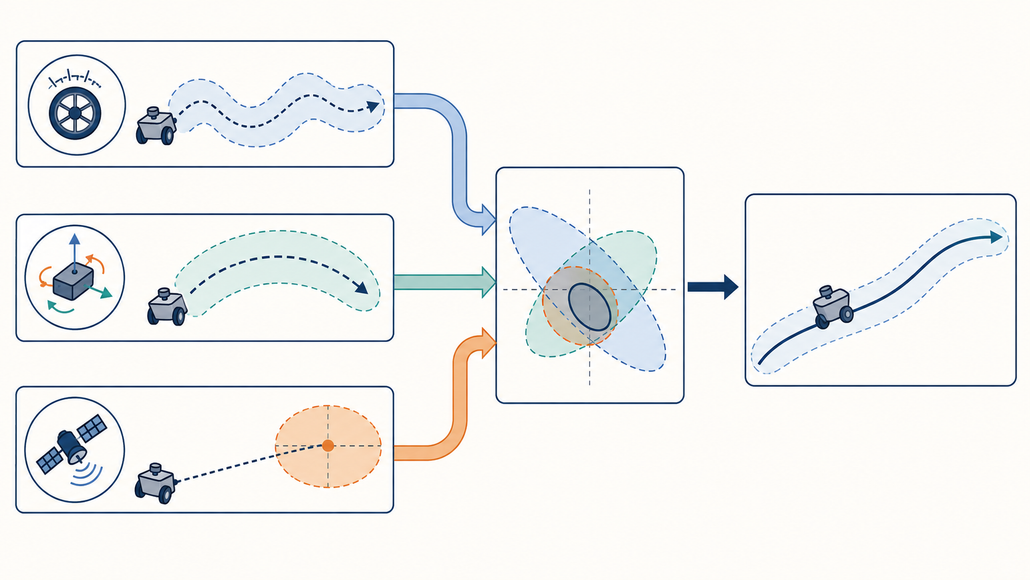
Broader fusion architecture, including GNSS. The minimum local experiment uses wheel velocity and IMU yaw rate; the global extension has additional fix-quality, heading and transform requirements.
What Makes the Result Worth Keeping?
Move from a running node to a result someone else can reproduce. Start with a small sequence of experiments.
Stationary: inspect IMU bias, zero wheel velocity, estimate drift and advancing timestamps.
Straight motion: use a known distance to check scale and sideways deviation, comparing wheel-based motion with the physical displacement.
In-place turns: examine wheel signs, angular-velocity direction, track width and heading estimates. Watch whether point-cloud distortion grows with turning speed.
A rectangular route: compare endpoint, heading and delay for raw and fused estimates. Record surface and operating conditions so comparisons use similar experiments.
Under controlled conditions, inspect how the system behaves when an input stops and returns. Look for stalled estimates, jumps and diagnostic changes.
Troubleshoot in the same order:
Connection and driver → messages and units → timestamps → frames and extrinsics → motion model → fusion configuration → experimental result.
No data calls for a connection check. Wrong magnitudes call for unit and decoding checks. Static offsets suggest geometry checks; motion-dependent errors require timing checks. Only then use residuals and repeatable tests to guide filter tuning.
A useful M03 result is a configuration, a recording, a raw-versus-fused comparison and an explanation of the observed behavior. Together they provide a stronger foundation for mapping and navigation than a screenshot of active topics alone.
Build Along and Bring Your Experiment to the Community
From the Jetson and ROS 2 foundation through camera perception to LiDAR, inertial and chassis feedback, this series connects the parts of a mobile robot into a system.
M03 develops a practical habit: for every measurement, ask what it observes, when it was acquired, which frame describes it and how much uncertainty it carries.
Star or fork the course repository, run the complete M03 experiments, and contribute reproducible issues or device-integration notes. A corrected CAN decoder, a measured mounting transform or an explanation of a drifting trajectory can help the next developer.
Share your hardware, software version, topic details, TF tree, configuration and a short recording alongside the result. A question such as “Why does this wall align at rest but split during a turn?” gives other builders something concrete to investigate.
Continue the conversation with the Seeed Studio community:
- Seeed Studio Discord
- WhatsApp Robotics Discussion Group
- Facebook AI Robotics Community Group
- Seeed Studio Forum
Get the robot moving, then make the measurements behind that motion understandable.
Resources Used in This Article
Hardware: reComputer Robotics J5011 with GMSL, with the J5012 configuration as an alternative to evaluate; RPLIDAR A1; Livox MID-360 with built-in IMU; the DM-H65 dual-motor chassis example. GNSS is an additional input for the global-positioning extension.
Setup and drivers: J501 Robotics getting-started guide · Chassis SDK, WebUI and driver resources.
Software: Ubuntu 22.04 · ROS 2 Humble · RViz2 · Livox-SDK2 and ROS Driver2 · SocketCAN · chrony and PTP where supported · robot_localization.
Hands-on course: M03 — LiDAR and Multi-Sensor Fusion. All seven inline images are original course assets reused from the corresponding experiments.
About Author
