How to choose the Right M12 Lens for Your reCamera
Choosing the right M12 lens reCamera combination is critical for any AI camera project. Even the most powerful edge AI vision pipeline can fail if the lens captures the wrong area, misses detail, or struggles in your lighting conditions. For reCamera users, the lens is where photons meet silicon — and getting that interface right matters.
reCamera is Seeed Studio’s open-source AI camera platform, built for developers who want edge AI vision without stitching together solutions. It runs Linux, supports popular inference frameworks, and comes in several form factors — from the compact reCamera 2002 series to the industrial-grade HQ PoE models. One feature shared across the lineup is the standard M12 lens mount, a threaded interface that gives you real flexibility in how your camera sees the world.
We’re introducing four new M12 lenses for reCamera, covering focal lengths from an ultra-wide 1.8mm fisheye to a 22mm ultra telephoto. This guide covers what each lens does best, explains the key terminology, and walks through installation.The new M12 lens family for reCamera four focal lengths from fisheye to ultra telephoto
Meet the New M12 Lens Family for reCamera AI Vision
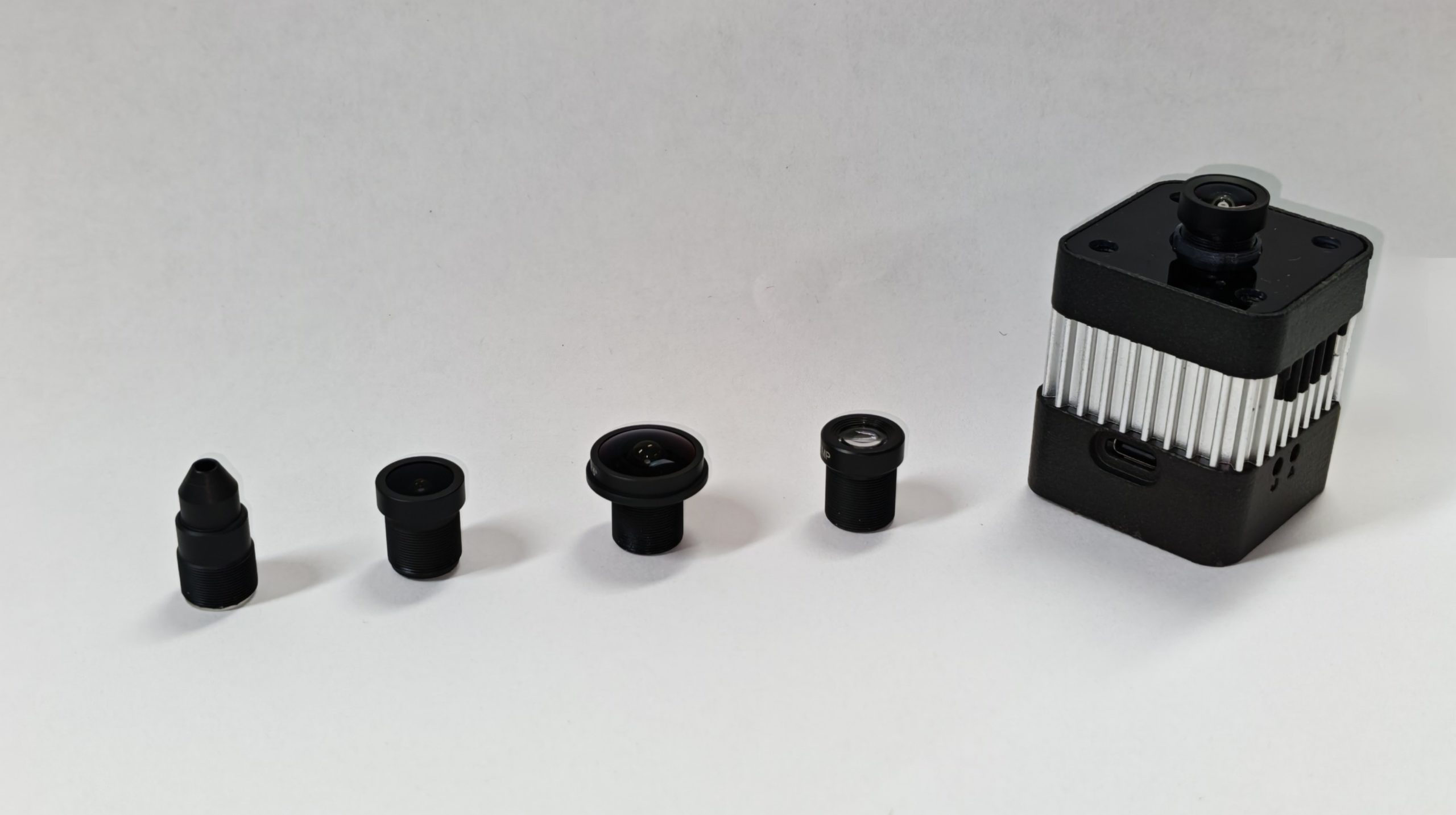
These four lenses span nearly an order of magnitude in focal length, from ultra-wide panoramic views to tight telephoto magnification. Despite their very different fields of view, they share the same compact form factor — an M12×0.5 mount, manual focus ring, and a weight of roughly 7 grams each. As a result, changing focal lengths is quick and straightforward: simply unscrew one lens and install another.
Since each lens costs only $7.90–$13.90, it’s practical to keep multiple options on hand and switch between them whenever project needs change. The standardized M12 mount eliminates the need for adapters or modifications, making lens swaps fast and hassle-free.
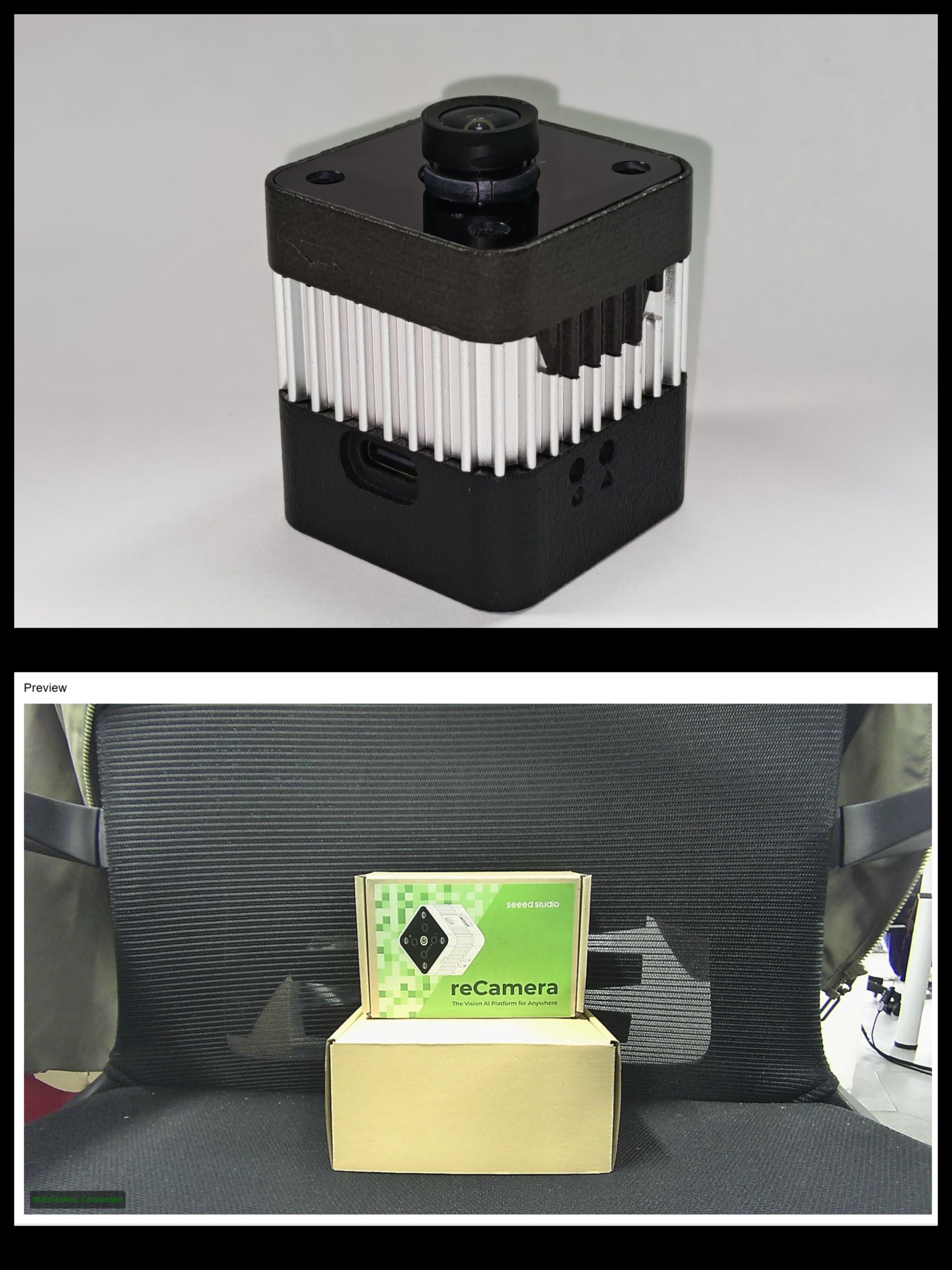
For comparison, this is the image effect of the original lens of reCamera HQ POE. This image and all the images of the following four lenses were taken at a distance of 30 cm from the reCamera packaging box.
1.8mm Fisheye Lens — 160° HFOV, 5MP, F1.8
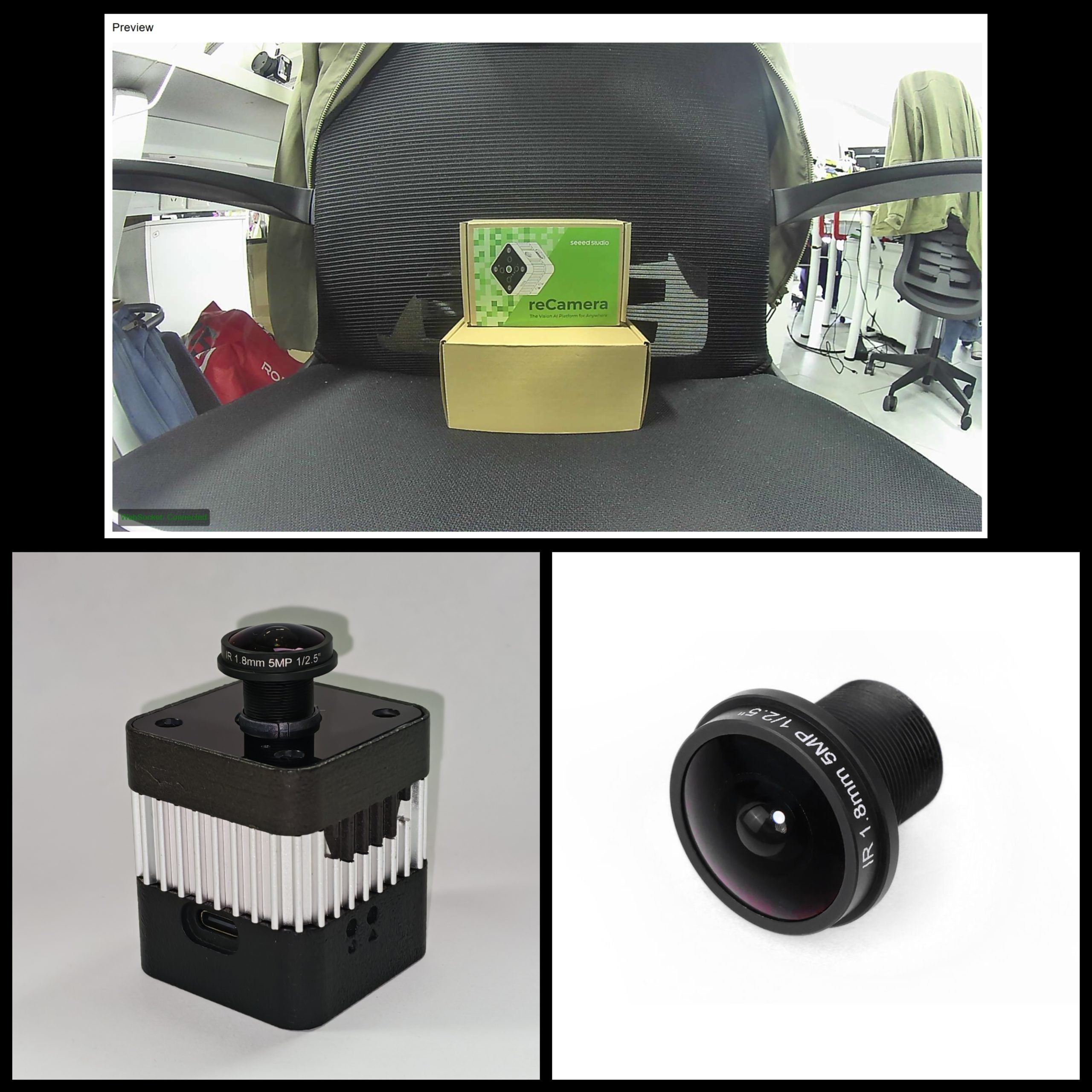
(The above pictures were taken with the lens 30 cm away from the reCamera’s packaging box.)
With a 160 degree horizontal field of view, this lens captures nearly everything in front of the camera useful when you can’t afford blind spots or when space is too tight to back the camera away from the scene.
The F1.8 aperture is the fastest in the lineup, letting in more light than the other options. That matters in dim hallways, at night, or anywhere you can’t control lighting. The 5MP resolution gives you enough pixels to run detection models across that massive field of view.
The trade-off is distortion. Straight lines near the edges curve outward in a characteristic barrel pattern — an inherent property of ultra-wide optics rather than a flaw. For most AI vision applications, such as people detection and occupancy sensing, distortion is usually a secondary concern compared with field of view and scene coverage.
It becomes more relevant for measurement, mapping, or other geometry-sensitive tasks. In those cases, distortion can be corrected in software or minimized by choosing a narrower lens.
Use this lens for: panoramic monitoring, tight indoor spaces, VR/360 capture, wide-area surveillance, and any application where coverage beats detail.
2.5mm Wide Angle Lens — 140° HFOV, 3MP
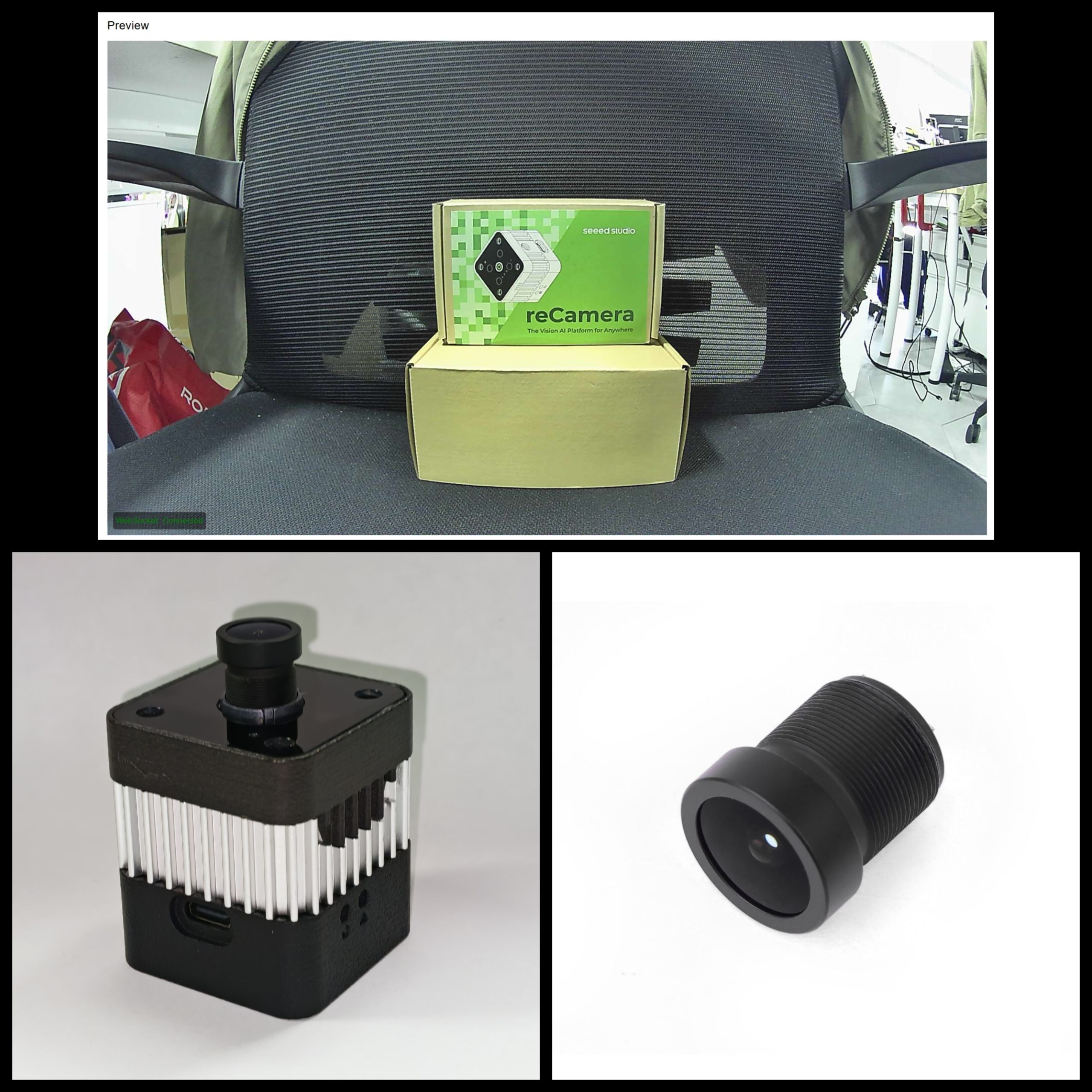
(The above pictures were taken with the lens 30 cm away from the reCamera’s packaging box.)
The 2.5mm wide angle gives a broad view with noticeably less distortion than the fisheye. Mount it above an entryway, in a hallway, or in a corner to cover the whole space without the extreme curvature of a fisheye.
At 3MP, the resolution is a step down from the fisheye, but for most detection and classification tasks — “is there a person in this room?” — 3MP is more than sufficient. With its balanced field of view and broad applicability, this lens is often the go-to choice for general-purpose AI vision deployments.
Use this lens for: general AI vision, room monitoring, entryways, hallway coverage, and any project where you need width without the fisheye look.
16mm Telephoto Lens — 20° HFOV, 5MP
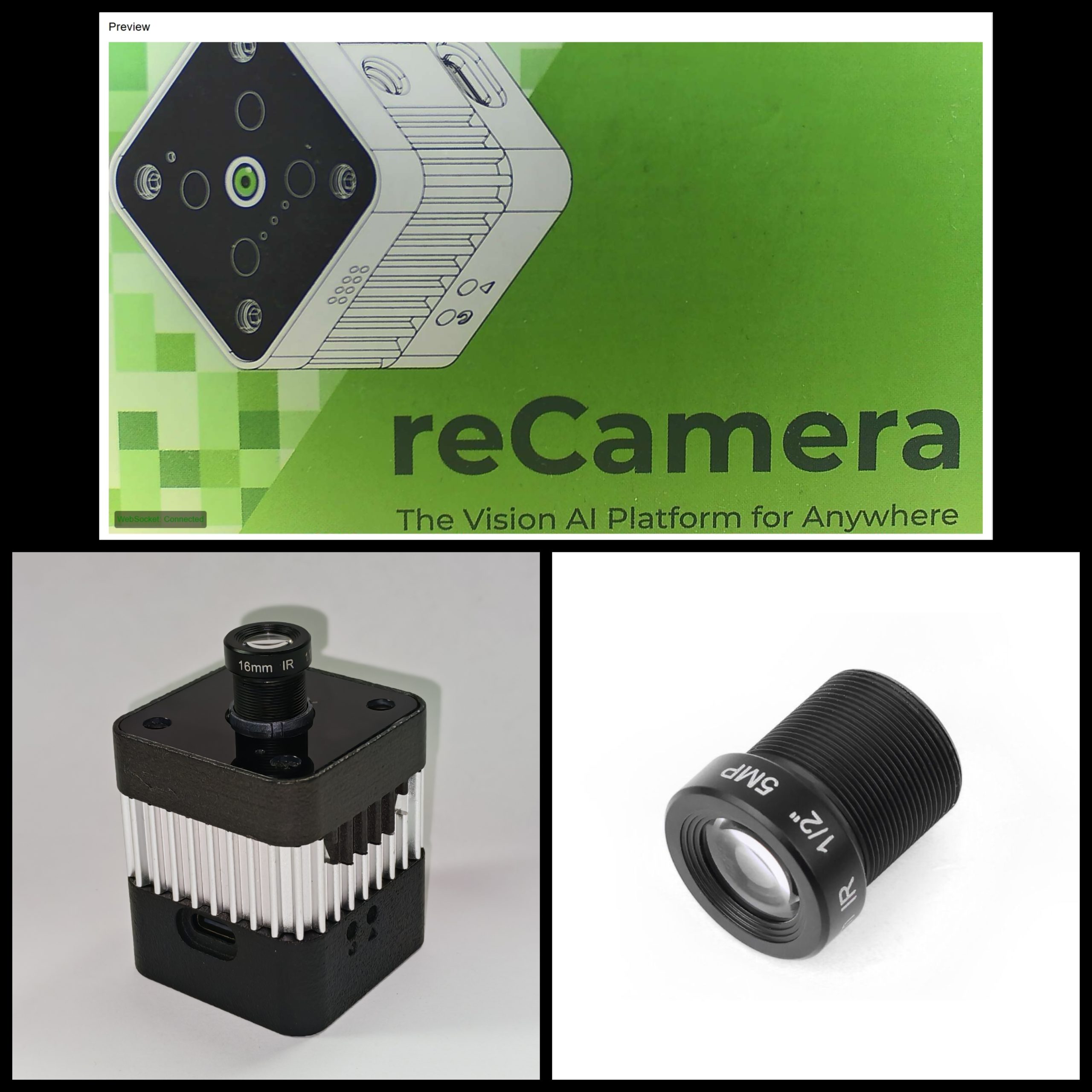
(The above pictures were taken with the lens 30 cm away from the reCamera’s packaging box.)
The 16mm telephoto narrows the field of view to 20 degrees horizontal — about one-eighth the width of the fisheye — and pulls distant subjects closer. The 5MP resolution captures fine details: facial features at medium distance, license plate characters, text on labels.
This lens changes how you think about placement. Instead of mounting high and wide, you position the camera at a distance from a specific choke point — a gate, a doorway, a production line station. The narrow FOV acts like a spotlight, concentrating your pixels where they matter.
Use this lens for: license plate recognition, facial recognition at distance, monitoring choke points, and any application where detail in a defined area beats wide coverage.
22mm Ultra Telephoto Lens — 15° HFOV, 2MP
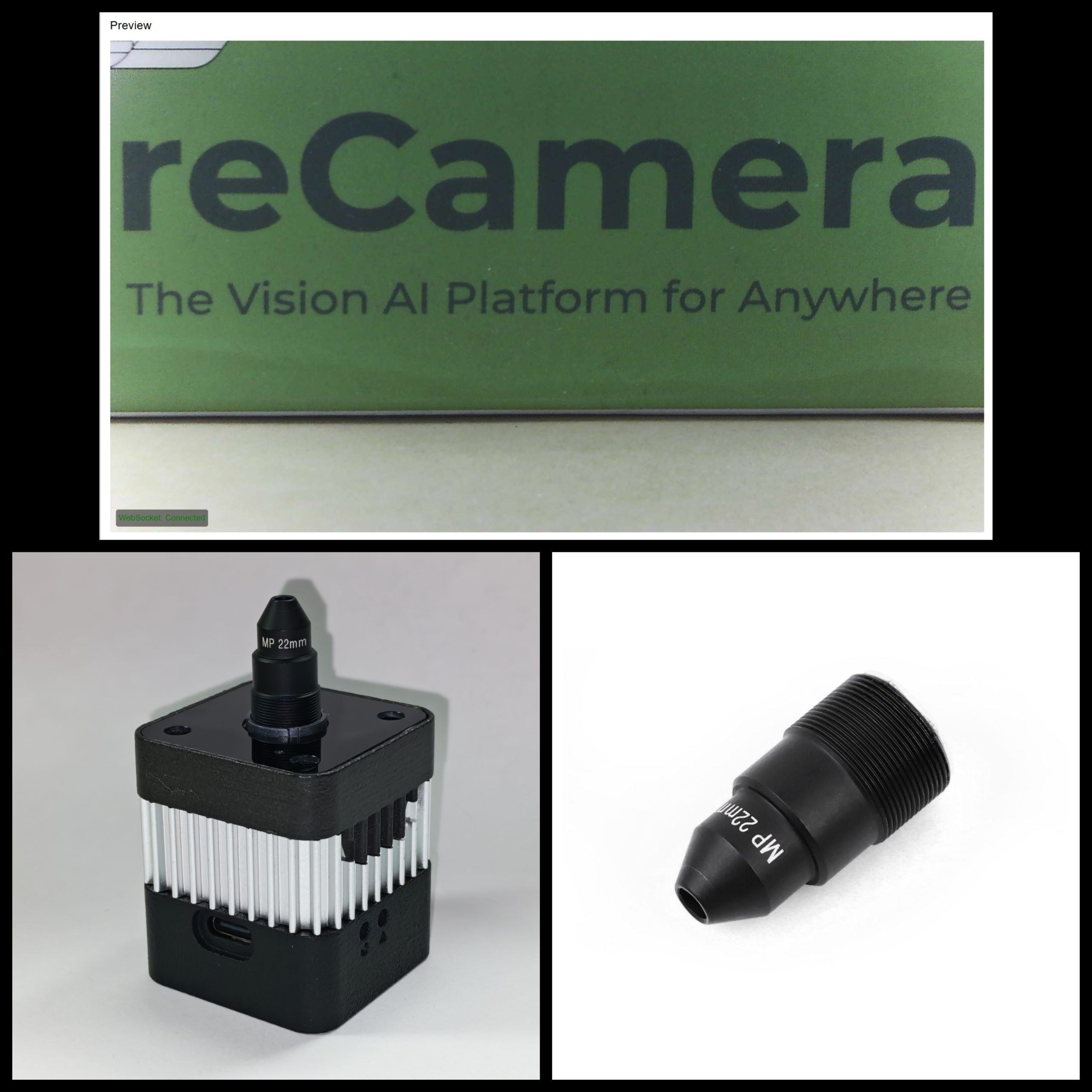
(The above pictures were taken with the lens 30 cm away from the reCamera’s packaging box.)
The 22mm ultra telephoto offers the most magnification in the family, with a 15-degree horizontal field of view. This is the lens you reach for when the camera sits far from the target and still needs to capture usable detail — reading small text from several meters away, inspecting distant equipment, or monitoring a specific point across a large space.
The 2MP resolution is lower than the fisheye and telephoto, but when concentrated on a 15-degree slice of the world, the effective detail on your target can still be high. Think of it as quality over quantity: fewer total pixels, all pointed where you need them.
Use this lens for: long-distance monitoring, reading small text or labels from afar, industrial inspection of distant targets, and any scenario where magnification is the priority.
Lens Comparison at a Glance: How to choose the Right M12 Lens for Your reCamera
| Lens | Focal Length | HFOV | Resolution | Aperture | Weight | Best For |
| Fisheye | 1.8mm | 160° | 5MP | F1.8 | 7g | Panoramic monitoring, tight spaces |
| Wide Angle | 2.5mm | 140° | 3MP | F2.5* | ~7g | General wide coverage |
| Telephoto | 16mm | 20° | 5MP | F2.0* | ~7g | Medium-distance detail |
| Ultra Telephoto | 22mm | 15° | 2MP | F2.0* | ~7g | Long-distance magnification |
*Aperture values for non-fisheye models are estimated based on typical M12 lens specs
All four lenses use the standard M12×0.5 mount, support 1/2.9” image sensors, feature manual focus adjustment.
M12 Lens Terminology 101 for reCamera Selection
Choosing a lens means reading a spec sheet and understanding what those numbers mean for your project. Here’s what matters.
Focal Lengthre
Focal length is the distance from the lens center to the image sensor, measured in millimeters. It’s the single most important number on a lens because it determines almost everything else about the image.
A shorter focal length (1.8mm) gives a wider view; a longer focal length (22mm) gives a narrower, more magnified view. These are all fixed focal length — or prime — lenses, which means no zoom. If you need different framing, you swap the lens.
Think of focal length like choosing between a wide doorway and a narrow window.
Field of View (FOV)
Field of view is the angular extent of the scene the lens captures, measured in degrees. There are three ways to quote it, and manufacturers aren’t always consistent:
- Horizontal FOV (HFOV): the width of the scene, left to right. This is what matters most for AI vision — it tells you how wide an area your model can see.
- Vertical FOV (VFOV): the height of the scene, top to bottom.
- Diagonal FOV (DFOV): the diagonal angle, corner to corner. This is usually the largest number and the one manufacturers put on the box.
For the same sensor size, FOV is inversely proportional to focal length. The reCamera uses a 1/2.9” sensor with active dimensions of approximately 4.96mm × 3.72mm. On that sensor, the diagonal FOV changes dramatically with focal length:
| Focal Length | Approx. Diagonal FOV | Perspective |
| 1.8mm | ~160° | Ultra-wide fisheye |
| 2.5mm | ~140° | Wide angle |
| 4mm | ~85° | Standard wide (reference only) |
| 8mm | ~45° | Normal/standard (reference only) |
| 16mm | ~20° | Narrow telephoto |
| 22mm | ~15° | Ultra telephoto |
This is why the 1.8mm fisheye feels like it’s swallowing the room while the 22mm feels like a telescope. The sensor hasn’t changed — just how much of the world gets squeezed onto it.
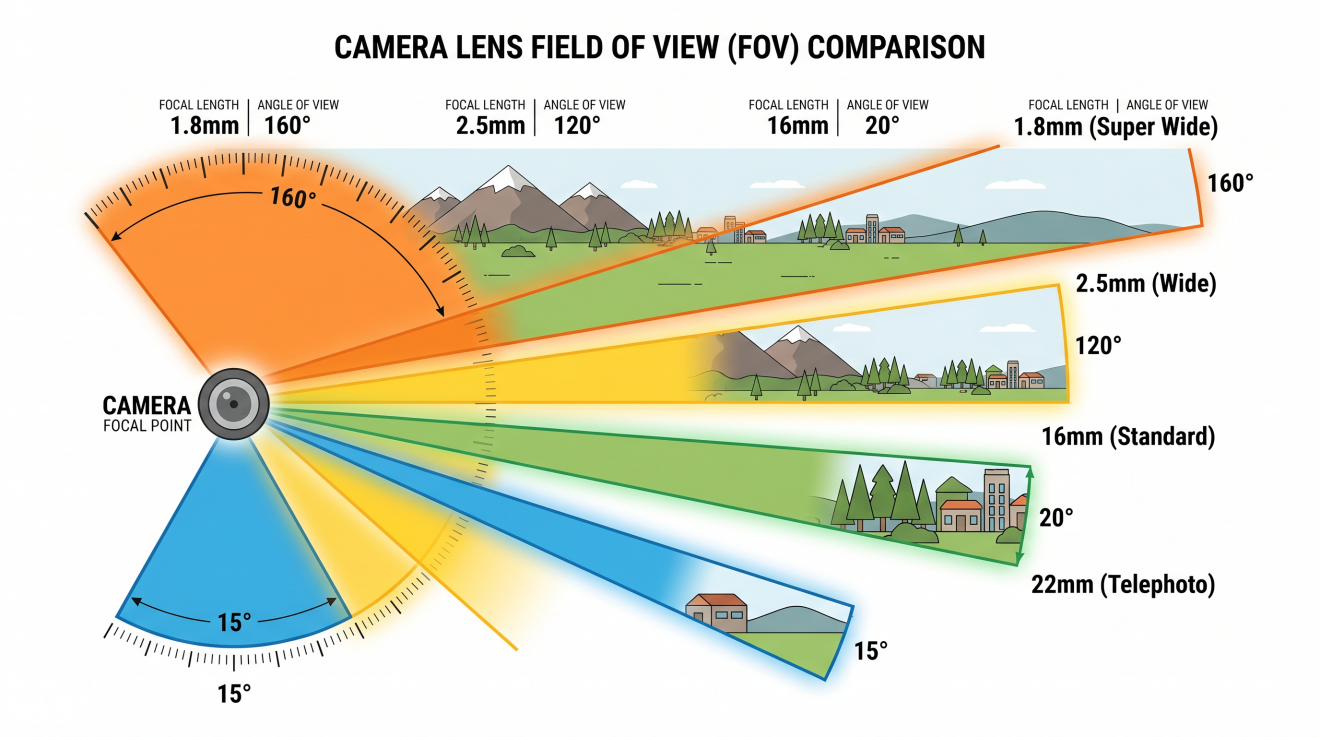
FOV comparison: how different focal lengths capture different amounts of the scene
Resolution (Megapixels)
Lens resolution and sensor resolution are two separate things, and the lower of the two becomes your bottleneck.
A 5MP lens on a 5MP sensor is a matched pair: the lens can resolve the detail that the sensor can record. A 3MP lens on a 5MP sensor means the sensor has more pixels than the lens can usefully feed. You still get a 5MP image file, but the fine detail won’t be any sharper than what the 3MP lens can deliver. For AI vision workloads, this matters less than you’d think — a 2MP or 3MP lens is usually enough for object detection, where the model just needs to recognize that something is a person, not read the logo on their shirt. Where 5MP helps is in recognition tasks: facial identification, license plate reading, OCR on small text.
Aperture (f-number)
Aperture controls how much light passes through the lens. It’s expressed as an f-number: F1.8, F2.0, F2.5. The key thing to remember is that smaller numbers mean wider openings and more light.
The fisheye’s F1.8 aperture lets in roughly twice as much light as an F2.5 lens. That can be the difference between a usable night-time image and noise soup. The trade-off is depth of field: wider apertures produce a shallower range of sharp focus. For most AI detection tasks this isn’t a problem — you don’t need razor-thin focus precision. If you’re doing measurement or inspection, a narrower aperture would help, though none of these lenses have adjustable apertures.
Image Sensor Format
The “1/2.9”” notation refers to the diagonal size of the image sensor — about 6.2mm in real units. It’s a holdover from vacuum tube days. What matters is that the lens must project an image circle covering the entire sensor. If the image circle is too small, you get vignetting — dark corners. All four lenses cover 1/2.9” sensors, which is exactly what reCamera uses.
Distortion
Wide-angle lenses, especially fisheyes, create barrel distortion — straight lines in the real world curve outward in the image. The 1.8mm fisheye has significant distortion by design. It’s not a defect; it’s how the lens achieves that 160-degree field of view on a flat sensor.
For AI models, distortion usually doesn’t hurt object detection — neural networks learn to recognize objects from all kinds of perspectives. Where it matters is geometric accuracy: measuring distances, stitching panoramas, or 3D reconstruction. In those cases, apply software distortion correction (reCamera’s ISP can help) or choose the 2.5mm wide angle, which has much lower distortion.
The 16mm and 22mm lenses have minimal distortion. Straight lines stay straight.
Now that you can read a lens spec sheet, let’s get one onto your camera.
Installing M12 Lenses on Your reCamera
Swapping an M12 lens is one of the simplest hardware modifications you can make — no tools required.
Compatibility Check
Not all reCamera models support lens replacement:
| reCamera Model | Lens Replacement Support | Notes |
| reCamera HQ PoE Series (100029708 / 100018917) | Direct | Unscrew old lens, screw in new one |
| reCamera 2002 / 2002W Series(102991896/102991894/102991897/102991895) | With sensor board | Requires reCamera 2002 Sensor Board (SKU: 100041077) |
| reCamera Gimbal Series(108990119/108990120) | Not supported | Structural constraints |
If you have an HQ PoE reCamera, you’re good to go. The 2002/2002W needs the detachable sensor board accessory. The Gimbal series has a fixed lens assembly.
Installation Steps (for HQ PoE Models)
- Power off your reCamera before handling the lens. This protects the sensor from static discharge and prevents you from accidentally touching a hot component.
- Remove the existing lens. Hold the metal lens mount ring (the fixed part on the camera body) steady with one hand. Grasp the lens barrel with your other hand and rotate it counter-clockwise to unscrew it from the mount. Set the old lens aside somewhere clean.
- Install the new lens. Align the threads of your new M12 lens with the mount. The threads are M12×0.5 — fine pitch, so they engage easily if aligned straight. Rotate clockwise until the lens is finger-tight. Do not overtighten. The threads are brass and will strip if you muscle them.
- Power on the reCamera and open the web preview at 192.168.42.1 (or your device’s configured IP address).
- Adjust focus. Slowly rotate the lens body (not the mount ring) while watching the live preview. The lens has a helical focus mechanism — rotating it moves the lens elements closer to or farther from the sensor. Turn until your subject appears sharp.
- Lock in. Once focused, the rubber gasket between the lens barrel and mount provides enough friction to hold the focus position. There’s no lock screw to tighten.
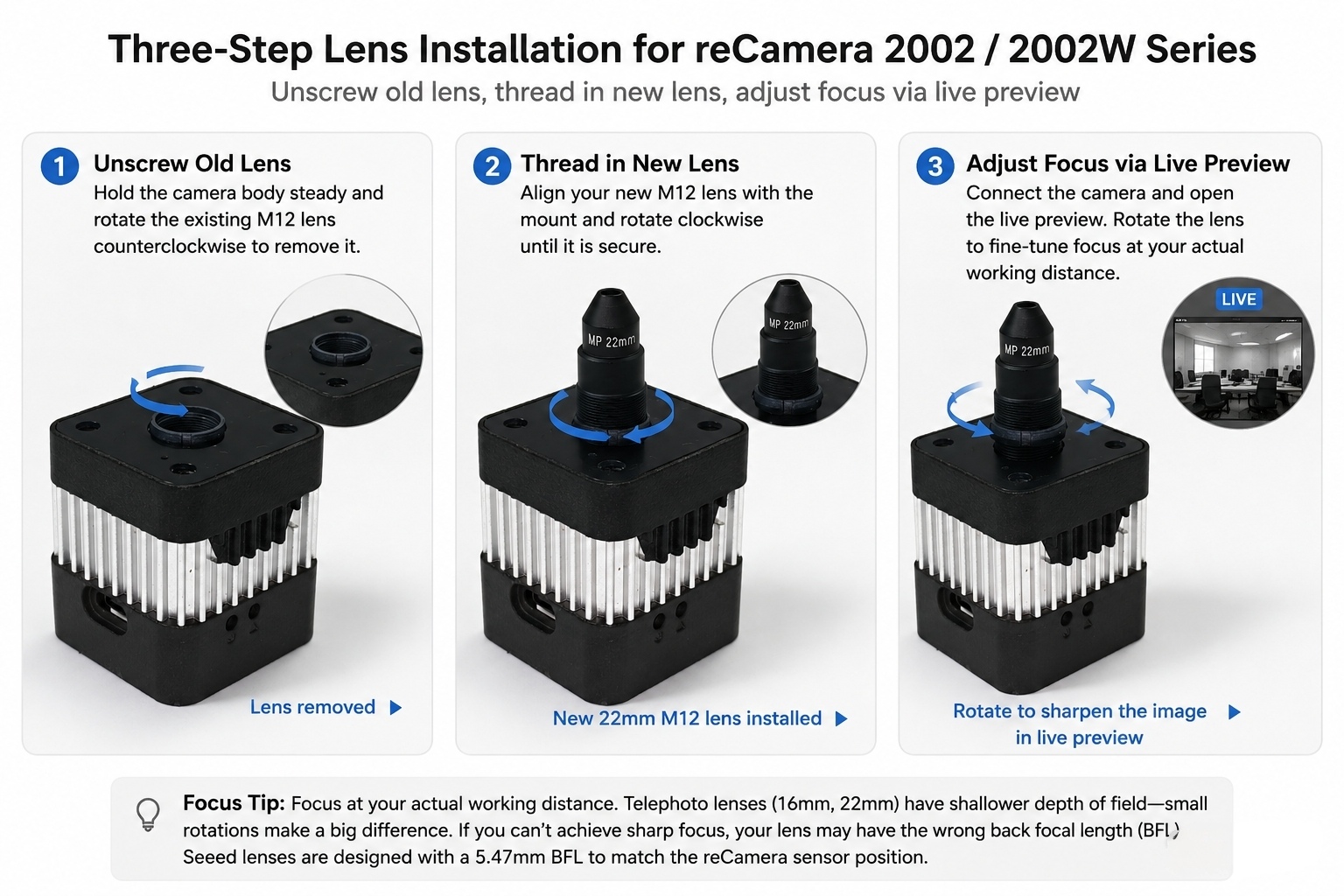
Three-step lens installation: unscrew old lens, thread in new lens, adjust focus via live preview
For reCamera 2002 / 2002W Series
The standard 2002 models have a fixed lens. To use interchangeable M12 lenses, you need the reCamera 2002 Sensor Board (SKU: 100041077), which replaces the stock sensor module and adds a detachable M12 mount.
Remove the sensor board from the camera module by disconnecting the ribbon cable and unscrewing the retaining screws. Unscrew the existing lens, install your new M12 lens onto the sensor board’s mount, then reassemble. Focus adjustment works the same way — use the live preview to dial it in.
Focus Tips
Focus at your actual working distance. Don’t focus on a nearby desk when your real detection target is five meters away — depth of field at these apertures isn’t that forgiving. The 1.8mm fisheye has a minimum object distance of 0.2 meters; don’t try to focus closer than that or you’ll just hunt forever without finding sharpness.
Telephoto lenses (16mm and 22mm) have shallower depth of field, which means focus is more critical. A few millimeters of rotation makes a bigger difference than it does on the wide-angle lenses. Take your time and find the sweet spot.
If you can’t achieve sharp focus at your desired distance, your replacement lens may have the wrong back focal length (BFL). These Seeed lenses are designed with a 5.47mm BFL that matches the reCamera sensor position — a third-party M12 lens with a different BFL may not focus properly.
Wrapping Up Get the Right Lens and Start Building with Your reCamera Now
Four lenses, four ways of seeing. The 1.8mm fisheye swallows an entire room in one frame. The 2.5mm wide angle covers general spaces without the fisheye distortion. The 16mm telephoto pulls medium-distance detail into sharp focus. And the 22mm ultra telephoto reaches out to capture small features from afar.
The right lens depends on your scene. Ask yourself: what does my model need to see, and from where can I mount the camera? The answers point you to the right focal length.
Grab all four lenses from the Seeed Studio store: https://www.seeedstudio.com/J0018027B-p-6647.html
Built something interesting with reCamera? Share your project andin the Seeed Forum 、Discord or tag us on social media.The best part of open hardware is seeing what the community builds with it.
About Author
